
SB-X100 - Loudspeaker AIWA - Free user manual and instructions
Find the device manual for free SB-X100 AIWA in PDF.


| Brand | Aiwa |
| Model | SB-X100 |
| Product Type | Portable Bluetooth Speaker |
| Dimensions | Approx. 18 x 6 x 6 cm |
| Weight | Approx. 350 g |
| Speaker Configuration | Mono driver with passive radiator |
| Output Power | 5 W RMS |
| Frequency Response | 80 Hz – 20 kHz |
| Connectivity | Bluetooth 5.0 |
| Bluetooth Range | Up to 10 m (33 ft) |
| Inputs | 3.5 mm AUX, Micro-USB charging |
| Battery Type | Li-ion rechargeable, 2000 mAh |
| Battery Life | Up to 10 hours (50% volume) |
| Charging Time | Approx. 3 hours |
| Control Buttons | Power, Volume +/-, Play/Pause, Bluetooth pairing |
| Hands-free Calling | Built-in microphone |
| Water Resistance | IPX4 (splash proof) |
| Included Accessories | Micro-USB cable, AUX cable, user manual |
| Compatibility | Smartphones, tablets, laptops, etc. |
| Color Options | Black, White, Gray |
| Cleaning | Wipe with dry cloth; avoid liquids |
| Storage | Keep in cool, dry place when not in use |
Frequently Asked Questions - SB-X100 AIWA
User questions about SB-X100 AIWA
0 question about this device. Answer the ones you know or ask your own.
Ask a new question about this device
Download the instructions for your Loudspeaker in PDF format for free! Find your manual SB-X100 - AIWA and take your electronic device back in hand. On this page are published all the documents necessary for the use of your device. SB-X100 by AIWA.
USER MANUAL SB-X100 AIWA

Japan est1951
SB-X100
User Manual
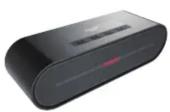
Product List

SB-X100

Micro USB charging cable

User Manual

3.5mm line-in AUX cable
Instructions

1. Power button
2. Play/Pause/TWS connection/BT Disconnection
3. Volume-/Previous track 4. Volume+/Next track
5. AUX in slot 6. Micro USB charging slot
Power button
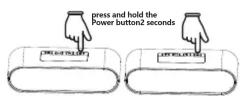
To turn on SB-X100, press and hold the Power button Ⓧ for 2 seconds
Play/Pause/TWS connection/BT Disconnection
1.BT,AUX play Mode,Short press " ” to Pause music, press again to replay.BT play mode,long press " ” to disconnect BT.
2.TWS mode, double press " ” to connection TWS.
Previous Track/Volume-
BT,AUX play mode, short press " — " to go to previous track, AUX play mode do not support turn to the previous track. Long press " — " to reduce the volume
Next Track/Volume+
BT,AUX play mode, short press “+” to go to next track, AUX play mode do not support turn to the next track. Long press “+” to increase the volume
AUX Connect
Turn on the speaker, insert 3.5mm audio cable, white indicator on, music playing from external audio source device Automatically

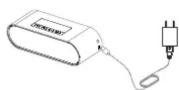
Micro USB charging slot
Please insert our provided cable connect with 5V/1A power supply in to Micro USB charging slot.(Please purchase power supply by yourself)
BT connect
Turn on the speaker, BT indicator light flash, open your bluetooth device to search "SB-X100" and connect it. BT indicator light stay on, BT connected successfully.

TWS Play Mode:
Turn on the 2pcs of SB-X100 (no need Synchronous boot), double press TWS connect button for 2 speakers, speaker are ready to pair after one beep. After connected successfully, one of the speaker's BT indicate light flash (this unit is Host left channel), and the other one's BT indicate light stay on(this unit is Secondary right channel), open BT device and search "SB-X100", select and connect it. connected successfully after one beep. BT indicator light stay on after music playing. both unit support button operation.

TWS disconnection
Long press TWS connect button of Host left channel unit, 2 speakers drop out of the TWS mode, disconnect with BT device at the same time. Long press TWS connect button of secondary right channel unit, 2 speakers drop out of the TWS mode, Host unit keep connecting with BT devices and keeping play music
Two device connection modes: (BT mode)
-
When playing music, long press play/pause button to disconnect current BT. then can connect with multiple devices after disconnected successfully.
-
Another BT device connected with speaker first, then the old BT device connect with speaker, 2 BT devices connect with speaker successfully.
-
Speaker will play the first connected device, the other device can be playing only pause the first one.
LED Indicator light
Blue BT mode:
Flash quickly
Flash slowly
[Non-Text]
Stay on
Flash
BT ready to pair
BT connected
successfully
Playing music
Slowly Pause
White AUX mode:
Stay on
Flash slowly
Flash slowly
[Non-Text]
AUX IN Playing
Pause
Battery low, battery
voltage less than 6.8V
Red light:
Stay on
Stovon
Stay on Pull battery
Calling coming call Bluelight flash slowly
Low battery requirement:
When battery is low, Speaker will send out low battery alarm beep, Orange LED on one beep each 15S, speaker will turn off after 3 beeps.
Specification
| Item:Bluetooth speaker | Model name:S8-X100 |
| Rated Voltage:DC5V | Bluetooth version:4.2 |
| Rated input current:1A | Support Audio format:aptX/SBC/AAC/MP |
| Bluetooth working rang:20M | Battery:18650 /2000mAh |
| Output:10W*2 | Charging time:3~4Hours |
| Play time:4-6Hours | Weight:960g |
| Dimension:190*53*60mm |

Japan est1951
Aiwa Electronics Int'l Co., Ltd. Explore more at www.int-aiwa.com
Brand : AIWA
Model : SB-X100
Category : Loudspeaker