
Kraken for Xbox One - Console RAZER - Free user manual and instructions
Find the device manual for free Kraken for Xbox One RAZER in PDF.


| Product Type | Gaming Headset for Consoles |
| Brand | Razer |
| Model | Kraken for Xbox One |
| Compatibility | Xbox One, Xbox Series X|S, PC, Mobile |
| Connectivity | 3.5 mm Audio Jack |
| Speaker Drivers | 50 mm Neodymium Magnets |
| Frequency Response | 12 Hz - 28 kHz |
| Impedance | 32 Ω |
| Sensitivity | 118 dB |
| Microphone Type | Unidirectional Condenser |
| Microphone Frequency Response | 100 Hz - 10 kHz |
| Microphone Signal-to-Noise Ratio | > 60 dB |
| Cable Length | 1.3 m (plus 2 m extension for PC) |
| Weight | Approximately 350 g |
| Dimensions (Approx.) | 200 x 200 x 100 mm |
| Power Source | Passive (No Battery Required) |
| Main Features | Immersive Audio, Retractable Microphone, Memory Foam Cushions |
| Maintenance & Cleaning | Wipe with a soft, dry cloth; avoid moisture |
| Safety Warnings | Use at moderate volume to prevent hearing damage |
| Spare Parts & Repairability | Replacement cables and ear cushions available; user-replaceable |
| General Information | Designed for Xbox One with optimized audio profile |
Frequently Asked Questions - Kraken for Xbox One RAZER
User questions about Kraken for Xbox One RAZER
0 question about this device. Answer the ones you know or ask your own.
Ask a new question about this device
Download the instructions for your Console in PDF format for free! Find your manual Kraken for Xbox One - RAZER and take your electronic device back in hand. On this page are published all the documents necessary for the use of your device. Kraken for Xbox One by RAZER.
USER MANUAL Kraken for Xbox One RAZER
Validated and used by top eSports athletes, the Razer Kraken Gaming Headset for Xbox One is engineered to deliver rich precise audio while isolating noise from the outside, so you can enjoy high-quality sound from its large 40mm Neodymium magnet drivers for hours on end. The unidirectional analog microphone leaves no room for miscommunication and can even be flipped up out of view when not in use.
The included stereo headset adaptor removes the hassle of having to take your hands off your Xbox One controller when you need to mute your microphone or turn up the game or chat volume. By having all the controls you need right at your fingertips, you won't have to stop your gaming session to reach for your audio controller.
TABLE OF CONTENTS
- PACKAGE CONTENTS / HARDWARE REQUIREMENTS ...... 2
- REGISTRATION / TECHNICAL SUPPORT .... 3
- TECHNICAL SPECIFICATIONS....4
- DEVICE LAYOUT .... 5
- USING THE RAZER KRAKEN FOR XBOX ONE HEADSET....6
- SAFETY AND MAINTENANCE 9
- LEGALESE.... 10
1. PACKAGE CONTENTS / HARDWARE REQUIREMENTS
PACKAGE CONTENTS
- Razer Kraken Gaming Headset for Xbox One™
- Stereo Headset Adapter for Xbox One
- Micro USB Cable
• Audio/Mic Splitter Cable - Important Product Information Guide
HARDWARE REQUIREMENTS
For Xbox ^® One connectivity:
• Available 3.5mm analog combined audio/mic port
Other audio usage:
- Devices with 3.5mm audio jack or devices with 3.5mm audio + mic combined jack (Compatible with Apple iPhone®, HTC®, BlackBerry®). The Razer Kraken for Xbox One works with smart phones and laptops that come default with a 4 pin TRRS audio + mic combined jack. Razer cannot guarantee performance for use with third party splitter cables.)
2. REGISTRATION / TECHNICAL SUPPORT
REGISTRATION
Sign up now for a Razer Synapse account to get real-time information on your product's warranty status. To learn more about Razer Synapse and all its features, visit www.razerzone.com/synapse.
If you are already a Razer Synapse user, register your product by clicking on your email address at the Razer Synapse application and select Warranty Status from the dropdown list.
To register your product online, visit www.razerzone.com/registration. Please note that you will not be able to view your warranty status if you register via the website.
TECHNICAL SUPPORT
What you'll get:
- 1 year limited manufacturer's warranty.
• Free online technical support at www.razersupport.com.
3. TECHNICAL SPECIFICATIONS
HEADPHONES
• Frequency response: 20 – 20,000Hz
- Impedance: 32 at 1kHz
- Sensitivity (@1kHz, 1V/Pa): 110 ± 4dB at 1 kHz Max
- Input power: 50mW @ 1.52V
- Drivers: 40mm, with Neodymium magnets
- Cable length: 1.3m
MICROPHONE
• Frequency response: 100 – 10,000Hz
• Signal-to-noise ratio: >50dB
• Sensitivity (@1kHz, 1V/Pa): -42 ± 3dB
- Pick-up pattern: Unidirectional
- Length: 13cm
STEREO HEADSET ADAPTER
- Proprietary port for connection to Microsoft Xbox One Controller
• Dedicated controls for volume and mute - Individual buttons for game and chat controls
4. DEVICE LAYOUT
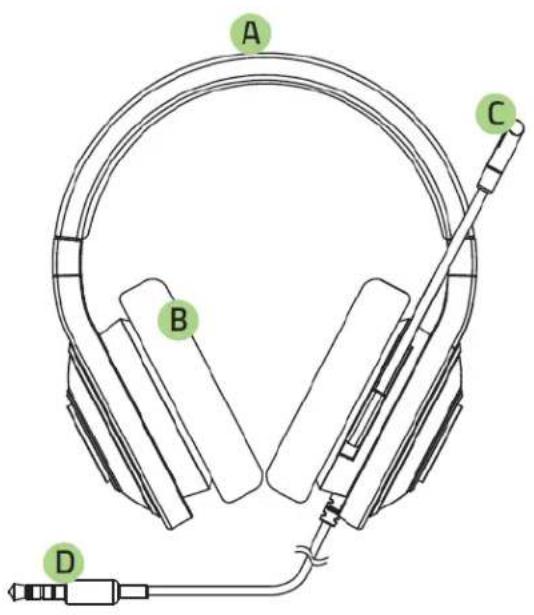
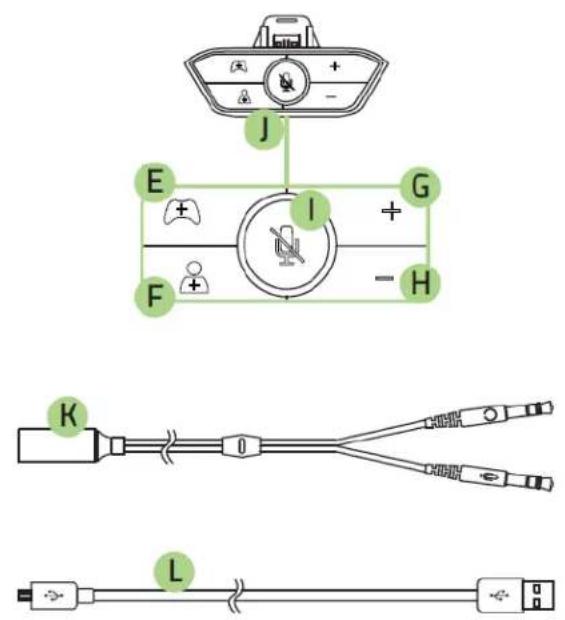
A. Adjustable padded headband
B. Circumaural, leatherette ear cushions
C. Adjustable microphone
D. 3.5mm combined audio/mic jack
E. Game balance
F. Chat balance
G. Volume up
H. Volume down
I. Mute
J. 3.5mm combined audio/mic port
K. Audio/mic splitter cable
L. Micro-USB cable
5. USING THE RAZER KRAKEN FOR XBOX ONE HEADSET
CONNECTING THE HEADSET

natural_image
Line drawing of a headset connected to a handheld device via cable, showing wiring and control buttons (no text or symbols)Connect the headset to the controller via the Stereo Headset Adapter for Xbox One Controllers by following the steps below.
-
Insert the Stereo Headset Adapter into the corresponding jack on the bottom of your Microsoft Xbox One controller.
-
Connect your headset to the audio port at the bottom of the Stereo Headset Adapter.
-
Turn on your Xbox One console and sign in to your Xbox Live® account.
-
Connect your controller to the Xbox One console via the USB cable.
-
The system should automatically detect the new hardware and prompt you to update your Xbox One Controller to enable it to work with the Stereo Headset Adapter. Follow the instructions on screen to complete the update.
CAUTION: Do not unplug your controller until the update is complete.
ADJUSTING OVERALL VOLUME
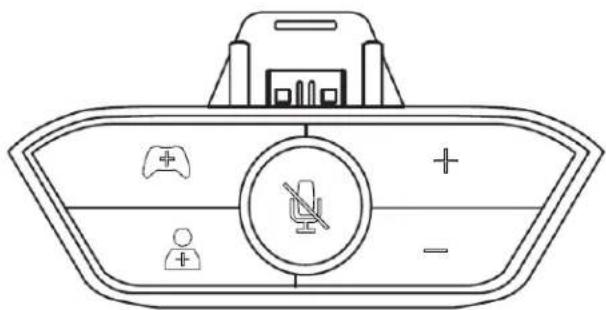
The Volume Up ( ) and Volume Down ( ) buttons controls the overall volume of your headset, including game and chat audio. Press these buttons repeatedly to increase/decrease the volume.
Note: You can also press and hold these buttons to increase/decrease the volume steadily over time.
ADJUSTING GAME / CHAT VOLUME BALANCE
Game Balance ( ) / Chat Balance ( ) buttons adjust the mix of game volume versus chat volume played through your headset. By default, both game and chat volumes are balanced at 50/50.
If you want your game volume to be louder than chat volume, press the button on the Stereo Headset Adapter for Xbox One repeatedly till your desired volume balance.
If you want your chat volume to be louder than game volume, press the button on the Stereo Headset Adapter for Xbox One repeatedly till your desired volume balance.
Note: You can also press and hold these buttons to increase the game/chat volume balance steadily over time. A beep tone will be played when either one of the volume balance reaches the maximum level (100/0 mix).
Press the 📄 button to mute your microphone. The LED on this button will be lighted when the microphone is muted.
7 | razer
natural_image
Line drawing of a headboard with an antenna and sound waves, no text or symbols presentWe recommend stretching the headphones gently apart before placing them over your head to minimize headband stress. However, please avoid overstretching the headphones beyond its technical limits.
6. SAFETY AND MAINTENANCE
SAFETY GUIDELINES
In order to achieve maximum safety while using your Razer Kraken for Xbox One, we suggest that you adopt the following guidelines:
- Should you have trouble operating the device properly and troubleshooting does not work, unplug the device and contact the Razer hotline or go to www.razersupport.com for support. Do not attempt to service or fix the device yourself at any time.
- Do not take apart the device (doing so will void your warranty) and do not attempt to service it yourself or operate it under abnormal current loads.
- Keep your device away from liquid, humidity or moisture. Operate your device only within the specified temperature range of 0^ C ( 32^ F) to 40^ C ( 104^ F). Should you operate it in a temperature that is beyond this range, unplug and switch off the device in order to let the temperature stabilize within the optimal temperature range.
- The device isolates external ambient sounds even at low volumes, resulting in lowered awareness of your external surroundings. Please remove the device when engaging in any activities that requires active awareness of your surroundings.
- Listening to excessively loud volumes over extended periods of time can damage your hearing. Furthermore, legislation of certain countries permits a maximum sound level of 86db to affect your hearing for 8 hours a day. We therefore recommend that you reduce the volume to a comfortable level when listening for prolonged periods of time. Please, take good care of your hearing.
MAINTENANCE AND USE
The Razer Kraken for Xbox One requires minimum maintenance to keep it in optimum condition. Once a month we recommend you unplug the device and clean it using a soft cloth or cotton swab with a bit of warm water to prevent dirt buildup. Do not use soap or harsh cleaning agents.
7. LEGALESE
COPYRIGHT AND INTELLECTUAL PROPERTY INFORMATION
Copyright ©2014 Razer Inc. All Rights Reserved. Razer, the Razer Triple-Headed Snake logo, the Razer distressed word logo and other trademarks contained herein are trademarks or registered trademarks of Razer Inc. and/or its affiliated or associated companies, registered in the United States and/or other countries.
This product is manufactured under license from Microsoft Corporation. Microsoft, Kinect, Windows, Windows Vista, the Windows Logo, Xbox, Xbox LIVE, Xbox 360, and the Xbox logos are trademarks of the Microsoft group of companies. Windows and the Windows logo are trademarks of the Microsoft group of companies. All other trademarks are the property of their respective owners.
Razer Inc. (“Razer”) may have copyright, trademarks, trade secrets, patents, patent applications, or other intellectual property rights (whether registered or unregistered) concerning the product in this guide. Furnishing of this guide does not give you a license to any such copyright, trademark, patent or other intellectual property right. The Razer Kraken for Xbox One (the “Product”) may differ from pictures whether on packaging or otherwise. Razer assumes no responsibility for such differences or for any errors that may appear. Information contained herein is subject to change without notice.
LIMITED PRODUCT WARRANTY
For the latest and current terms of the Limited Product Warranty, please visit www.razerzone.com/warranty.
LIMITATION OF LIABILITY
Razer shall in no event be liable for any lost profits, loss of information or data, special, incidental, indirect, punitive or consequential or incidental damages, arising in any way out of distribution of, sale of, resale of, use of, or inability to use the Product. In no event shall Razer's liability exceed the retail purchase price of the Product.
COSTS OF PROCUREMENT
For the avoidance of doubt, in no event will Razer be liable for any costs of procurement unless it has been advised of the possibility of such damages, and in no case shall Razer be liable for any costs of procurement liability exceeding the retail purchase price of the Product.
GENERAL
These terms shall be governed by and construed under the laws of the jurisdiction in which the Product was purchased. If any term herein is held to be invalid or unenforceable, then such term (in so far as it is invalid or unenforceable) shall be given no effect and deemed to be excluded without invalidating any of the remaining terms. Razer reserves the right to amend any term at any time without notice.

- TABLE OF CONTENTS
- PACKAGE CONTENTS / HARDWARE REQUIREMENTS
- PACKAGE CONTENTS
- HARDWARE REQUIREMENTS
- REGISTRATION / TECHNICAL SUPPORT
- REGISTRATION
- TECHNICAL SUPPORT
- TECHNICAL SPECIFICATIONS
- HEADPHONES
- MICROPHONE
- STEREO HEADSET ADAPTER
- DEVICE LAYOUT
- USING THE RAZER KRAKEN FOR XBOX ONE HEADSET
- CONNECTING THE HEADSET
- ADJUSTING OVERALL VOLUME
- ADJUSTING GAME / CHAT VOLUME BALANCE
- SAFETY AND MAINTENANCE
- SAFETY GUIDELINES
- MAINTENANCE AND USE
- LEGALESE
- COPYRIGHT AND INTELLECTUAL PROPERTY INFORMATION
- LIMITED PRODUCT WARRANTY
- LIMITATION OF LIABILITY
- COSTS OF PROCUREMENT
- GENERAL
Brand : RAZER
Model : Kraken for Xbox One
Category : Console