
C50300Mx Hybrid - Video Conferencing System KONFTEL - Free user manual and instructions
Find the device manual for free C50300Mx Hybrid KONFTEL in PDF.


| Product Type | Video Conferencing System |
| Brand | Konftel |
| Model | C50300Mx Hybrid |
| Dimensions (W x H x D) | 200 x 200 x 100 mm |
| Weight | 1.5 kg |
| Power Supply | PoE (Power over Ethernet) or 12V DC adapter |
| Main Functions | Full-HD video, wideband audio, echo cancelation, hybrid connectivity (USB + IP) |
| Camera Resolution | 1080p @ 30fps |
| Field of View | 120° diagonal |
| Microphone | Beamforming microphone array, 3-meter pickup range |
| Speaker | Full-range speaker, 95 dB SPL |
| Connectivity | USB 2.0, Ethernet (RJ-45), HDMI out |
| Compatibility | Microsoft Teams, Zoom, Google Meet, Cisco |
| Maintenance & Cleaning | Clean lens with soft dry cloth; update firmware via web interface |
| Safety Certifications | FCC, CE, RoHS |
| Spare Parts & Repairability | Replacement power adapter, USB cable, mounting bracket available |
| General Information | Supports up to 10 participants in room; wall mountable; 3-year limited warranty |
Frequently Asked Questions - C50300Mx Hybrid KONFTEL
User questions about C50300Mx Hybrid KONFTEL
0 question about this device. Answer the ones you know or ask your own.
Ask a new question about this device
Download the instructions for your Video Conferencing System in PDF format for free! Find your manual C50300Mx Hybrid - KONFTEL and take your electronic device back in hand. On this page are published all the documents necessary for the use of your device. C50300Mx Hybrid by KONFTEL.
USER MANUAL C50300Mx Hybrid KONFTEL
- USB cable 5 m
- AC adapter
- Remote control with two AAA batteries
- Wall mount
- Quick guide
- Safety declaration
931401002/932401002
933401002/834401002900102149
Konftel OCC Hub
• USB cable Ⓐ (Konftel Ego) 5 m
• USB cable B (Konftel 55/300-series) 5 m
- USB cable © (laptop) 3 m
- AC adapter
- Velcro®
- Quick guide
- Safety declaration
3. AUDIO
Only one of the following audio devices is included in the video kit.
Konftel C5055Wx
Konftel 55Wx
• USB cable (to be replaced by B)
- Power cable
- AC adapter
- Battery
- Safety declaration
910101082
Konftel C50300IPx Hybrid
Konftel 300IPx
• USB cable (to be replaced by B)
- Power cable
- AC adapter
- Network cable
- Safety declaration
910101084
Konftel C50300Wx Hybrid
Konftel 300Wx
• USB cable (to be replaced by B)
- Rechargeable battery
- Charging cradle
- Power cable
- AC adapter
- Safety declaration
Konftel C50300Mx Hybrid
Konftel 300Mx
• USB cable (to be replaced by B)
- Rechargeable battery
- Charging cradle
- Power cable
- AC adapter
- Safety declaration
910101083 (Not available in all regions) 910101078/84C
![graph TD A["User"] --> B["USB Device"] B --> C["Device 1"] B --> D["Device 2"] B --> E["Device 3"] B --> F["Device 4"] B --> G["Device 5"] B --> H["HDMI"] H --> I["HDMI cable (not included)"] I --> J["Device 6"] J --> K["Laptop"] K --> L["USB Cable"] style A fill:#f9f,stroke:#333 style B fill:#ccf,s…](/content/2026/05/1082176/images/c2bd2af0b294ba8bb1e7a7b6484a0372ebc50a8d44783ec18654f840942a3692.jpg)
Before connecting the USB cable to the laptop, make sure that the DisplayLink driver is installed on the laptop.
→ Download driver at displaylink.com/downloads
Connect the USB cable.
NOTE! The configuration can
in some cases take more than
60 seconds.
The consequential re-connec-tions will be faster (\~10 seconds).
Konftel is a leading company within collaboration endpoint solutions. Since 1988, our mission has been to help people in businesses around the world to have meetings regardless of distance. Based on our success, we know that remote collaboration is a smooth way to save time, money and at the same time contribute to a more sustainable world.
Crystal clear audio and a sharp video image are essential for efficient meetings, this is why we only focus on cutting-edge technology in our Collaboration Solutions. Our patented audio technology OmniSound ® is built into all Konftel Conference phones and devices. The products are sold globally under the Konftel brand and our headquarter is based in Sweden.
Read more about the company and our products at konftel.com.
Konftel AB, Box 268, SE-901 06 Umeå, Sweden
Tel: +46 90 70 64 89 E-mail: info@konftel.com
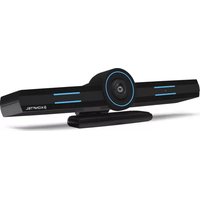
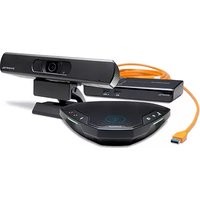
Brand : KONFTEL
Model : C50300Mx Hybrid
Category : Video Conferencing System