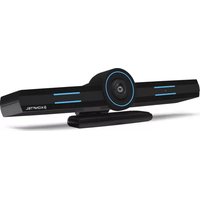
CC200 - Video Conferencing System KONFTEL - Free user manual and instructions
Find the device manual for free CC200 KONFTEL in PDF.


Pick your language and provide your email: we'll send you a specifically translated version.
| Product Type | Video Conferencing System (Camera, Microphone, Speaker) |
| Dimensions (camera) | 150 x 70 x 70 mm |
| Weight | 500 g |
| Power Supply | USB 5V, 500 mA |
| Video Resolution | 4K (3840 x 2160) @ 30 fps |
| Field of View | 120° (diagonal) |
| Microphone Type | Built-in omni-directional microphone |
| Microphone Range | Up to 5 meters |
| Speaker Output | 5W full-range speaker |
| Connectivity | USB 2.0/3.0, plug-and-play |
| Compatibility | Windows, macOS, Chrome OS, popular video conferencing apps |
| Mounting Options | On top of monitor, tripod, or table stand |
| Operating Temperature | 0°C to 40°C |
| Maintenance & Cleaning | Wipe lens with soft, dry cloth; avoid solvents |
| Safety Precautions | Use only supplied USB cable; do not expose to water |
| Spare Parts & Repairability | No user-serviceable parts; contact Konftel support for repairs |
| General Information | Includes camera, USB cable, quick start guide; CE, FCC certified |
Frequently Asked Questions - CC200 KONFTEL
What operating systems are compatible with the Konftel CC200?
The CC200 works with Windows 10/11, macOS, and Chrome OS. It is plug-and-play with most video conferencing apps like Zoom, Teams, and Google Meet.
How do I set up the Konftel CC200?
Simply plug the USB cable into your computer, and position the camera on your monitor or tripod. It will be automatically recognized without additional drivers.
What is the maximum video resolution?
The CC200 supports 4K Ultra HD (3840 x 2160) at 30 frames per second, ensuring sharp and clear video.
What is the field of view?
It has a wide 120° diagonal field of view, perfect for capturing everyone in small to medium meetings.
How far can the microphone pick up sound?
The built-in omni-directional microphone can clearly capture voices up to 5 meters (16 feet) away.
Can I adjust the camera angle?
Yes, the camera is adjustable with a built-in tilt mechanism, and the included stand allows for various mounting positions.
How do I clean the lens?
Use a soft, lint-free cloth to gently wipe the lens. Do not use any liquids or abrasive cleaners.
Does the CC200 work with a USB hub?
It is recommended to connect directly to a USB 3.0 port for best performance. Using an unpowered USB hub may cause issues.
Is the Konftel CC200 certified for Microsoft Teams or Zoom?
While not officially certified, it is fully compatible and works seamlessly with Microsoft Teams, Zoom, Google Meet, and other major platforms.
What is the warranty period?
Konftel offers a 2-year limited warranty against defects in materials and workmanship. Contact Konftel support for details.
User questions about CC200 KONFTEL
0 question about this device. Answer the ones you know or ask your own.
Ask a new question about this device
No questions yet. Be the first to ask one.
Download the instructions for your Video Conferencing System in PDF format for free! Find your manual CC200 - KONFTEL and take your electronic device back in hand. On this page are published all the documents necessary for the use of your device. CC200 by KONFTEL.
USER MANUAL CC200 KONFTEL
Manual assistant
Powered by Anthropic
Waiting for your message
Product information
Brand : KONFTEL
Model : CC200
Category : Video Conferencing System