
Hip & Pocket PDM-100A - Pedometer HOMEDICS - Free user manual and instructions
Find the device manual for free Hip & Pocket PDM-100A HOMEDICS in PDF.


| Product Type | Pedometer |
| Brand | Homedics |
| Model | Hip & Pocket PDM-100A |
| Dimensions | Approx. 2.0 x 1.8 x 0.6 inches (5.1 x 4.6 x 1.5 cm) |
| Weight | Approx. 0.7 oz (20 g) |
| Power Source | 1 CR2032 battery (included) |
| Battery Life | Approx. 1 year under normal use |
| Step Counting Method | Mechanical pendulum sensor |
| Display | LCD screen with step count, distance, and calorie display |
| Maximum Step Count | 99,999 steps |
| Distance Range | Up to 99.9 miles (160 km) |
| Calorie Range | Up to 9,999 kcal |
| Accuracy | ±5% under normal walking conditions |
| Mounting Options | Clip for belt or pocket clip |
| Operating Temperature | 32°F to 104°F (0°C to 40°C) |
| Care & Maintenance | Wipe with a dry cloth; avoid water and extreme temperatures |
| Safety Notes | Keep away from strong magnetic fields; not a medical device |
| Spare Parts / Reparability | Battery is user-replaceable; no other user-serviceable parts |
| General Information | Includes user manual (PDF); designed for walking and running |
Frequently Asked Questions - Hip & Pocket PDM-100A HOMEDICS
User questions about Hip & Pocket PDM-100A HOMEDICS
0 question about this device. Answer the ones you know or ask your own.
Ask a new question about this device
Download the instructions for your Pedometer in PDF format for free! Find your manual Hip & Pocket PDM-100A - HOMEDICS and take your electronic device back in hand. On this page are published all the documents necessary for the use of your device. Hip & Pocket PDM-100A by HOMEDICS.
USER MANUAL Hip & Pocket PDM-100A HOMEDICS
Hip & Pocket Pedometer

Please Take A Moment Now Register
Your Product At:
www.homedics.com/register
Your valuable input regarding this product will help us create the products you will want in the future.
PDM-100
Ver. A
1 year limited warranty
Hip & Pocket
Pedometer
To Monitor Your Daily Activity
Dual-Axis Technology for Reliable Accuracy
TABLE OF CONTENTS
BASIC INFORMATION:
Introduction......3
Name/Function of Each Part .... 3
Installing the Battery 4
Pedometer Modes 6
Calculating Stride Length 8
Setting the Time......9
Setting User Information......11
Average Speed Mode 14
Exercise Time Mode 15
Memory Mode 15
Care, Maintenance & Cleaning ..... 17
Specifications 19
Default Settings 19
1 Year Limited Warranty......20
This digital pedometer displays steps taken, distance traveled, Calories burned, average speed, total exercise time, and 7-day memory storage. Please read this manual carefully before using this pedometer. We suggest you keep this manual for future reference.
For promoting good health, including weight-loss, it is recommended that adults should walk 10,000 steps a day.*
When you start to walk or run, this pedom-eter will automatically begin displaying your steps taken, distance traveled, Calories burned, average speed, and exercise time.
NAME/FUNCTION OF EACH PART
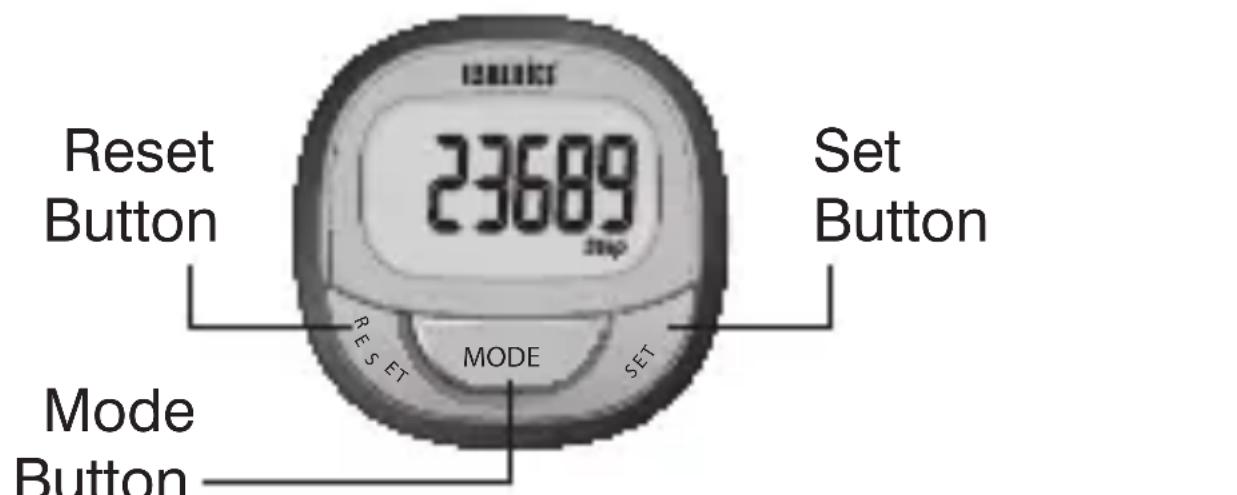
*American Heart Association

INSTALLING THE BATTERY
- The battery cover is located on the back of the pedometer. Unscrew the battery compartment and remove the cover. Fig. A
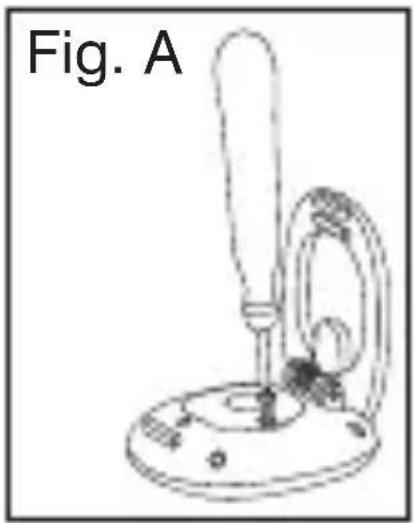
natural_image
Simple line drawing of a laboratory apparatus with a bulb, stand, and base (no text or symbols)- Place the battery according to the polarity indications inside the compartment. Battery Type: 1 3V Lithium CR2032 battery (included). Fig. B

natural_image
Line drawing of a mechanical device with three circular components and a curved base (no text or symbols)- Replace the battery compartment cover and fasten the screw. Fig. C
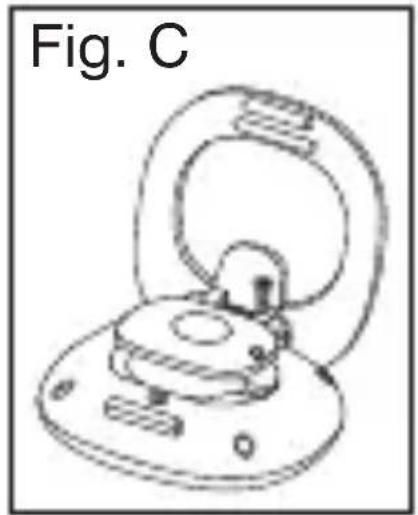
natural_image
Line drawing of a mechanical component with a circular base and looped top, labeled 'Fig. C' (no text or symbols on the diagram itself)Important Notes:
- Replace the battery when screen is dark.
- Batteries are hazardous waste. Do not dispose of them together with the household garbage.
Use only CR2032 Lithium batteries for this pedometer. Remove the battery when the unit is not in use for extended periods of time. All user info, including the time, will need to be reset if the battery is removed or replaced. Clean contact on battery and in battery compartment with a soft dry cloth each time you install batteries.
This pedometer has 7 operational modes and are in the following sequence:
Press Mode button to scroll through modes:
- Time Mode: Displays the time of the day.
- Steps Mode: Displays the number of steps taken that day.
- Distance Mode: Displays the number of miles or kilometers traveled that day.
- Calories Mode: Displays the number of Calories burned that day.
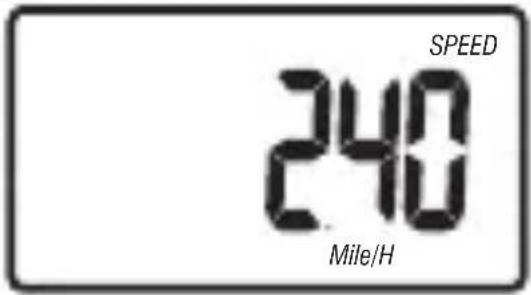
• Average Speed Mode: Displays the daily average speed while walking and running.
• Exercise Time Mode: Displays the amount of time you were active for that day. - Memory Mode: Displays the number of steps taken, distance traveled, Calories burned, average speed, and exercise time for the past 7 days.
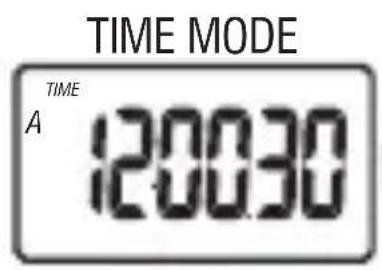
TIME MODE

STEPS MODE
DISTANCE MODE

MEMORY MODE

CALORIES MODE

EXERCISE TIME MODE

AVERAGE SPEED MODE
CALCULATING STRIDE LENGTH
In order to display accurate DISTANCE traveled, you need to measure and input your stride length in inches.
How to calculate your Stride Length:
To properly calculate your stride length, take 10 steps at a normal pace. Once completed, use a measuring device to measure the distance you traveled in feet, and divide by 10 (the number of steps you had taken). Convert this number into inches.
Example:
If you walked a distance of 15 feet by taking only 10 steps, the stride length is 1 12 feet = 18 inches.
Formula:
$$ \frac {\text {distance traveled (in feet)}}{# \text {of steps taken}} = \text {stride length (in feet)} $$
Conversion:
1 foot = 12 inches
Please write your stride length here for future reference:
Note: To start, please install the battery. For more information, refer to the INSTALLING THE BATTERY section of this manual.
The pedometer will turn ON and will show full LCD segments for 2 seconds and then will automatically display the TIME. If the pedometer does not automatically display this mode, press the MODE button until the time is displayed.
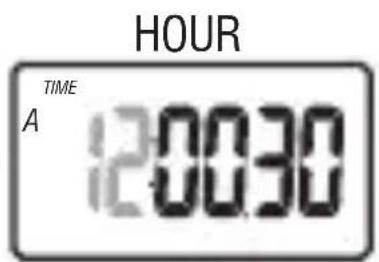
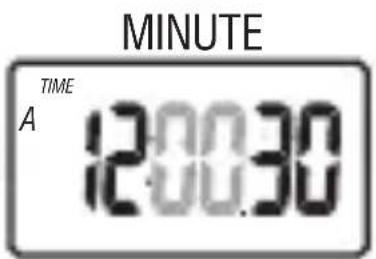
- While in TIME mode, press and hold down the SET button for 3 seconds. The HOUR should be blinking.
- To increase the HOUR, press the RESET button. Each press will increase the number by one in a cycling manner. Pressing the MODE button will confirm the entry.
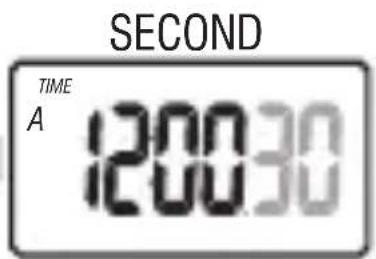
- Change the MINUTE, SECOND and 12 or 24 HOUR MODES as described in step 2 above, using the RESET button to increase the selection and the MODE button to confirm the entries.
Notes:
- If the SECONDS is less than 30 and the RESET button is pressed, the SECONDS will go back to 00. If the SECONDS is greater than 30 and the RESET button is pressed, the SECONDS will go to 00 and the MINUTE will increase by one.
- If after 30 seconds no data has been entered, the display will automatically switch back to the last used mode.

12/24 HOUR FORMAT

SETTING USER INFORMATION
- Press the MODE button until you reach STEP mode.
- Press and hold the SET button until UNIT displays on the screen, and a blinking MILE or KM.
- To change the measurement, press the RESET button. Each press will change the selection in a cycling manner.
Pressing the MODE button will confirm the entry.
Note: By selecting MILE, all information will be displayed in Imperial format. By selecting KM, all information will be displayed in Metric format. - To change the WEIGHT, press the RESET button to increase the number by one in a cycling manner. Pressing the MODE button will confirm the entry.
- To change the STRIDE LENGTH, press the RESET button to increase the selection and the MODE button to confirm the entry.

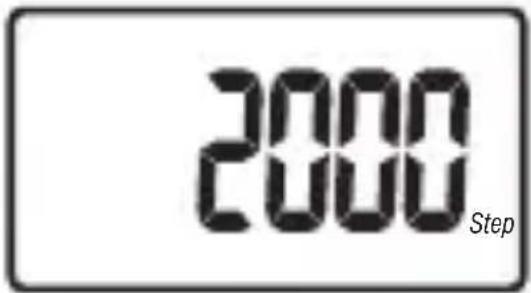
flowchart
graph TD
    A["2000 Step"] --> B["Adu"]
    B --> C["Unit Mile"]
    C --> D["Weight 60 lbinch"]
    D --> E["STRIDE LENGTH 50"]
    E --> F["STEPS MODE Step"]
Notes:
- If after 30 seconds no data has been entered, the display will automatically switch back to the last mode used.
- Resetting any one of the following features will result in clearing all of the following features: STEPS TAKEN, DISTANCE TRAVELED, CALORIES BURNED, AVERAGE SPEED, or EXERCISE TIME.
- If after 5 minutes no buttons are pressed, the display will return to TIME mode.
• To reset ALL INFORMATION on the
pedometer, use a paperclip to press the MASTER RESET button on the back of the pedometer. After the button is pressed, the display will show full LCD segments for 2 seconds and then automatically display the TIME. If the pedometer does not automatically display this mode, press the MODE button until the TIME is displayed.
Press the MODE button to scroll through the different modes of the pedometer.
TIME MODE
Displays the time in the 12 or 24 Hour Format. (HH:MM.SS)
STEPS MODE
In this mode, a running total of the amount of steps taken per day will be displayed.
Note:
• This information automatically resets at midnight.
- Press and hold the RESET button to
clear the data.
DISTANCE MODE
This mode will display how far you have walked or ran each day.
Note:
• This information automatically resets at midnight.
- Press and hold the RESET button to clear the data.
- Press the SET button to toggle between Kilometers and Miles.
CALORIES BURNED MODE
This mode will display the amount of Calories burned.
Note:
• This information automatically resets at midnight.
- Press and hold the RESET button to clear the data.
AVERAGE SPEED MODE
This mode displays the average speed at which you have walked or ran during
each day.
Note:
• This information automatically resets at midnight.
- Press and hold the RESET button to clear the data.
- Press the SET button to toggle between Km/H and Mile/H.
EXERCISE TIME MODE
In this mode, you can see the length of time you were active per day.
• Exercise time automatically starts when you begin activity.
• This information automatically resets at midnight.
- Press and hold the RESET button to clear the data.
MEMORY MODE
After midnight, the information recorded during the day will be stored into this device for up to 7 days. In this mode, you can review your activity from the past week.

Note:
- Press the RESET button to scroll through the days. Day 7 is the most recent day, day 6 is the second most recent, and this pattern continues 7 days back.
- While viewing the information from past days, press the SET button to review other information such as CALORIES BURNED, DISTANCE TRAVELED, AVERAGE SPEED and EXERCISE TIME.
• While in MEMORY Mode, press and hold the RESET button to clear the data. - When the 7 days of memory is full, the pedometer will automatically delete day 7 (7 days in the past) and continue doing so each day the memory is full.
CARE, MAINTENANCE & CLEANING
- Do not disassemble the pedometer. If in need of repair, refer to the warranty section of this manual.
- Do not subject the device to extreme shocks (do not drop on the floor).
- Do not subject the device to extreme temperatures, humidity, moisture, or direct sunlight. Protect from dust.
- Do not expose the device to strong chemicals such as gasoline, cleaning solvents, acetone, alcohol, or insect repellents, as they may damage the device’s seal, case, or finish.
- Leaky batteries can damage the unit. Remove the battery when the unit will not be used for a long time.
-
Follow local ordinances and recycling instructions regarding disposal or recycling of the device and device components, including batteries.
-
If the unit is stored near freezing, allow it to acclimate to room temperature before use.
- Do not immerse the unit in water, as this will result in damage to the unit.
- This device may not meet its performance specifications if stored or used outside of these temperature and humidity ranges:
• Storage/Transportation Environment
Temperature:
41°F\~95°F
(5°C\~35°C)
Humidity:
less than 70%
- Operating Environment
Temperature:
32°F\~122°F
(0°C\~50°C)
Humidity:
less than 90%
SPECIFICATIONS
| Step Range: | 0 – 999,999 Steps |
| Weight Range: | 44 – 441 lbs (20 – 200kg) |
| Stride Length: | 12 – 71” (30 – 180 cm) |
| Distance Range: | 0 – 9,999.99 Mile / km |
| Calories Range: | 0 – 99,999.9 kcal |
DEFAULT SETTINGS
| Time: | AM 12:00.00, 12Hr Mode |
| Step: | 0 |
| Weight: | 110 lb |
| Stride Length: | 20 inch |
| Calorie: | 0.0 Kcal |
| Distance: | 0.00 Mile |
| Speed: | 0.00 Mile/H |
| Timer: | 0:00.00 |
HOMEDICS
For service or repair, do not return this unit to the retailer. Contact HoMedics Consumer Relations at:
Email: cservice@ homedics.com
Phone: 1-800-466-3342 Business Hours: 8:30am-7pm ET Monday-Friday
Distributed by HOMEDICS®
HoMedics, LLC. 3000 Pontiac Trail Commerce Township MI 48390
Printed in China
LIMITED ONE YEAR WARRANTY
HoMedics sells its products with the intent that they are free of defects in manufacture and workmanship for a period of one year from the date of original purchase, except as noted below. HoMedics warrants that its products will be free of defects in material and workmanship under normal use and service. This warranty extends only to consumers and does not extend to Retailers.
To obtain warranty service on your HoMedics product, contact a Consumer Relations Representative by telephone at 1-800-466-3342 for assistance. Please make sure to have the model number of the product available.
HoMedics does not authorize anyone, including, but not limited to, Retailers, the subsequent consumer purchaser of the product from a Retailer or remote purchasers, to obligate HoMedics in any way beyond the terms set forth herein. This warranty does not cover damage caused by misuse or abuse; accident; the attachment of any unauthorized accessory; alteration to the product; improper installation; unauthorized repairs or modifications; improper use of electrical/power supply; loss of power; dropped product; malfunction or damage of an operating part from failure to provide manufacturer's recommended maintenance; transportation damage; theft; neglect; vandalism; or environmental conditions; loss of use during the period the product is at a repair facility or otherwise awaiting
parts or repair; or any other conditions whatsoever that are beyond the control of HoMedics. This warranty is effective only if the product is purchased and operated in the country in which the product is purchased. A product that requires modifications or adoption to enable it to operate in any other country than the country for which it was designed, manufactured, approved and/or authorized, or repair of products damaged by these modifications is not covered under this warranty.
THE WARRANTY PROVIDED HEREIN SHALL BE THE SOLE AND EXCLUSIVE WARRANTY. THERE SHALL BE NO OTHER WARRANTIES EXPRESS OR IMPLIED INCLUDING ANY IMPLIED WARRANTY OF MERCHANTABILITY OR FITNESS OR ANY OTHER OBLIGATION ON THE PART OF THE COMPANY WITH RESPECT TO PRODUCTS COVERED BY THIS WARRANTY. HOMEDICS SHALL HAVE NO LIABILITY FOR ANY INCIDENTAL, CONSEQUENTIAL OR SPECIAL DAMAGES. IN NO EVENT SHALL THIS WARRANTY REQUIRE MORE THAN THE REPAIR OR REPLACEMENT OF ANY PART OR PARTS WHICH ARE FOUND TO BE DEFECTIVE WITHIN THE EFFECTIVE PERIOD OF THE WARRANTY. NO REFUNDS WILL BE GIVEN. IF REPLACEMENT PARTS FOR DEFECTIVE MATERIALS ARE NOT AVAILABLE, HOMEDICS RESERVES THE RIGHT TO MAKE PRODUCT SUBSTITUTIONS IN LIEU OF REPAIR OR REPLACEMENT.
This warranty does not extend to the purchase of opened, used, repaired, repackaged and/or resealed products, including but not limited to sale of such products on Internet auction sites and/or sales of such products by surplus or bulk resellers. Any and all warranties or guarantees shall immediately cease and terminate as to any products or parts thereof which are repaired, replaced, altered, or modified, without the prior express and written consent of HoMedics.
This warranty provides you with specific legal rights. You may have additional rights which may vary from state to state. Because of individual state regulations, some of the above limitations and exclusions may not apply to you.
For more information regarding our product line in the USA, please visit: www.homedics.com.
HoMedics® is a registered trademark of HoMedics, LLC.
© 2012 HoMedics, LLC. All rights reserved.
HOMEDICS
www.homedics.com/register
natural_image
Line drawing of a laboratory apparatus labeled Fig. A, showing a test tube with a bulb and base (no text or symbols on the diagram itself)natural_image
Line drawing of a mechanical device with three circular components and a curved base (no text or symbols)natural_image
Technical line drawing of a mechanical component with no visible text or symbolsNotas importantes:
Hora


12 o 24 Horas Formato

Segundo

Minuto

- Hip & Pocket Pedometer
- Hip & Pocket
- Pedometer
- To Monitor Your Daily Activity
- TABLE OF CONTENTS
- BASIC INFORMATION:
- INSTALLING THE BATTERY
- Important Notes:
- CALCULATING STRIDE LENGTH
- How to calculate your Stride Length:
- Example:
- Formula:
- Conversion:
- Notes:
- SETTING USER INFORMATION
- TIME MODE
- STEPS MODE
- Note:
- DISTANCE MODE
- CALORIES BURNED MODE
- AVERAGE SPEED MODE
- EXERCISE TIME MODE
- MEMORY MODE
- CARE, MAINTENANCE & CLEANING
- SPECIFICATIONS
- DEFAULT SETTINGS
- HOMEDICS
- Distributed by HOMEDICS®
- LIMITED ONE YEAR WARRANTY
- Notas importantes:
Brand : HOMEDICS
Model : Hip & Pocket PDM-100A
Category : Pedometer