
EzyTalk - Hands-free kit BLUEANT - Free user manual and instructions
Find the device manual for free EzyTalk BLUEANT in PDF.


| Type | Hands-free kit |
| Brand | BlueAnt |
| Model | EzyTalk |
| Connectivity | Bluetooth |
| Bluetooth Version | Bluetooth 3.0 |
| Operating Range | Up to 10 meters |
| Talk Time | Up to 10 hours |
| Standby Time | Up to 200 hours |
| Charging Time | Approximately 2 hours |
| Battery Type | Rechargeable lithium-ion |
| Weight | Approximately 10 grams |
| Dimensions | 50 x 20 x 10 mm |
| Compatible Devices | Smartphones, tablets, computers with Bluetooth |
| Audio Features | Noise cancellation, echo reduction |
| Controls | Multi-function button, volume buttons |
| Indicators | LED for power and pairing status |
| Material | Plastic, silicone ear hook |
| Cleaning Instructions | Wipe with a soft, dry cloth. Do not use liquids. |
| Storage | Keep in a cool, dry place away from direct sunlight |
| Safety Precautions | Do not disassemble. Avoid exposure to water. |
| Spare Parts Availability | Ear hooks and charging cables available from BlueAnt |
Frequently Asked Questions - EzyTalk BLUEANT
User questions about EzyTalk BLUEANT
0 question about this device. Answer the ones you know or ask your own.
Ask a new question about this device
Download the instructions for your Hands-free kit in PDF format for free! Find your manual EzyTalk - BLUEANT and take your electronic device back in hand. On this page are published all the documents necessary for the use of your device. EzyTalk by BLUEANT.
USER MANUAL EzyTalk BLUEANT
natural_image
Close-up of a black and white portable microphone with mesh grille and connector (no visible text or symbols)USERMANUAL
EzyTalk
Bluetooth plug and go handstree

Bluetooth®
BLUEANT EZYTALK BLUETOOTH CAR KIT USER MANUAL
Features....02
Introduction....05
What's in the Package?......05
Pairing Car Kit with a Bluetooth Cell Phone - Example.....06
Adjust the Position of EZYTALK....08
AUTO ANSWERING or MANUAL ANSWERING....09
Turning EZYTALK ON and OFF....10
Making a Call....11
Voice Dialing....12
Answer and Reject a Call....13
Ending a Call from EZYTALK....14
Call Transfer....14
Last Number Redial....15
Speaker Volume Control....15
Audio and Visual Indication: 16
EZYTALK Specifications....17
Storage of Car Kit....17
BlueAnt Warranty Process....18
Limited Warranty and Parts Replacement....19
Contact Us: 21
Trouble Shooting....22
Additional Notes....26
Certification and Safety Approvals/General Information.....27
Caution: 28
www.blueant.com.au
Blue

ant
wireless ^1
EzyTalk
Bluetooth plug and go handefree

Bluetooth®
Features

1.MICROPHONE:
Voice input for outgoing audio.
2.SPEAKER:
For output of incoming audio.
3.TALK button:
3.1) Press once to manually take an incoming call.
3.2) Press and hold for 5 seconds to redial the last number called from the phone.
4.HANG UP button:
4.1) Press once to hang up a call.
4.2) Press and hold HANG-UP button for at least 5 seconds to get into Pairing Mode.

5.VOLUME UP or DOWN button:
Adjust the volume in 8 pre-set levels. Press once for volume up or down.
6. AUTO ANSWERING or MANUAL ANSWERING switch:
Switch it up with the letter "A" showing on the switch enables Auto Answering. Switch it down with the letter "M" showing on the switch enables Manual Answering.
www.blueant.com.au
Blue ant wireless®
EzyTalk
Bluetooth plug and go hundafree

Bluetooth®

natural_image
Close-up of a black and white handheld device with mesh grille and connector (no visible text or symbols)7.FIXING SCREW:
Adjust to a proper angle then secure the EZYTALK with this screw.
8.CAR CIGARETTE LIGHTER HEAD:
Plug this part into a standard car cigarette lighter jack.
Introduction
The BlueAnt EZYTALK Bluetooth Car Kit provides hands-free communication using cell phones. It requests no professional installation. This user guide focuses on establishing a connection with your mobile phone. You need to have a phone with embedded Bluetooth capability. The phone can be tucked away in your pocket or in a bag while you handle incoming call and outgoing calls, and adjust the volume up or down using the buttons on the car kit. The power for the EZYTALK comes from the car cigarette lighter jack. This device utilizes Bluetooth wireless technology. Any device that you want to work with this car kit must be compatible with Bluetooth technology version 1.1. that supports Bluetooth HEADSET and/or HANDSFREE profile.
Make sure that you have paired the EZYTALK with your Bluetooth phone or other Bluetooth devices before you start to use it.
What's in the Package?
- One EZYTALK Bluetooth car kit.
- User Manual
www.blueant.com.au
Blue
ant
wireless ^1
EzyTalk
Bluetooth plug and go hundefree

Bluetooth®
Pairing Car Kit with a Bluetooth Cell Phone - Example
Before using EZYTALK for the first time, you must pair EZYTALK with a Bluetooth phone. The Bluetooth audio connection between the car kit and your phone can be established by setting up a PAIRED link. EZYTALK will only store pairing info for one phone. If you intend to use this car kit with another cell phone, please repeat pairing procedure below.
A. Check your mobile phone's user guide, then, find out the locations of the Bluetooth Menu in your phone, and turn Bluetooth on.
B. Plug the EZYTALK into the car cigarette lighter jack, turn on the car, and you will hear two "do do" sounds which mean that EZYTALK is in Standby.
C. Press and hold the HANG UP button for 5 sec., then a "do lu do lu do" melody will be played, release the button. Now the EZYTALK is in Pairing Mode ready to be found by your phone. The Blue light will flash quickly.
D. Perform Bluetooth device discovery on your cell phone. It takes few seconds to search for and find other Bluetooth devices around you.
E. Phone display will show "EZYTALK" as found and ask for your confirmation that you want to pair with it. Please confirm this.
F.Enter passkey "1234" when your phone prompts you. The phone will start to pair with EZYTALK.
G.Your phone will then advise that pairing has been successful. The blue light of EZYTALK will flash one time per second.
If pairing failed, the blue indication keeps flashing rapidly for 2 minutes. Please repeat steps D to G for pairing again. Over 2 minutes, the blue indication will go back to normal, and a re-pairing procedure is needed. Please refer to step C to G above.
NOTE: Most cell phones show a Bluetooth linkage symbol on the display screen. Once EZYTALK and phone have successfully paired, you are ready to make and receive calls.
www.blueant.com.au
Blue ant wireless®
EzyTalk
Bluetooth plug and go huntfree

Bluetooth®
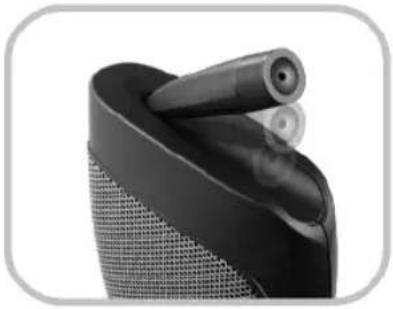
Adjust the Position of EZYTALK
You can loosen the FIXING SCREW to adjust the EZYTALK to fit your car. You can also adjust MICROPHONE tube to increase sound sensitivity. Face the hole towards the driver.
natural_image
Close-up of a black mechanical component with two cylindrical protrusions, no visible text or symbolsAUTO ANSWERING or MANUAL ANSWERING
Switch it up or down for selecting AUTO ANSWERING or MANUAL ANSWERING for an incoming call. If "M" appears on the switch it means that MANUAL ANSWERING is enabled. Answer the call using the answer button on the kit. If "A" appears on the switch it means that AUTO ANSWERING is enabled. The call will answer automatically after 1 - 3 rings.or depends upon your cell phone setting.
www.blueant.com.au
Blue

ant
wireless ^1
EzyTalk
Bluetooth plug and go hundafree

Bluetooth®
Turning EZYTALK ON and OFF
To switch the EZYTALK on, just plug the EZYTALK into a car cigarette jack and turn on the engine. You will hear a "do do" sound and the back lights of the buttons will turn on.
To switch EZYTALK off, just take EZYTALK out of the cigarette jack or turn off the engine. The lights on the buttons will turn off.
When the EZYTALK powers on it will automatically try to find the paired cell phone. Then, it will link with the cell phone if it is on and the Bluetooth function is activated. If the paired cell phone is off or Bluetooth is off, it is necessary to select the EZYTALK car kit in the cell phone and connect manually after the cell phone is power on. Alternatively simply remove the kit from the cigarette socket and replace. Please refer to cell phone user manual.
Making a Call
- Dial the phone number using the keypad on the cell phone.
- To send the call, press the phone's SEND/CALL key.
- The call will then be transferred automatically to the EZYTALK when the connection is made.
NOTE: It is recommended to keep the distance between car kit and cell phone to at least 30 cm to avoid cell phone power interference which may cause noise during conversation.
www.blueant.com.au
Blue ant wireless®
EzyTalk
Bluetooth plug and go handfree

Bluetooth®
Voice Dialing
If your Bluetooth phone supports voice dialing, you can use this feature with EZYTALK. Please refer to your phone's user guide for more information on setting up and recording voice commands.
The procedures for using voice dialing are below:
A. Voice dialing function on your phone must be turned on and voice tags must be stored.
B. Make sure that EZYTALK is turned ON.
C. On the EZYTALK, press the TALK button once whilst in standby mode.
D.A short tone "do" will prompt you to speak the voice tag that was previously stored in the phone's voice dial phone book.
E. The phone automatically dials out the contact you've selected.
F.When connected, you can speak as usual by using EZYTALK.
NOTE: Voice dialing is available for those phones which have a voice dialing function. It is a must to record voice tags in a quite environment directly into your phone.
Answer and Reject a Call
If there is an incoming call, the ring tones will sound from EZYTALK. If EZYTALK is in auto answering mode. EZYTALK will take the call automatically after few ring tones depends upon your cell phone setting. If EZYTALK is in manual answering mode, just press the TALK button once to pick up the call.
While in MANUAL ANSWERING mode if you wish to reject an incoming call, press once the HANG UP button on the EZYTALK.
Please note, this function only works on Bluetooth phones that support HANDSFREE profile.
For Headset Mode rejecting a call must be done from the cell phone.
www.blueant.com.au
Blue ant wireless®
EzyTalk
Bluetooth plug and go hundafree

Bluetooth®
Ending a Call from EZYTALK
To end a call, simply press the HANG UP button. Also when the other end hangs up the phone, the call also is terminated automatically.
Call Transfer
During the conversation, you may transfer the call from car kit to cell phone or from cell phone to car kit by pressing and hold TALK button about 5 sec.
NOTE: This function only works with Bluetooth phones that support HANDSFREE profile.
Last Number Redial
While EZYTALK is in standby condition (not in conversation), press and hold the TALK button for 5 seconds and your phone will redial the last number that you have previously called.
NOTE: This function only works on Bluetooth phones that support HANDSFREE profile.
Speaker Volume Control
The EZYTALK offers adjustment of speaker volume by pressing the "Vol. Up" or "Vol. Down" buttons. You can adjust the volume to 8 pre-set levels. Each button pressed increases/decreases one volume level; you can repeat the button press until a satisfactory level is reached. An audio tone will be played when either the minimum or maximum volume has been reached.
www.blueant.com.au
Blue ant wireless®
EzyTalk
Bluetooth plug and go handfree

Bluetooth®
Audio and Visual Indication:
LED indication:
| Car kit state | Light state |
| Power on | Buttons light on |
| No link with cell phone | Blue light is off |
| Standby | Flashes once every second. |
| During a call | Flashes 2 times every second. |
| Incoming call | Flashes 5 times and off 2 seconds |
| Pairing | Rapid flashes 5 times every second |
Audio indication:
| Car kit state | Audio indication |
| Power on | "do do" sound |
| Pairing | "do lu do lu do" melody |
EZYTALK Specifications
| Compatible: | Bluetooth 1.1 HEADSET profile and HANDSFREE profile |
| Pairing distance: | It is recommended that EZYTALK and phone distance is as close as possible with no solid objects in between. |
| Working distance: | 3 meters (best fit in the car) |
| Frequency band: | 2.4GHz ISM band |
| Speaker power: | 1W |
| Power: | 12V cigarette lighter jack |
| Power consumption: | 500mA during talk |
Storage of Car Kit
- Always store EZYTALK safely. It is not suitable for children.
- Avoid storage in direct constant sun light.
- Do not expose EZYTALK or any of its supplied parts to rain or other liquids.
- If you wish to clean EZYTALK, please use dry and soft cloth.
www.blueant.com.au
Blue
ant
wireless ^1
EzyTalk
Bluetooth plug and go handfree

Bluetooth®
BlueAnt Warranty Process
- Should you be having difficulties in the operation of your EZYTALK please refer to the F.A.Q in this Manual.
- Check our website for more information, updated manuals and troubleshooting. www.blueant.com.au
- Call us on 1300 669 049 and speak to one of the Blueant Wireless Customer Service Team.
- Return the unit directly to BlueAnt for testing and replacement of faulty items please call 1300 669 049 to arrange a Return Merchandise Authorization (RMA) number. Or
- Return the unit to your place of purchase and the store will be able to return the kit to Blueant for testing and replacement of faulty items.
Limited Warranty and Parts Replacement
We warrant this product against all defects in material and workmanship for a period of two years from the date of original purchase. The conditions of this warranty and our responsibilities under this warranty are as follows:
* The warranty is limited to the original purchaser.
* A copy of your receipt or other proof of purchase is required. Without proof of purchase, your warranty is defined as beginning on the date of manufacture as labeled on the products.
* The warranty is void if the serial number, date code label or product label is removed, or if the product has been subject to physical abuse, improper installation, modification, or repair by unauthorized third parties.
* The responsibility of our products shall be limited to the repair or replacement of the product at its sole discretion.
* Any implied warranty on our products is limited to two years from the date of purchase on all parts, including any cords and connectors.
www.blueant.com.au
Blue ant wireless®
EzyTalk
Bluetooth plug and go hundafree

Bluetooth®
* Specifically exempt from any warranty are limited-life consumable components subject to normal wear and tear, such as microphone, decorative finishes, and other accessories.
* We are not liable for any incidental or consequential damages arising from the use or misuse of any our product.
* This warranty gives you specific rights and you may have other rights which vary from area to area.
* Unless otherwise instructed in the user guide, the user may not, under any circumstances, attempt to perform service, adjustments or repairs on this unit, whether in or out of warranty. It must be returned to the purchase point, factory or authorized service agency for all such work.
* We will not assume any responsibility for any loss or damage incurred in shipping. Any repair work on our products by unauthorized third parties voids any warranty.
Contact Us:
For Connection Assistance or if you are having difficulties using your EZYTALK, please make an enquiry to support@blueant.com.au on our website www.blueant.com.au. or Call us on 1300 669 049 and speak to one of the BlueAnt Customer Service Team for guided connection assistance.
www.blueant.com.au
Blue ant wireless®
EzyTalk
Bluetooth plug and go handfree

Bluetooth®
Trouble Shooting
- Could not pair with phone
-Please check car kit is correctly plugged into cigarette lighter jack and the engine starts. If you hear "do do", it means EZYTALK is powered on.
-Please check whether there are many paired devices in your cell phone. Some Bluetooth cell phones cannot pair the EZYTALK if the paired devices are over the limited quantity. Please delete those you don't use.
-If somebody nearby is in pairing mode with another EZYTALK car kit, it is possible that their cell phone connects to your car kit first.
You can repeat pairing procedures to make EZYTALK work with your cell phone.
-Some times the cell phone will shut down. Please turn off the cell phone and repeat pairing procedures.
- Why does EZYTALK not function?
-Make sure EZYTALK is fixed firmly in the cigarette lighter jack properly.
-Make sure the 12V cigarette lighter jack is working properly.
-Make sure the cell phone is on and Bluetooth function is open.
-Please make sure EZYTALK and cell phone are paired and linked.
You can check the link symbol in your cell phone.
- Cannot hear the sound from car kit:
-Please make sure EZYTALK and cell phone are linked. You can check the link symbol in your cell phone.
-Make sure EZYTALK is powered on and the blue light is flashing.
-Make sure the communication distance between car kit and cell phone is within 3 meters.
-Using a Bluetooth headset and a Bluetooth car kit paired at the same time the EZYTALK cannot link with your cell phone if the Bluetooth headset is still actively connected with your cell phone.
- Could not hear the voices clearly or there are noises during conversation:
-Please check cell phone signal level. If the level is low, it could cause noise and could not be heard clearly.
-Make sure the communication distance is within 3 meters.
-If both conversation sides are in a very noisy environment, such as fair ground, disco or pub, it could cause noise.
-As cell phones power may vary in a different status, please keep the cell phone and car kit distance more than 30 cm to avoid interference.
www.blueant.com.au
Blue
ant

wireless ^1
EzyTalk
Bluetooth plug and go hundafree

Bluetooth®
-A roaming call could cause noise during conversation.
-When you try to adjust car kit position or MICROPHONE tube during conversation, some noise could occur for a very short time then come back to normal.
-Please keep away from microwave oven if you try to use EZYTALK at home.
- Car kit can not auto answering the call:
-Please make sure that you switch EZYTALK at AUTO ANSWERING mode.
-Under AUTO ANSWERING mode, the ring tone times will be different according to different cell phones.
- Does EZYTALK support all Bluetooth cell phones?
-Because this car kit supports HEADSET profile and HANDSFREE profile, it is suitable for most of Bluetooth cell phones which supports the same profiles.
-Please make sure the cell phone supports Bluetooth HEADSET Profile or HANDSFREE Profile. Some cell phones only support Bluetooth data transmission function which cannot be used with our car kit.
- What is the communication distance between car kit and cell phone?
-It is about 3 meters in car. However, the exact communication distance may vary according to the brands and models of cell phones.
-Different signal strength could also make the communication distance change.
- Do I need to pair EZYTALK and cell phone every time I use them?
-No. EZYTALK will search for the cell phone you use last time and automatically link to it. When you intend to change your cell phone, then it is necessary to pair again.
-When EZYTALK powers on, if you don't turn on the cell phone or open the Bluetooth function, you can connect on the cell phone or open Bluetooth function for link.
- Why can't I use voice dialing?
-Please check cell phone user guide carefully to see if it supports voice dialing function.
-Speak the voice tag clearly.
- Why there are different ring tones between different cell phones?
-Cell phone manufacturers have different designs of Bluetooth related software.
www.blueant.com.au
Blue ant wireless®
EzyTalk
Bluetooth plug and go huntfree

Bluetooth®
Additional Notes
- Some phones such as the Panasonic X70 (needs version32), Siemens S55 or NEC e616v require the latest firmware to be loaded onto the phone to work correctly. Contact the phones manufacturer and take it to a service center to be upgraded.
- If you are using a PDA phone such as an XDAII/Xphone or an imate/SmartphoneI please be sure to have the most recent firmware version loaded onto your phone. For xdaII go to www.myxda.com .For imate go to www.clubimate.com .This can be done over Active Sync by the user and does not require a call to a service center.
Certification and Safety Approvals/General Information
This product is CE, FCC, BQB and e-mark approved. Please note that this product uses radio frequency bands not harmonized within EU. Within the EU, this product is intended to be used in Austria, Belgium, Denmark, Finland, France, Germany, Greece, Ireland, Italy, Luxembourg, The Netherlands, Portugal, Spain, Sweden, United Kingdom and within EFTA in Iceland, Norway and Switzerland. Users are not permitted to make changes or modify the device in any way. Changes or modifications not expressly approved by your distributor will void the users' authority to operate the equipment.
Bluetooth is a trade mark owned by Bluetooth SIG, Inc.
www.blueant.com.au
Blue
ant

EzyTalk
Bluetooth plug and go hundafree

Bluetooth®
Caution:
Important information regarding safe and efficient operation. Read this information before using your kit. Users are not permitted to make changes or modify the device in any way. Changes or modifications not expressly approved by the party responsible for compliance could void the user's authority to operate the equipment.
This device complies with part 15 of the FCC rules. Operation is subject to the following two conditions: (1) This device may not cause harmful interference, and (2) this device must accept any interference received, including interference that may cause undesired operation.

www.blueant.com.au
Ph: 1300 669 049 (AUS)
www.blueant.com.au
Blue ant wireless®
- USERMANUAL
- EzyTalk
- BLUEANT EZYTALK BLUETOOTH CAR KIT USER MANUAL
- Features
- 1.MICROPHONE:
- 2.SPEAKER:
- 3.TALK button:
- 4.HANG UP button:
- 5.VOLUME UP or DOWN button:
- AUTO ANSWERING or MANUAL ANSWERING switch:
- 7.FIXING SCREW:
- 8.CAR CIGARETTE LIGHTER HEAD:
- Introduction
- What's in the Package?
- Bluetooth®
- Pairing Car Kit with a Bluetooth Cell Phone - Example
- Adjust the Position of EZYTALK
- AUTO ANSWERING or MANUAL ANSWERING
- Turning EZYTALK ON and OFF
- Making a Call
- Voice Dialing
- Answer and Reject a Call
- Ending a Call from EZYTALK
- Call Transfer
- Last Number Redial
- Speaker Volume Control
- Audio and Visual Indication:
- EZYTALK Specifications
- Storage of Car Kit
- BlueAnt Warranty Process
- Limited Warranty and Parts Replacement
- Contact Us:
- Trouble Shooting
- Additional Notes
- Certification and Safety Approvals/General Information
- Caution:
Brand : BLUEANT
Model : EzyTalk
Category : Hands-free kit