
Headrest Built-in - Monitor BOSS - Free user manual and instructions
Find the device manual for free Headrest Built-in BOSS in PDF.


| Product Type | Headrest Monitor |
| Brand | BOSS |
| Model | Headrest Built-in |
| Screen Size | 10.1 inches |
| Resolution | 1024 x 600 pixels |
| Display Type | TFT LCD |
| Aspect Ratio | 16:9 |
| Input Voltage | 12V DC (vehicle) |
| Power Consumption | 12W |
| Dimensions (L x W x H) | 10.6 x 4.9 x 1.6 inches |
| Weight | 2.2 lbs |
| Connectivity | AV input, USB, SD card slot, FM transmitter |
| Supported Media | DVD, CD, MP4, AVI, MP3, JPEG |
| Video Output | RCA composite |
| Built-in Speaker | Stereo, 2 x 2W |
| Remote Control | IR remote included |
| OSD Language | English, Spanish, French, German, Italian, Dutch |
| Headrest Mounting | Replaces original headrest, universal fit |
| Safety Features | Reverse camera input, parking brake detect (optional) |
| Cleaning | Wipe with soft dry cloth, avoid solvents |
| Spare Parts | Remote control, power cable, AV cable, mounting brackets |
| Repairability | User serviceable: fuse replacement, SD card slot, USB port |
| Certifications | FCC, CE, RoHS |
Frequently Asked Questions - Headrest Built-in BOSS
User questions about Headrest Built-in BOSS
0 question about this device. Answer the ones you know or ask your own.
Ask a new question about this device
Download the instructions for your Monitor in PDF format for free! Find your manual Headrest Built-in - BOSS and take your electronic device back in hand. On this page are published all the documents necessary for the use of your device. Headrest Built-in by BOSS.
USER MANUAL Headrest Built-in BOSS
WITH PRE-INSTALLED 7" (178mm)
WIDESCREEN TFT MONITOR
WITH BUILT-IN DVD PLAYER AND FEATURING
USB PORT AND SD/MMC CARD PORT
UNIVERSAL HEADREST
WITH PRE-INSTALLED 7" (178mm)
WIDESCREEN TFT MONITOR
WITH BUILT-IN DVD PLAYER AND FEATURING
USB PORT AND SD/MMC CARD PORT
AVA ENTERPRISES, INC.
3451 Lunar Court • Oxnard, CA 93030
Techs upport: 800.999.1236
02.2011

DVD CONTENTS
DVD Features 2
Front Panel Controls 3
Installation 4
Remote Control Operation 6
OSD Operation 7
DVD Operation 8
Disc Compatibility 9
Handling Discs 9
Safety Precautions 10
Leather replacement 11
Troubleshooting 12
Technical Specifications 13
DVD Features:
• Built-in DVD Player compatible with DVD/VCD/MP3/MP4/CD-R/CD-RW/DIVX
• LED backlit panels for exceptional picture quality, high efficiency and long life
- Cover colors easily interchangeable between black, grey and tan to match vehicle interior (all 3 colors included)
- Pole distance adjustable from 4"-7" apart for universal fit
• Free tilt mechanism allows for adjustment to optimal viewing angle
- Mini USB port and SD/MMC card slot for music, image and video files
• Automatically selects PAL/NTSC system
• Front 3.5 mm jack for headphones
- 2 A/V inputs
One 3.5 mm front input jack
One wired RCA input
• 1 A/V RCA output
- Wireless remote control
• Built-in dual-channel speaker
• Built-in FM transmitter
• Built-in dual channel IR transmitter
Ch A: 2.3MHz(left)-2.8MHz(right)
Ch B: 3.2MHz(left)-3.8MHz(right)
• 7"(16:9) TFT LCD display
• Resolution: 480(H) X 3(RGB) X 800(W)
• Number of Pixels: 1,152,000
• Brightness: 400 cd/m²
• Power supply: DC +12V (10.6V-15.8V).
• Power consumption: 12W
- Operating temperature: -10ircC to +60ircC .
• Dimensions: 11" x 6" x 14 ¾"
• Weight: 3.7 lbs.
Front Panel Controls

3
Installation
First check to make sure the appearance and installation specifications match with the subject vehicle. Before you begin, choose the right accessories and right tools.
Installation steps:
Step 1. Remove original pillow
Step 2. Choose the correct installation steel tube size, to ensure proper fit.
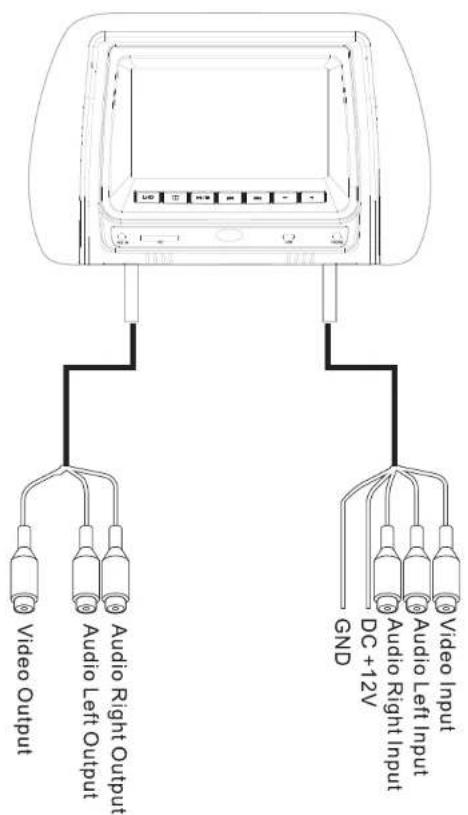
Step 3. Connect the power cord and the Video cable.
Step 4. Properly position the pillow.

Note:
The appearance and installation specifications are not suited for all vehicles. Please choose the correct appearance and installation specifications.
| Connecting Power Line | 1 |
| 12mm diameter steel tube | 2 |
| Remote controller | 1 |
| User's manual | 1 |
The headrest DVD player has an AV input port and an output. The input port can connect with other sources such as GPS, TV Box, Game TV-Box etc. The AV output port can connect to other displays.
Remote Control Operation

OSD Operation
1) Pressing "TFT MENU" key to enter menu below.
2) Press [ < ] [ > ] to adjust.







DVD Operation
1)1) Pressing "DVD SETUP" key to enter menu below.
2) Press [▲] [▼] to select an item.
3) Press [◀] [▶] to adjust.


Disc Compatibility
| Disc type | DVD video | Video CD | Audio CD |
| Logo mark | DVD | DISC | DISC |
| Contents | Audio+ Video | Audio+ Video | Audio |
| Disc type | Disc size | Maximum playing time | |
| Disc type | 5 inches (12cm) | Approx.133 minutes(SS/SL) Approx.242 minutes(SS/DL) Approx.266 minutes(DS/SL) Approx .484 minutes(DS/DL) *SS:Single Sided ,DS:Double Sided, SL:Single Layer ,DL :Dual Layer | |
| Video CD | 5 inches (12cm) | Approx.74 minutes | |
| Audio CD | 5 inches (12cm) | Approx.74 minutes | |
| CD-ROM | 5 inches (12cm) | Mp3 : music file WAV: music file MPG: motion picture file VOB: DVD file JPG: picture file | |
Handling Discs
Dust particles, scratches or twisting may cause sound disruption, poor sound quality or poor screen image during play.
- Use a soft cloth to gently clean fingerprints and dust on the data surface (polished side) of the disc
- Never use anti-static spray or liquid, benzene, thinner or other chemical solvents to clean discs. Such chemical solvents may damage the plastic surface of the disc.
- After playing discs, you are advised to place them inside their original cases to prevent any damage to them.
- Do not expose discs to direct sunlight, high humidity or high temperatures for long periods of time. Discs may deform.
- Do not write on the disc's signal surface. A sharp pen or ink may cause damage to the surface of the disc.
- The sound quality may vary among discs depending on their recording methods.
Safety Precautions
- This device is designed to be operated with a DC 12V grounded system.
- Do not allow any foreign substance to get into the disc slot.
- The device may not work in high or low temperatures. Stop using the device until the temperature returns to a normal level. Operating temperature range: 14°F\~122°F)
Cleaning
- When cleaning the device, do not make contact with water. The device may get damaged.
- Since chemical solvents may damage the surface of the unit, do not use them for cleaning.
- Use a clean and dry cloth to clean.
Condensation
- When turning the heater on in the car during a rainy or humid day, moisture may condense on the optical lens. If this occurs, the device may not read the disc and will not function properly. In such a case, it is advised to remove the disc from the device until the unit is dried.
Installation and Repairs
- Please install and operate the device as specified by this manual. If you cannot install the device correctly yourself, take it to an authorized dealer.
- Do not open the device by yourself for repairs. If the device does not work properly, take it to an authorized dealer. (If you disassemble the unit, you will void the warranty).
Video/Audio Trouble
- When driving on a rough road the unit is prone to severe shaking and may experience video/audio problems. This is inevitable.
Leather replacement
- Hold down the 2 buttons simultaneously, and removed the screen. Disconnect the cable.
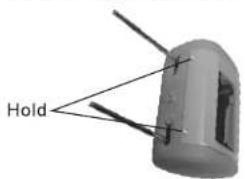
- Remove the leather.

- Replace the leather with the matching color cover.

- Connected the cable, lock the monitor's buttons into position and push it in place to lock.

Troubleshooting
| Fault | Reason | Resolution |
| No power | Yellow wire should be connected to 12v + source; red wire should be connected to the ACC; black wire should be connected to the ground | Connect power correctly |
| Fuse burned out | Change fuse | |
| Power cable is disconnected | Connect power correctly | |
| No picture | No AV input | Input video |
| Video lines disconnected | Reconnect video lines | |
| Remote does not work | Battery is blocked by protective paper | Remove paper |
| Pointed in wrong direction | Point remote to remote sensor | |
| No power | Change batteries | |
| Can't play Disc | Bad disc | Replace disc |
| Distortion | Disc loaded incorrectly | Re-insert disc |
| Disc is dirty | Clean disc | |
| Fast forward/backward | This is normal |
Technical Specifications
| panel | TFT LCD |
| Screen size | 7 Inches (16:9) |
| Pixel | 800 X 3 (RGB) X 480 |
| Temperature | Operation:14 °F ~ 122 °F; Storage:-22 °F ~167 °F |
| Back light | LED |
| Brightness | 400 cd /m2 |
| Color system | PAL/NTSC |
| Playable discs | DVD、VCD、CD、MP3、CR-R、CD-RW、DVD-R、DVD-RW、DVCD |
| Resolution | ≥500 |
| S/N | ≥90 dB |
| Isolation | ≥65 dB |
| Audio Input/Output | 1.6V±20% |
| Video Input/Output | 1V p-p ±20% |
| Power supply | DC 12V |
| Power | ≤ 12W |
| Product Dimensions | 11" x 6" x 14 3⁄4 |
| Net weight | 3.7 lbs |
Note: The design and specifications are subject to change without notice.


Brand : BOSS
Model : Headrest Built-in
Category : Monitor