Crocodile - Mp3 player Zipy - Free user manual and instructions
Find the device manual for free Crocodile Zipy in PDF.


| Product type | MP3 Player |
| Brand | Zipy |
| Model | Crocodile |
| Dimensions (L x W x H) | 90 x 40 x 10 mm |
| Weight | 50 g |
| Power supply | Rechargeable lithium-ion battery, 300 mAh |
| Battery life | Up to 10 hours of playback |
| Storage capacity | 8 GB internal, expandable via microSD up to 32 GB |
| Supported audio formats | MP3, WMA, WAV, FLAC |
| Main functions | Music playback, FM radio, voice recording, folder navigation, equalizer |
| Connectivity | USB 2.0 port, 3.5 mm headphone jack |
| Included accessories | Earphones, USB cable, user manual |
| Care and cleaning | Wipe with a soft, dry cloth. Do not use harsh liquids. |
| Safety | Do not expose to water or extreme temperatures. Do not attempt to disassemble. |
| Spare parts and repairability | Battery, earphones, USB cable available. Repair possible by a professional. |
| General information | Compact and lightweight MP3 player, ideal for daily use. |
Frequently Asked Questions - Crocodile Zipy
User questions about Crocodile Zipy
0 question about this device. Answer the ones you know or ask your own.
Ask a new question about this device
Download the instructions for your Mp3 player in PDF format for free! Find your manual Crocodile - Zipy and take your electronic device back in hand. On this page are published all the documents necessary for the use of your device. Crocodile by Zipy.
USER MANUAL Crocodile Zipy
natural_image
Red and black smartwatch with app interface display (no readable text or symbols)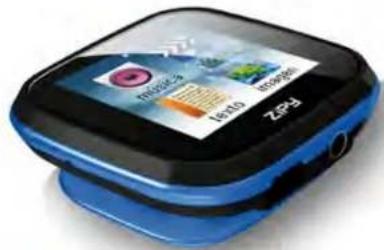
natural_image
Blue and black ZEP3 smartwatch with app interface display (no readable text or symbols beyond branding)ZiPY
HOJA DE PRECAUCIONES

natural_image
Red and black ZEPy smartwatch with app interface display (no readable text or symbols)
natural_image
Blue and black smartwatch with app icons displayed on screen (no readable text or symbols)ZiPY
PRECAUÇÕES
natural_image
Red and black ZEP3 smartwatch with app interface display (no readable text or symbols beyond branding)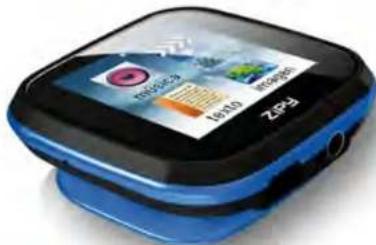
natural_image
Blue and black smartwatch with app interface display (no readable text or symbols)ZiPY
INSTRUCTIONS DE PRECAUTIONS
CONDITIONS DE GARANTIE AID
natural_image
Red and black smartwatch with app interface display (no readable text or symbols)
natural_image
Blue and black smartwatch with visible app icons (no readable text or symbols)ZiPY
PRECAUTIONS AND MAINTENANCE
When using the device, remember to follow the following precautions to prevent the deformation of the case, the breakage of the screen or glass, or also may cause loss of fluid.
All this causes a malfunction. Remember:
- Do not expose the device to water. The device is not waterproof.
- Be careful not to throw the device in a sink or other water container.
- Do not use the device in wet places or outside in bad weather, for example, if it rains or snows.
- If you touch the device with wet hands or is placed in a wet garment, the device may get wet and cause a malfunction.
- Be sure not to sit down with the device in your pocket.
- Do not expose the device to heat. The damage to the device may be irreversible and can cause an abnormal reaction in the battery: swelling or explosion.
- Do not bring the device to heat sources: radiators, heaters, etc..
- Do not expose to high temperatures such as in direct sunlight or in a car parked in the sun.
- When you connect the headphones take care not to damage the connection port.
- When you disconnect the headphones from the device, try to hold the headphone plug. Pulling the headphone cord can damage it.
- Avoid listen at very high levels, because prolonged listening could damage your hearing.
- At high levels, the external sound can be inaudible and could be dangerous, especially driving a car or bicycle.
Content
1: Additional Information .... 5
2: Function Description .... 5
2.1 Music play mode: 6
2.2 Video Playback: 8
2.3 E-Book: 8
2.4 Photo: 9
2.5 Recording: 9
2.6 Radio:....10
2.7 Setting: 10
2.8 Explorer: 11

1: Additional Information
| Clip |
| ON/OFF |
| Display |
| VOL - |
| VOL + |
| Earphone jack |
| USB jack |
2: Function Description
To turn on the mp3 player and press the button" 🔊 " for 3 seconds, after which the screenmenu opens. To move to the next menu page, touch the screen with your finger andmove it slightly from right to left. To return to the previous menu page, the touch screenwith your finger and move it from left to right.
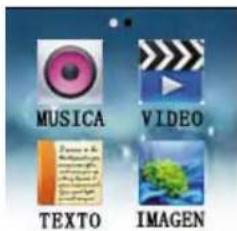

Swipe
Tap
"HOLD" Funktion:
- ON/OFF- Press the button to lock the screen.
- ON/OFF- Press the key to unlock the screen.
2.1 Music play mode:
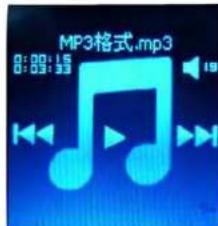
a) Tap on the music icon"

to display the playback menu

- Press the button “⊕,⊖” and adjust the volume of the headphone output.
- Back-press key “◀” to play the previous songs.
- Forward-press key" to play the next songs.
- Play icon" ▶ to play / pause function key.
b) During playback
- finger to touch the screen and move it slightly from right to left, to get the song listinformation.
- finger to touch the screen and move it slightly from left to right to return to the menu.

2.2 Video Playback:
- Video-icon" button to access the video list.
- Touch the screen with your finger and move it slightly from right to left to bring up the next video list.
- Press the video title to play the video.
[VIDEO-FORMAT- SUPPORT: AVI with resolution 128X128]
-finger to touch the screen and move it slightly from left to right to enter the main menu screen.
2.3 E-Book:
- Press the Text icon" " to go to E-Book
- Press the power button for automatic page switching
- Negative Volume button “(−)” to move to next page
- Positive volume button “⊕” to go to the previous page
- touch the screen with your finger and move it slightly from left to right to return to the main menu screen.
2.4 Photo:
- Photo icon “ ” to view photos of press
- touch the screen with your finger and move it slightly from right to left to bring up thenext photo. - touch the screen with your finger and move it slightly from left to right, to the previousphoto or return to the main screen.
2.5 Recording:
a). Recording icon “θ” button to display the Capture menu:

- Pause icon "☐" button to pause to start recording. - Stop icon button "☐" to save the recorded file.
2.6 Radio:
- Radio icon “” button to open the radio menu

- Press key "☐" to go to the Radio Setup menu. - Back-press key "◀" to go to the previous channel. - Forward-press key "▶" to go to the next channel.
2.7 Setting:
- Settings icon “ ” button to display the Systemeinstellmenu - touch the screen with your finger and move it slightly from left to right, to the main screen menu.
2.8 Explorer:
- Explorer icon “” button to display the setup menu of the information.
- touch the screen with your finger and move it slightly from left to right, to the main screen menu.
Note
- The player does not excessively hot, cold, dusty or suspend dark environments.
- Player to protect against friction with hard objects in order to protect it fromscratches at the surface or from battery or hardware damage.
- Player to use in extremely dry environments, to protect it from static electricity.
- During formatting, uploading and downloading the player does not switch offsuddenly to avoid the occurrence of bugs;
- player away from babies or small children with.
- The player supports Windows XP, Win7, Vista OS System or Mac OS x 10.6.4version.
- The contents of this manual may change without notice for purpose of improvement. We reserve the right to make changes without notice to this manual.
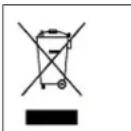
Contribute to environmental protection!
Be sure to follow the local environmental regulations: bring non-functioning electrical equipment provided for waste disposal system.
INGLÉS / ENGLISH
AID WARRANTY CONDITIONS
AID, in compliance with the Customer Protection Law (Ley 23/2003, July 10th, of Warranty in the Sale of Consumer Goods, BOE no. 165, 11/07/2003), offers Direct Warranty to Spain and Portugal customers for all our brands' products: ZIPY, MUSE, NEW ONE, AC-RAYAN, TNB, BARKAN, BRASFORMA, THE COMPLEMENTS, and GO BY ZIPY, under the following conditions:
A – Our products have a two year warranty. During the first year original defects that may be detected are repaired. In those cases stipulated by law, the buyer will be entitled to the replacement of the device by a new one, provided that the defects are not due to the negligence or exclusive fault of the buyer in handling the device. During the second year the buyer will need to prove that the malfunctioning of the device is due to a manufacturing defect. In both cases the warranty will apply provided that:
- The product has been used for its destined purpose alone.
- It was not opened, manipulated or altered in any way by someone other than the Official Technical Service.
- It has not undergone shock, flood, overheating, electric overcharge or any other external circumstance that may constitute a possible reason of INVALIDATING the warranty.
- The product will be returned to AID in proper packaging together with the receipt where the brand and type of product, the date of the purchase, the name and address of the shop that sold it and the reason for the malfunctioning should be clearly stated.
Any of the following circumstances invalidates the present warranty:
- Breaking the ports, the screen or the glass.
- Loss of liquid from the screen.
- Wearing out, obvious marks of incorrect manipulation, inappropriate use, ill-treatment, shock, falls, dirt, and so on.
- The data contained in the products are under no circumstances covered by any warranty whatsoever, nor are they to be considered during the physical repairing process of the products. AID guarantees absolute confidentiality of the data.
- AID does not cover the incorrect configuration or installation of the software / hardware on the part of the client, neither as a component nor as a peripheral, included prives / controllers included.
- The legislation on guarantees sets certain limits. "the guarantee does not cover additional components such as batteries, nor any elements that are subject to maintenance due to its use such as earphones". These accessories have a 6 months guarantee.
- Waterproof bags have a 48-hour trial period, such as indicated on the product itself, therefore once this time period is elapsed they will no longer be covered by any guarantee.
- Final users do not need to send us the device accessories, especially if they are not the original ones, since we will not be held responsible for them.
CASES:
- If the product is out our guarantee, the AID technical department will facilitate a budget for the repair by fax or e-mail. Said budget will need to be authorized in writing, sealed and signed, and the user will have to satisfy the repair fee as well as the freight.
- If the budget is not accepted a diagnosis fee will be charged. (6€)
- Repairs have a 90 days guarantee, provided that the breakdown is under the same concept and in
the case of budgeted breakdowns alone.
B – All the freight costs for the product will be covered by AID using only the transportation company designed by AID following the authorization procedure.
The expenses derived from incorrect or unjustified returns on the part of the client will be covered by the client alone.
C – Any incidence detected at the moment of the reception of the merchandise must be immediately notified at the AID Post-Sales Department: maria@accesoriosdigital.com in compliance with Article 366 from the Code of Commerce, AID will not consider complaints about breakages, shocks or absence of boxes or pieces 24 hours after the delivery of the merchandise.
In the case of shipments originated in Canarias, Ceuta and Melilla, AID will not pay the customs tax nor any kind of reimbursable expenses.
DECLARATION OF CONFORMITY
ACCESORIOS INTELIGENTES DIGITAL S.A.
We declare under our sole responsibility that the product:
MP 3: CROCODILE which belongs to the brand Zipy, made in China
Conforms with the requirements of the Directives below by compliance with the following standards listed:
EN60950-1:2006+A11:2009
EN55022:2006+A1:2007
EN61000-3-2:2006+A1:2009+A2:2009
EN61000-3-3:2008
EN55024:1998+A1:2001+A2:2003
In accordance with the provisions of the Directive 99/05/EC, European Parliament and Council on March 9, 1999, transposed into Spanish legislation by Royal Decree 1890/2000, of November 20, 2000.
Place and date of issue:
June, 3, 2011
Signed by: Miguel Fauro


Waste management for all of your containers and domestic packagings that you deposit in the recycling bin
The packaging contains removable materials in order to treat them later in waste management
Do not deposit the device or the battery in the bin. Please, put it in a recycling bin or carry it to your local nearby store
- ZiPY
- HOJA DE PRECAUCIONES
- PRECAUÇÕES
- INSTRUCTIONS DE PRECAUTIONS
- CONDITIONS DE GARANTIE AID
- PRECAUTIONS AND MAINTENANCE
- Content
- 2: Function Description
- Music play mode:
- Video Playback:
- E-Book:
- Photo:
- Recording:
- Radio:
- Setting:
- Explorer:
- Note
- INGLÉS / ENGLISH
- AID WARRANTY CONDITIONS
- CASES:
- DECLARATION OF CONFORMITY
- MP 3: CROCODILE which belongs to the brand Zipy, made in China
Brand : Zipy
Model : Crocodile
Category : Mp3 player