
Rebel - Headphones Sunstech - Free user manual and instructions
Find the device manual for free Rebel Sunstech in PDF.


| Product Type | Headphones |
| Brand | Sunstech |
| Model | Rebel |
| Connectivity | Bluetooth 5.0 |
| Battery Life | Up to 20 hours |
| Charging Time | Approximately 2 hours |
| Driver Size | 40 mm |
| Frequency Response | 20 Hz - 20 kHz |
| Impedance | 32 ohms |
| Weight | 200 g |
| Dimensions (folded) | 180 x 160 x 60 mm |
| Microphone | Built-in, for hands-free calls |
| Controls | Volume, playback, power, ANC toggle (if applicable) |
| Noise Cancellation | Active Noise Cancellation (ANC) available |
| Compatibility | iOS, Android, Windows, Mac |
| Maintenance | Clean with a soft, dry cloth. Avoid moisture. |
| Safety | Do not use at high volume for extended periods to prevent hearing damage. |
| Spare Parts & Repairability | Ear pads and headband cushion replaceable. Contact Sunstech support. |
| General Information | Over-ear design, foldable for portability. Includes USB charging cable and audio cable. |
Frequently Asked Questions - Rebel Sunstech
User questions about Rebel Sunstech
0 question about this device. Answer the ones you know or ask your own.
Ask a new question about this device
Download the instructions for your Headphones in PDF format for free! Find your manual Rebel - Sunstech and take your electronic device back in hand. On this page are published all the documents necessary for the use of your device. Rebel by Sunstech.
USER MANUAL Rebel Sunstech
natural_image
Abstract illustration of a stylized human figure reading a book with a large circle and a small sun, set against a dark background (no text or symbols)REBEL
BT HEADPHONES
USER GUIDE
ENGLISH
User guide
REBEL
CONTENT
PRODUCT DESCRIPTION ....1
FUNCTION FEATURES....1
PLAY MUSIC....2
FUNCTION DEFINITION OF BUTTONS AND SLOTS....3
BLUETOOTH PAIRING 5
RADIO FUNCTION....5
ORDINARY HEADPHONE....5
CHARGING THE DEVICE....5
Low Battery 6
TECHNICAL SPECIFICATIONS....6
WARNINGS....7
ENGLISH
User guide
REBEL
PRODUCT DESCRIPTION
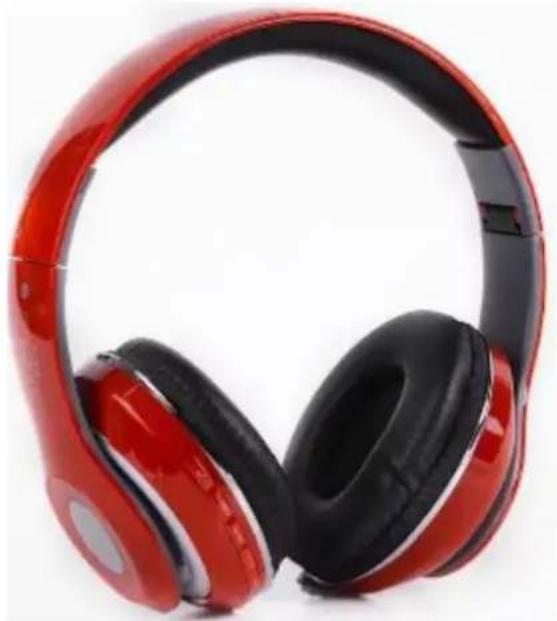
REBEL is a high quality stereo Bluetooth headphone which possesses wireless music and calling function. Appearance vogue, beautifully designed, easy to carry, suitable for household, outdoor travel and other places, enjoy music anytime and anywhere. Provide super perfect sound quality for your computer, digital music players, and mobile phones and so on audio-visual products.
natural_image
Red and black outdoor headphones with glossy black covers (no text or symbols visible)FUNCTION FEATURES
Bluetooth Play: Support pairing Bluetooth devices to play music such as mobile phone, tablet, TV.
Hands-free calls: Support for hands-free calls function, built-in high sensitive microphones, making phone calls have carefree to enjoy.
Voice Prompt Coming Calls: It will prompt the phone number when you have a coming call, it is more convenient.
iOS Battery Display: IOS mobile phone real-time display the earphone battery, let you know the earphone battery.
ENGLISH
User guide
REBEL
MP3 Play: Play the SD card MP3 files directly.
FM Radio: FM digital stereo radio, automatic search and memory radio and save time and effort.
Audio Input: Stereo audio input ports. Easy to connect the computer, digital music player, mobile phone and other audio-visual products so on all kinds of audio source.
Rechargeable Lithium Electricity: The built-in rechargeable lithium battery, environmental protection, economical and practical.
Intelligent Charging: The voice prompt please charge when the battery is low, when full charge it will automatically cut off power to avoid battery charging too much to damage to the battery.
PLAY MUSIC
Microcomputer system of the native can automatically detect recognition peripherals, enter the Bluetooth mode after power on, automatic identification play when insert SD card. Insert audio signal will automatic power off and turn to ordinary headphone for use. Detailed functional operation, please read the following "Function Definition of Product Buttons and Slot"
ENGLISH
User guide
REBEL
FUNCTION DEFINITION OF BUTTONS AND SLOTS
- ⏻/▶
- ▶▶|/V+
- ▶/V-
-
FM/MP3
5. -
Micro USB Charging Ports
-
Audio Input Ports
-
SD Card Slot
-
Reset Button
-
Built-in Microphone
-
Status indicator lamp

1. ⏻/▶
Long press about 3 second, it was default to the Bluetooth mode after power on, the blue light and green light alternately flashes, now the Bluetooth enter match mode. Again long press about 3 second to power off, indicator light will be off. Listening to SD card music or mobile phone music via Bluetooth, short press this button to put in pause the music and short press again to play again. Listening to the radio, short press for all automatic channel search platform, and store the search to radio down (for the first time to use this headphones listening to the radio, please make a full channel searching operation), it will take about 1 minute to complete the whole channel searching time.
2. ▶▶|/V+
When listening to SD card music or mobile phone music via Bluetooth, short press for play the next song. Listening to the radio, short press to select radio stations that broadcast the next stored. Long press for up the volume in any mode.
ENGLISH
User guide
REBEL
3. ◀◀/V-
When listening to SD card music or mobile phone music via Bluetooth, short press for play the previous song. Listening to the radio, short press to select radio stations that broadcast the previous stored. Long press for down the volume in any mode.
4. FM/MP3
Long press can switch to radio, Bluetooth, SD card mode (only insert SD card can switch to the SD card mode) in turn. Listen to mobile phone music via Bluetooth or SD card music, short press can choose natural, pop, rock, jazz, country, heavy bass six kinds of sound in turn
5.
After the success connection of the Bluetooth and phone, when short press for answering the phone call, long press can refuse to answer the phone. After the call short press for hang up, continue press two times will redial the last time phone number.
6. Micro USB Charging Port
Power input jack, can use the native USB cable connect to the computer USB interface for charging, or use a mobile phone charger to charge.
7. Audio Input
Stereo audio input ports, easy to connect the computer, digital music player, mobile phone and other audio-visual products so on all kinds of audio source.
8. SD Card Slot
Insert the SD Card to play the music.
9. Reset Button
If the headphones sudden crash, press the reset button. Then can be used again.
ENGLISH
User guide
REBEL
BLUETOOTH PAIRING
In the Bluetooth mode, the blue light and green light alternately flashes, it is the state of the Bluetooth pairing. At this time search the corresponding Bluetooth device name on the phone, click the device name on the mobile phone for the Bluetooth pairing, hear "Connect successfully" means the pairing is successful, the status indicator lamp lights blue color.
RADIO FUNCTION
To control the volume during Radio function long press the /V- key to turn down the volume and long press the /V+ key to turn up the volume.
- Automatic searching
In FM Radio mode press ⏻/▶ key to start searching automatically. Indicator lights flashing when searching, automatic memory and save the stored after the completion searching.
- Memory channel selection
After automatically searching, press the ◀◀/V- or ▶▶/V+ key can select the radio has been saved.
ORDINARY HEADPHONE
Insert the 3,5mm audio line jack into the audio input ports, the Bluetooth headphone will automatically power off, can use the Bluetooth headphone as ordinary headphone now, at the same time the function of the Bluetooth headphone are useless (power off status) to save the electricity.
CHARGING THE DEVICE
Insert the end of the charging cable to native MINI USB socket, the other end of the USB plug into the PC USB port, or connect to the standard 5 v charger interface, the indicator light turns red when charging, the red light will extinguish when full of.
ENGLISH
User guide
REBEL
Low Battery
When there was a low voltage power, the machine will prompt "Low battery, please charge", and then will automatically shut down, please recharge in time at this time. If it is not to be used for a long time, charging one time every month at least, it can protect the battery and extend battery life.
TECHNICAL SPECIFICATIONS
Charging voltage: Micro USB 5V
Working current: 25-40 mA
Bluetooth Working range: 10 m
Output power: 20 mW (x2)
Frequency range: 2.401 - 2.480 GHz
Distortion factor: ≤1%
SNR: ≥95dB
Support SD Card: 128 MB - 32 GB
Radio frequency: 87.5 - 108 MHz
Frequency response: 15 Hz - 25 KHz
Normal Working Time: 4 hour playing music
Charging Time: About 2 hours
ENGLISH
User guide
REBEL
WARNINGS
 | Correct disposal of this Product(Waste Electrical & Electronic Equipment)(WEEE)Your product is designed and manufactured with high quality materials and components which can be recycled and reused.This symbol means that electrical and electronic equipment, at their end of-life should be disposed of separately from your household waste.Please dispose of this equipment at your local community waste collection/recycling centre.In the European Union there are separate collection systems for used electrical and electronic products. Please help us to conserve the environment we live in! |
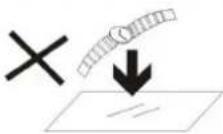 | DO NOT place objects on top of the device, as objects may scratch the device. |
 | DO NOT expose the device to dirty or dusty environments. |
 | DO NOT place the device on an uneven or unstable surface. |
 | DO NOT insert any foreign objects into the device. |
 | DO NOT expose the device to strong magnetic or electrical field. |
 | DO NOT expose the device to direct sunlight as it can damage the device. Keep it away from heat sources. |
 | DO NOT store your device in temperatures higher than 40°C(104°F). The internal operating temperature for this device is from 20°C(68°F) to 60°C(140°F). |
ENGLISH
User guide
REBEL
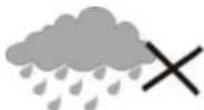 | DO NOT use the device in the rain. |
 | Please check with your Local Authority or retailer for proper disposal of electronic products. |
 | The device and adaptor may product some heat during normal operation of charging. To prevent discomfort or injury from heat exposure, DO NOT leave the device on your lap. |
 | POWER INPUT RATING: Refer to the rating label on the device and be sure that the power adaptor complies with the rating. Only use accessories specified by the manufacturer. |
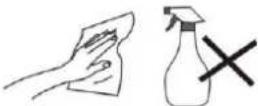 | Clean the device with a soft cloth. If needed, dampen the cloth slightly before cleaning. Never use abrasives or cleaning solutions. |
 | Always power off the device to install or remove external devices that do not support hot-plug. |
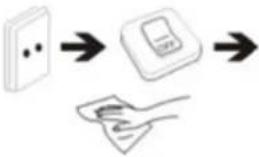 | Disconnect the device from an electrical outlet and power off before cleaning the device. |
 | DO NOT disassemble the device. Only a certified service technician should perform repair. |
 | The device has apertures to disperse heat. DO NOT block the device ventilation, the device may become hot and malfunction as a result. |
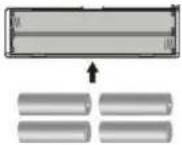 | Risk of explosion if battery replaced by an incorrect type. Dispose of used batteries according to the instruction. |
ENGLISH
User guide
REBEL
 | PLUGGABLE EQUIPMENT: the socket-outlet shall be installed near the equipment and shall be easily accessible. |
 | European Union: Disposal Information.This symbol means that according to local laws and regulations your product and/or its battery shall be disposed of separately from household waste. When this product reaches its end of life, take it to a collection point designated by local authorities. The separate collection and recycling of your product and/or its battery at the time of disposal will help conserve natural resources and ensure that it is recycled in a manner that protects human health and the environment. |
| MADE IN CHINA | |

natural_image
Simple line drawing of a book with a large circle and a crescent moon, set against a dark background (no text or symbols)REBEL
AURICULARES BT
GUÍA DE USUARIO
ESPAÑOL
natural_image
Red and black outdoor headphones with reflective covers (no text or symbols visible)CARACTERÍSTICAS FUNCIONALES
natural_image
Simple line drawing of a person reading a book with a large circle and a sun in the background (no text or symbols)REBEL
CASQUE BT
GUIDE DE L'UTILISATEUR
FRANÇAIS
natural_image
Red and black headboard headphones with white buttons, isolated on white background (no text or symbols visible)FONCTIONS
natural_image
Simple line drawing of a person reading a book with a large circle and a sun in the background (no text or symbols)REBEL
AUSCULTADORES BT
GUIA DO UTILIZADOR
PORTUGUÊS
Guia do utilizador
REBEL
CONTEÚDO
natural_image
Red and black outdoor headphones with white reflective covers (no text or symbols visible)For you. For everyone.

- ENGLISH
- CONTENT
- PRODUCT DESCRIPTION
- FUNCTION FEATURES
- User guide
- REBEL
- PLAY MUSIC
- FUNCTION DEFINITION OF BUTTONS AND SLOTS
- ⏻/▶
- ▶▶|/V+
- ◀◀/V-
- FM/MP3
- 5.
- Micro USB Charging Port
- Audio Input
- SD Card Slot
- Reset Button
- BLUETOOTH PAIRING
- RADIO FUNCTION
- ORDINARY HEADPHONE
- CHARGING THE DEVICE
- Low Battery
- TECHNICAL SPECIFICATIONS
- ESPAÑOL
- CARACTERÍSTICAS FUNCIONALES
- FRANÇAIS
- FONCTIONS
- PORTUGUÊS
- CONTEÚDO
Brand : Sunstech
Model : Rebel
Category : Headphones