
KX-TCD153SP - Cellphone PANASONIC - Free user manual and instructions
Find the device manual for free KX-TCD153SP PANASONIC in PDF.


Pick your language and provide your email: we'll send you a specifically translated version.
| Product Type | Cordless DECT Phone |
| Brand | Panasonic |
| Model | KX-TCD153SP |
| Handset Dimensions (H x W x D) | 16.5 x 4.8 x 3.0 cm |
| Base Station Dimensions (H x W x D) | 9.5 x 11.0 x 6.0 cm |
| Handset Weight | 130 g |
| Base Station Weight | 80 g |
| Power Supply | 2x AAA Ni-MH 1.2 V 550 mAh (handset); AC 220-240 V (base) |
| Battery Life | Up to 15 hours talk time / 150 hours standby |
| Display | Monochrome LCD with backlight |
| Phonebook Capacity | 50 names and numbers |
| Caller ID | Yes, with memory for 50 calls |
| Answering Machine | Yes, up to 15 minutes recording time |
| Speakerphone | Yes, hands-free on handset |
| Intercom | Yes, between handsets (up to 6 handsets supported) |
| Range (Outdoor) | Up to 300 meters |
| Range (Indoor) | Up to 50 meters |
| Cleaning | Wipe with a soft, dry cloth; do not use abrasive cleaners |
| Safety Precautions | Use only specified rechargeable batteries; do not expose to moisture or extreme temperatures |
| Spare Parts / Repairability | Replacement batteries and charging cradle available; service by authorized technician |
| General Information | DECT standard, frequency 1.88-1.90 GHz, eco mode |
Frequently Asked Questions - KX-TCD153SP PANASONIC
How do I set the date and time on my Panasonic KX-TCD153SP?
Press Menu, then navigate to Settings > Date & Time. Use the keypad to enter the current date and time, then press Save.
Can I use the handset as a speakerphone?
Yes, during a call press the Speaker button on the handset to activate hands-free mode.
How do I record a custom greeting on the answering machine?
Press Menu, select Answering Machine > Greeting, then choose Record. Speak after the beep and press Save when finished.
What type of batteries does the handset use?
The handset uses two AAA Ni-MH rechargeable batteries (1.2V, 550 mAh). They are included with the phone.
How many handsets can I register to one base?
You can register up to 6 handsets to a single base station. Additional handsets can be purchased separately.
How do I transfer a call between handsets?
During a call, press the Intercom button and enter the number of the other handset. The call will be transferred.
What is the range of the phone?
The range is up to 300 meters outdoors and up to 50 meters indoors, depending on building structure.
How do I block unwanted calls?
This model does not have built-in call blocking. You can register with your network provider's call blocking service or use a separate device.
How do I reset the handset to factory settings?
Press Menu, go to Settings > Reset, and confirm. Note: this will erase all saved data.
Why is the handset not charging?
Ensure the handset is properly placed on the charging cradle. Check the charging contacts are clean. If the problem persists, try a different power outlet or replace the batteries.
User questions about KX-TCD153SP PANASONIC
0 question about this device. Answer the ones you know or ask your own.
Ask a new question about this device
No questions yet. Be the first to ask one.
Download the instructions for your Cellphone in PDF format for free! Find your manual KX-TCD153SP - PANASONIC and take your electronic device back in hand. On this page are published all the documents necessary for the use of your device. KX-TCD153SP by PANASONIC.
USER MANUAL KX-TCD153SP PANASONIC
natural_image
Line drawing of a mobile phone with keypad and base (no text or symbols)KX-TCD150SP

natural_image
Pure geometric diagram with intersecting lines and circles, no text or symbols presentMontaje en la pared
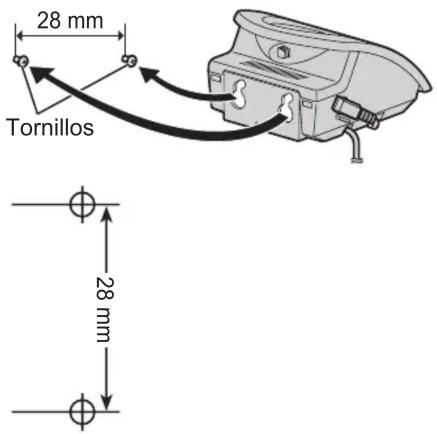
natural_image
Pure geometric diagram with intersecting lines and a circular pattern, no text or symbols present
Manual assistant
Powered by Anthropic
Waiting for your message
Product information
Brand : PANASONIC
Model : KX-TCD153SP
Category : Cellphone