
KX-TCD202SP - Cellphone PANASONIC - Free user manual and instructions
Find the device manual for free KX-TCD202SP PANASONIC in PDF.


| Product Type | Cordless Phone |
| Brand | Panasonic |
| Model | KX-TCD202SP |
| Frequency Band | DECT (1.88-1.90 GHz) |
| Dimensions (Handset) | Approx. 168 mm × 55 mm × 28 mm |
| Weight (Handset) | Approx. 130 g with battery |
| Power Supply | AC adapter (input 100-240 V, 50/60 Hz) for base unit |
| Battery Type | Rechargeable Ni-MH (AAA size, 2 pcs) |
| Standby Time | Up to 240 hours |
| Talk Time | Up to 12 hours |
| Display | Backlit LCD with date/time and caller ID |
| Phonebook | Up to 50 entries |
| Caller ID | Yes (requires network service) |
| Redial | Last 10 numbers |
| Ringer Volume Control | Yes (off, low, medium, high) |
| Keypad Lock | Yes |
| Range | Up to 300 m outdoors, 50 m indoors |
| Cleaning | Wipe with dry cloth; avoid solvents |
| Safety | Use only supplied AC adapter; avoid water exposure |
| Spare Parts / Repairability | Battery replacement (standard AAA Ni-MH), base AC adapter |
Frequently Asked Questions - KX-TCD202SP PANASONIC
User questions about KX-TCD202SP PANASONIC
0 question about this device. Answer the ones you know or ask your own.
Ask a new question about this device
Download the instructions for your Cellphone in PDF format for free! Find your manual KX-TCD202SP - PANASONIC and take your electronic device back in hand. On this page are published all the documents necessary for the use of your device. KX-TCD202SP by PANASONIC.
USER MANUAL KX-TCD202SP PANASONIC
natural_image
Line drawing of a classic mobile phone with keypad and control buttons (no text or symbols)KX-TCD200SP
+
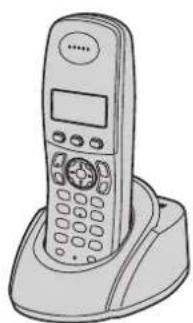
natural_image
Line drawing of a classic mobile phone with keypad and front panel (no text or symbols)TCD202SP(es).fm Page 2 Wednesday, February 23, 2005 5:52 PM

natural_image
Pure geometric diagram with intersecting lines and circles, no text or symbols present


natural_image
Pure geometric lines and crosshair symbols without any text or labelsPQQW14691ZA
DC0205FW0
SP-2/2

natural_image
Pure electrical circuit lines without any symbolsBrand : PANASONIC
Model : KX-TCD202SP
Category : Cellphone