
BFC2302NW - Refrigerator BRANDT - Free user manual and instructions
Find the device manual for free BFC2302NW BRANDT in PDF.
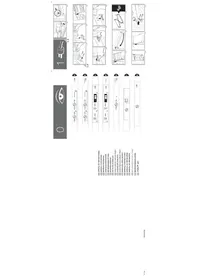



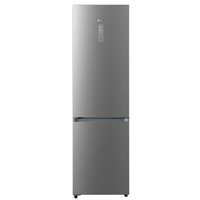
| Product type | Refrigerator with freezer compartment |
| Power supply | 220-240 V, grounded plug |
| Refrigerant | R600A (environmentally friendly) |
| Number of doors | 2 (refrigerator door and freezer door) |
| Interior lighting | Bulb E14, 220-240 V, 15/25 W |
| Charcoal filter | Absorbs odors and retains microorganisms; replacement recommended every 6 months |
| Quick cooling function (refrigerator) | Activates the coldest temperature for 6 hours; recommended for large quantities of food |
| Quick cooling function (freezer) | Activates the coldest temperature for 52 hours; recommended 24 hours before adding large quantities |
| Holiday function | Reduces consumption during prolonged absence; keeps the freezer running |
| Door open alarm | Activates after 2 minutes; stops when the door is closed |
| Freezer temperature alarm | Indicates an abnormally high temperature; can be disabled manually |
| Electrical connection | Let stand for 2 hours in an upright position before plugging in; do not use an adapter or extension cord |
| Interior maintenance | Clean with a sponge or damp cloth and baking soda; do not use steam cleaners |
| Exterior maintenance | Clean without steam; vacuum the rear grille once a year |
| Safety instructions | Keep ventilation grilles clear; do not damage the refrigeration circuit; do not use electrical appliances inside |
Frequently Asked Questions - BFC2302NW BRANDT
User questions about BFC2302NW BRANDT
0 question about this device. Answer the ones you know or ask your own.
Ask a new question about this device
Download the instructions for your Refrigerator in PDF format for free! Find your manual BFC2302NW - BRANDT and take your electronic device back in hand. On this page are published all the documents necessary for the use of your device. BFC2302NW by BRANDT.
USER MANUAL BFC2302NW BRANDT
Very important: Read this manual carefully before using your refrigerator.
This manual is designed with texts corresponding to drawings.

Identification

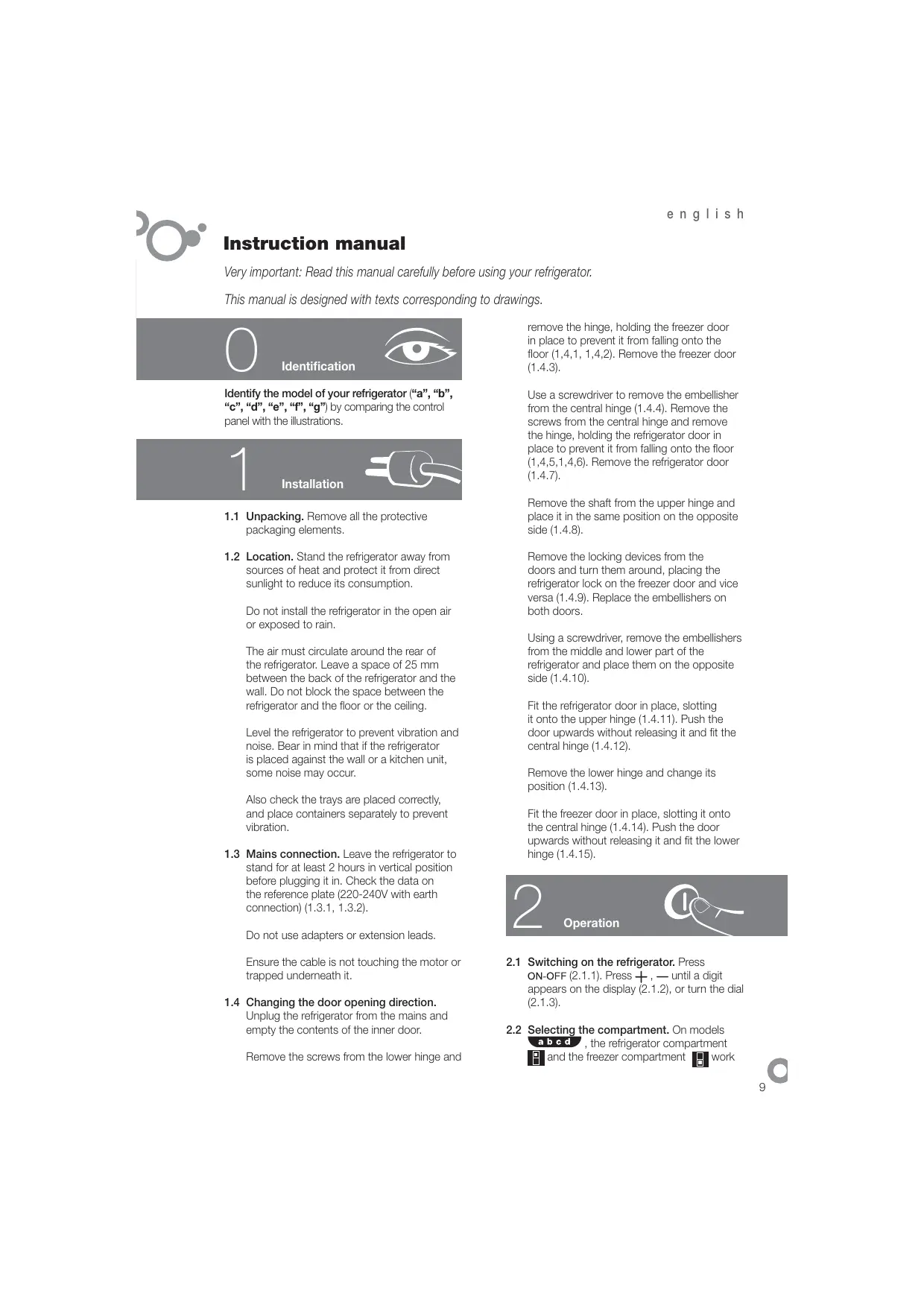
Identify the model of your refrigerator ("a", "b", "c", "d", "e", "f", "g") by comparing the control panel with the illustrations.

Installation

1.1 Unpacking. Remove all the protective packaging elements. 1.2 Location. Stand the refrigerator away from sources of heat and protect it from direct sunlight to reduce its consumption.
Do not install the refrigerator in the open air or exposed to rain.
The air must circulate around the rear of the refrigerator. Leave a space of 25 mm between the back of the refrigerator and the wall. Do not block the space between the refrigerator and the floor or the ceiling.
Level the refrigerator to prevent vibration and noise. Bear in mind that if the refrigerator is placed against the wall or a kitchen unit, some noise may occur.
Also check the trays are placed correctly, and place containers separately to prevent vibration.
1.3 Mains connection. Leave the refrigerator to stand for at least 2 hours in vertical position before plugging it in. Check the data on the reference plate (220-240V with earth connection) (1.3.1, 1.3.2).
Do not use adapters or extension leads.
Ensure the cable is not touching the motor or trapped underneath it.
1.4 Changing the door opening direction.
Unplug the refrigerator from the mains and empty the contents of the inner door.
Remove the screws from the lower hinge and
remove the hinge, holding the freezer door in place to prevent it from falling onto the floor (1.4.1, 1.4.2). Remove the freezer door (1.4.3).
Use a screwdriver to remove the embellisher from the central hinge (1.4.4). Remove the screws from the central hinge and remove the hinge, holding the refrigerator door in place to prevent it from falling onto the floor (1.4.5, 1.4.6). Remove the refrigerator door (1.4.7).
Remove the shaft from the upper hinge and place it in the same position on the opposite side (1.4.8).
Remove the locking devices from the doors and turn them around, placing the refrigerator lock on the freezer door and vice versa (1.4.9). Replace the embellishers on both doors.
Using a screwdriver, remove the embellishers from the middle and lower part of the refrigerator and place them on the opposite side (1.4.10).
Fit the refrigerator door in place, slotting it onto the upper hinge (1.4.11). Push the door upwards without releasing it and fit the central hinge (1.4.12).
Remove the lower hinge and change its position (1.4.13).
Fit the freezer door in place, slotting it onto the central hinge (1.4.14). Push the door upwards without releasing it and fit the lower hinge (1.4.15).

Operation

2.1 Switching on the refrigerator. Press ON-OFF (2.1.1). Press +, - until a digit appears on the display (2.1.2), or turn the dial (2.1.3). 2.2 Selecting the compartment. On models a, b, c, d, the refrigerator compartment and the freezer compartment work
separately. On models e, f, g, the two compartments work together.
2.3 Temperature selection. Turn the dial (2.3.1) or press the +, - buttons of the freezer compartment, followed by those of the refrigerator compartment (2.3.2).
When you have selected the temperature, you can find out the real temperature in the compartment by observing the indicator lights (2.3.3), or by holding down the + or - buttons of the desired compartment for 5 seconds. The temperature in the compartment will flash on the display (2.3.4).
Recommendation: The recommended temperature for the refrigerator compartment is 4°C and for the freezer compartment it is -19°C for already frozen food, and -24°C if you wish to freeze food.
Remember that the temperature inside the appliance depends on the room temperature, where the refrigerator is located, and how often you open the door.
2.4 Refrigerator functions.
Quick cool function: This function activates the refrigerator at a cooler temperature for 6 hours. It is recommended to activate it when you place a large amount of food in the refrigerator.
To enable and disable this function: Press SUPER (2.4.1, 2.4.2). Models e, f, and g do not have this function.
Holiday function: The holiday function is very useful when you will not be using the refrigerator for a long period of time but you wish to keep food in the freezer. With this function, your refrigerator will consume very little power and bad smells will not be generated inside it. Models a, c, e, f, and g do not have this function.
Warning: The refrigerator door must be kept closed when this function is in use.
To enable and disable this function: Press HOLIDAY (2.4.3), or the +, - buttons of the refrigerator compartment until H appears on the display (2.4.4). To disable the function, repeat this operation.
2.5 Freezer functions.
Quick cool function: This function activates the freezer at a cooler temperature for 52 hours. It is recommended to activate it 24 hours before placing a large amount of food in the freezer. On model , it should be deactivated 24 hours later.
To enable and disable this function: Press SUPER (2.5.1, 2.5.2, 2.5.3). Model g does not have this function.
Winter function: Models only. Use this function if you notice that the freezer is becoming warmer. Hold down the SUPER button for 5 seconds until the orange pilot light begins to flash (2.5.4). The refrigerator light will remain on at half power so that the compressor functions for longer. When the freezer has reached the right temperature, switch off the winter function by holding down the SUPER button for 5 seconds again.
Switching the freezer on and off: Press the ON-OFF button of the freezer compartment (2.5.5). Press the + or - button until no temperature appears on the display (2.5.6), or turn the dial to ON-OFF (2.5.7). When the freezer is switched off the refrigerator compartment will also switch off.
2.6 Recommendations for use.
- Do not open the doors for any longer than necessary, and do not place hot food in the refrigerator. This will ensure a more efficient use of your refrigerator and will avoid excess power consumption.
- If your refrigerator is NO FROST type, do not obstruct the ventilation grilles, and leave space between the food for the air to circulate.
- Do not place bottles of fizzy drinks or glass bottles containing liquids in the freezer, as they may burst.
- Place food in sealed containers to prevent it from drying out.
- Do not consume ice cream or food that is very cold, as this can cause burns.
3
Maintenance and cleaning

3.1 Cleaning the inside of the refrigerator. Use a sponge or a dish cloth soaked in water with bicarbonate of soda to clean the inside of the refrigerator, to prevent bad smells from forming.
Never use steam cleaning machines, solvents, or abrasive detergents.
3.2 Cleaning the outside of the refrigerator. Do not use steam cleaning machines to clean the displays.
It is recommended to clean the rear grille with a vacuum cleaner once a year.
3.3 Cleaning the accessories. The accessories are not dishwasher-safe. Wash them by hand, using a sponge or a dish cloth. 3.4 Changing the light. If the light bulb blows: Unplug the refrigerator. Press the tab to remove the light cover (3.4.1, 3.4.3) and remove the blown bulb (3.4.2, 3.4.4). Replace it with another bulb with the same screw type, E14, 220-240V, 15/25W, or as indicated on the light fitting. 3.5 Changing the carbon filter. Your refrigerator may be equipped with a carbon filter to absorb the unpleasant smells generated by some foods and to retain the microorganisms (fungus and bacteria) in the circulating air.
The filter maintains its properties for a limited time of 6 months. When this time has elapsed, the filter should be changed and a new one fitted. The filter location depends on the model.
To change the filter: Press the tab and remove the cover (3.5.1, 3.5.5). Remove the used filter (3.5.2, 3.5.6).
If the filter needs activating: Remove the seals (3.5.3) and press the BIOFILTER display until you hear a slight click (3.5.4). In a few seconds the duration scale will begin to change colour. Fit the filter in its original location.
Keep used filters and spares out of reach of children; as swallowing large amounts of this substance can be dangerous.
Do not wet the filter as it will lose all its properties.
4
Diagnostics

4.1 Door open. If you leave the door open for longer than 2 minutes, an alarm will sound and the refrigerator light will switch off. The alarm will stop when you close the door.
4.2 The freezer is not cold enough
- If the freezer temperature is abnormally warm, an alarm light will come on (4.2.1, 4.2.2) and an intermittent beep will sound. Press SUPER (4.2.3, 4.2.4) to switch off the beeper manually.
- Model e only. If the winter function is activated, the alarm light will flash. To deactivate it, see (2.5.4).
- When you switch on the appliance for the first time, the alarm light will be activated, although the alarm beeper will not sound.
4.3 Electricity cuts
Open the refrigerator doors as infrequently as possible. When the electricity returns, check whether the frozen food has thawed.
4.4 Normal refrigerator noise
Your refrigerator may make some noise on functioning. Do not worry about the following noises, as they are normal.
- The refrigerant gas may cause a bubbling noise as it circulates around the refrigerator circuits.
- The compressor may make a buzzing noise or a slight tapping sound, particularly on start-up.
- Expansion and contraction of the materials used may cause tapping or crackling noises.
- The air moving the freezer fan may generate slight background noise.
Do not attempt to repair the refrigerator yourself. Call the technical assistance service.


Safety

- Keep the ventilation grilles free from any obstructions.
- Take care not to damage the refrigeration circuit.
- Do not use electrical appliances inside the refrigerator, unless they are of a type recommended by the manufacturer.
- Do not use mechanical devices or any other means to speed up the defrosting process, unless recommended by the manufacturer.
- This appliance is not designed for use by people (including children) whose physical, sensorial or mental capacities are impaired, or who lack sufficient experience or knowledge, unless they are supervised or have been instructed in the use of the appliance by a person responsible for their safety. Children must be supervised to ensure they do not play with the appliance.
- If the supply cable is damaged, it must be replaced by the manufacturer, the after-sales service or similar qualified staff to prevent hazard.

The environment

This refrigerator was designed with environmental conservation in mind.
The appliance operates with coolant R600A, which does not damage the environment.
Respect the environment. Use the recommended temperatures for each compartment. They will depend on the mode you need for efficient use of your refrigerator.
Disconnect the refrigerator or set it to holiday mode when you will not be using it for a prolonged period. You will reduce power consumption and save energy.
Avoid leaving the doors open more time than necessary. It causes an increase in power use.
Waste management of electrical and electronic appliances.
The symbol indicates that the appliance must not be disposed of in traditional bins for domestic waste.
Deliver your refrigerator to a special collection centre.
Recycling domestic appliances prevents negative impacts on health and the environment and helps save energy and resources.
For more information, contact your local authorities or the establishment where you purchased your refrigerator.

The manual is arranged so that the text information is related to the corresponding figures.

Identification
Determine which type of refrigerator you have ("a", "b", "c", "d", "e", "f", "g"). To do this, compare the control panel with the illustrations.

Installation
1.1. Unpacking. Remove all protective elements. 1.2. Placement. To reduce electricity consumption, the refrigerator should be installed away from heat sources in a specially designated place, protected from direct sunlight.
The refrigerator should not be installed outdoors or in a place where it may be exposed to rain.
When installing the appliance, it is necessary to leave space for air circulation. Between the base of the appliance and the rear wall there should be at least 25 mm. Do not obstruct the space between the refrigerator and the floor, as well as between the refrigerator and the walls of the room.
To avoid vibration and noise, the position during installation must be adjusted so that it is not tilted. Pay attention to the fact that when the refrigerator is placed near walls or furniture, slight noises may occur during its operation.
To avoid vibration, it is also necessary to check the correct installation of the adjustable feet, and when placing dishes in the refrigerator, make sure that individual items do not touch each other.
1.3. Connection to the electrical network. Before connecting the appliance to the mains, it must be left in a vertical position for at least 2 hours. Check that the actual electrical parameters correspond to the data indicated on the rating plate (from 220 to 240 V with grounding) (1.3.1, 1.3.2).
The use of adapters (extension cords) and extension cords is not allowed.
Make sure that the network cable does not touch the refrigerator and does not get pinched.
1.4. Reversing the door opening side. Disconnect the refrigerator from the power supply and remove all accessories from the inside of the door.
Unscrew the lower hinge and remove it, while supporting the door so that it does not fall (1.4.1, 1.4.2). Remove the door of the freezer compartment (1.4.3).
Using a screwdriver, remove the decorative cap of the central hinge (1.4.4). Unscrew the screws of the central hinge and remove it, while supporting the door so that it does not fall (1.4.5, 1.4.6). Remove the door of the refrigerator compartment (1.4.7).
Remove the upper hinge and install it in a similar position on the opposite side (1.4.8).
Remove the automatic door closing device, turning it so that the device of the refrigerator compartment becomes the device of the freezer compartment and vice versa (1.4.9). Install the decorative caps on both doors.
Using a screwdriver, remove the decorative caps of the central hinge on the middle and lower parts of the refrigerator body and install them on the opposite side (1.4.10).
Install the refrigerator door by inserting it into the upper hinge (1.4.11). While holding the door, press it upward and install the central hinge (1.4.12).
Remove and reposition the pin of the lower hinge (1.4.13).
Install the freezer door by inserting it into the central hinge (1.4.14). While holding the door, press it upward and install the lower hinge (1.4.15).

Operating instructions

2.1 Switching on the refrigerator. Press ON-OFF (2.1.1). Press + or –, holding the visualization of the set value on the display (2.1.2). Alternatively, turn the knob (2.1.3). 2.2 Selecting compartments. In models abcd, the refrigerator compartment and freezer compartment operate independently. In models efg, both compartments operate in conjunction. 2.3 Setting the temperature. Turn the knob (2.3.1) or press the + and – buttons, first for the freezer compartment and then for the refrigerator compartment (2.3.2).
After setting the required temperature, you can check the actual temperature in the compartment by looking at the color indicators (2.3.3) or by pressing and holding the + or – button of the required compartment. The compartment temperature will be displayed (2.3.4).
Recommended temperature for the refrigerator compartment is 4°C, for the freezer compartment -19°C (for frozen products). If you need to freeze products, it is recommended to set the temperature level to -24°C.
Remember that the temperature inside the refrigerator chambers depends on the ambient temperature, the location of the appliance, and the frequency of door openings.
2.4 Freezer modes
Fast freeze mode. When this mode is enabled, the freezer will maintain a lower temperature for 6 hours. This mode is recommended when placing a large quantity of products in the freezer.
Switching on and off: press SUPER (2.4.1, 2.4.2). In models efg this mode is not provided.
Holiday mode. Holiday mode is useful when you plan a long break in the operation of the refrigerator, but you want to freeze
products in the freezer. In this mode, the refrigerator consumes little electricity, and no ice forms inside it. In models a and cefg this mode is not provided.
Attention. When using this mode, the refrigerator doors must be closed.
Switching on and off: press HOLIDAY (2.4.3), or press the +, - buttons of the refrigerator compartment while holding them pressed for a few seconds (2.4.4). Switching off is done by repeating the procedure.
2.5 Freezer modes.
Fast freeze mode. When this mode is enabled, the freezer will maintain a lower temperature for 52 hours. This mode is recommended to be switched on 24 hours before placing a large quantity of products in the freezer. In model f, this mode must be switched off after 24 hours.
Switching on and off: press SUPER (2.5.1, 2.5.2, 2.5.3). In models e and g this mode is not provided.
Winter mode. Available only in models e. This mode should be used if the room temperature drops, causing the refrigerator to lose cold. Press and hold SUPER for 5 seconds until the orange signal lamp starts flashing (2.5.4). The refrigerator lighting will be constantly on at reduced power, so that the compressor runs longer. When the required temperature is reached in the refrigerator, switch off Winter mode by pressing and holding SUPER again for 5 seconds.
Switching on/off the freezer: press ON-OFF of the freezer (2.5.5). Press the + or - button, holding it pressed until the temperature indication appears on the display (2.5.6), or press the toggle button to the ON-OFF position (2.5.7). After switching off the freezer, the refrigerator compartment also switches off.
2.6 Operating recommendations.
Do not keep the doors open longer than necessary, and do not put hot products in the refrigerator. Thanks to this, the refrigerator will


be used more efficiently, and you will avoid increased electricity consumption.
- Do not block the ventilation openings and leave some space between products, allowing air to circulate between them. Do not place bottles of carbonated drinks or glass bottles with liquid in the freezer compartment, as they may explode. To avoid drying out products, place them in the refrigerator in airtight containers. Do not consume very cold ice cream or heavily frozen products, as this may cause mouth burns.
3 Cleaning and maintenance

3.1 Cleaning the interior parts. To clean the interior parts, use a sponge or cloth moistened with a weak soda solution to remove persistent odors. It is strictly forbidden to use steam cleaners, solvents, or abrasive cleaning agents for cleaning. 3.2 Cleaning the exterior parts. It is forbidden to use steam cleaners for cleaning. It is recommended to wipe with a cloth, then dry the grille. 3.3 Cleaning accessories. It is forbidden to wash accessories in dishwashers. It is recommended to hand wash with a sponge or cloth. 3.4 Replacing the lamp. If the lamp no longer lights, the following steps must be performed. Disconnect the refrigerator from the power supply. Remove the cover by pressing on the indicated points (3.4.1, 3.4.3), then pull out the faulty lamp (3.4.2, 3.4.4). Replace it with a new lamp of the same type (E14, 220-240 V, 15/25 W) and in accordance with the lighting instructions. 3.5 Replacing the charcoal filter. In the refrigerator
Russian
there may be a charcoal filter that absorbs foreign odors produced by some products and traps microorganisms (mold and bacteria) from the circulating air.
The filter properties are maintained for a certain time, about 6 months. After this time, it is recommended to replace the filter. The location of the filter depends on the model.
Procedure for replacing the filter. Press the "tongue" and remove the cover (3.5.1, 3.5.5). Pull out the used filter (3.5.2, 3.5.6).
If filter replacement is required. Remove the protective caps (3.5.3) and press on the BIOFILTER until a light click (3.5.4). After a few seconds, the filter indicator will start to color. Install the filter in the correct position
Used and replaced filters must be stored out of the reach of children. Disposal of significant amounts of filter material may be dangerous. Do not allow the filter to get wet, as it may lose its properties.
4 Control functions of the refrigerator state
4.1 Opening the door. If the door remains open for more than 2 minutes, the refrigerator will emit an audible signal, and the lighting will turn off. After closing the door, the alarm stops.
4.2 Insufficient cold in the freezer compartment
- If the temperature in the freezer is abnormally high, an audible signal is given (4.2.1, 4.2.2) and, in turn, an intermittent audible signal. To stop the audible signal manually, press the SUPER button (4.2.3, 4.2.4). Available only in models with this feature. If the "ALARM" mode is enabled, the signal will be intermittent. See section 2.5.4 for how to enable it. When the appliance is switched on, the light signal is activated, but no audible signal is given.

4.3 Switching off the appliance
Open the freezer door as rarely as possible and for as short a time as possible. After the voltage returns to normal, check that the products have not thawed.
4.4 Normal operating sounds
During operation, the refrigerator may produce sounds that are normal due to the operation of the refrigeration system.
Do not attempt to repair the appliance yourself.
If a malfunction occurs, contact the technical support service.

Safety instructions

- Do not block the ventilation grille. Be careful not to damage the cooling circuit.
- Do not use electrical appliances inside the refrigerator unless they are of the type recommended by the manufacturer. Do not use mechanical devices or other means to accelerate the defrosting process, except those recommended by the manufacturer. This appliance is not intended for use by persons (including children) with reduced physical, sensory or mental capabilities, or lack of experience and knowledge, unless they have been given supervision or instruction concerning use of the appliance by a person responsible for their safety.
Children should be supervised to ensure that they do not play with the appliance.
If the supply cord is damaged, it must be replaced by the manufacturer, its service agent or similarly qualified persons in order to avoid a hazard.

Environment

The design of this refrigerator takes into account requirements and aspects related to environmental protection.
The appliance uses refrigerant R600A, which is environmentally friendly and non-toxic.
Ensure proper air circulation around the appliance. Follow the temperature recommendations for each compartment depending on the mode required for efficient refrigerator operation.
If the refrigerator will not be used for an extended period, disconnect it from the power supply or switch to vacation mode. This will reduce electricity consumption and save energy.
Try not to keep the doors open longer than necessary, as this leads to increased electricity consumption.
Disposal of waste electrical and electronic equipment.
The symbol indicates that this appliance must not be disposed of in regular household waste containers.
At the end of its service life, the refrigerator should be taken to a designated collection point.
Recycling of waste electrical appliances helps prevent negative consequences for health and the environment, and also saves energy and resources.
3.1
i 1
3.1,1.3.1) (204-220)
4.1
a 1
(2.4.1, 1.4.1)
(3.4.1)
,5.4.1) 2
- 24 ① 25 ≤ x ≤ 27 ②
1 1
4.2
a 6
aiaai 1
(2.4.2, 1.4.2)
Therefore A(1,0), B(-3/4, sqrt(3)/4)
i 1
1
Therefore sin Δ = BC/AC = sqrt(3/5)
. 1
. 2.3
.
4.3
E14,220-240,15/25,
5.3
(5.5.3, 1.5.3)
. (6.5.3, 2.5.3)
BIOFILTER
4

4.1
.
. 4.2
(2.2.4, 1.2.4)
(4.2.4, 3.2.4)
()
.(4.5.2)
J 1
.
. 3.4
a 1
aal alal alal alal alal
J 1
4.4
Ae 8a
J 1
. 1
aaiil
1/ jj j j j j j j j j j j
Jaaal 123 Lioa Jua 111
jll jlll jlll jlll lll
1

Therefore, the area of triangle ACD equals the area of triangle COD plus the area of triangle DCE minus the area of triangle CDE.
4.2
J 1
alalal alai jai jai jai jai jai jai jai jai
jll jaii 2 gill aygall
ailll jgi gdi jai
jJU 1
aillll lglssn 10
4yjyj0j0j0j0j0j0j
.
a

- IDENTIFICATION
- INSTALLATION
- OPERATION
- REFRIGERATOR FUNCTIONS
- FREEZER FUNCTIONS
- RECOMMENDATIONS FOR USE
- MAINTENANCE AND CLEANING
- DIAGNOSTICS
- THE FREEZER IS NOT COLD ENOUGH
- ELECTRICITY CUTS
- NORMAL REFRIGERATOR NOISE
- SAFETY
- THE ENVIRONMENT
- THIS REFRIGERATOR WAS DESIGNED WITH ENVIRONMENTAL CONSERVATION IN MIND
- WASTE MANAGEMENT OF ELECTRICAL AND ELECTRONIC APPLIANCES
- OPERATING INSTRUCTIONS
- CLEANING AND MAINTENANCE
- RUSSIAN
- CONTROL FUNCTIONS OF THE REFRIGERATOR STATE
- INSUFFICIENT COLD IN THE FREEZER COMPARTMENT
- SWITCHING OFF THE APPLIANCE
- NORMAL OPERATING SOUNDS
- SAFETY INSTRUCTIONS
- ENVIRONMENT
- THE DESIGN OF THIS REFRIGERATOR TAKES INTO ACCOUNT REQUIREMENTS AND ASPECTS RELATED TO ENVIRONMENTAL PROTECTION
- DISPOSAL OF WASTE ELECTRICAL AND ELECTRONIC EQUIPMENT
Brand : BRANDT
Model : BFC2302NW
Category : Refrigerator