
NVR-830TBTU - Loudspeaker NEVIR - Free user manual and instructions
Find the device manual for free NVR-830TBTU NEVIR in PDF.


| Product Type | Portable Bluetooth Speaker |
| Model | NVR-830TBTU |
| Brand | Nevir |
| Dimensions (approx.) | 20 cm x 8 cm x 8 cm (7.9 in x 3.1 in x 3.1 in) |
| Weight | 0.6 kg (1.32 lbs) |
| Power Supply | Built-in rechargeable lithium-ion battery, DC 5V via Micro USB |
| Battery Life | Up to 6 hours at medium volume |
| Bluetooth Version | 5.0 |
| Bluetooth Range | Up to 10 meters (33 feet) |
| Supported Audio Sources | Bluetooth, USB drive, microSD card, AUX input, FM Radio |
| Speaker Output | 10W RMS (1 x 10W or 2 x 5W) |
| Frequency Response | 80 Hz - 18 kHz |
| Hands-Free Function | Yes, built-in microphone for phone calls |
| Controls | Buttons: Power, Volume+/-, Play/Pause, Mode, Next/Previous track |
| Additional Features | TWS (True Wireless Stereo) pairing support |
| Materials | Plastic housing with fabric grille |
| Water Resistance | IPX6 (splash resistant) - estimate |
| Maintenance | Clean with a soft, dry cloth; avoid liquids into openings |
| Safety | Do not disassemble; keep away from heat sources and moisture |
| Spare Parts & Repairability | Battery replacement by qualified technician; contact Nevir support |
Frequently Asked Questions - NVR-830TBTU NEVIR
User questions about NVR-830TBTU NEVIR
0 question about this device. Answer the ones you know or ask your own.
Ask a new question about this device
Download the instructions for your Loudspeaker in PDF format for free! Find your manual NVR-830TBTU - NEVIR and take your electronic device back in hand. On this page are published all the documents necessary for the use of your device. NVR-830TBTU by NEVIR.
USER MANUAL NVR-830TBTU NEVIR
Wireless Tower Speaker
5 VOL- 12.PLAY/PAUSE
6.VOL+ 13.RESET
7 SEARCH 14.SEEK-
15.SEEK+
STBY:
BLUETOOTH

SINCRONIZAR BLUETOOTH:
natural_image
Blue vertical bar with black base, no visible text or symbols
natural_image
Black vertical stand with a small red icon at the top (no text or symbols visible)
natural_image
Red vertical rectangular object with black base, no visible text or symbolsSPEAKER TOWER BLUETOOTH
NVR-830TBTU
nevir®
CAUTION
RISK OF ELECTRIC SHOCK
DO NOT OPEN
CAUTION TO REDUCE THE RISK OF ELECTRIC SHOCK
DO NOT REMOVE COVER (OR BACK)
NO USER SERVICEABLE PARTS INSIDE
REFER SERVICING TO QUALIFIED SERVICE PERSONNEL
WARNING:
To prevent fire or shock hard, do not expose the unit to rain or moisture environment.
Note: This product is for indoor use only.

The lightning flash with arrowhead symbol, within an equilateral triangle, is intended to alert the user to the presence of uninsulated “dangerous voltage” with the product’s enclosure that may be of sufficient magnitude to constitute a risk of electric shock.

The exclamation point within an equilateral triangle is intended to alert the user to the presence of important operating and maintenance (servicing) instructions in the literature accompanying the product.
IMPORTANT SAFETY INSTRUCTIONS
- Read these instructions before using the product.
- Do not use this unit near water.
- Clean only with dry cloth.
- Do not block any ventilation openings. Install in accordance with the manufacturer's instructions.
- Do not install the speaker system near any heat sources such as radiators, heat registers, stoves, or other apparatus (including amplifiers) that produce heat.
- Protect the power card from being waled on or pinched particularly at plug points and the point where they exit from the unit.
- Only use attachments/accessories specified by the manufacturer.
- Use only with the cart, stand, tripod, bracket or table specified by the manufacturer, or sold with the unit. When a cart is used, be cautious while moving the cart/unit combination to avoid injury from tip-over.

-
Unplug this unit during lightening storms or when unused for long periods of time.
-
Refer all servicing to qualified service personal. Servicing is required when the unit has been damaged in any way, such as power-supply cord or plug is damaged, liquid has been spilled or objects have fallen into the unit, the unit has been exposed to rain or moisture environment, can not be operated normally, or has been dropped.
FEATURES
Wireless Tower Speaker
Built-In 2*3" high powered speaker (2x5W full range) system, total output power: 10W RMS
Works with most smartphones, tables, music devices
Wireless operating range: 10 meters
With FM Radio (not programmable)
USB and SD function to play MP3 music
With RCA (L/R) audio input jack
LED display
Full function remote control
Adapter power supply:
AC 110-240V, 50-60Hz; DC 7V/2A
PACKING LIST
Tower Speaker 1pc
Bottom Plate 1pc
Screw and Shim 2 sets
AC Adapter 1pc
Remote Control 1pc
2 in 1 Audio Cable 1pc
User Manual 1pc
INSTALLATION INSTRUCXTION
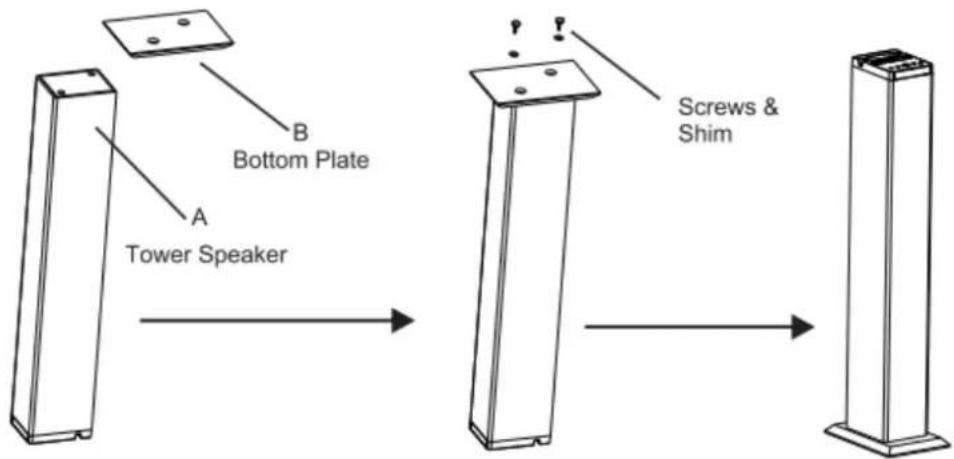
Put “B” onto the other side of “A”,
make sure the screw holes in same line.
To fix “B” onto “A” by using the screws & shims from the accessories.
Installation finished.
DESCRIPTION FOR THE FRONT PANEL

- USB PORT
2.SD/MMC CARD READER
3.MODE
4.PREV/VOL-
- POWER/PLAY/PAUSE
6.NEXT/VOL+
7.SCAN
MODE:
To switch functions between Bluetooth/USB/SD/FM/AUX.
PREV/VOL-
Short press to choose previous song;
Long press to subtract the volume.
POWER/PLAY/PAUSE
Long press to turn on or turn off the power of the tower speaker;
Short press to pause or play the songs.
NEXT/VOL+
Short press to choose next song;
Long press to add the volume.
SCAN
Under FM status, long press this key to search FM programs automatically;
DESCRIPTION FOR THE REAR PANEL

A. AUX AUDIO INPUT
B. FM Antenna
C. POWER INPUT
AC 110-240V,50-60Hz DC 7V/2A
DESCRIPTION OF THE REMOTE CONTROL

1.STBY 8.USB/SD
2.FM 9.MUTE
3.PREV 10.BLETOOTH
4 NEXT 11.AUX
- VOL. 12. PLAY/PAUSE
6 VOI + 13. RESET
- SEARCH 14.SEEK-
15.SEEK+
STBY:
Press this button, the speaker are in stand by mode; press again to return its power on state.
FM
Press this button, the system will turn to FM radio function.
SEARCH
Under FM status, long press this key to search FM programs automatically.
USB/SD
Insert USB device and SD card, press this button to switch them.
MUTE
Press this key to mute the system, press again to return to normal state.
BT
Press this key to enter into bluetooth function.
AUX
To switch to audio-in function.
RESET
Return to default factory setting.
SEEK-/+
Under FM Status, short press once to make frequency adjustment; Long press 3 seconds to realize manually search function.
BATTERY INSTALLATION
-
Take off the protective paper from the battery case before using the Remote.
-
Open the battery case when replace the battery. Insert 1pc 3V Lithium Cell (Cr2025).
-
Keep within 5 meter range, 30 degree angle while aiming at the unit.

BLUETOOTH

BLUETOOTH MATCH::
Power on the speaker, press MODE key or BT key on the remote to enter into bluetooth status, then search and connect the Bluetooth device NVR-830TBTU on your cell phone or laptop, the password is 0000 if necessary.
MUSIC PLAYING:
Under the mode of Bluetooth connecting, press VOL+/- to control the volume; press PREV/NEXT key to choose the songs, and press PLAY/PAUSE key into play or pause status.
SPECIFICATIONS
R.M.S.: 5W*2
Drive Units: 3W*2
Power Supply: AC 110-240V, 50-60Hz; DC 7V/2A
Frequency Response: 60Hz-18kHz
TROUBLE SHOOTING
Before contact with the repair person, you should check the problem reason follow the instructions:
| Phenomenon | Reasons | Solution |
| No function light or No sound | Plug is not connected well. | Insert the plug into the electric outlet well. |
| Function light is ON, but No sound | Cable misconnected | Turn off the power, check the input jack, to ensure is connected to relevant input jack. |
| Failed when connect to the Bluetooth device | To connect the Bluetooth device properly, and make sure it was connected successfully. | |
| Volume was set at 0 degree or at Mute status. | To add the volume at the proper degree or press the MUTE key again on the remote. | |
| If the problem exists after checking related procedures above, please refer to the service agent's professional technician to fix it. Do not attempt to open the back cover, otherwise there is no responsibility for our company. | ||


- STBY:
- BLUETOOTH
- SINCRONIZAR BLUETOOTH:
- CAUTION
- RISK OF ELECTRIC SHOCK
- DO NOT OPEN
- WARNING:
- IMPORTANT SAFETY INSTRUCTIONS
- FEATURES
- PACKING LIST
- INSTALLATION INSTRUCXTION
- DESCRIPTION FOR THE FRONT PANEL
- MODE:
- PREV/VOL-
- POWER/PLAY/PAUSE
- NEXT/VOL+
- SCAN
- DESCRIPTION OF THE REMOTE CONTROL
- FM
- SEARCH
- USB/SD
- MUTE
- BT
- AUX
- RESET
- SEEK-/+
- BATTERY INSTALLATION
- BLUETOOTH MATCH::
- MUSIC PLAYING:
- SPECIFICATIONS
- TROUBLE SHOOTING
Brand : NEVIR
Model : NVR-830TBTU
Category : Loudspeaker