
NVR-852APKB8 - Loudspeaker NEVIR - Free user manual and instructions
Find the device manual for free NVR-852APKB8 NEVIR in PDF.


| Product Type | Bluetooth Speaker with Karaoke & FM Radio |
| Dimensions (W x H x D) | 336 x 230 x 540 mm |
| Weight | 6 kg |
| Power Supply | AC 100-240V ~ 50/60Hz; DC 9V 500mA |
| Output Power | 15 Watts (8 inch + 3 inch) |
| Frequency Response | 60Hz - 20kHz |
| Signal-to-Noise Ratio | ≥78 dB |
| Bluetooth Range | 10 meters (open space) |
| Battery Type | Built-in 1800mAh rechargeable Li-ion |
| Playback Time | Approx. 6 hours (normal volume) |
| Charging Time | Approx. 4 hours |
| Inputs | USB 2.0, Micro SD slot, AUX-IN (3.5mm), Dual Microphone jacks (6.35mm) |
| FM Radio | 87.5 - 108 MHz (use AUX cable as antenna) |
| Recording | Voice recording to USB or Micro SD via MIC |
| Karaoke | Dual microphone inputs with echo and mic volume control |
| Display | LED display |
| Controls | Knobs: Volume, Treble, Echo, Mic Volume; Remote: number keys, mode, prev/next, play/pause, repeat, EQ, mute, standby |
| Accessories Included | Microphone, Remote control (batteries not included), AUX-IN cable, AC adapter |
| Remote Control Range | 5 meters, 30° angle |
| Cleaning | Soft cloth slightly moistened with mild detergent; avoid solvents |
| Safety | Class 1 laser device; do not open; keep away from moisture and heat |
| Waste Disposal | Do not dispose with household waste; follow WEEE directive |
Frequently Asked Questions - NVR-852APKB8 NEVIR
User questions about NVR-852APKB8 NEVIR
0 question about this device. Answer the ones you know or ask your own.
Ask a new question about this device
Download the instructions for your Loudspeaker in PDF format for free! Find your manual NVR-852APKB8 - NEVIR and take your electronic device back in hand. On this page are published all the documents necessary for the use of your device. NVR-852APKB8 by NEVIR.
USER MANUAL NVR-852APKB8 NEVIR
natural_image
Black and white photo of a black suitcase with checkered pattern and two legs (no text or symbols visible)- STBY
- NUMBER KEYS
- PREV
- VOL+/-
- MUTE
- PLAY/PAUSE
- REPEAT
- EQ
- MODE
- NEXT
STBY (STANDBY)
natural_image
Pure technical line drawing of a mechanical assembly with no text or symbolsRemote Control
natural_image
Black and white photo of a black and white checkered suitcase with four legs (no text or symbols visible)- USER MANUAL -
Thank you for you chose our Bluetooth speaker.
In order to maintain good performance for this unit, please read this user manual carefully before using and make sure to use it in a proper way.
IMPORTANT SAFETY INSTRUCTIONS

The lighting flash and arrow head within the triangle is warning sign alerting you of dangerous voltage inside the product
CAUTION
RISK OF ELECTRIC SHOCK DO NOT OPEN
CAUTION: TO REDUCE THE RISK OF ELECTRIC SHOCK DO NOT REMOVE COVER (OR BACK). NO USER SERVICIABLE PARTS INSIDE. REFER SERVICING TO QUALIFIED SERVICE PERSONNEL.

The exclamation point within the triangle is a warning sign alerting you of important instructions accompanying the product
- Please read this user manual carefully before you use this product. Please reserve it properly for reference in the future.
- Please do not expose the unit in the raining or moist environment to avoid fire hazard or electric shock.
- On the machine should not receive the water drop or the water splashes, on the machine could not lay object filled with liquid, like vase.
THE AC MUST REMAIN EASILY ACCESSIBLE IN ORDER TO BE ABLE TO DISCONNECT THE DEVICE IN CASE OF EMERGENCY.
- Read through the manual before operating.
- Read the instructions.
- Follow all instructions in the manual.
- Keep the manual for future reference.
- Do not use the apparatus in places that are extremely hot, cold, dusty or humid.
- Do not keep the apparatus in a high humidity area such as a bathroom, kitchen sink or pool. Keep the apparatus away from heaters, stoves, etc. Never leave the apparatus in an area exposed to direct sunlight where there could be a considerable rise in temperature.
- The apparatus should not be exposed to dripping or splashing, and no objects filled with
liquids such as vases, should be placed on the apparatus.
-
Do not block any ventilation openings. The ventilation should not be impeded by covering the ventilation openings with items such as newspapers, table-cloths, curtains and the like.
-
Install the apparatus in accordance with the manufacturer's instructions.
-
Clean the cabinet with a soft cloth slightly moistened with a mild detergent solution. Do not use strong solvents which may cause unpredictable damage to the apparatus.
-
Do not use attachments/accessories not recommended by the product manufacturer as they may be hazardous.
-
Power-supply cords should be routed so that they are not likely to be trapped in any way. Also protect the power cord from being walked on or pinched, particularly at plugs, convenience receptacles and the pointers where they exist from the apparatus.
-
This product should be operated only from the type of power source indicated on the marking label. If you are not sure of the type of power supply to your home, consult your product dealer or local power company. For products intended to operate from battery power, or other sources, refer to the operation instructions.
-
The mains plug is used as disconnect device. The mains plug of apparatus should not be obstructed OR should be easily accessed during intended use. To be completely disconnect the power input, the mains plug of apparatus should be disconnected from the mains.
-
An outside antenna system should not be located in the vicinity of overhead power lines or other electric light or power circuits, or where it can fall into such power lines or circuits. When installing an outside antenna system, extreme care should be taken to keep from touching such power lines or circuits as contact with them might be fatal.
-
If the apparatus is not used for a period of time, unplug the power cord.
-
If the remote control unit is not used for a period of time, remove batteries from the remote control unit and store them in a cool dry area.
-
If it is lightening, unplug the power cord to prevent the unit from unnecessary damages.
-
This product should be moved with care to avoid damage or injury.
-
Never try to disassemble batteries. Neither put batteries under the direct sunlight nor throw them into fire or heater. As all of these may cause unnecessary damages to you.
-
Refer all servicing to qualified service personnel. Servicing required when the apparatus does not operate normally or has been damaged in any way such as the power cord or plug is damaged, liquids spilled into the apparatus, any hard object fallen on the apparatus, the

apparatus has been dropped, the apparatus has been exposed to rain or moisture.
- The marking information is located at the back of the apparatus.
- Minimum distance 5 cm around the apparatus for sufficient ventilations
- Do not place any flame sources such lighted candles on top of the apparatus.
- Attentions should be drawn to the environmental aspects of batteries disposal.
- Use the apparatus in moderate climates.
ELECTRIC SUPPLY
- Please unplug the product in case of prolonged non-use.
- If the supply cable is damaged, it must be replaced by the manufacturer or qualified after-sales personnel to avoid any danger.
- This product must be connected to an electrical supply 100-240V \~ 50/60Hz.
- The plus must be accessible after installation.
- Hold the plug well when you plug the power cord in or out.
- Please do not put the AC power cord near any heat source equipment.
- Please do not place any heavy objects on the AC power cord.
- Please do not overhaul the AC power cord.
- This product contains a low power laser device. In order to keep safety, please do not open the unit to expose the inside parts. If there is some problem need to be repaired, please let the professional people check and repair it.
CAUTION
- Use of controls and adjustments or performance of procedures other than those specified herein may result in hazardous radiation exposure.
- If this product develops trouble, contact qualified service centers, and do not use the product in defective states.
BEFORE USE
- Choose unit installation location carefully. Avoid placing it in direct sunlight or close to a source of heat. Also avoid locations subject to vibrations and excessive dust, cold or moisture. Keep away from sources that hum, such as transformers or motors.
- Do not open the cabinet as this might result in damage to the circuitry or electrical shock. If a foreign object should get into the set, contact your dealer.
- When removing the power plug from the wall outlet, always pull directly on the plug, never pull the cord.
- Do not attempt to clean the unit with chemical solvents as this might damage the finish. Use a clean, dry cloth.
- In order to shut off the power to this product completely, unplug the power cord from the wall outlet. Be sure to unplug the unit if you do not intend to use it for an extended period of time, such as while on vacation.
- Keep this manual in a safe place for future reference.
FEATURES
• Speaker built-in 13 Watts
- Bluetooth connectivity
- Bluetooth operating range: 10 meters
- FM Radio
• Voice record function
- KARAOKE function
- USB2.0 port
- Micro SD slot card
- Audio input
• Double Mic input jack
- LED display
• Volume/Treble/Echo/Mic volume control
• Built-in 1800mAh rechargeable Li-ion battery
- DC 9V input
DESCRIPTION FOR THE FRONT PANEL

- DC IN 9V Jack
- AUX-IN Jack/FM antenna Jack: Under FM radio status, Input AUX-IN cable to be FM antenna
- Micro SD card slot
- USB Port
- Record- To record voice into USB or Micro SD card devices
- Mode- To switch functions between BT, USB, Micro SD, FM and AUX-IN
- PREV- Press to choose previous song
- LED Display
- NEXT- Press to choose next song
- Play/Pause- Under FM radio, long press this to search the channel automatically
- MIC priority
- Number keys: when in SD /USB mode, press the number to choose the number of the songs in the SD/USB device.
- Power ON/OFF
- MIC 2 Jack- Input Microphone
- MIC 1 Jack- Input Microphone
- ECHO Knob
- MIC VOL Knob
- Treble Knob
- Volume Knob- To control volume up or down
DESCRIPTION OF THE REMOTE CONTROL

- STBY
- NUMBER KEYS
- PREV
- VOL+/-
- MUTE
- PLAY/PAUSE
- REPEAT
- EQ
- MODE
- NEXT
STBY (STANDBY)
- Press this button, the speaker are in stand-by mode.
- Press again to return its power on state.
NUMBER KEYS
- when in SD /USB mode, press the number to choose the number of the songs in the SD/USB device.
MODE
- Press this button, the system will switch functions between BT (Bluetooth), USB, Micro SD, FM and AUX-IN.
PREV
- Press this button, the system will choose previous song.
VOL+/-
- To control volume up or down
PLAY/PAUSE
- Press this button, the system will play or pause.
MUTE
- Press this button to mute the system, press again to return to normal state.
NEXT
- Press this button, the system will choose next song.
RPT (REPEAT)
- Press this button, the system will repeat one or all.
EQ
- Press this button for EQ setting.
BATTERY INSTALLATION REMOTE CONTROL
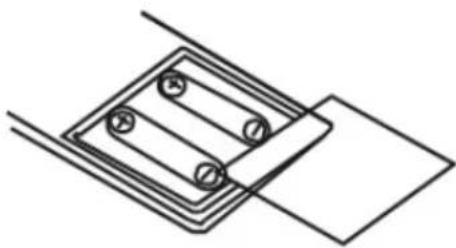
Remove the cover of the battery compartment of the remote control according to the diagram on below.
Step 1: Load in 2pcs of 7# batteries (make sure they are loaded with correct polarity).
Step 2: Put back the cover of the remote control.
Step 3: Aim the controller against the receiving window of the player while operating the player with the controller.
natural_image
Pure technical line drawing of a mechanical assembly with no text or symbolsRemote Control
Note : Keep within 5 meter range, 30 degree angle while aiming at the unit.
BLUETOOTH CONNECTIVITY
- Power on the speaker, press MODE key to enter into Bluetooth status.
- Then search and connect the Bluetooth device "NVR-852APKB8" on your cell phone or laptop.
The password is 0000 if necessary.
Under the mode of Bluetooth connecting, switch VOL+/- to control the volume; press PREV/
NEXT key to choose the songs, and press PLAY/PAUSE key into play or pause status.
LINE-IN FUNCTIONS
- Power on the speaker, press MODE key to enter into LINE-IN status.
- Connect the one end of the included 3.5mm audio cable to the LINE IN jack on the speaker, and the other end of the cable to the output jack on your computer or any personal music player such as a mobile phone or tablet.
- Open a media player on your computer, mobile phone or tablet, and click on Play to start playing your music.
FM INSTRUCTION
- Power on the speaker, press MODE key to enter into FM tune status.
- Insert the Aux-in cable (included) into AUX IN slot as the antenna.
- Short press PLAY/PAUSE button to search the channel automatically.
RECORD FUNCTION
- Insert the microphone (One MIC included) into MIC slot, press REC key; you could record the voice by microphone.
- Press REC again to stop the record.
- The voice will be recorded into insert TF card or USB device.
KARAOKE FUNCTION
-Insert Microphone (one Microphone included) into MIC slot to enter into KARAOKE mode.
CHARGE
- Charge the speaker by using the include adaptor. The battery can be fully charged by 4 hours.
- The device can play 6 hours under the normal status.
- When the device in charging, the LED light is in red, after full charging the LED light will be off.
SPECIFICATIONS
| Output Power | ...... | 15 WATTS (8 Inch+3 Inch) |
| Frequency Response | ...... | 60Hz-20kHz |
| DC IN | ...... | 9V 500mAh |
| INPUT | AUX-INMicro SD slot cardUSB portMICRO X 2 | |
| FM Radio | ...... | 87.5Hz-108KHz |
| S/N ratio | ...... | ≥78db |
| Dimensions (W x H x D) | ...... | 336 x 230 x 540 mm |
Weight
......
6 Kg
Accessories
......
Microphone
Remote control
AUX-IN cable
Adaptor AC
TROUBLE SHOOTING
Before contact with the repair person, you should check the problem reason follow the instructions.
| Phenomenon | Reasons | Solution |
| No function light or No sound | Plug is not connected well. | Insert the plug into the electric outlet well. |
| Function light is ON, but No sound | Cable disconnected | Turn off the power, check the input jack, to ensure the proper signal is connected to relevant input jack. |
| Failed when connect to the Bluetooth device | To connect the Bluetooth device properly, and make sure it was connected successfully. | |
| Volume was set at 0 degree or at Mute status. | To add the volume at the proper degree or press the MUTE key again on the remote | |
| If the problem exists after checking related procedures above, please refer to the service agent's professional technician to fix it. Do not attempt to open the back cover, otherwise there is no responsibility for our company.. | ||
DETAILS AND PRECAUTIONS ON THE USE OF BATTERIES
- Discard a used battery in nature or garbage pollutes and prevents the recovery of recyclable materials.
It is therefore important to limit consumption of batteries and follow these guidelines:
focus on alkaline batteries (that last longer than the saline batteries) and when possible, rechargeable batteries
deposit batteries and accumulators in specific containers arranged among traders.
For example, metals will be valued and polluted the environment because they contain
heavy metals hazardous to health and the environment primarily (cadmium and nickel)
- The piles must installation by respecting the polarity indicated on the apparatus and the pile. An incorrect positioning can is to damage the apparatus, is to cause escapes on the level of the pile, is to the extreme to cause a fire or the explosion of the pile.
- To ensure proper operation, the batteries must be in good condition. In case of abnormality in the functioning of the device, put fresh batteries
- Never attempt to recharge non-rechargeable batteries. They could run, warm up, causing a fire or explosion.
- Replace all batteries at the same time. Never mix zinc batteries with alkaline batteries or rechargeable batteries
- The batteries must be removed from the device
- Also, remove the batteries from your device if you do not use it for a long time, if the batteries may leak and cause damage.
- Never try to short-circuit the battery terminals
- Never dispose of batteries in fire, they might explode
- Charging of batteries is to be performed by an adult.
- Remove batteries from the device before reloading.
- We recommend an adult to supervise children when they change the batteries so that these instructions are complied with or to make himself the replacement of batteries.
- If a battery is swallowed, immediately consult a doctor or poison control center nearest you. Do not forget to carry the product with you.
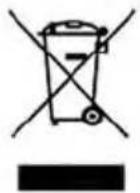
This logo present on the product indicates that this device (which is considered as waste) is registered in the European Directive 2012/19/EU regarding Waste Electrical and Electronic Equipment (WEEE). This directive states that old household electrical appliances must be collected separately in order to optimize the recovery and recycling of the materials they contain, and thus reduce their impact on the environment and human health.
As end user, your role is of great importance in the reuse, recycling and other forms of recovery of this Electrical and Electronic Equipment.
You have to use the collection systems provided for this purpose.
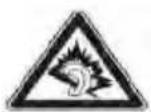
WITH FULL POWER, THE PROLONGED LISTENING
We certify that the power supply is used as a device for disconnecting the power distribution network, which should stay easily accessible.


- STBY (STANDBY)
- IMPORTANT SAFETY INSTRUCTIONS
- CAUTION
- RISK OF ELECTRIC SHOCK DO NOT OPEN
- ELECTRIC SUPPLY
- BEFORE USE
- FEATURES
- DESCRIPTION FOR THE FRONT PANEL
- DESCRIPTION OF THE REMOTE CONTROL
- NUMBER KEYS
- MODE
- PREV
- VOL+/-
- PLAY/PAUSE
- MUTE
- NEXT
- RPT (REPEAT)
- EQ
- BATTERY INSTALLATION REMOTE CONTROL
- BLUETOOTH CONNECTIVITY
- LINE-IN FUNCTIONS
- FM INSTRUCTION
- RECORD FUNCTION
- KARAOKE FUNCTION
- CHARGE
- TROUBLE SHOOTING
- DETAILS AND PRECAUTIONS ON THE USE OF BATTERIES
Brand : NEVIR
Model : NVR-852APKB8
Category : Loudspeaker