
BAMP-606-A - Support & Base BRIGMTON - Free user manual and instructions
Find the device manual for free BAMP-606-A BRIGMTON in PDF.


| Product Type | Support & Base |
| Brand | Brigmton |
| Model | BAMP-606-A |
| Dimensions (W x D x H) | 60 x 20 x 10 cm |
| Weight | 2 kg |
| Material | Aluminum alloy / Steel |
| Maximum Load Capacity | 8 kg |
| VESA Compatible | 75 x 75 mm / 100 x 100 mm |
| Height Adjustment | Yes, gas spring |
| Tilt Range | -5° to +15° |
| Swivel Range | ±90° |
| Rotation (Landscape/Portrait) | Yes, 360° |
| Cable Management | Built-in cable clips |
| Color | Black |
| Mounting Type | Desk clamp / Grommet mount |
| Recommended Desk Thickness | 10 - 50 mm |
| Cleaning Instructions | Wipe with a soft, damp cloth; avoid abrasive cleaners |
| Safety Note | Do not exceed maximum load; ensure stable mounting |
| Included Accessories | Mounting hardware, cable ties, user manual |
Frequently Asked Questions - BAMP-606-A BRIGMTON
User questions about BAMP-606-A BRIGMTON
0 question about this device. Answer the ones you know or ask your own.
Ask a new question about this device
Download the instructions for your Support & Base in PDF format for free! Find your manual BAMP-606-A - BRIGMTON and take your electronic device back in hand. On this page are published all the documents necessary for the use of your device. BAMP-606-A by BRIGMTON.
USER MANUAL BAMP-606-A BRIGMTON
natural_image
Three modern super radio speakers with visible brand logos (SUPER, BRIGHT) and no additional text or symbols on the devices themselves.BAMP-606-N-A-R
ALTAVOZ BLUETOOTH-RADIO FM-MICROSD
INSTRUCTIONS
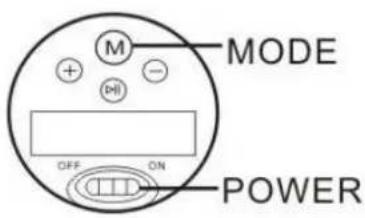
- Press⊕ momentarily, it turns to next song.
- Press ⊕ and hold it to volume up.
- Press ⊖ momentarily, it turns to previous song.
- Press ⊖ and hold it to volume down.
- Press ⬆ momentarily to pause or play.
- Press ^® to switch Bluetooth /TF /Line in /FM(Option) /Bluetooth Telephone (Option) Function
BASIC FEATURES
- Bluetooth play
- Playing songs in MP3 format which saved in TF card.
- Support PC/iPod/iPhone/IPAD/MP3/MP4/and other smart phone and tablet by connecting with 3.5mm jack.
- Bluetooth telephone function (Option)
- FM radio(optional): under FM radio mode, press and hold button ⏻ auto search the radio station and auto save them.
TROUBLE SHOOTING
• Failed to read TF card,
formatting TF card or change the format of song to MP3.
- No audio input when connecting with other devices, press "M(Mode)" button to switch it or shut down to reboot it.
- Cannot turn on the speaker, check if the speaker does not have power, if no power, charge it first. Can not connect with Bluetooth devices,
- check if speaker connected with the third Bluetooth device, if yes, disconnect it first, if still can not connect, reboot it and try again.
DATA TRANSFERRING/CHARGING VIA USB CABLE
- Switch ON, and connect it with PC via USB cable. It will play songs during charging.
- Switch OFF, and connect it with PC for charging only.
- USB cable is not for the use of data transferring.
SPECIFICATIONS
• Built-in Li-ion battery, 3.7V/500mAh
- USB charging voltage: DC 5V
• Speaker:40mm 4ohm 3W
• Frequency range: 60Hz\~18KHz
· S/N: ≥96db
- Distortion≤0.5%
- Size: 60*60*53mm
INTERFACES
• Volume control knob
Turn the knob in a clockwise direction to volume up. Turn it in an anticlockwise direction to volume down.
- USB port: charge/audio input.
- Microphone
Hands-free speaker available only for the Bluetooth mode.
- LED Indicator
Blue flash: wait for Bluetooth connection.
Blue slow flash: bluetooth connected or playing music
Red: charging stauts(red indicator off when Fully charged).
• TF card slot is for inserting TF card.
FEATURE
• Vibration resonance technology.
• 360 degree omni-directional sound.
CAUTIONS
- Keep out of reach of children.
- Never knock the speaker.
- Keep it away from fire, water, high and low temperature.
- Never block speaker nets.
- Never open it by yourself.
- Do not charge for too long time in case of damage to the battery, 3 hours is the best charging time.
I.R.P., S.L
SANTA CLARA DE CUBA NAVE 5
SEVILLA
ESPAÑA
DECLARATION OF CONFORMITY
I.R.P., SL declare under our responsibility that the equipment meets the requirements indicated in the following directives:
EMC DIRECTIVES
IEC60950-1:2005; Am 1:2009
EN50371
EN60065
ETSI EN301 489
ETSI EN300 328
ETSI EN301 489-1 V 1.9.2 (2011-09)
ETSI EN301 489-17 V2.2.1 (2021-09)
EN62479:2010
ETSI EN 300 328 V 1.7.1 (2066-10)
Description of apparatus:
BRIGMTON Model BAMP-606-N-A-R
Bluetooth Speaker
Importer: I.R.P., SL
Address: Avenida Santa Clara de Cuba 5, 41007, Sevilla.


Brand : BRIGMTON
Model : BAMP-606-A
Category : Support & Base