
APPICRV2 - Card Reader Approx - Free user manual and instructions
Find the device manual for free APPICRV2 Approx in PDF.


| Product Type | Card Reader |
| Brand | Approx |
| Model | APPICRV2 |
| Supported Memory Cards | SD/Mini SD/MMC/RS-MMC/Micro SD/T-Flash, MS/MS Pro/MS Duo/MS Pro Duo/M2, XD, CFI/CFII/CF-Extreme/CF-ExtremeIII |
| Operating Systems Supported | Windows Me/2000/XP/Vista/7, Mac OS 9.2 and later |
| Interface | USB 2.0 (backward compatible with USB 1.1) |
| Plug and Play | Yes |
| Operating Temperature | -20°C to +65°C |
| Storage Temperature | -40°C to +85°C |
| Dimensions | Approximately 70 x 50 x 15 mm |
| Weight | Approximately 50 g |
| Power Supply | USB bus-powered (5V, 500mA) |
| LED Indicator | Power/activity LED |
| Number of Card Slots | Multi-slot (combo) |
| Card Insertion Type | Push-push or push-pull |
| Compliance | CE, RoHS |
| Color | Black or white (typical) |
| Material | ABS plastic |
| Cable Length | Integrated USB cable, approx 15 cm |
| Package Contents | Card reader, user manual |
| Warranty | 1 year limited warranty |
| Repairability | Not user-serviceable; contact support |
| Maintenance | Clean with dry soft cloth; avoid liquids |
Frequently Asked Questions - APPICRV2 Approx
User questions about APPICRV2 Approx
0 question about this device. Answer the ones you know or ask your own.
Ask a new question about this device
Download the instructions for your Card Reader in PDF format for free! Find your manual APPICRV2 - Approx and take your electronic device back in hand. On this page are published all the documents necessary for the use of your device. APPICRV2 by Approx.
USER MANUAL APPICRV2 Approx
- Supports card media:
- SD/Mini SD/MMC/RS-MMC/Micro SD/T-Flash
• MS/MS Pro/MS Duo/MS Pro Duo/M2 - XD
• CFI/CFII/ CF-Extreme/CF-ExtremeIII - Support Windows® Me/ 2000/ XP/ Vista/ Windows® 7 and Mac OS 9.2 and later version
- Operating temperature: -20°C \~ +65°C
Hardware Connection Diagram
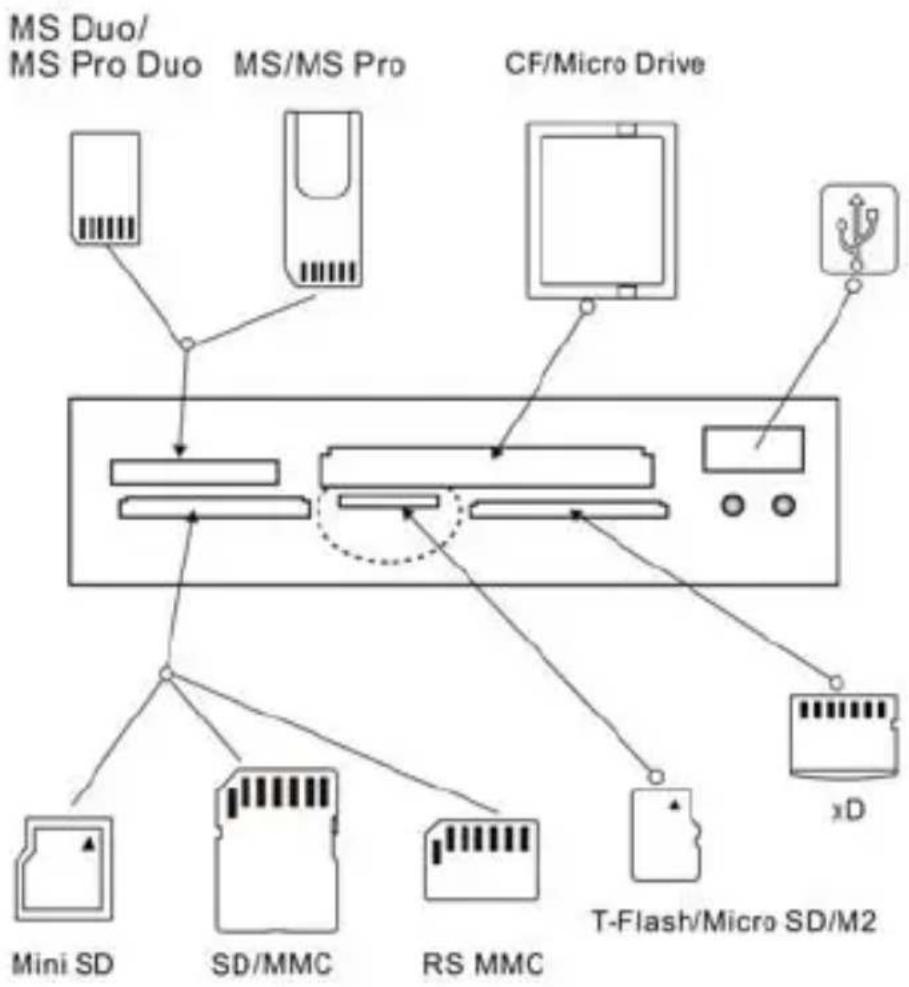
flowchart
graph TD
    A["MS Duo/MS Pro Duo"] --> B["MS/MS Pro"]
    B --> C["CF/Micro Drive"]
    C --> D["xD"]
    D --> E["T-Flash/Micro SD/M2"]
    F["Mini SD"] --> G["SD/MMC"]
    H["RS MMC"] --> I["DS"]
    J["xD"] --> K["Micro Chip"]
Spécifications
- Médias supportés:
• SD/Mini SD/MMC/RS-MMC/Micro SD/T-Flash
• MS/MS Pro/MS Duo/MS Pro Duo/M2
• XD
• CFI/CFII/ CF-Extreme/CF-ExtremelII
flowchart
graph TD
    A["MS Duo/MS Pro Duo"] --> B["MS/MS Pro"]
    B --> C["CF/Micro Drive"]
    C --> D["xD"]
    D --> E["T-Flash/Micro SD/M2"]
    F["Mini SD"] --> G["SD/MMC"]
    H["RS MMC"] --> I["DS"]
    J["Micro Chip"] --> K["Micro Chip"]
Spezifikationen
- Medien enthält:
• SD/Mini SD/MMC/RS-MMC/Micro SD/T-Flash
• MS/MS Pro/MS Duo/MS Pro Duo/M2
• XD
• CFI/CFII/ CF-Extreme/CF-ExtremelII
- Windows® Me/ 2000/ XP/ Vista/ Windows® 7 und Mac OS 9.2 und höher
- Temperatur: -20^ +65^
flowchart
graph TD
    A["MS Duo/MS Pro Duo"] --> B["MS/MS Pro"]
    B --> C["CF/Micro Drive"]
    C --> D["xD"]
    D --> E["T-Flash/Micro SD/M2"]
    F["Mini SD"] --> G["SD/MMC"]
    H["RS MMC"] --> I["DS"]
    J["xD"] --> K["Micro Chip"]
Specifiche:
- Sopporta:
• SD/Mini SD/MMC/RS-MMC/Micro SD/T-Flash
• MS/MS Pro/MS Duo/MS Pro Duo/M2
• XD
• CFI/CFII/ CF-Extreme/CF-ExtremelII - Sopporta Windows® Me/ 2000/ XP/ Vista/ Windows® 7 e Mac OS 9.2 e superiore
- Temperatura Operativa: -20^ +65^
flowchart
graph TD
    A["MS Duo/MS Pro Duo"] --> B["MS/MS Pro"]
    B --> C["CF/Micro Drive"]
    C --> D["xD"]
    D --> E["T-Flash/Micro SD/M2"]
    F["Mini SD"] --> G["SD/MMC"]
    H["RS MMC"] --> I["RS MMC"]
    J["Micro Devices"] --> K["Micro Devices"]
Especificações
- Suporta:
• SD/ Mini SD/ MMC/ RS-MMC/ Micro SD/ T-Flash
• MS/ MS Pro/ MS Duo/ MS Pro Duo/ M2
- XD
• CFI/ CFII/ CF-Extreme/ CF-ExtremeIII
- Suporta Windows® Me/ 2000/ XP/ Vista/ Windows® 7 e Mac OS 9.2 e superior
Brand : Approx
Model : APPICRV2
Category : Card Reader