
BAF-520BT - Sound system Steren - Free user manual and instructions
Find the device manual for free BAF-520BT Steren in PDF.


| Product Type | Portable PA System with Bluetooth |
| Brand | Steren |
| Model | BAF-520BT |
| Dimensions (W x H x D) | Approx. 35 x 50 x 30 cm |
| Weight | Approx. 10 kg |
| Power Output | 200 W RMS |
| Power Supply | AC 110-240V, 50/60Hz; Built-in rechargeable battery (12V) |
| Battery Life | Up to 6 hours at moderate volume |
| Bluetooth Version | 4.0 with A2DP profile |
| Inputs | 2 x 6.3mm microphone jacks, 1 x 3.5mm aux in, USB port, SD card slot, FM antenna |
| Outputs | 1 x 6.3mm line out |
| Speaker Configuration | 8" woofer + 1" tweeter |
| Controls | Volume, bass, treble, echo, microphone volume, input selector |
| Supported Media | MP3, WMA from USB/SD |
| FM Radio | Frequency range 87.5-108 MHz |
| Included Accessories | Wireless microphone (2), remote control, power cord, user manual |
| Maintenance and Cleaning | Wipe with dry cloth; avoid liquids; clean air vents regularly |
| Safety Precautions | Do not expose to rain or moisture; keep away from heat sources; use provided power adapter |
| Spare Parts and Repairability | Contact Steren service center; some parts available online (model BAF-520BT) |
Frequently Asked Questions - BAF-520BT Steren
User questions about BAF-520BT Steren
0 question about this device. Answer the ones you know or ask your own.
Ask a new question about this device
Download the instructions for your Sound system in PDF format for free! Find your manual BAF-520BT - Steren and take your electronic device back in hand. On this page are published all the documents necessary for the use of your device. BAF-520BT by Steren.
USER MANUAL BAF-520BT Steren
natural_image
Illustration of a speaker with concentric circles and stripes, no text or symbols present
natural_image
Illustration of a speaker with concentric circles and stripes, no text or symbols presentImportante
natural_image
Two identical illustrations of a speaker with concentric circular components, no text or symbols present.natural_image
Two identical line drawings of a coiled electrical or medical device with probe connectors (no text or symbols)natural_image
Coiled electrical plug with two connectors (no text or symbols visible)natural_image
Technical line drawing of a device front panel with multiple knobs and a central display (no text or symbols)natural_image
Technical line drawing of a tripod-mounted support structure with two vertical posts (no text or symbols)2 soportes

1 control remoto
natural_image
Line drawing of two car seats with ventilation grilles and a directional arrow indicating movement (no text or symbols)natural_image
Diagram of a vehicle seatbelt mechanism with a directional arrow (no text or symbols)
natural_image
Diagram showing two identical stand-mounted speakers with circular head covers, one emitting a double-headed arrow (no text or symbols present)natural_image
Line drawing of a device with an attached power connector and cable, showing no text or symbolsEncender el equipo
natural_image
Line drawing of a device with two switches connected to an output socket (no text or symbols)Conexiones
BAF-520

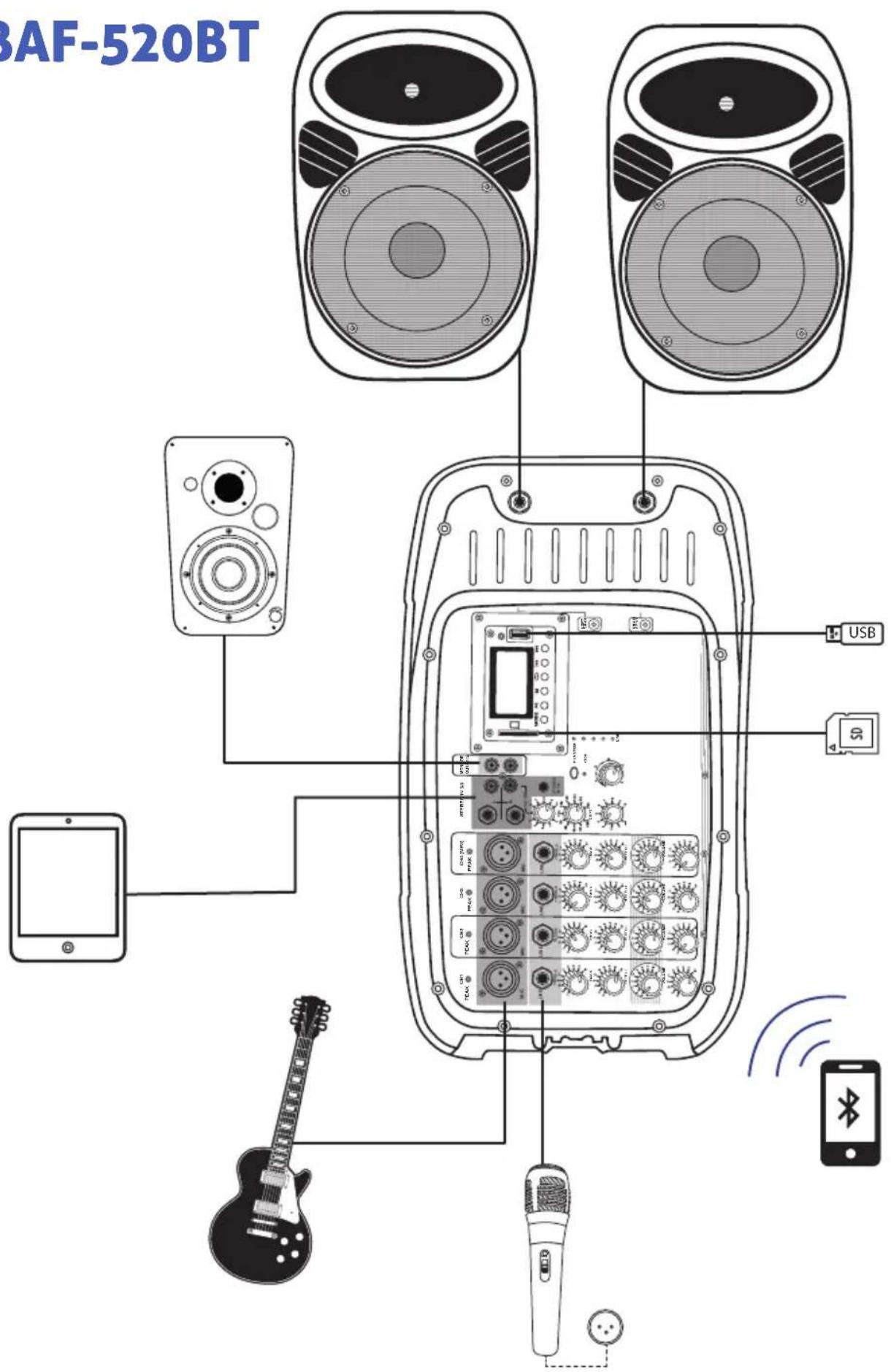
Conexiones
BAF-520BT
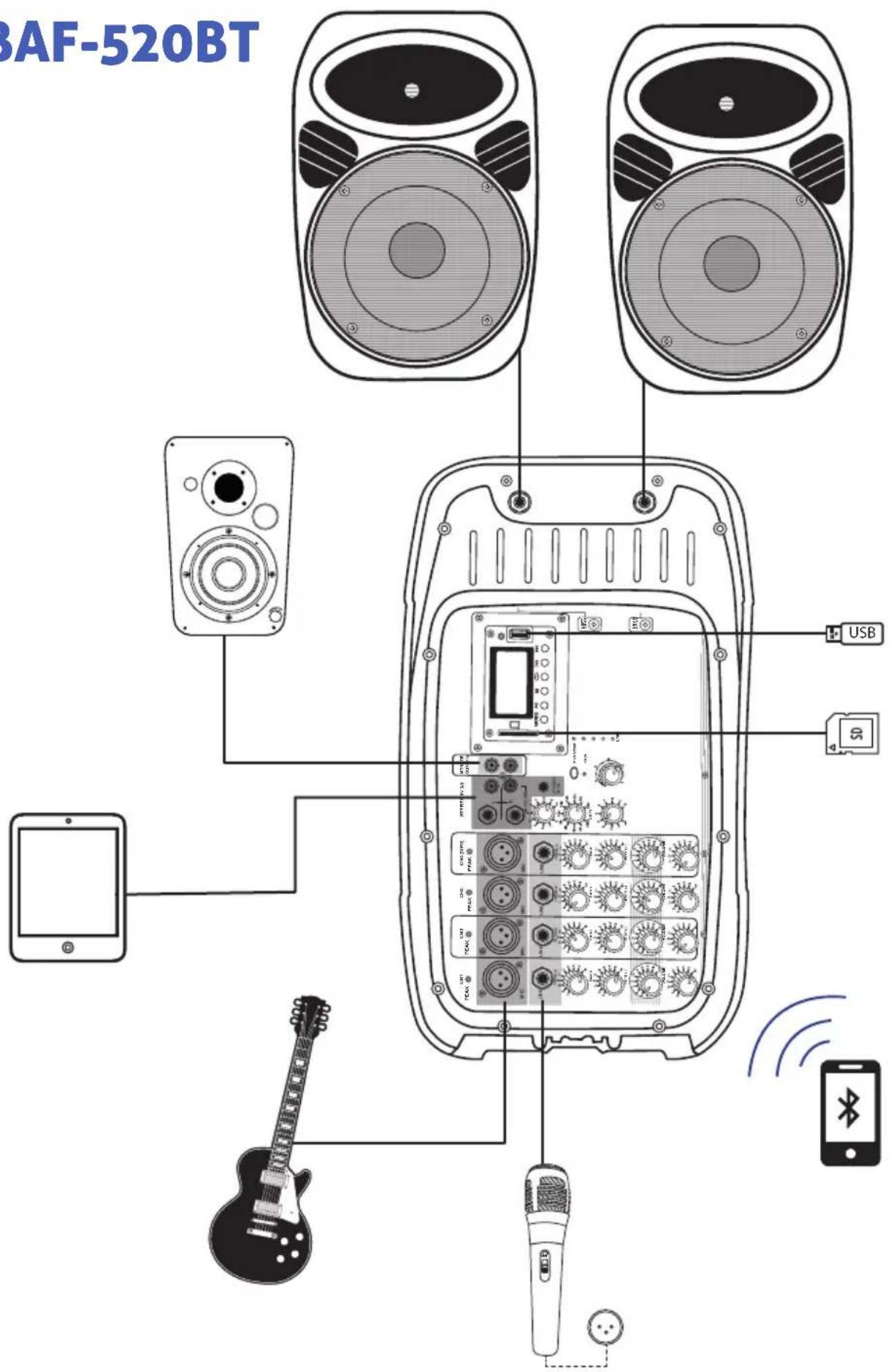
natural_image
Simple line drawing of a mechanical device with a circular component and wires, no text or symbols present.
natural_image
Simple line drawing of a connector with a circular component and wires, no text or symbols presentnatural_image
Illustration of a speaker with concentric circles and striped buttons (no text or symbols)
natural_image
Illustration of a speaker with concentric circles and stripes, no text or symbols presentImportant
- Read this instruction manual carefully to be sure how to use the product properly.
- The information presented is for reference only. Due to updates there may be differences.
- Please check our website www.steren.com for the latest version of this manual.
Cautions
• This product is not a toy; Keep out of children reach.
- This product is not intended for use by persons with different abilities, unless supervised or instructed by a person responsible for its safety.
- Do not use chemicals or corrosives to clean it.
- Do not place the unit in unstable positions.
Operation of this equipment is subject to the following two conditions: (1) this device or device may not cause harmful interference, and (2) this device or device must accept any interference, including interference that may cause undesired operation.
natural_image
Illustration of a speaker emitting sound waves (no text or symbols)
natural_image
Illustration of a speaker with concentric circles and stripes, no text or symbols presentContent

natural_image
Two identical black-and-white diagrams of a speaker with concentric circles and buttons, no text or symbols present.2 passive two way baffles

natural_image
Two identical line drawings of a coiled electrical cable with terminal connectors (no text or symbols)2 baffle connection cables (6.3 mm)
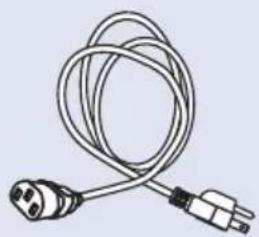
natural_image
Coiled cable with two connectors (no text or symbols visible)1 input cable

natural_image
Technical line drawing of a device front panel with multiple knobs and a central display (no text or labels)1 console with MP3 player
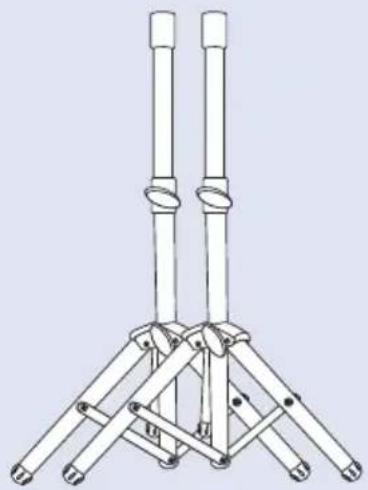
natural_image
Technical line drawing of a tripod-mounted support structure with two vertical posts (no text or symbols)2 support
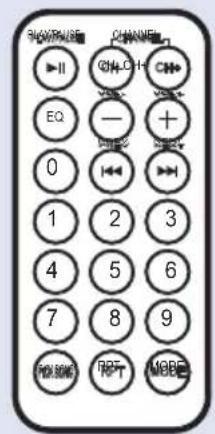
1 remote control
How to get started with the system
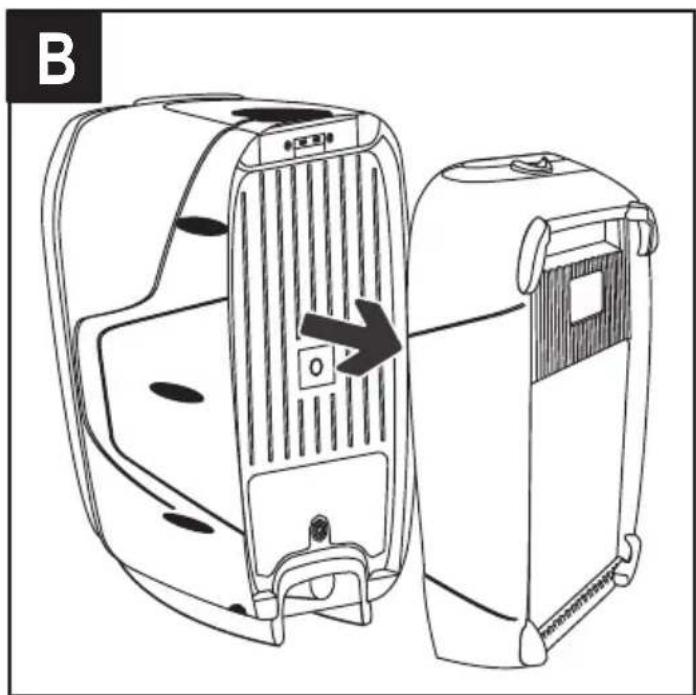
Remove the battery compartments
The baffles have detachable compartments in the back.
Slide the top button in the direction of the arrows and remove the compartments to gain access to the console and accessories.

natural_image
Line drawing of two car seats with ventilation grilles and a directional arrow indicating movement (no text or symbols)To reposition the compartments insert the lower tabs and push the top
Install the baffles
Carefully place the baffles on a flat surface or brackets. Turn knob to secure.

natural_image
Diagram of a vehicle seat with a directional arrow indicating left side (no text or symbols)
natural_image
Line drawing of a portable air conditioner with a stand and ventilation grille, no text or symbols present
natural_image
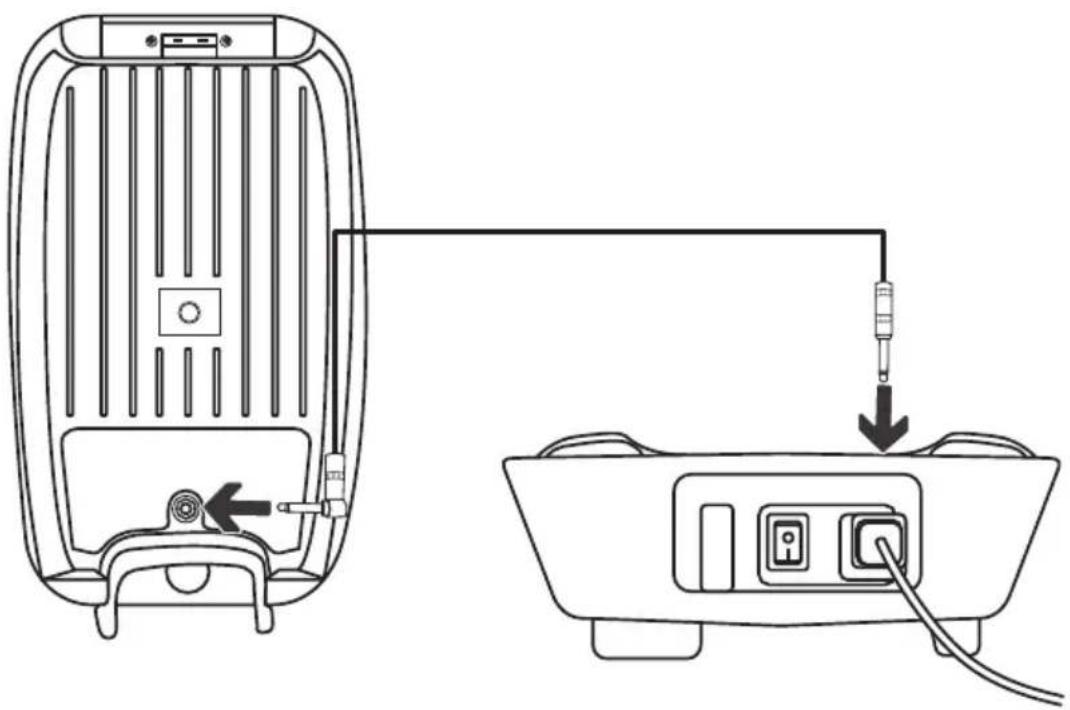
Line drawing of a speaker on a tripod stand with a grid-patterned head, showing a downward arrow indicating sound or sound flow (no text or symbols present)Connect the bafles to the console using the 6.3 mm cables.
natural_image
Line drawing of a device rear panel connected to a cable outlet, showing internal components and wiring (no text or symbols)Turn on the equipment
Connect the power cord to the console and to a power outlet.

natural_image
Line drawing of a device with two switches connected to an electrical outlet (no text or symbols)Press the switch on the console to turn it on or off.

The console includes a fuse to protect it against voltage surges and short circuits. In case of melting, remove the compartment (located at the entrance for the power cable) with a screwdriver and replace it with a similar one. There is a spare fuse in the compartment.
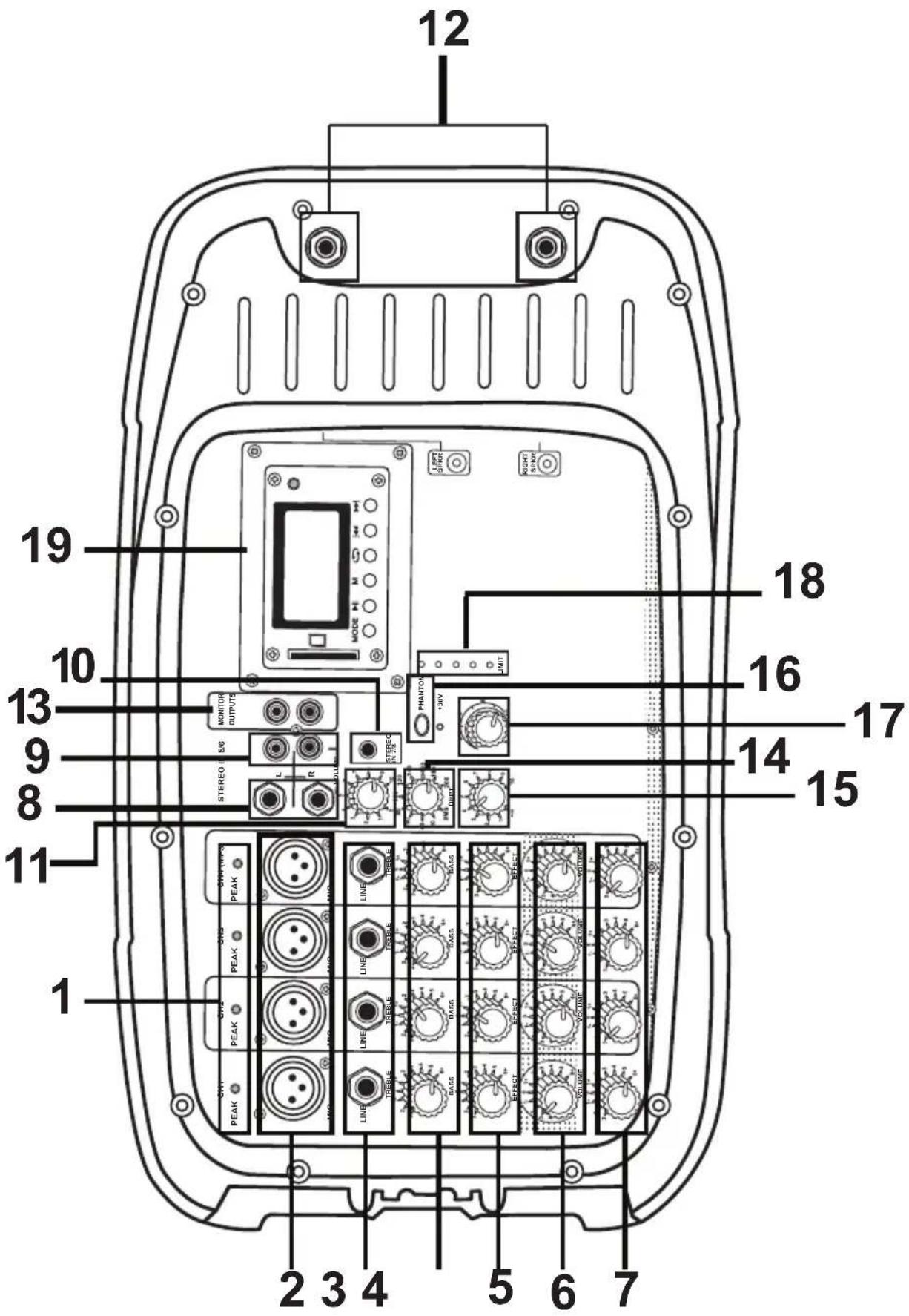
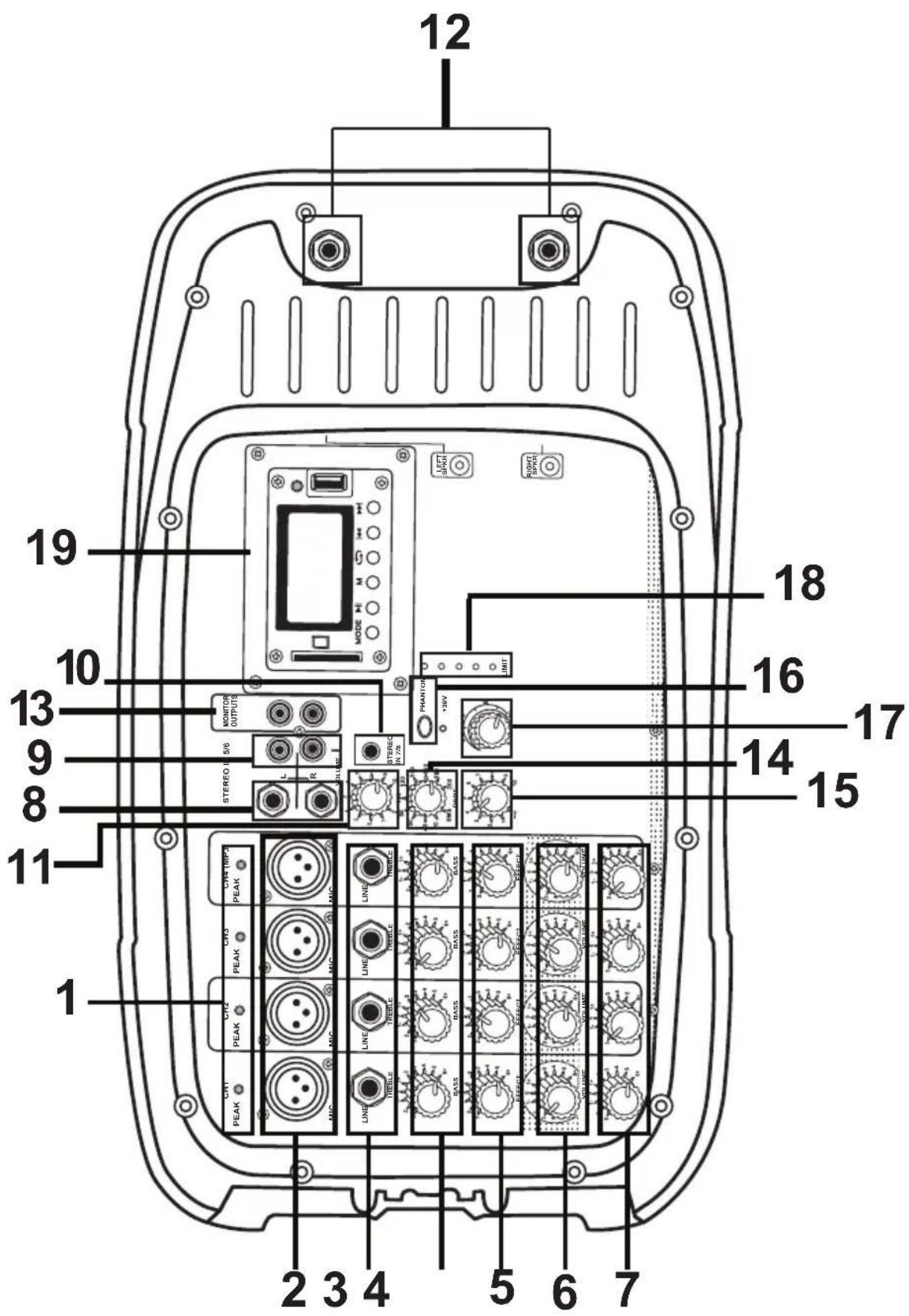
Console overview
- LED indicators (Green: Channel active / Red: Overload)
- Inputs (balanced) Cannon
- Inputs (unbalanced) 6.3 mm
- High Frequency Controls
- Low-frequency controls
- Effect Controls
- Channel Volume
- Inputs (stereo) 6.3 mm
- Inputs (stereo) RCA
- Input (stereo) 3.5 mm
- Volume control of stereo inputs
- Speaker connectors
- Auxiliary outputs RCA (recorders, baffles, etc.)
- Effect delay time
- Intensity of effect
- Power supply for condenser microphones (PHANTOM)
- Master Volume
- Saturation LED indicators (VUMETER)
- Playback module
BAF-520
BAF-520BT
Connections
BAF-520

Connections
BAF-520BT
Playback module
BAF-520

The controls corresponding to Channel 4 Also suitable for MP3 player

- Display
- SD card slot (with MP3 files)
- No function
- Play / Pause
- Playback menu *
- Repeat tracks (ALL: all / Folder: one folder / One: one track / Random: all randomly)
- Previous track / Fast rewind **
- Next track / Fast forward **
* Use the buttons |◀◀ ▶▶| to scroll through the options. Press ▶|| to confirm and M to exit.
**Press and hold
Playback module
BAF-520BT

The controls corresponding to Channel 4 Also suitable for MP3 player

- Display
- SD card slot (with MP3 files)
- Change playback mode (SD / USB / Bluetooth / FM Radio)
- Play / Pause / Automatic Search for FM stations
- Playback menu *
- Repeat tracks (ALL: all / Folder: one folder / One: one track / Random: all randomly)
- Previous FM Station / Track / Fast Backward **
- Next FM Track / Station / Fast Forward **
- USB memory port (with MP3 files)
* Use the buttons |◀◀ ▶▶▶| to scroll through the options. Press ▶▶▶ to confirm and M to exit.
**Press and hold
Remote control

- Play / Pause / Automatic search of FM stations *
- Manual selection of FM station *
- Equalization
- Decrease / Increase volume
- Previous track / Previous FM station *
- Next track / Next FM station *
- Direct selection of track number
- Not available for this version
- Repeat
- Change playback mode * (SD / USB / Bluetooth / FM Radio)
* Only for BAF-520BT
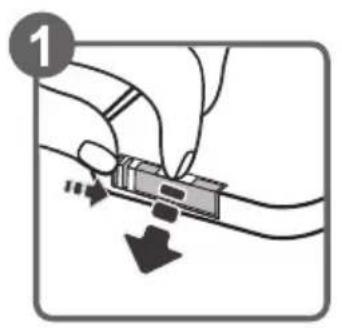
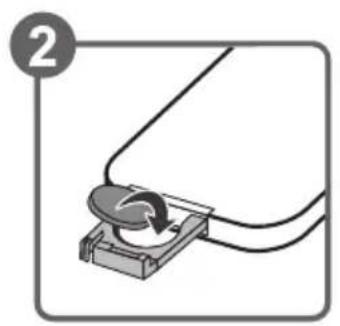
Battery Replacement
Insert a CR2025 battery. Be sure to place it with the polarity as follows:
natural_image
Simple line drawing of a mechanical device with a circular component and wires, no text or symbols present.
natural_image
Simple line drawing of a mechanical component with a circular base and wires, no text or symbols present.Playback options
From the module you can play music via Bluetooth *, SD memory or USB *, and tune into FM radio stations *.
Go to pages 11 and 12 of this manual to learn how to control playback from the module, or pages 13 and 14 to view the remote control functions.
Bluetooth connection\*
- Press the MODE button on the module or on the remote control to switch to Bluetooth mode.
- Enter the Bluetooth options on the device you want to link.
- Locate and select Steren BAF-520BT. If the connection is successful, the display will read "Connected!"
- Start playback from the device.
SD/USB memory\*
-
Insert SD or USB memory with MP3 files into the corresponding port.
-
Press the MODE button on the module or remote control to switch to SD or USB mode. Playback will start automatically
Radio FM\*
Press the MODE button on the module or on the remote control to switch to FM radio mode.
*Only model BAF-520BT
Specifications
Input: 120 V \~ 60 Hz 100 W máx
Frequency response: 50 Hz – 20 kHz < 1dB
Phantom output: 30 V
THD: < 0,1%
SNR: < -110 dB
Consumption: 60W/h
Standby Power consumption: Not applicable
Remote control
Frequency response: 50 Hz – 20 kHz + 3dB @ 1 W
- Importante
- Encender el equipo
- Conexiones
- BAF-520
- BAF-520BT
- Important
- Cautions
- Content
- How to get started with the system
- Remove the battery compartments
- Install the baffles
- Turn on the equipment
- Console overview
- Connections
- Playback module
- The controls corresponding to Channel 4 Also suitable for MP3 player
- Remote control
- Battery Replacement
- Playback options
- Bluetooth connection\*
- SD/USB memory\*
- Radio FM\*
- Specifications
Brand : Steren
Model : BAF-520BT
Category : Sound system