
SPUBT710 - Loudspeaker Sunstech - Free user manual and instructions
Find the device manual for free SPUBT710 Sunstech in PDF.


| Product Type | Portable Bluetooth Speaker |
| Brand | Sunstech |
| Model | SPUBT710 |
| Dimensions (L x H x W) | 20 x 10 x 10 cm |
| Weight | 0.8 kg |
| Power Supply | Rechargeable lithium-ion battery 2000 mAh |
| Battery Life | Up to 10 hours |
| Charging Time | Approximately 3 hours |
| Connectivity | Bluetooth 5.0, USB port, AUX input |
| Bluetooth Range | 10 meters |
| Output Power | 10 W RMS |
| Frequency Response | 80 Hz - 20 kHz |
| Main Functions | Bluetooth playback, hands-free, playback controls, FM radio |
| Care and Cleaning | Clean with a soft, dry cloth, avoid liquids |
| Safety | Do not expose to water or extreme temperatures |
| Spare Parts and Repairability | Battery replaceable by a professional |
| Box Contents | Speaker, USB cable, AUX cable, user manual |
| Warranty | 2 years |
Frequently Asked Questions - SPUBT710 Sunstech
User questions about SPUBT710 Sunstech
0 question about this device. Answer the ones you know or ask your own.
Ask a new question about this device
Download the instructions for your Loudspeaker in PDF format for free! Find your manual SPUBT710 - Sunstech and take your electronic device back in hand. On this page are published all the documents necessary for the use of your device. SPUBT710 by Sunstech.
USER MANUAL SPUBT710 Sunstech
natural_image
Abstract illustration of a white sphere resting on a gray book with a small circle and crescent moon against a dark background (no text or symbols)SPUBT710
PORTABLE SPEAKER
USER GUIDE
ENGLISH
User guide
SPUBT710
CONTENT
- PRODUCT OVERVIEW AND KEY MAP .... 1
- USING TF CARD OR PEN DRIVE 2
- FM RADIO 2
- AUX 2
- BLUETOOTH....2
- CHARGING 3
- SET AUTO POWER OFF THE SPEAKER 3
- ALARM....3
- TECHNICAL INFORMATION......4
- WARNINGS....5
ENGLISH
User guide
SPUBT710
1. PRODUCT OVERVIEW AND KEY MAP


- USB port, support pen drives up to 32GB
- Micro SUB for charging with an external adaptor (not included) 5V/500Mha
- TF Card reader up to 32GB
- AUX conector
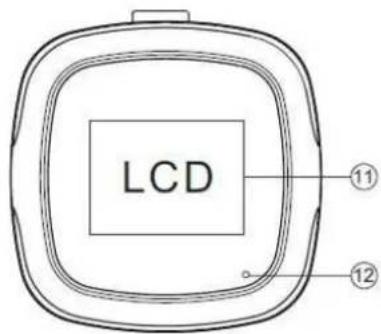
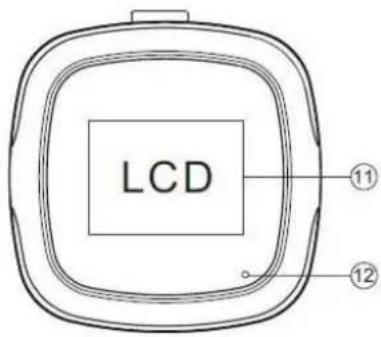
- Indicator, when turn on will be BLUE
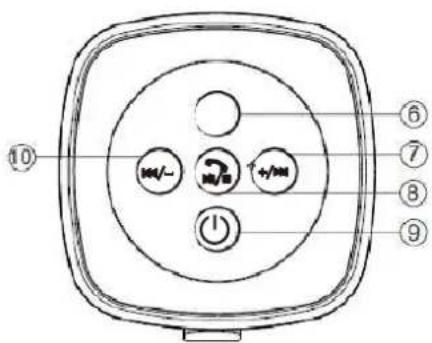
- Menu, turn on speaker then press shortly MENU to enter MENU functions, after selecting the desire function press shortly to confirm.
- ▶▶ / Volume UP, Press shortly to move on to the next song/track, press long to increase volume level.
In the main interface, short press to show the Calendar, System Settings, FM RADIO, Bluetooth, Music.
- Play / Pause / Hands-free, While playing music from TF Card /
U-disk/AUX or listening to radio, press the key shortly to pause or restart music playback.
Short press to answer or reject a call under Bluetooth mode.
- Power ON/OFF, Kepp pressing POWER key for 2 seconds to turn on the speaker, indicator light will turn BLUE, use same operation to turn OFF the speaker.
In the main interface, short press the switch from Calendar to System settings, FM radio, Bluetooth or Music.
- LCD Screen
- Microphone
2. USING TFFCARDORPENDRIVE
Turn on the speaker, plug in the TF car or Pen Drive in the corresponding slot, it will begin to streaming music automatically.
Press the 🔊 key to Play / Pause; Press the key ◀ / - to go back to last song or decrease the volume, pres de key /+ to move on to the next song or increase the volume.
While streaming music user can press the key to switch from TF/SD Card to U-Disk (Pen Drive) or to set CYCLE MO DE or EQ SETTINGS.
3. FM RADIO
Please plug charging cable (supplied with the speaker) IN THE dc-5v SLOT FOR BETTER RECEPTION. Press MENU to select FM Radio. Afer that press MENU shortly to select manual search or automatic search (automatic search and save all the radio station avaliables at the time) when the speaker finishes searching users can press 📂 to move to the next station.
4. AUX
Plug one en of the 3.5mm audio cable into the AUX convection of the speaker and the other end into the audio AUX convection of your mobile phone, notebook, tablet or MP3/MP4 player, afeter that you can start playback music in the source device and listening trogh the speaker.
5. BLUETTOOTH
Turn on the speaker and switch to bluetooth in the main interface. Bluetooth will automatically sear for previous paring devices, if the speaker fails to link with a previous device you will need to search and pair a new device, when requested the PIN CODE is "0000".
After the speaker success to pair with a phone or other device you can start playing music trogh the speaker.
ENGLISH
User guide
SPUBT710
6. CHARGING
Plug the charging cable into the Micro USB slot of the speaker, use your PC USB slot to plug in the other end of the USB cable to charge the speaker, the led indicator will turn RED, once the speaker is fully charged the led will turn OFF.
7. SET AUTO POWEROFF THE SPEAKER
When the speaker is on standby press MENU to select System Settings → Tool → Power off Set, press ◀◀/- ▶▶/+ to set the time, press MENU to confirm the changes, press 📋 to go back.
8.ALARM
When the speaker is on standby press MENU to enter the System Settings → Tool → Alarm, after that start setting Alarm OFF, Time cycle, Alarm Signal, Volume. When changes are made press Menu to confirm.
9. TECHNICAL INFORMATION
Function
TF Card, AUX, USB-disk, Bluetooth, FM, Hands-free
Bluetooth Version V3.0
Transmission Distance of Bluetooth
10 meters
Power Supply
DC 5V, lithium battery
Battery 3.7V 600MAH lithium battery
Output 3W
Frequency 150Hz-18 KHz
Diameter of Driver 45mm
Audio Slot 3.5mm audio slot
Antimagnetic function Available
Material Metallic material + ABS plastic
ENGLISH
User guide
SPUBT710
10. WARNINGS
 | Correct disposal of this Product(Waste Electrical & Electronic Equipment)(WEEE)Your product is designed and manufactured with high quality materials and components which can be recycled and reused.This symbol means that electrical and electronic equipment, at their end of-life should be disposed of separately from your household waste.Please dispose of this equipment at your local community waste collection/recycling centre.In the European Union there are separate collection systems fo used electrical and electronic products. Please help us to conserve the environment we live in! |
 | DO NOT place objects on top of the device, as objects may scratch the device. |
 | DO NOT expose the device to dirty or dusty environments. |
 | DO NOT place the device on an uneven or unstable surface. |
 | DO NOT insert any foreign objects into the device. |
 | DO NOT expose the device to strong magnetic or electrical field. |
 | DO NOT expose the device to direct sunlight as it can damage the device. Keep it away from heat sources. |
 | DO NOT store your device in temperatures higher than 40°C(104°F). The internal operating temperature for this device is from 20°C(68°F) to 60°C(140°F). |
ENGLISH
User guide
SPUBT710
 | DO NOT use the device in the rain. |
 | Please check with your Local Authority or retailer for proper disposal of electronic products. |
 | The device and adaptor may product some heat during normal operation of charging. To prevent discomfort or injury from heat exposure, DO NOT leave the device on your lap. |
 | POWER INPUT RATING: Refer to the rating label on the device and be sure that the power adaptor complies with the rating. Only use accessories specified by the manufacturer. |
 | Clean the device with a soft cloth. If needed, dampen the clot slightly before cleaning. Never use abrasives or cleaning solutions. |
 | Always power off the device to install or remove external devices that do not support hot-plug. |
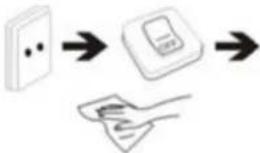 | Disconnect the device from an electrical outlet and power off before cleaning the device. |
 | DO NOT disassemble the device. Only a certified service technician should perform repair. |
 | The device has apertures to disperse heat. DO NOT block the device ventilation, the device may become hot and malfunction as a result. |
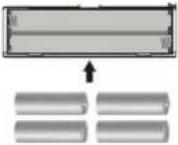 | Risk of explosion if battery replaced by an incorrect type. Dispose of used batteries according to the instruction. |
ENGLISH
User guide
SPUBT710
 | PLUGGABLE EQUIPMENT: the socket-outlet shall be installed near the equipment and shall be easily accessible. |
 | European Union: Disposal Information.This symbol means that according to local laws and regulations your product and/or its battery shall be disposed of separately from household waste. When this product reaches its end of life, take it to a collection point designated by local authorities. The separate collection and recycling of your product and/or its battery at the time of disposal will help conserve natural resources and ensure that it is recycled in a manner that protects human health and the environment. |
| MADE IN CHINA | |

natural_image
Abstract illustration of a white sphere resting on a gray book with a white circle and a small crescent, against a dark background (no text or symbols)SPUBT710
ALTAVOZ PORTÁTIL
GUÍA DE USUARIO
ESPAÑOL
Guía del usuario
SPUBT710
CONTENIDO
- RESUMEN DEL PRODUCTO Y GUÍA DE TECLAS......1
- UTILIZAR TARJETA MICRO SD O MEMORIA USB ......2
- RADIO FM 2
- AUX 2
- BLUETOOTH....2
- CARGANDO .... 3
- CONFIGURAR EL APAGADO AUTOMÁTICO DEL ALTAVOZ..... 3
- ALARMA 3
- INFORMACIÓN TÉCNICA......4
- ADVERTENCIAS....5
ESPAÑOL
Guía del usuario
SPUBT710
1. RESUMEN DEL PRODUCCO YGGÍA DE ETELASAS


natural_image
Abstract illustration of a white sphere resting on a gray book with a white circle and a small crescent, against a dark background (no text or symbols)SPUBT710
HAUT-PARLEUR PORTABLE
GUIDE DE L'UTILISATEUR
FRANÇAIS

natural_image
Abstract illustration of a white sphere resting on a gray book with a white circle and a small crescent, against a dark background (no text or symbols)SPUBT710
ALTIFALANTE PORTÁTIL
GUIA DO UTILIZADOR
PORTUGUÊS
Guia do utilizador
SPUBT710
CONTEÚDO
- VISÃO GERAL DO PRODUTO E MAPA DE TECLAS......1
- UTILIZAR CARTÃO TF OU DISPOSITIVO PEN....2
- RÁDIO FM 2
- AUX 2
- BLUETOOTH....2
- A CARREGAR....3
- CONFIGURAR DESLIGAR AUTOMÁTICO NO ALTIFALANTE..... 3
- ALARME ....3
- INFORMAÇÃO TÉCNICA 4
- ADVERTÊNCIAS....5
PORTUGUÊS
Guia do utilizador
SPUBT710
1. VISÃO GERALDO PRODUDE MAPARDETECHAS

For you. For everyone.

- SPUBT710
- PORTABLE SPEAKER
- ENGLISH
- CONTENT
- User guide
- PRODUCT OVERVIEW AND KEY MAP
- USING TFFCARDORPENDRIVE
- FM RADIO
- AUX
- BLUETTOOTH
- CHARGING
- SET AUTO POWEROFF THE SPEAKER
- 8.ALARM
- TECHNICAL INFORMATION
- WARNINGS
- ESPAÑOL
- Guía del usuario
- CONTENIDO
- RESUMEN DEL PRODUCCO YGGÍA DE ETELASAS
- FRANÇAIS
- PORTUGUÊS
- Guia do utilizador
- CONTEÚDO
- VISÃO GERALDO PRODUDE MAPARDETECHAS
Brand : Sunstech
Model : SPUBT710
Category : Loudspeaker