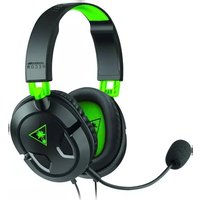
Ear Force Recon 50X - Headphones TURTLE BEACH - Free user manual and instructions
Find the device manual for free Ear Force Recon 50X TURTLE BEACH in PDF.


| Brand | Turtle Beach |
| Model | Ear Force Recon 50X |
| Product Type | Wired Gaming Headset |
| Connectivity | 3.5mm Audio Jack |
| Driver Size | 40mm Neodymium Speakers |
| Frequency Response | 20Hz - 20kHz |
| Impedance | 32 Ohms |
| Sensitivity | 96 dB |
| Microphone Type | Omnidirectional, Flip-to-Mute |
| Cable Length | 1.2 m (4 ft) |
| Weight | 195 g (6.9 oz) |
| Color Options | Black / White / Green |
| Compatibility | Xbox One, Xbox Series X|S, PlayStation 4/5, Nintendo Switch, PC, Mobile |
| Main Features | Lightweight design, high-quality audio, flip-to-mute microphone, in-line volume/mute controls |
| Safety | Moderate listening levels to prevent hearing damage |
| Care & Cleaning | Wipe with a soft, dry cloth. Avoid moisture and chemical cleaners. |
| Replaceable Parts | Ear cushions can be replaced with compatible aftermarket pads |
| Repairability | Non-replaceable cable; repair limited to headband and ear cushion replacement |
| Warranty | 1 year limited warranty |
Frequently Asked Questions - Ear Force Recon 50X TURTLE BEACH
User questions about Ear Force Recon 50X TURTLE BEACH
0 question about this device. Answer the ones you know or ask your own.
Ask a new question about this device
Download the instructions for your Headphones in PDF format for free! Find your manual Ear Force Recon 50X - TURTLE BEACH and take your electronic device back in hand. On this page are published all the documents necessary for the use of your device. Ear Force Recon 50X by TURTLE BEACH.
USER MANUAL Ear Force Recon 50X TURTLE BEACH
Any Questions? Des questions ? turtlebeach.com/Recon50X | turtlebeach.com/Support

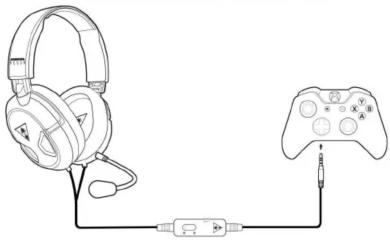
Xbox One Setup Configuration Xbox One
natural_image
Line drawing of a game headset connected to a game controller via cable (no text or symbols)
Note/ Remarque
The Recon 50X requires the NEW Xbox One Controller (with 3.5mm headset jack). Purchase the Ear Force Headset Audio Controller from turtlebeach.com for use with the original Xbox One Controller.
natural_image
Line drawing of a game headset connected to a handheld gaming controller via cable (no text or symbols)- Go to Settings >> Devices >> Audio Devices
- Select Headset Connected to Controller for Input & Output Device
- Set Output to Headphones to All Audio
- Set Volume Control [Headphones] level to maximum
- Select Adjust Microphone Level and follow the on-screen instructions to calibrate your microphone

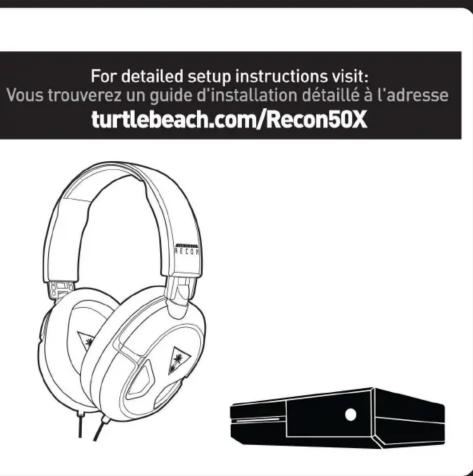
Removable Mic Boom
Microphone amovible
PT 1. Go to Settings >> Devices >> Audio Devices
-
Select Headset Connected to Controller for Input & Output Device
-
Set Output to Headphones to All Audio
- Set Volume Control (Headphones) level to maximum
- Select Adjust Microphone Level and follow the on-screen instructions to calibrate your microphone
Regulatory Compliance Statements for the EAR FORCE Recon 50 Model
Federal Communications Comm Class B Interference Statement
This equipment has been tested and found to comply with the limits for a Class B digital device, pursuant to Part 15, Subpart B of the FCC Rules. These limits are designed to provide reasonable protection against harmful interference in a residential installation. This equipment generates, uses, and can radiate radio frequency energy and, if not installed and used in accordance with the instructions, may cause harmful interference to radio communications. However, there is no guarantee that interference will not occur in a particular installation. If this equipment does cause harmful interference to radio or television reception, which can be determined by turning the equipment off and on, the user is encouraged to try to correct the interference by one or more of the following measures:
• Reorient or relocate the receiving antenna.
- Increase the separation between the equipment and receiver. - Connect the equipment into an outlet on a circuit different from that to which the receiver is connected
• Consult the dealer or an experienced radio/TV technician for help.
FCC Cautien:
This device complies with Part 15 of the FCC Rules. Operation is subject to the following two conditions: (1) This device may not interfere with (ii) this device must contact any interference received including interference that may have undetected operation.
interference, and (2) this de Canadian ICES Statements
Canadian Department of Communications Radio Interference Regulations
This digital apparatus does not exceed the Class B limits for radio-noise emissions from a digital apparatus as set out in the Radio Interference
Regulations of the Canadian Department of Communications. This Class B digital apparatus complies with Canadian ICES-003.
Declaration of Conformity
Letting the model
Marking by this symbol: CE
Indicates compliance with the Essential Requirements of the EMC
Directive of the European Union (2004/108/EC). This equipment meets
the following conformance standards:
Safety:
EN 60950-1: 2006 + A11: 2009 + A1: 2010 + A12: 2011 (T-Mark License) JEC (0950.1: 2005 [2nd Edition] + Am 1: 2009 [CR Scheme Report/Partif
IEC 804950-1: 2003 (2nd Edition) + Am 1: 2009 (LB Scheme Report, Certificate).
EN 50332-1: 2000, EN 50332-2: 2001, EN 71-3: 2013 LOW Voltage Directive 100kV/μFEC, RHD 2011/03/EC, REACH 2006/1907/EC. WEEE 2012/19/EU. Packaging \$4/42/EC.
Also Licensed for Standards: Toys Safety Directive 2009/48/EC
UL 60950-1: 2007 R12.11, CAN/CSA-C22.2 No. 60950-1-07 * A1: 2011
The image is too blurry to recognize any text content.
Instead, it is your responsibility to dispose of your waste equipment by handing it over to a designated collection point for the recycling of waste electrical and electronic equipment. The separate collection and recycling of your waste equipment at the time of disposal will help conserve natural resources and ensure that it is recycled in a manner that protects human health and the environment. For more information about where you can drop off your waste for recycling, please contact your local authority, or where you purchased your product.
Please visit the following URL for a complete copy of the declaration of conformity: http://www.turtlebeach.com/homologation
Brand : TURTLE BEACH
Model : Ear Force Recon 50X
Category : Headphones