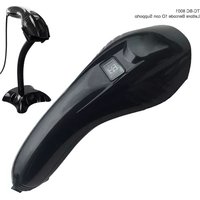
TC-BC 8001 - Barcode scanners TECNO - Free user manual and instructions
Find the device manual for free TC-BC 8001 TECNO in PDF.


| Product Type | Laser Barcode Scanner |
| Brand | Tecno |
| Model | TC-BC 8001 |
| Interfaces | USB, RS232, PS/2 |
| Power Supply | DC 5V ±5% |
| Operating Current | 50mA (operating), 30mA (standby), 100mA (max) |
| Light Source | Visible laser 650nm |
| Laser Class | Class 2 (IEC 60825-1) |
| Decoding Capability | Code 39, Code 93, Code 128, Code 11, UCC/EAN 128, EAN 8, EAN 13, UPC A, ISSN, ISBN, Industrial 25, Interleaved 25, Codabar, MSI, Plessey, GS1, etc. |
| Scan Speed | 300 scans/sec |
| Resolution | Minimum 0.1mm (4 mils) |
| Depth of Field | 2-5cm (0.1mm bar width); 3-50cm (0.3mm bar width) |
| Scan Width | 5cm - 30cm |
| Operating Temperature | 0°C to 50°C (32°F to 122°F) |
| Storage Temperature | 0°C to 50°C (32°F to 122°F) |
| Operating Humidity | 20% - 85% (non-condensing) |
| ESD Protection | 15KV air discharge |
| Shock Resistance | 1.5m free fall on concrete surface |
| Material | A85+178+PC |
| Weight (estimated) | approx. 160g |
| Dimensions (estimated) | approx. 17.5 x 7.0 x 8.5 cm |
| Maintenance | Clean lens with a soft, dry cloth. Avoid liquids and abrasive cleaners. |
| Safety Precautions | Avoid direct eye exposure to laser beam. Use only specified power supply. |
Frequently Asked Questions - TC-BC 8001 TECNO
User questions about TC-BC 8001 TECNO
0 question about this device. Answer the ones you know or ask your own.
Ask a new question about this device
Download the instructions for your Barcode scanners in PDF format for free! Find your manual TC-BC 8001 - TECNO and take your electronic device back in hand. On this page are published all the documents necessary for the use of your device. TC-BC 8001 by TECNO.
USER MANUAL TC-BC 8001 TECNO
USB Laser Scanner Barcode
Modello TC- PB 8001
Manuale D' Uso

7121100004
V:1607
RS232
natural_image
Illustration of a desktop computer setup with monitor, tower, and handheld device (no text or symbols visible)Technical Parameters
Physical parameters
| Material | A85+178+PC |
| Power supply | DC 5V +5% |
| Operating current | 50ma(operating mode);30ma(standby mode);100ma(maximum) |
| Colescent current | 20mA |
Performance parameters
| Interface | USE, RS232, PS/2 |
| Baud rate | RS232 baucrate: 60C-115200 |
| Light source | Visible laser 650nm (National laser safety standard Class *) |
| Decoding Capability | Code 39,Code 93,Code128,Code11,UCC/EAN 126, EAN B,EAN 13,UPC A,ISSN i 2,ISSN i 5,Industrial 25,etc. |
| Trigger model | Manual operation;Autosensing scanning; Continuous scanning |
| Sensing distance | 15cm(100cm2) |
| Resolution | Minimum 0.1mm(4mils) |
| Depth of field | 2—5cm(0.1mmbar width):3—50cm(0.3mm bar width) |
| Decoding speed | 300scans/sec |
| Scan width | 5cm—30cm |
| Prompt Mode | Buzzer, Indicator light |
| Contast | 30% |
| Contrast | Roll 30°, Pitch 75°, Yaw 65° |
| Cylinder Horizontal | Diameter 35mm |
Environmental parameters
| Operating Temp. | 0 to 50 °C / 32 to 122 °F |
| Storage Temp. | 0 to 50 °C / 32 to 122 °F |
| Operating Humidity | 20 - 85% (non-condensing) |
| Storage Humidity | 20 - 85% (non-condensing) |
| ESD Protection | 15KV air discharge |
| Shock resistance | 1.5m free fall on concrete surface |

Show Version Info
(user-defined)

Show Serial NO (user-defined)

set Factor Defaults
Interface

Default Interface

PS2 Keyboard Wedge

Serial

USB Keyboard Wedge

USB Serial
Reading Mode

Default Mode

Single Scan No Trigger

Multiscan

Multiscan No Trigger

Continuous Scan

Buzzer Serial Mode Parameter Settings (Baud Rate)

ON

CFF
Add Code ID

No Code ID

Send Code ID as Prefix

Send Code ID
as Soffia
Language Settings

America—nglis

Canada French

Dutch

Spanish

Argentina(Latin)

Brazil Portuguese

Danish

ngland — ngli

Italian

France French

2017.05.1

Norway

Swedish, Finnish

Slovak

Portugal Portugueso

Switzerland
German French

Croatian

Hungarian

600bps

120Gbps

2400bps

4830726

2603bps

19203bus

38400bps

37500Bp

11570bps
Serial Protocol

Serial XON/OFF

Serial RTS/CTS

Serial ACK/NA

Hand Shake

Hand Shake
Data Bits

Stop Bits

Check Digits

Nore


ODD


Mark Check Digit

Space Check Digit
Transmit Speed


Image


UPC-A


Coco 39


—AN13

—AN13 o

AN13 pI

AN13 ID as 'r
Code93

Code93/on

Code93/ off

Code 93 ID as 'T'

transmit—ANT
check code-enable

Convert—AN1
into ISBN-ENABLE

Transmit —ANT
check code-disable

Convert — AN1
into ISBN - disable

Code93

Code 93 MOD47/cn

Code 13
raduadang:disabia

Code 93 MOD47/off

Convert — ANT into ISSN, digital

—ANT
redundancy enable

Convert — AN1 into ISO, serial

—ANT
redundancy disable
Code12B

Code128/on

Code128/off

Code 128 ID a

—AN8/a

—AND/o

—ANB ID as

Code128
redundancy disable

Code128 redundancy enable
Códabar

Codabar/on

Codabar/off

Codabar ID as V

Supplements -5 digits

Supplements 2&5 digits

Supplements-2 digits


Codabar Send start/stop CHARS-enable

Codabar redundancy enable

Codabar Sand start/stop CHARS-disable

redundancy disable
Interleaved 25

Interleaved/TT25-on

Interleaved/TT25-off

IT25 ID as 'n'

11725 redundancy disable

ITF25 redundancy enable
Code 11

Code11/on

Code11/off

Code 11 ID as U

Code11 idency disable
Industrial 25

Industrial 257 on

Industrial 25/ off

Industrial 25 D as 'o'

Code11 redundancy enable

Code11 auto CK verify

Industrial 2.5 redundancy enable

Industrial 25 redundancy disable

Code11 C verify


Code MSI

Code MS/01

Code M51/01

MSI ID as 's
Matrix 25

Matrix 25/cn

Matrix 25/off

Matrix 25 D as 'a

Code MSI redundancy disable

Code MSI redundancy enable

Postage Code 25/0n

Postage Code 25/off
Code Plessey

Code Plessey

Code Plessey/off

Code Plessey ID as Y

Postage Code 251D as ?


Aviation 25 ID as p

Coral Plessey redundancy disable

Code Plessey redundancy enable
GS1

GS1 Omnidirectional/on

G51 Omnidirectional/off
Front/Behind CHARS Settings

Hide CHARS-disable

Hide CHAIRS

GS1 Omni ID as T


GS1 Limited ID as 'k

Replace '0' with 'A -disable

Replace V with 'A' enable

FUNC

Cancel FUNC Mapping

Replace TUNCT with 'D

Replace 'I with 'ON—disable

with ON—enable


Replace TUNC4 with 6"

Delete CHARS in front of '12345' disable

Delete CHARS in front of '12345'
USB Upload

USA quick upload/on

USB quick upload/off
IR Auto-sensing

IR Auto-sensing/on


Don't want upload without ASCI CHARS
Hide Characters

Hide the behind CHARS-disable

Hide the front

Hide the middle character, disable

Starting from the front fourth CHAB

Hide the last 5 characters—equivalve

Hide the front 5

Hide the middle 5

nter into checking mode (used with caution)
Prefix & Suffix Setting

All codes add suffix CR

All codes add suffix CR-CR

LF all codes add suffix - T


All codes add suffix format CHARS disable

All codes add suffix F2

All codes add prefix disable

Set to add prefix


Clear all prefix CHARS
Multiscan Settings

3 sec

5 sec
Conversion of —AN, ISBN & ISSN

Convert all — At into ISBN - enable

Convert all — At

sec

Convert all — AI into ISBN - disable

Convert all —N
Alphabet
| SOH | STX | —T |
| G | —VQ | ACK |
| E-L | Backspace | TAB |
| LE | VT | SF |
| CR | SO | SI |
| DL | DC1 | DC2 |
| DC3 | DC4 | DARK |
| 2PN | —F | CAN |
| —K | SUB | —Si |
| FS | GS | RS |
| JS | SPAC | S |
TE
EC - Dichia
1999/5/EC

Brand : TECNO
Model : TC-BC 8001
Category : Barcode scanners