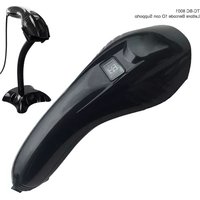
TC-BC2D-10 - Barcode scanners TECNO - Free user manual and instructions
Find the device manual for free TC-BC2D-10 TECNO in PDF.


Pick your language and provide your email: we'll send you a specifically translated version.
| Product Type | 2D Barcode Scanner |
| Model | TC-BC2D-10 |
| Brand | TECNO |
| Scan Technology | CMOS Image Sensor |
| Barcode Types Supported | 1D: UPC/EAN, Code 128, Code 39, Interleaved 2 of 5, etc.; 2D: QR, Data Matrix, PDF417, etc. |
| Scan Angle | Horizontal: 60°, Vertical: 40° |
| Reading Distance | Up to 200 mm (depending on barcode density) |
| Scan Rate | 300 scans per second (typical) |
| Resolution | 1280 x 960 pixels |
| Interface | USB HID / Virtual COM / USB Keyboard Emulation |
| Connectivity | USB 2.0 (Type-A cable) |
| Power Supply | USB Powered (5V DC, 500mA) |
| Cable Length | 1.5 meters (straight cable) |
| Dimensions (W x D x H) | 170 x 70 x 100 mm (approx.) |
| Weight | 150 g (approx.) |
| Material | ABS Plastic, Rubberized grip |
| Operating Temperature | 0°C to 50°C |
| Storage Temperature | -20°C to 70°C |
| Humidity | 5% to 95% (non-condensing) |
| Drop Resistance | 1.5 m onto concrete |
| LED Indicators | Power, Good Read, Error |
| Buzzer | Programmable tone for successful scan |
| Operating Systems Supported | Windows, macOS, Linux, Android, iOS (via OTG) |
| Spare Parts Available | Replacement cable, stand, trigger assembly |
| Cleaning Instructions | Wipe with a soft, slightly damp cloth; do not use abrasives or solvents. |
| Safety Certifications | FCC, CE, RoHS |
Frequently Asked Questions - TC-BC2D-10 TECNO
How do I connect the TC-BC2D-10 to my computer?
Connect the USB cable to a compatible USB port. The scanner will automatically power on and be recognized as a HID keyboard device. For advanced configuration, download the TECNO Barcode Scanner Utility from the official website.
What types of barcodes can this scanner read?
It reads all major 1D barcodes (UPC, EAN, Code 128, Code 39, Interleaved 2 of 5, etc.) and 2D codes such as QR Code, Data Matrix, PDF417, and Aztec.
Does the scanner require special drivers?
For basic keyboard emulation, no drivers are needed. For serial emulation or custom formatting, install the virtual COM port drivers available on the TECNO support page.
How do I clean the scanner?
Disconnect the scanner. Wipe the exterior with a soft, lint-free cloth slightly dampened with water or isopropyl alcohol. Do not spray liquids directly. Avoid abrasive cleaners.
What should I do if the scanner stops scanning?
Check the USB connection. If using a USB hub, try a direct port. Ensure the barcode is intact and well-lit. Reset the scanner by scanning the Reset to Factory Defaults configuration barcode in the manual.
Can the scanner be used wirelessly?
The TC-BC2D-10 is a wired USB scanner. It does not support Bluetooth or Wi-Fi. For wireless needs, consider TECNO's wireless models.
What is the maximum scanning distance?
Typical reading distance is up to 200 mm for high-contrast barcodes. For very small or low-quality codes, distance may reduce to 50 mm.
How do I configure the scanner to add a prefix or suffix?
Use the TECNO Barcode Scanner Utility software to program prefix/suffix, barcode formatting, and other settings. Alternatively, scan configuration barcodes from the user manual.
Is the scanner compatible with my POS system?
Yes, it works with any system that accepts keyboard input (Windows, macOS, Linux, Android). For serial input, configure the scanner to Virtual COM mode and install drivers.
What spare parts are available for this model?
Replacement USB cables, stands, and trigger assemblies are available from authorized TECNO distributors. Contact support for ordering.
User questions about TC-BC2D-10 TECNO
0 question about this device. Answer the ones you know or ask your own.
Ask a new question about this device
No questions yet. Be the first to ask one.
Download the instructions for your Barcode scanners in PDF format for free! Find your manual TC-BC2D-10 - TECNO and take your electronic device back in hand. On this page are published all the documents necessary for the use of your device. TC-BC2D-10 by TECNO.
USER MANUAL TC-BC2D-10 TECNO

Manual assistant
Powered by Anthropic
Waiting for your message
Product information
Brand : TECNO
Model : TC-BC2D-10
Category : Barcode scanners