
CS-2X - Musical instrument CASIO - Free user manual and instructions
Find the device manual for free CS-2X CASIO in PDF.


| Product Type | Electronic Keyboard (Musical Instrument) |
| Brand | Casio |
| Model | CS-2X |
| Number of Keys | 61 (Standard touch-sensitive keys) |
| Polyphony | 48 notes (maximum) |
| Built-in Tones | 200+ instrument sounds |
| Built-in Rhythms | 100+ accompaniment patterns |
| Display | Backlit LCD screen |
| Connectivity | USB-MIDI, Headphone output, Sustain pedal input |
| Power Supply | AC adapter (AD-E95100 or equivalent) or 6 x AA batteries |
| Dimensions (W x D x H) | Approx. 945 x 307 x 122 mm |
| Weight | Approx. 4.3 kg (without batteries) |
| Key Features | Touch response, Layer/Split, Metronome, Transpose, Reverb/Chorus effects |
| Learning Functions | Built-in song bank with step-up lessons |
| Maintenance & Cleaning | Wipe with a soft dry cloth; avoid solvents. Keep away from moisture and extreme temperatures. |
| Safety Warnings | Do not disassemble. Keep away from children under 3 years. Use only recommended power adapter. |
| Spare Parts & Repairability | Contact Casio service center for parts and repairs. Model-specific parts may be available. |
| General Information | Designed for beginners and intermediate players. Compact and portable for home practice or performance. |
Frequently Asked Questions - CS-2X CASIO
User questions about CS-2X CASIO
0 question about this device. Answer the ones you know or ask your own.
Ask a new question about this device
Download the instructions for your Musical instrument in PDF format for free! Find your manual CS-2X - CASIO and take your electronic device back in hand. On this page are published all the documents necessary for the use of your device. CS-2X by CASIO.
USER MANUAL CS-2X CASIO
MA1007-A Printed in China
Safety Precautions
Congratulations on your selection of the CASIO Product.
● Before using the instrument, be sure to carefully read through the instructions contained in this leaflet.
- Be sure to keep all user documentation handy for future reference.
Symbols
Various symbols are used in this leaflet and on the product itself to ensure that the product is used safely and correctly, and to prevent injury to the user and other persons as well as damage to property. Those symbols along with their meanings are shown below.
! WARNING
This indication stipulates matters that have the risk of causing death or serious injury if the product is operated incorrectly while ignoring this indication.
CAUTION
This indication stipulates matters that have the risk of causing injury as well as matters for which there is the likelihood of occurrence of physical damage only if the product is operated incorrectly while ignoring this indication.

Do not allow the bag to be placed over the head or ingested.
Never place the plastic bag this stand comes in over your head or in your mouth. Doing so creates the risk of suffocation. Particular care concerning this precaution is required where small children are present.
Avoid locating the instrument or stand on an unstable surface.
Do not locate the instrument or stand on an unsteady platform, on an uneven surface, or in any other unstable location. Doing so can cause the stand to fall over, creating the risk of personal injury.
About the stand
- When using the stand, make sure the two longer lengths of horizontal piping are on the floor (shorter lengths under the instrument). Never try to use the stand while it is upside down.
- Do not drop the stand or otherwise subject it to strong impact.
! WARNING
Do not climb up onto the instrument or stand.
Doing so can cause the stand to tip over, creating the risk of personal injury. Particular care concerning this precaution is required where small children are present.
CAUTION
About the stand
● This stand is intended for use with a CASIO Digital Keyboard only.
Improper use of this stand can cause the instrument to fall or the stand to tip over, creating the risk of personal injury.
Be sure to observe the following points.
– Use this stand only with the CASIO Digital Keyboard model for which it is intended.
- Do not try to use this stand for any other purpose or application.
- Be sure to remove the instrument from the stand before trying to move the stand.
- Be sure to remove the instrument from the stand before trying to adjust the height of the stand.
- The bolt of the stand can work loose due to the effects of temperature and humidity changes, vibration, and other factors. Because of this, you need to periodically check the bolt for proper tightness.
- Be sure to follow the assembly instructions precisely when assembling the stand and mounting the instrument on it. Failure to adequately tighten the bolt or improper positioning of the instrument can cause the stand to tip over and the instrument to fall, creating the risk of personal injury.
- When placing the instrument onto the stand, take care that you do not pinch your fingers.
- Never remove the bolt while the instrument is mounted on the stand. Doing so can cause the keyboard to fall and creates the risk of your hands becoming pinched by the stand legs.
Do not place heavy objects on the keyboard.
Do not place heavy objects on the keyboard. This may cause the keyboard to tip over or fall off the stand.
Parts List

• 4 pieces per set. Use changing the stand height, etc.

Cushioning sponges × 3

Bolt × 1

Washer × 1 Nut × 1

Allen wrench × 1Fastening ta

Stand Assembly / Mounting the Keyboard onto the Stand
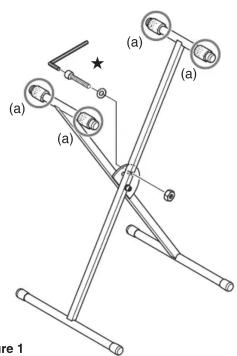
Figure 1

Figure 2
- With the longer lengths of horizontal piping towards the floor, pull the short pipes apart to expand the stand.
Fix the stand in its open position. As shown at ★ in Figure 1, pass the bolt through the washer and then through the hole in the stand. Affix the nut and then tighten with the Allen wrench that comes with the stand. - Tighten the bolt to the point that there is no space between the washer and bolt.
- You can adjust the stand to either of two heights.
- Affix the fastening tape to the bottom of the instrument as shown in Figure 2.
- Position four pieces of tape so they align with the tape on the stand, as shown in Figure 1 (a).
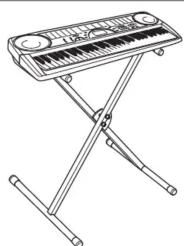
- Place the instrument onto the stand (Figure 3).
- Adjust the position of the instrument so the pieces of fastening tape engage with each other.
* If the stand is unstable, affix the cushioning sponges to the pipes of the legs (Figure 4). - Peel the tape from the backs of the sponges and then install them.
- Be sure to remove the instrument from the stand before affixing the sponges.
natural_image
Line drawing of a folding keyboard with stand (no text or symbols)
Figure 4
- Safety Precautions
- Symbols
- ! WARNING
- CAUTION
- Do not allow the bag to be placed over the head or ingested.
- Avoid locating the instrument or stand on an unstable surface.
- About the stand
- Do not climb up onto the instrument or stand.
- Do not place heavy objects on the keyboard.
- Parts List
- Stand Assembly / Mounting the Keyboard onto the Stand
Brand : CASIO
Model : CS-2X
Category : Musical instrument