
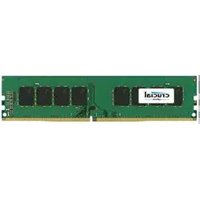
PC4-19200 - Memory Crucial - Free user manual and instructions
Find the device manual for free PC4-19200 Crucial in PDF.


| Product Type | Memory Module (RAM) |
| Brand | Crucial |
| Model | PC4-19200 |
| Memory Type | DDR4 |
| Speed | 2400 MHz |
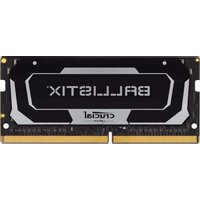
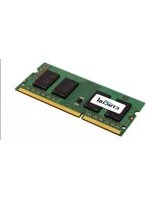
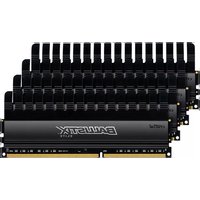
| Form Factor | SO-DIMM (laptop) or DIMM (desktop) |
| Capacity | Varies (e.g., 4GB, 8GB, 16GB) |
| Voltage | 1.2 V |
| CAS Latency | CL 17 (typical) |
| Dimensions (SO-DIMM) | Approx. 30 x 67.6 mm |
| Dimensions (DIMM) | Approx. 31.75 x 133.35 mm |
| Weight (SO-DIMM) | Approx. 7 g |
| Weight (DIMM) | Approx. 15 g |
| Pin Count | 260-pin (SO-DIMM) or 288-pin (DIMM) |
| Memory Bandwidth | 19200 MB/s |
| ECC Support | Non-ECC (usually) |
| Maintenance | Keep dust-free; avoid static discharge |
| Safety | Handle by edges; use anti-static precautions |
| Spare Parts & Repairability | Not applicable; RAM is not user-repairable |
| General Information | DDR4 memory for laptops or desktops; designed for reliable performance |
Frequently Asked Questions - PC4-19200 Crucial
User questions about PC4-19200 Crucial
0 question about this device. Answer the ones you know or ask your own.
Ask a new question about this device
Download the instructions for your Memory in PDF format for free! Find your manual PC4-19200 - Crucial and take your electronic device back in hand. On this page are published all the documents necessary for the use of your device. PC4-19200 by Crucial.
USER MANUAL PC4-19200 Crucial
natural_image
Technical line drawing of a multi-layered electronic component with multiple square slots and mounting holes (no text or symbols)Install Guide
General Memory Module Installation
Equipment needed
- Memory module(s)
- Non-magnetic-tip screwdriver (for removing the cover on your computer)
- Your system's owner's manual
Installation process
-
Make sure that you are working in a static-safe environment. Remove any plastic bags or papers from your work space.
-
Shut down your system and make sure the power is completely off before unplugging the power cable from your computer. For laptops, then remove the battery.
-
Discharge residual power by pressing the power button.
-
Remove your computer's cover. Refer to your owner's manual for how to do this.
-
To protect your new memory modules and your system's components from static damage during the installation process, touch any of the unpainted metal surfaces on your computer's frame before handling and installing memory.
- Using your system's owner's manual, locate your computer's memory expansion slots. Do not use any tools in the removal or installation of memory modules.
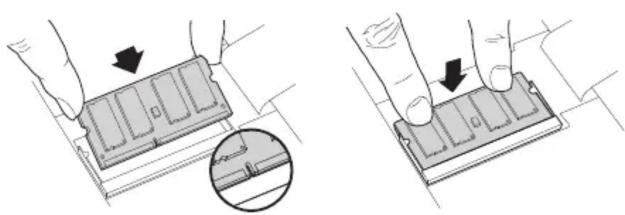
- Insert your new memory module(s) in accordance with the illustrations in this guide. Align the notch(es) on the module with the notch(es) in the slot, and then press the module down until the clips on the slot snap into place. (It can take 20 to 30 pounds of pressure to install a module.) Fill the memory slots on your computer starting with the highest density (i.e. put the highest density module in bank 0).
- Once the module(s) have been installed, replace the cover on your computer and reconnect the power cord or battery. Installation is now complete.
Desktop, server, and printer memory installation (DIMM modules)

natural_image
Diagram showing a hand pressing down on a RAM module with a magnified inset illustrating the internal structure (no text or symbols present)Using firm, even pressure, push DIMM into socket until clips snap into place. Do not assist clips.
Laptop memory installation (SODIMM modules)
natural_image
Two-step diagram showing hands holding a device with a magnified inset highlighting a component (no text or symbols present)Firmly push SODIMM in at 45irc angle, and then push down until clips snap into place.
Helpful hints & troubleshooting tips
If your system does not boot, check the following:
- If you receive an error message or hear a series of beeps, your system may not be recognizing the new memory. Remove and reinstall the modules to ensure they are securely seated in the sockets.
- If your system won't boot, check all of the connections inside your computer. It is easy to bump a cable and pull it out of its connector, disabling devices such as your hard drive or CD-ROM. If your system still won't reboot, contact Crucial Technical Support.
- When restarting your system, you may get a message prompting you to update the configuration settings. Refer to your owner's manual for information. If you are still unsure, please call Crucial Technical Support for assistance.
- If you get a memory mismatch message, follow the prompts to enter the Setup menu, and then select Save and Exit. (This is not an error—some systems must do this to update the system settings.)
If you encounter any of the following problems, please contact Crucial Technical Support:
- Your module doesn't seem to fit; do not force it into the socket.
- Your system is recognizing only half of the new module's memory.
Customer Service and Technical Support
For technical support, customer service or returns, contact us using your preferred method below.
North and South America
Email: crucial.service@micron.com
Phone: (208) 363-5790
Toll free phone: 1 (800) 336-8915 (US and Canada only)
Europe
Email: crucialeusupport@micron.com
Phone: +44 (0) 1355 586100
Freephone: 0800 013 0330 (UK only)
Phone: +44 (0) 1355 586083 (France only)
Freephone: 0805 10 29 63 (France only)
Asia, Australia, and New Zealand
Email: asiacrucialsupport@micron.com
Phone: (65) 6278-2425
Freephone: 1 (800) 142982 (Australia and New Zealand only)
www.crucial.com/support/memory
©2013 Micron Technology, Inc. All rights reserved. Information is subject to change without notice. Crucial and the Crucial logo are trademarks or registered trademarks of Micron Technology, Inc. All other trademarks and service marks are property of their respective owners. Products and specifications are subject to change without notice. Neither Crucial nor Micron Technology is responsible for omissions or errors in typography or photography.

- Install Guide
- General Memory Module Installation
- Equipment needed
- Installation process
- Desktop, server, and printer memory installation (DIMM modules)
- Laptop memory installation (SODIMM modules)
- Helpful hints & troubleshooting tips
- If your system does not boot, check the following:
- If you encounter any of the following problems, please contact Crucial Technical Support:
- Customer Service and Technical Support
- North and South America
- Europe
- Asia, Australia, and New Zealand
Brand : Crucial
Model : PC4-19200
Category : Memory