
3014727 - Doorbell ACE - Free user manual and instructions
Find the device manual for free 3014727 ACE in PDF.


| Product Type | Wireless Doorbell |
| Brand | ACE |
| Model | 3014727 |
| Chime Power Source | 2 x C alkaline batteries (not included) |
| Button Power Source | 1 x 12V battery (type may vary; included) |
| Frequency | 433 MHz (typical) |
| Range | Up to 300 ft (open air; may vary with environment) |
| Mounting Options | Screws or double-sided tape |
| Number of Channels | Multiple (jumper selectable) |
| Warranty | 1 year limited |
| Maintenance | Clean with dry cloth; avoid mounting on metal or near concrete floor |
| Safety | Do not modify; use only specified batteries; observe polarity |
| Spare Parts | Batteries replaceable; no other user-serviceable parts |
| Repairability | Limited; return to place of purchase for warranty service |
| Compliance | FCC (modifications void authority to operate) |
Frequently Asked Questions - 3014727 ACE
User questions about 3014727 ACE
0 question about this device. Answer the ones you know or ask your own.
Ask a new question about this device
Download the instructions for your Doorbell in PDF format for free! Find your manual 3014727 - ACE and take your electronic device back in hand. On this page are published all the documents necessary for the use of your device. 3014727 by ACE.
USER MANUAL 3014727 ACE
Your doorbell includes:
- Doorbell chime
- Doorbell button/transmitter w/battery
- Hardware pack
You'll need to buy 2 "C" alkaline batteries for the chime. In typical use, alkaline batteries will last up to one year.

-
Open the chime case. Press in catch on the bottom of the chime and lift the case open.
-
Install the 2 alkaline "C" batteries. Make sure the batteries are oriented properly.


- Before mounting, test the doorbell range.
Put the chime where you want to mount it and temporarily place the doorbell button on the doorjamb. Press the doorbell button.
Operation
Press the doorbell button to verify that the doorbell and chime work properly. If the chime does not sound see the troubleshooting guide on page 3.

Doorbell button
4. Mount the doorbell button and chime.
Use either screws or double sided tape to mount the doorbell button.
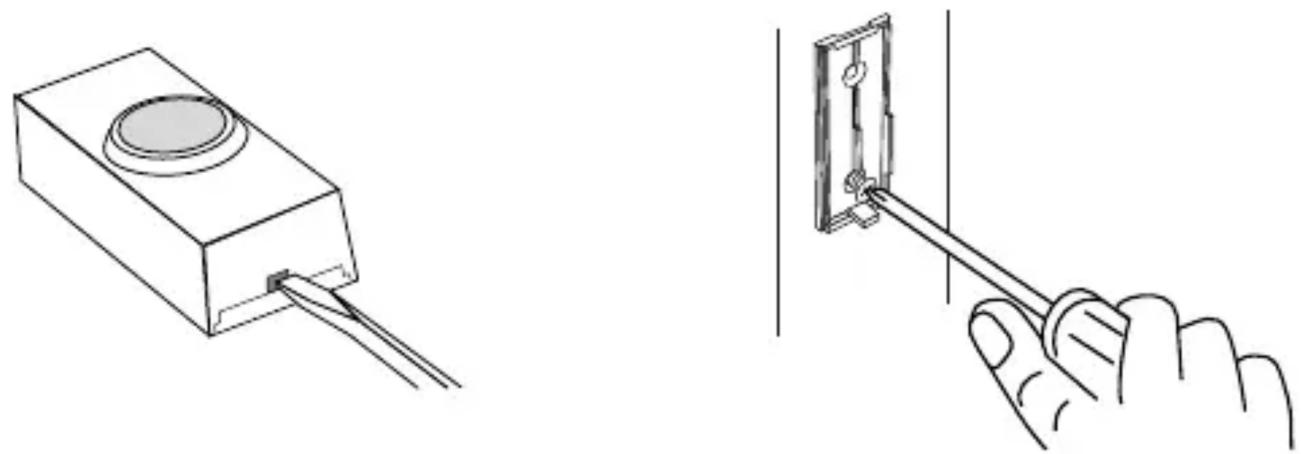
Tomount with screws, remove the back of the case by pushing in the tab on the bottom with a small screwdriver and rotating the blade.
Attach the back of the case to the door jamb or wall. Snap the front of the button back on.
When attaching the doorbell button using the double sided tape, make sure the surface of the door jamb or wall is clean.
The chime can be mounted by using the 2 holes in the back of the case, or by using 1 screw with the keyhole.
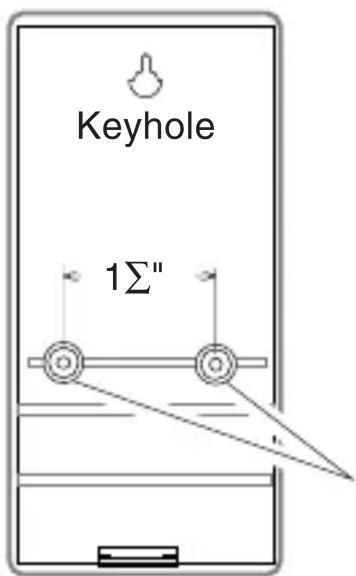
Chime Back Case
Holes for Wall
Mounting

Close Chime Case From Top
Snap the front of the chime case back on. Start with the top edge of the case aligned with the top of the back plate.
NOTE: Most installations will not require you to change any of the jumpers on your doorbell. However, if you need to make changes to the factory settings follow the instructions below.

Trouble shooting
Chime doesn't sound:
- Make sure the doorbell button and the chime channels are the same (See above).
- Check orientation of doorbell button battery (See page 4).
- Check the doorbell button and chime batteries, replace if necessary.
Batteries seem OK, but the chime doesn't work when installed:
- Don't mount the chime or doorbell button on metal or near metal studs. This reduces the transmitter range. Use 4" to 2" wood shims to move the chime or doorbell button off the metal surface.
- Don't mount the chime too close to ground level concrete slabs. This may also reduce the range. Mount the chime away from the floor.
- Try different locations for the chime closer to the doorbell button. Also try to orient the chime at a different angle to increase the range.
The range of the doorbell depends on location, temperature and battery condition.
Doorbell Button Battery Replacement
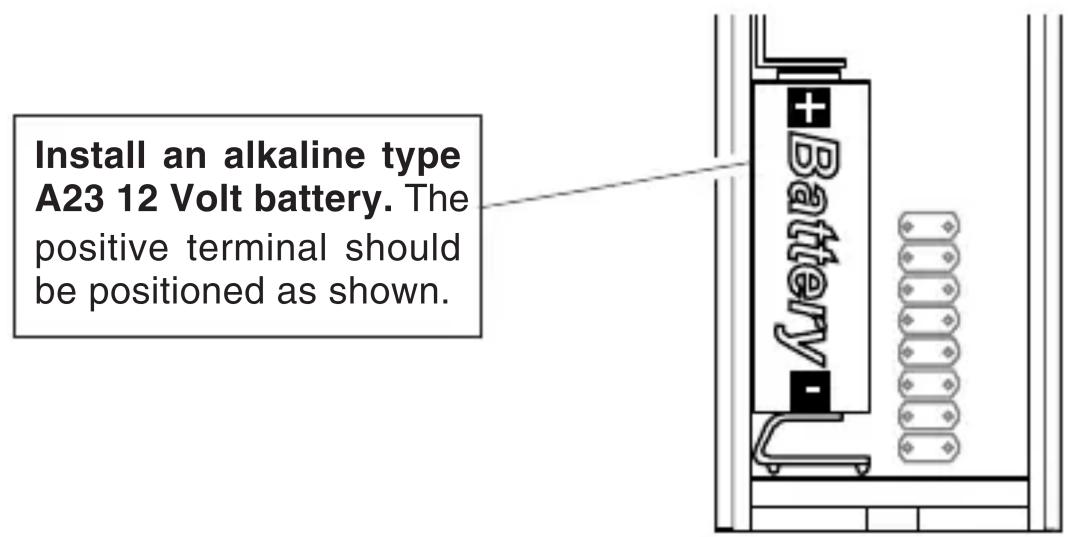
Regulatory Information
The user is cautioned that changes or modifications not expressly approved by the party responsible for regulatory compliance could void the user's authority to operate the equipment.
YOUR ACE ONE YEAR LIMITED WARRANTY
This is a “Limited Warranty” as defined in the U.S. Consumer Product Warranty and Federal Trade Commission Improvement Act. This warranty gives you specific legal rights, and you may also have other rights which vary from state to state.
For a period of one year from the date of purchase, any malfunction caused by factory defective parts or workmanship will be corrected at no charge to you. Batteries are not covered. To obtain a refund or a replacement, return the product to the place of purchase.
Not Covered — Repair service, adjustment and calibration due to misuse, abuse or negligence, light bulbs, batteries and other expendable items are not covered by this warranty. Unauthorized service or modification of the product or of any furnished component will void this warranty in its entirety. This warranty does not include reimbursement for inconvenience, installation, set-up time, loss of use, or unauthorized service.
This warranty covers only ACE products and is not extended to other equipment and components that a customer uses in conjunction with our products.
SUCH REPAIR OR REPLACEMENT SHALL BE THE SOLE REMEDY OF THE CUSTOMER AND THERE SHALL BE NO LIABILITY ON THE PART OF HEATH FOR ANY SPECIAL, INDIRECT, INCIDENTAL, OR CONSEQUENTIAL DAMAGES, INCLUDING BUT NOT LIMITED TO ANY LOSS OF BUSINESS OR PROFITS, WHETHER OR NOT FORESEEABLE. Some states do not allow the exclusion or limitation of incidental or consequential damages, so the above limitation or exclusion may not apply to you. Retain receipt for warranty claims.
ACE reserves the right to discontinue and to change specifications at any time without notice without incurring any obligation to incorporate new features in previously sold products.


Brand : ACE
Model : 3014727
Category : Doorbell