
Ultra Clear 2L01VIB - Baby monitor GRACO - Free user manual and instructions
Find the device manual for free Ultra Clear 2L01VIB GRACO in PDF.


| Product Type | Baby Monitor |
| Brand | Graco |
| Model | Ultra Clear 2L01VIB |
| Display Type | 2.8-inch Color LCD |
| Camera Resolution | HD with Night Vision |
| Audio | Two-way Talk, DECT Technology |
| Range (Indoor) | Up to 150 feet |
| Range (Outdoor) | Up to 1000 feet |
| Frequency | 2.4 GHz FHSS |
| Power Source | AC Adapter (included) or 4 AA batteries (not included) per unit |
| Features | Two-way Talk, Night Vision, Temperature Sensor, Lullabies, VOX Mode |
| Parent Unit Dimensions | 7.5 x 4.5 x 1.5 inches |
| Baby Unit Dimensions | 4.5 x 4.5 x 1.5 inches |
| Parent Unit Weight | 0.5 lbs |
| Baby Unit Weight | 0.3 lbs |
| Security | FHSS Secure Transmission, Low Battery Alert, Out of Range Alert |
| Cleaning & Maintenance | Clean with a dry cloth; do not immerse in water or use liquid cleaners |
| Spare Parts Availability | Contact Graco customer service for replacement adapters, batteries, or units |
| General Information | Includes parent unit, baby unit, AC adapters, and user manual. Downloadable PDF manual available. |
Frequently Asked Questions - Ultra Clear 2L01VIB GRACO
User questions about Ultra Clear 2L01VIB GRACO
0 question about this device. Answer the ones you know or ask your own.
Ask a new question about this device
Download the instructions for your Baby monitor in PDF format for free! Find your manual Ultra Clear 2L01VIB - GRACO and take your electronic device back in hand. On this page are published all the documents necessary for the use of your device. Ultra Clear 2L01VIB by GRACO.
USER MANUAL Ultra Clear 2L01VIB GRACO
Product Registration (USA)
To purchase parts or accessories or for warranty information in the
United States, please contact us at the following:
www.gracobaby.com OR
1-800-345-4109
To register your Graco product from within the U.S.A. visit us online at www.gracobaby.com/productregistration.
We currently do not accept product registrations from those living outside the United States of America.
GRACO
2L01VIB/2L02VIB


Ultra Clear™
OWNER'S MANUAL - Keep instructions for future use.
©2010 Graco PD142728B 4/10
Product Features
Parent's Unit (PD141837)
Model 2L01 - 1 unit
Model 2L02 - 2 units
SoundLights
Power LED

Vibrate.

Power/Volume
Channel Selector

DC Adapter Jack
Clip
Nursery Unit (PD141818)
Model 2L01/2L02 - 1 unit

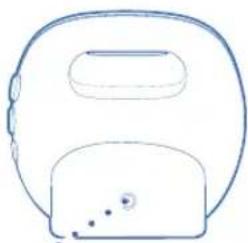
DC Adapter Jack
Power.

Channel Selector
NightLight


AC Adapter
Model 2L01 - Qty. 2
Model 2L02 - Qty. 3
WARNING
Failure to follow these warnings and the assembly instructions could result in serious injury or death.
This device is designed only to monitor the sounds of your child. It will not alert you to your child's silent activities. When using the monitor, you must still provide the supervision necessary for the continued safety of your child. This product is not designed or intended for use as a medical monitor. Always be sure that both the transmitter and receiver are working properly and are within range of each other.
- STRANGULATION HAZARD. Keep the adapter cords out of the reach of children. Do not use with extension cords.
- DO NOT place the Nursery Unit or its cord within your child's reach. Do not put the Nursery Unit inside a crib or play yard.
- Use ONLY with 110-120 volt AC electrical outlets.
- Protect the AC adapter cords. Place them so they are not walked on or pinched by furniture or other items.
- Allow for proper ventilation when units are in use. Do not cover the Nursery Unit or Parent Units with any object such as a blanket. Do not place it in a drawer or in any location which would muffle the sound or interfere with the normal flow of air.
- DO NOT immerse any part of the Nursery Unit or Parent Units in water. Clean only with a dry cloth.
- DO NOT place unit near water and moisture. Do not use the Nursery Unit outdoors. Do not use the Nursery Unit near possible wet areas, such as a bathtub, shower, wash basin, sink, laundry tub, swimming pool, wet basement, etc.
- Keep Nursery Unit away from heat sources, such as fireplaces, radiators, stoves, and TVs or other appliances. Heat can damage the case or electrical parts.
• DO NOT use the Nursery Unit if:
• The adapter cords or plugs have been damaged.
• The unit has been exposed to liquids.
- Unit has been dropped or is damaged.
- DO NOT OPEN THE NURSERY UNIT, PARENT UNITS, OR ADAPTERS. No user-serviceable parts inside. Risk of electrical shock, fire or death.
- The antenna used for this transmitter must be installed to provide a separation distance of at least 20 cm (7.9") from all persons and must not be co-located or operating in conjunction with any other antenna or transmitter.

FCC Statement:
⚠ WARNING Modifications not authorized by the manufacturer may void users authority to operate this device.
NOTE: This equipment has been tested and found to comply with the limits for a Class B digital device, pursuant to Part 15 of the FCC Rules. These limits are designed to provide reasonable protection against harmful interference in a residential installation. This equipment generates, uses and can radiate radio frequency energy and, if not installed and used in accordance with the instructions, may cause harmful interference to radio communications.
However, there is no guarantee that interference will not occur in a particular installation. If this equipment does cause harmful interference to radio or television reception, which can be determined by turning the equipment off and on, the user is encouraged to try to correct the interference by one or more of the following measures:
• Reorient or relocate the receiving antenna.
- Increase the separation between the equipment and receiver.
- Connect the equipment into an outlet on a circuit different from that to which the receiver is connected.
- Consult the dealer or an experienced radio/TV technician for help.
This device complies with part 15 of the FCC Rules. Operation is subject to the following two conditions: (1) This device may not cause harmful interference, and (2) this device must accept any interference received, including interference that may cause undesired operation.
- Look for the FCC ID on the bottom of the Nursery Unit and inside the Battery compartment on the Parent Unit.
Ultra Clear™ 2L01VIB/2L02VIB 3 Glenlake Pkwy Atlanta, GA 30328
Battery Installation
Parent Unit
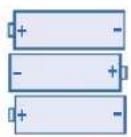
- Remove the battery door cover on the Parent Unit with a key or flat blade screw driver.
- Place 3-AAA (1.5V-LR03) batteries into the battery compartment. Note the proper orientation of the batteries.
- Do not mix old and new batteries.
- Do not mix alkaline, standard (carbon zinc), or rechargeable (ni-cadmium, etc) batteries.
- Place the battery door back on the unit.
- Please remove a dead battery promptly. A dead battery left in the unit may leak, damaging your unit.
- Do not attempt to recharge a non-rechargeable battery.
- A rechargeable battery CANNOT be recharged by plugging the AC adapter into the Parent Unit.
- Remove the batteries from the unit if it is no longer being used or will be stored for an extended period of time.


Batteries should be disposed of properly by recycling.
Using AC Adapters
- The Parent Unit uses 3-AAA (1.5V-LR03) batteries or standard 120 volt AC household current. The Nursery Unit uses standard 120 volt AC household current.
- To use AC adapters, plug the connector on the cord into the AC adapter jack on the side of the Parent Unit and the back of the Nursery Unit. Then plug adapter into a standard wall outlet.
- Use ONLY the Graco adapters included with the unit. Do not use these adapters with other equipment under any circumstances.
- If units do not work, check that AC adapters are plugged into working outlets.
Selecting Channels
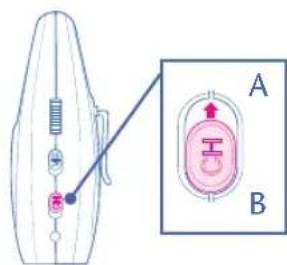
- In case you are experiencing some interference, the channel on the Nursery Unit can be changed by sliding the "ch" button on the side of the unit to either channel A or B ("X" or "Y").
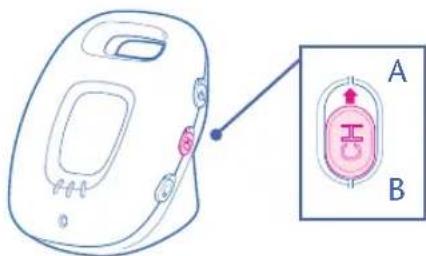
- The channel on the Parent Unit can be changed by sliding the "ch" button on the side of the unit to either channel A or B ("X" or "Y").
NOTE: Both units must be on the same channel.
Low Battery Indication
Parent Unit
- If operated too long on a low battery, you may also experience a poor signal and the Power LED on the front of the parent unit may change from green to red.
- You may either turn off the unit, plug in the A/C adapter.
Out of Range Indication
- If the Parent Unit begins to lose the signal from the Nursery Unit you may hear static or other noise. Immediately move the Parent Unit closer to the Nursery Unit to regain connection.
***Note: It is not uncommon for the Parent Unit to occasionally lose and regain connection with the Nursery Unit in environments that have a significant amount of obstructions.

Setting Up the Baby Monitor
- For optimum operation, it is best to use new batteries in the Parent Unit.
- Place the Nursery Unit within 10 feet (3 meters) of your baby. Plug an AC adapter into the jack on the side of the Nursery Unit. Plug it into a working 120 volt AC outlet.
- Aim the Nursery Unit toward your baby. Check that there are no walls or large objects that could block sound transmission.
- Set both the Nursery Unit and Parent Unit to the same channel, "A" or "B" ("X" or "Y").
- Turn on the Nursery Unit using the On/Off switch on the side. The green power light should come on.
- Place the Parent Unit within five (5) feet (1.5 meters) of the Nursery Unit and turn on the Parent Unit using the On/Off switch on the side of the unit. The green power light should come on.
- If you have 2 Parent Units, repeat same set-up procedure for 2nd Parent Unit if not continue to Step 8.
- Your monitor is now ready for use.
Testing the System
It is VERY IMPORTANT to test the system when first set up, and at regular times thereafter. Test the units if you suspect they may have been damaged or have not been used for a long time.
- If two adults are present, have one take the Parent Units to different locations, trying various volume settings, while the other speaks into the Nursery Unit.
- If only one adult is available, place a ticking clock, radio, or other sound-producing device near the Nursery Unit to test it.
- When testing, keep the level of your child's sounds in mind, and adjust the volume accordingly.
- If there is sound interference, switch the Nursery Unit and the Parent Units to the other channel setting.
Operation
To Listen To Baby
- Turn on Nursery Unit using the ON/OFF switch.
- Turn on Parent Unit using the Power/Volume wheel.


- Adjust the volume on the Parent Unit by turning the Power/Volume wheel.
- The Sound Lights on the Parent Unit will illuminate as your child (or other objects) make noise near the Nursery Unit. Please note that the Sound Lights and

volume control on the Parent Unit are independent of each other. With the volume turned all the way down, the Sound Lights will still illuminate as your child (or other objects) make noise near the Nursery Unit.
Vibration Alert Feature
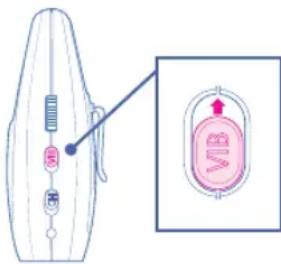
- To turn on the Vibration Alert Feature, set the switch on the side of the parent unit to ON.
NightLight Feature
•To turn on NightLight slide button on side of Nursery Unit up.

TroubleShooting
DO NOT ATTEMPT to modify the unit. Any modifications to the transmitter and/or receiver can void the operator's authority to operate the equipment.
Most problems have a simple solution. First, check that:
• Power is turned ON for both units
- Both units are plugged in (or batteries are fresh in Parent Unit)
• Electrical outlet works
• Volume is turned up on Parent Unit
• Parent Unit is in range of the Nursery Unit
No Sound
- Battery dead or weak — replace or use AC adapter.
- AC adapter not properly connected — check the connections.
- Nursery Unit covered or blocked — remove the obstruction.
Weak Sound
- Nursery Unit too far from baby — move closer.
- Large objects blocking the signal — try repositioning Nursery Unit.
• Volume setting too low — turn it up.
Static
• Interference from other electrical equipment — eliminate cause of static (TVs, mixers, computers, fans, fluorescent lights, light dimmers, etc.)
- Parent Unit too far from Nursery Unit — move them closer.
- Significant amount of obstructions between Parent Unit and Nursery Unit such as walls, ceilings & buildings. Try moving the Nursery Unit to another part of the room.
- Change channel on Nursery Unit.
Shrill Sound (Feedback)
- Nursery Unit and Parent Unit too close together — move them farther apart.
• Volume set too high — lower the volume.
Ultra Clear
©2010 Graco PD142728B
4/10
Clip

•Encendido
• Selector de canales
Luz nocturna


Graco Children's Products 3 Glenlake Pkwy Atlanta, GA 30328
Battery Installation
Unidad para padres



- PRODUCT REGISTRATION (USA)
- GRACO
- PRODUCT FEATURES
- WARNING
- FAILURE TO FOLLOW THESE WARNINGS AND THE ASSEMBLY INSTRUCTIONS COULD RESULT IN SERIOUS INJURY OR DEATH
- FCC STATEMENT
- BATTERY INSTALLATION
- PARENT UNIT
- USING AC ADAPTERS
- SELECTING CHANNELS
- LOW BATTERY INDICATION
- OUT OF RANGE INDICATION
- SETTING UP THE BABY MONITOR
- TESTING THE SYSTEM
- OPERATION
- TO LISTEN TO BABY
- VIBRATION ALERT FEATURE
- NIGHTLIGHT FEATURE
- TROUBLESHOOTING
- DO NOT ATTEMPT TO MODIFY THE UNIT. ANY MODIFICATIONS TO THE TRANSMITTER AND/OR RECEIVER CAN VOID THE OPERATOR'S AUTHORITY TO OPERATE THE EQUIPMENT
- MOST PROBLEMS HAVE A SIMPLE SOLUTION. FIRST, CHECK THAT
- NO SOUND
- WEAK SOUND
- STATIC
- SHRILL SOUND (FEEDBACK)
- UNIDAD PARA PADRES
Brand : GRACO
Model : Ultra Clear 2L01VIB
Category : Baby monitor