
APPR150V4 - Router Approx - Free user manual and instructions
Find the device manual for free APPR150V4 Approx in PDF.


| Product Type | Router |
| Brand | Approx |
| Model | APPR150V4 |
| Wireless Standard | IEEE 802.11 b/g/n |
| Maximum Data Rate | 150 Mbps |
| Frequency Band | 2.4 GHz |
| Number of Antennas | 1 internal |
| LAN Ports | 1 x 10/100 Mbps (WAN), 4 x 10/100 Mbps (LAN) |
| Security | WEP, WPA, WPA2 |
| Dimensions (W x D x H) | 150 x 110 x 30 mm |
| Weight | 200 g |
| Power Input | 5V DC, 1A |
| Power Consumption | < 5W |
| Operating Temperature | 0°C to 40°C |
| Storage Temperature | -20°C to 60°C |
| Humidity | 10% to 90% (non-condensing) |
| Care & Cleaning | Unplug before cleaning. Use a soft, dry cloth. Avoid liquids and abrasive cleaners. |
| Safety | Place on a flat, ventilated surface. Do not expose to water or heat sources. |
| Spare Parts & Repairability | No user-serviceable parts. Contact support for repairs. |
| Warranty | 2 years from purchase date |
Frequently Asked Questions - APPR150V4 Approx
User questions about APPR150V4 Approx
0 question about this device. Answer the ones you know or ask your own.
Ask a new question about this device
Download the instructions for your Router in PDF format for free! Find your manual APPR150V4 - Approx and take your electronic device back in hand. On this page are published all the documents necessary for the use of your device. APPR150V4 by Approx.
USER MANUAL APPR150V4 Approx
EC DECLARATION OF CONFORMITY
We declare under ausrale responsibility that the product
Brand name: APPROX BERTA S.L.
Model no APP R150V4
Product description(Wireless Router 150Mbps)
The measurements shown in this test report were made in accordance with the
procedures given in the
- EMC DIRECTIVE: 2004/104/DC - RTTE DIRECTIVE: 1999/S/EC
- RaHS DIRECTIVE: 2011/65/EU
- LVDTADECIN
To which this declaration is based on with full conformance to the following European norms and standards:
- EN €1000-3-2 / A2:2009
- EN 61000 -3-3.2008
- DN SS024 / A2:2003
- ETSI EN301 489 -1 V1.8.1 (2008-04) - ETSI EN301 489 -17'V2.1.1 (2009-05)
Signed Jul 25, 2014
(1)
m = 311
2017年1月1日
Jose Luis Ruiz Gómez
Managing Director
APPROXIBERA SL
ADD: PoligonsIndustrialGuaridquirir
C/ Tecnología, S. Paltodice 41120 Góvelos (Sevilla), Spain.
Website: www.apprux.no

aqprox
Wireless-N Broadband Router
Quick User Guide
appR150V4
V1.0
Introduction and product description
Thank you for choosing the Wireless-N Broadband Router APPR150V4
General product information
The APPR150V4 Wireless N Router provides high speed up to 150 Mbps and is also compatible with 802.11b/g/n, ensuring compatibility with a wide range of wireless devices.
Includes four LAN Ethernet ports ready for you to connect your PC, printers, or other devices.
Easy to use and install with the Router Setup Wizard, you can set up your wireless network in minutes, the wizard will guide you through an easy setup process.
The APPR150V4 has a Wi-Fi Protected * (WPS) certified setup, making it even easier to configure your wireless network and enable security.
It can also be configured as an access point or repeater to transmit or receive wifi signal.
3. Installation
For a typical wireless setup at home, please do the following:
-
Connect the power adapter between the router and power outlet in your home
-
Configure your router as described below.
IMPORTANT NOTICE
You can return to the initial values of the Router by pressing the "Reset" button for 40s.
You can use this solution if you forget your password.
4. Connection to router via Wireless lan card.
-
Turn on your computer.
-
Open Network connection, click on the network icon (or) in the notification area.
-
Choose "APPR150V4" from wireless network list that appears, and then click on connect.

5. Connecting to the router via Rj-45 cable
-
Turn on your computer.
-
Connect the supplied RJ-45 cable between one of the LAN outputs of the router and LAN output of the network card on your computer.
-
The device will automatically connect.
Note:
If you cannot access your device do the following:
-
Click "Start," "Control Panel", "Network and Internet", "Network Connections" direct button click "Local Area Connection" or "Wireless Network Connection", "Properties". Select "Internet Protocol Version 4 (TCP/IPv4)" and click "Properties."
-
Enter 192.168.1.2 in IP address, 255.255.255.netmask and 192.168.1.1 in gateway and accept.
You can also restore the factory settings with the following procedure below. Connect the router to a power outlet, press the reset button for 20 seconds and release, wait and do nothing, the router will be returned to the default values.
6. Configuration via Web browser
Open your Web browser and type http://192.168.1.1 in the browser address box. This number is the default IP address for this device.
The login screen below will appear. Enter the "User Name" and "Password" and click "OK" to login.
The default user name is "admin" and password is "admin".

7. Setup Wizard
After starting the session, the following summary of the router will be displayed in your Web browser:
The setup wizard will guide you to configure the access point for the first time. Please follow the setup wizard step by step.
The Wizard will guide you through the following steps.
Start by selecting the desired mode
Access Point, Router and Repeater

Access Point
-
Select Access Point
-
Rename network Network Name (SSID) if desired.
-
Enter a password in Key Value if desired.
-
Press the Save / Apply button to save changes.
Router
You can configure the WAN interface with three different methods.
Fixed IP

-
Select Fixed IP
-
Enter an IP address according to the network when connecting in IP Address
-
Enter the Subnet Mask in Red Mask
-
Enter Gateway of main router in Default Gateway.
-
Enter the DNS from your main supplier in DNS
-
Press the Save / Apply button to save changes.
Auto Config DHCP
![Language: English Access Point Router Repeatter Auto Setup Network Name (SMD): APPF150V4 Key Value Connection Type: Fixed IP Auto Config (GKCF) PPVAC Data-Up Host Name: APPCCX MAC Address Client: 06000000000 [ABDCGDDDEF] Auto File Close SwitchUp Cancel](/content/2026/05/1071789/images/dfee34ca0c49a852ab4925fbb5ce437260e6e41f6c9323caba896c94a2c65f50.jpg)
-
Select Auto Config (DHCP)
-
Enter a computer name in Host Name if desired
PPPoE Dial-Up

-
Select PPPoE Dial-Up
-
Enter the user name of your service provider in User Name
-
Enter your service provider's password in Password
-
Press the Save / Apply button to save changes
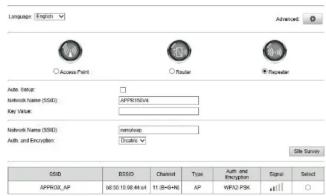
Configuration as a Repeater
1. Select Repeater
-
Click the Site Survey button to search the network list
-
Select the desired network and enter the network key router to be connected.
| SISD | BISSO | Channel | Type | Auth and Encryption | Sign | Select |
| APPROX_AP | 0255 10 384 44 64 | 11 (G+V+N) | AF | VIRUS-PSK | ### | # |
- Press the Save / Apply button to save changes
8. Technical Support
For more information on the configuration or installation of this product visit our website www.approx.es or write an email to soporte@approx.es
aqprox

aqprox
EC DECLARATION OF CONFORMITY
We declare under muscle responsibility that the product
Brand name: APPROX BERIA S.L.
Model no APP R150V4
Product description/Wireless Router 150Mbps
The measurements shown in this test report were made in accordance with the procedure given in the
PROCEDURE GIVEN IN THE EMC DIRECTIVE
• DATE DIRECTIVE: 2004/10/EC • RATE DIRECTIVE: 1999/S/EC
- RaHS DIRECTIVE: 2011/65/EU - LVD DIRECTIVE: 2004/95/EC
To which this declaration is based on with full conformance to the following European
norms and standards:
- EN 61000-3-2/A2:2009
- EN 61000 -3-3:2008 - CN SS022 / A1:2007
- DN SS024 / A2:2003
- ETSI EN301 489 -11 V1.8.1 (2008-04) - ETSI EN301 489 -17 V2.1.1 (2009 -05)
Signed Jul 25, 2014
√
m = 311
(No text)
Jose Luis Ruiz Gómez Maggins Diretas
managing
APPROXIBERA SL
ADD: PoligonsIndustrialGuaridadequirir C/Tecnologia, S. Pazitode 41120
Gelves (Sevilla), Spain.


- aqprox
- Wireless-N Broadband Router
- Quick User Guide
- appR150V4
- V1.0
- Introduction and product description
- General product information
- Installation
- IMPORTANT NOTICE
- Connection to router via Wireless lan card.
- Connecting to the router via Rj-45 cable
- Note:
- Configuration via Web browser
- Setup Wizard
- Access Point
- Fixed IP
- Auto Config DHCP
- PPPoE Dial-Up
- Configuration as a Repeater
- Select Repeater
- Technical Support
- EC DECLARATION OF CONFORMITY
Brand : Approx
Model : APPR150V4
Category : Router