
NI-E510C - Iron PANASONIC - Free user manual and instructions
Find the device manual for free NI-E510C PANASONIC in PDF.


| Product Type | Iron |
| Brand | Panasonic |
| Model | NI-E510C |
| Power Consumption | 2400 W |
| Soleplate Material | Ceramic |
| Steam Output (Continuous) | 40 g/min |
| Steam Boost | 150 g/min |
| Water Tank Capacity | 300 ml |
| Spray Function | Yes |
| Self-Clean Function | Yes |
| Anti-Calc System | Yes |
| Auto Shut-Off | Yes (8 min idle) |
| Vertical Steaming | Yes |
| Adjustable Temperature | Yes (dial with fabric settings) |
| Power Cord Length | 2.5 m |
| Weight | 1.2 kg |
| Dimensions (LxWxH) | 30 x 15 x 18 cm |
| Color | White/Blue |
| Warranty | 2 years |
| Spare Parts Available | Soleplate, water tank, steam nozzle |
Frequently Asked Questions - NI-E510C PANASONIC
User questions about NI-E510C PANASONIC
0 question about this device. Answer the ones you know or ask your own.
Ask a new question about this device
Download the instructions for your Iron in PDF format for free! Find your manual NI-E510C - PANASONIC and take your electronic device back in hand. On this page are published all the documents necessary for the use of your device. NI-E510C by PANASONIC.
USER MANUAL NI-E510C PANASONIC
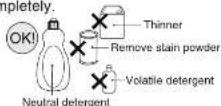
Unplug iron, wait until iron cools completely.
- Wipe off iron Soleplate and other part with a
damp and soft cloth.
• For serious stain, use a neutral detergent.
FABRIC AND IRONING RECOMMENDATIONS
| Fabric | Temperature setting | Ironing recommendations |
| NYLON | 尼龙 | Dry iron on reverse side. |
| SILK | 丝绸 | Dry iron on reverse side.To touch-up collars, cuffs.pockets,etc.,iron lightly on right side. |
| WOOL | 羊毛 | Iron lightly on right side. |
| COTTON | 格布 | Steam ironing is suggested.Sprinkle water on the fabric,depending on its thickness or stubcorn. |
| LINEN | 亚麻 | wrinkles; iron dark fabrics on reverse side to avoid unwanted wire. |
SPECIFICATIONS
| Rated voltage | 220 V ~ 50 Hz | Function | Stream/Dry iron |
| Rated power | NI-E510C: 1960 WNI-E410T: 1800 W | Steam generation way | drop |
| Plug/Cords | single phase three pole plug (1.9 m long) | Thermostat | Temperature range(about 65°C-200°C) |
| Dimensions | (LXWXH)about 256 x 113 x136 mm | Iron surface | 179 cm ^2 |
| Weight | about 1.1 kg | Reservoir capacity | 200 ml |
| Stand mode | self stand | Lamp | Temperature Select Indicator |
GENERALLY MALFUNCTION AND TACKLING METHOD
(please check
| Malfunction\Check | Plug | Temperature Select Dial | Steam/Dry Selector | Shot Button (NEUTIC City) | Steam hold | The way of drainage | Temperature scale (Temperature Select Dial) |
| No steam | ○ | ○ | ○ | ○ | |||
| Too small steam | ○ | ○ | ○ | ||||
| Dripping | ○ | ○ | ○ | ||||
| Corroding | ○ | ○ | |||||
| No heat | ○ | ○ | |||||
| Scorch | ○ | ○ | |||||
| Dealing method( Contact with sales agent if can't deal with) | Connect well ? | Position is correct? | Move Steam/ Dry Selector 2-3 times, reset to steam position, keep on Dry (臭) position while storing | The interval time of pressing Button should be 2-5 seconds. | Cleaning according to "MAIN-TENANCE." | Drainage before the iron cooling. | Select temperature according to indication or use a press both. |
AFTER SERVICE
| For after service, if there are any questions, please inquiry to shop or telephone 400-810-0781. | |
| 1 Warranty card (append) | Get the warranty card from shop purchased this product, read completely and store carefully, confirm the warranty card have been recorded [purchased date, name of the shop etc]. |
| 2 Require repairing | Contact with the specified service agent if can't deal according to the table of 《TROUBLE-SHOOTING GUIDE》. |
| Warranty period | According to the warranty card, provide the the specified service agent with the electric iron and warranty card. |
| Exceed warranty period | Repair by the specified service agent, it will be charged according to regulations, if repair by others, please contact with the the specified service agent. |
Operating Instructions
Steam Iron
型号/Model No.NI-E510C/E410T
Before operating this unit, please read these instructions completely and save these
instructions carefully.
松下·万宝(广州)电熨斗有限公司
Panasonic Wanbao Appliances Electric Iron (Guangzhou) Co., Ltd. 地址: 广州市番禺区钟村万宝基地万宝南街2号 原产地: 中国 电话(Tel): (020)84770888 Add: No.2, South Wanbao Street, Wanbao Base, Zhongcun, Panyu District, Guangzhou City Panasonic 客户咨询服务中心: 400-810-0781
Panasonic Customer Services Center: 400-810-0781
中文
本产品仅限于家庭使用
产品的安全使用
您和他人的安全是最重要的!
To get better results when using vertical shot, hang the garment on a clothes hanger. Curtains and drapes may also be steamed once they're hung. Hold the iron away from your body, close to but not touching the fabric. Pull the fabric tight with your tree hand and pump the Shot Button at 2 second intervals as you pass the iron over the wrinkled fabric.

SELF-CLEANING
With the self-cleaning feature you can flush out mineral residue from the steam generating chamber and the steam vents, refreshing your iron each time for a longer steaming life. It is very important to operate the self-cleaning feature after each steam ironing to prevent mineral accumulation from hardening
- Check water level. Water level should be more than half full. When water level is less than half full, fill with water according to the instructions in "HOW TO FILL WITH WATER".
- Preheat at 满水 setting (for about 1-2 minutes).
- Make sure that the Steam/Dry Selector is in the Dry position.
- Set the Dial to "0".
- Hold the iron horizontally over the sink. Pump the * Shot Button ** quickly (at least 3 times per second) about 20-30 times.
- While self-cleaning, tilt the iron up and down slowly to help clean the entire inside and let the water drip out of the soleplate vents.
- Check that all water and steam have completely stopped coming out of the soleplate vents. After self-cleaning is finished, empty any remaining water from the Water Tank by turning the iron upside down.
- Preheat the iron for about 5 minutes at "满水" temperature when the iron has cooled and none of the operation buttons have been pressed.
- Unplug the Power Plug.
- Iron on a used cloth to remove any impurities on the Soleplate.

-19-
STAY CLEAN VENTS
The built-in Anti Calcium System (Calc Cut) in the Water Tank continuously reduces scale build-up in the vaporizing chamber of the iron.
This system makes it possible to use the steam function for a long period of time and prevents steam vents from clogging.
HOW TO CARE FOR YOUR IRON
AFTER EACH USE
- Set the Temperature Selector to "0".
- Turn the iron off and unplug.
- Empty the iron immediately after using.
Do not store the iron with water in it. - Move the Steam/Dry Selector into the Dry position.
If the Steam/Dry Selector is not in the Dry position after using, remaining water will move into the Soleplate and damage the Soleplate and may result in burns during the next initial use of the iron. - Wait until the iron has cooled before storing it, and always set it on the Heel Rest to protect the Soleplate from scratches, corrosion or stains
Note: After draining the iron, close the water fill cap. This prevents foreign matters and dust
CAUTION
If the Steam/Dry Selector is not in the Dry position after using, remaining water will move into the Soleplate and can result in burns the next time the iron is used.
OUTSIDE SURFACE OF IRON
After unplugging and cooling the iron, simply wipe off with a damp cloth and if necessary, use a mild detergent.
NEVER USE ANY HARSH CLEANERS.
SOLEPLATE
- Starch and other residue can be easily removed from the Soleplate with a damp cloth.
- To avoid scratching the finish, never use a metallic pad to clean the Soleplate, and never place the iron on a rough surface.
- If synthetics are being ironed on a higher temperature level than instructed, not only will the fabric be damaged, but the Soleplate will often be covered with the melted remains of the synthetic fabric.
- The best way to remove synthetic residue from the Soleplate is to iron over an old cotton rag after heating the iron.
-20-
HOW TO USE THE "SPRAY" FEATURE
Note: Before using the spray feature, check the fabric label for ironing instructions because some fabrics may be spotted or stained with moisture.
The spray feature is particularly helpful for removing stubborn wrinkles and where extra dampening is needed.
The spray may be used with steam or dry ironing.
- Fill the iron as described in "HOW TO FILL WITH WATER".
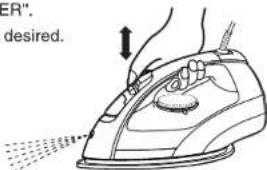
- Simply pump the Spray Mist Button "?" when spray is desired. if the spray doesn't work immediately, keep pumping until it does.
- To get a finer spray, pump the Button quickly and press fully.
HOW TO USE THE " POWER SHOT " FEATURE
The "Power Shot" feature provides extra steam which goes deep into the garment and is helpful for removing stubborn wrinkles. The "Power Shot" feature operates properly only in the "setting on the Temperature Selector when steam or dry ironing (If used at a lower setting, water spotting will occur because the iron is not hot enough to change water to steam). If you have not used the "Power Shot" feature for a long time, it is necessary to clean the inside of the iron before using this feature on any clothes to be ironed. Simply test the "Power Shot" feature several times away from the ironing board and clothes to be ironed. This will prevent brown spotting or water spotting on the clothes.
- Fill the iron as described in "HOW TO FILL WITH WATER".
- Position the iron vertically and be sure the Temperature Selector is set to "0".
Plug the Power Plug into the household outlet.
- Set the Temperature Selector to the "◇" indication.
- Preheat the iron until the Thermostat Operating Indicator Light goes off usually about 1-2 minutes. This light will go on and off during ironing to indicate that the temperature chosen by the Temperature Selector is being maintained.
- Simply pump the "Shot Button" when steam is desired. Pump the "Shot Button" several times at the beginning of each ironing session.
- Allow at least 2 seconds between uses of the "Shot Button" to prevent water spotting. Use a press cloth if necessary.


- Fill the iron as described in "HOW TO FILL WITH WATER"
- Position the iron vertically and be sure the Temperature Selector is set to "0".
- Plug the Power Plug into the household outlet.
- Set the Temperature Selector according to the type of fabric.
- Preheat the iron until the Thermostat Operating Indicator Light goes off, usually about 1-2 minutes. This Light will go on and off during ironing to indicate that the temperature chosen by the Temperature Selector is being maintained.
- Hold the iron horizontally and move the Steam/Dry Selector into the steam position
3 Position Steam/Dry Selector.
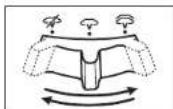
Dry | Low steam | High steam
Please make sure the Temperature Select indicator setting is on "满水" when using "High steam(亚麻)".
Note: Whenever the iron is positioned vertically, the steaming action will stop.


Do not use the Steam/Dry Selector unless the appliance is sufficiently hot to produce steam. Doing so may cause water to leak.
HOW TO USE AS A DRY IRON
- Move the Steam/Dry Selector to the Dry position.
- Position the iron vertically, set the Temperature Selector to "0".
- Plug the Power Plug into the household outlet.
- Set the Temperature Selector to the desired position.
- Preheat the iron until the Thermostat Operating Indicator Light goes off usually about 1-2 minutes. This light will go on and off during ironing to indicate that the temperature chosen by the Temperature Selector is being maintained.
HELPFUL IRONING TIPS
The Temperature Selector of the Panasonic iron has words, dots and steam symbols.
a) Set the Temperature Selector according to the type of fabric. For general information on the number of settings, refer to the Heel Rest.
b) The dots are symbols for 3 temperature ranges:
- Low Temperature
•• Medium Temperature
High Temperature
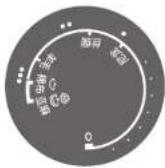
Some fabrics are labeled with these dots as a guide for selecting the proper ironing temperature setting.
c) The steam symbols are used for selecting the steam setting. For further details, refer to pages 16-21


HOW TO FILL WITH WATER

WARNING
The Power Plug must be removed from the household outlet before the Water Tank is filled with water. Failure to do so may cause electric shock.
- Move the Steam/Dry Selector to the Dry position to avoid water leakage.
Open the Water Fill Cover. Hold the iron as shown and fill the
iron with water up to "满水" line (about 200 mL). Use a cup for filling.
-
Do not overfill. Check for the correct water fill level with the iron in the vertical position.
-
Close the Water Fill Cover, or water will splash from Water Tank when ironing.

Note:
Inject clean tap water in the iron; otherwise foreign matters in the water may damage the steam valve.
各部位的名称功能/COMPONENTS IDENTIFICATION

本产品符合 GB4706.1-2005, GB4706.2-2007, GB4343.1-2009, GB17625.1-2012 国家标准。This product conforms to GB4706.1-2005, GB4706.2-2007, GB4343.1-2009, GB17625.1-2012 Standard.
功能表 FUNCTIONS
household outlet; instead, grasp the Power Plug and pull on the Power Plug to disconnect the iron.
- Do not store the Power Cord at sharp angles. Doing so may cause the wire in the Power Cord to break with the load, which may cause electric shock or fire due to a short circuit.
- Do not let the Power Cord touch hot surfaces. Let the appliance on cool completely before putting the iron away.
- Test on an inconspicuous area when using with high-end or specially processed items. Failure to do so may cause damage to fabric.
- Do not use the appliance with the exception of fabric (e.g.leather). Failure to do so may cause damage it.
- If the Steam/Dry Selector is not in the Dry position after using, remaining water will move into the Soleplate and can result in burns the next time the iron is used.
- Do not use the Power Shot, while the Power Plug is unplugged. Water will remain inside the Soleplate which will cause staining.
- Do not use Steam or Power Shot while Temperature Selector is set to "0". Doing so may cause water to leak.
- Do not use the Steam/Dry Selector unless the appliance is sufficiency hot to produce steam. Doing so may cause water to leak.
SAVE THESE INSTRUCTIONS
For proper use of your iron, read remaining safety cautions and operation instructions.
WARNING
Don't touch the high temperature parts (such as Soleplate surface, Heat-insulated Plate, underside of the Water Reservoir).

(May be scalded.)

Set the iron vertically at stable place.
(To avoid scratch on the surface or hurt by the dropped iron.)


Don't touch the hot steam with your hands or other parts of your body.

(May be scalded.)
Don't slant or shake the iron too much.

(May be scalded by hot water.)
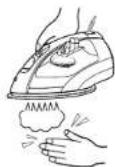


Prohibit such accident occurring.

Operate based on the drawing.
SPECIAL INSTRUCTIONS

WARNING
To reduce the risk of electric shock or fire:
Do not operate another high wattage appliance in the same circuit, to avoid acircuit overload.

CAUTION
To reduce the risk of personal injury and damage to your iron:
- Only use an appliance for its intended use. To protect against burns or injury to persons, do not iron or steam fabrics while being worn on the body.
- Burns can occur from touching hot metal parts, hot water, or steam. Use caution when you turn the appliance upside down. There might be hot water in the Water Tank.
- The appliance must be used and rested on a flat, stable surface. Failure to do so may cause injury or burn.
- When placing the appliance on its Heel Rest, ensure that the surface on which the Heel Rest is placed is stable.
- Do not add perfume, vinegar, starch, descaling agents, ironing aids or other chemicals, they can stain fabrics; instead, use room temperature tap water for it.
- Drain water from the Water Tank after use. Failure to do so may cause scalds due to remaining water leaking out the next use.
- Always turn the appliance "0" before plugging or unplugging the appliance from the household outlet. Never pull on the Power Cord to disconnect the iron from the
蒸汽电熨斗的使用方法
natural_image
Line drawing of a hand using an iron on a steam machine, emitting smoke (no text or symbols)natural_image
Line drawing of a car exhaust pipe with smoke rising (no text or symbols)board. Doing so may cause fire.
- To avoid a circuit overload, do not operate the appliance on the same circuit with another high wattage appliance.
- Do not use in proximity to flammable materials (such as alcohol, benzine, thinners, aerosols, hair care products, nail polish remover). Doing so may cause an explosion or fire.
- The appliance is not to be used if it has been dropped, if there are visible signs of damage or if it is leaking. Do not repair by yourself. It should be repaired by the authorized service center. Failure to do so may cause ignition or electric shock.
- Never modify, disassemble, or repair. Doing so may cause ignition or injury due to abnormal operation. Contact an authorized service center for repair.
- Do not use the appliance with a wet hand. Doing so may cause electric shock or fire due to a short circuit.
- Do not connect or disconnect the Power Plug to a household outlet with a wet hand. Doing so may cause electric shock or injury.
- To avoid the risk of electric shock, do not immerse the appliance in water or other liquids or use this appliance near water. Doing so may cause electric shock or burn or fire due to a short circuit.
- Do not damage or modify, or forcefully bend, pull, or twist the Power Cord. Also, do not place anything heavy on or pinch the Power Cord. Doing so may cause electric shock or fire due to a short circuit.
- Never use the appliance if the Power Plug fits loosely in a household outlet. If the Power Cord is damaged, it must be replaced by the manufacturer, its service center to avoid a hazard. Failure to do so may cause an accident or injury.
- Do not use an extension cord. If an extension cord is absolutely necessary, a cord with an ampere rating equal to or greater than the maximum rating of the appliance shall be used. A cord rated for less amperage can result in a risk of fire or electric shock due to overheating. Care shall be taken to arrange the cord so that it cannot be pulled or be tripped over.
- Do not operate the appliance with a damaged Power Cord or in the event the appliance has been dropped or damaged. To avoid the risk of electric shock, do not disassemble the appliance. Take it to a qualified serviceman for examination and repair. Incorrect assembly might result in a risk of electric shock when the appliance is used after reassembly.
- Do not use with the Power Cord bundled. Doing so may cause fire or electric shock.
- Do not wrap the Power Cord around the main body when storing. Doing so may cause the wire in the Power Cord to break with the load, and may cause electric shock or fire due to a short circuit.
- Always disconnect the appliance from the household outlet before filling the appliance with water, emptying the water from the appliance, and when it is not in use. Failure to do so may cause electric shock or fire.
- Regularly clean the Power Plug to prevent dust from accumulating. Failure to do so may cause fire due to insulation failure caused by humidity. Disconnect the Power Plug and wipe with a dry cloth.
English
HOUSEHOLD USE ONLY
SAFE USE OF THE IRON
Your safety and the safety of others is very important.
We have provided important safety messages in this Operating Instruction and on your appliance. Always read and obey all safety messages.

This is the safety alert symbol. It is used to alert you to potential hazards that can kill or injure you and others. The safety messages will follow the safety alert symbol and either the word "WARNING" or "CAUTION". These words mean:

WARNING

CAUTION
This describes issues which could cause death or serious injury.
This describes issues which could cause minor injury or damage your belongings.
The safety messages will tell you what the potential hazard is, how to avoid and reduce the chance of getting injured, and what can happen if the instructions are not followed.
Thank you for buying a Panasonic Iron
Your iron is an appliance to be used only for ironing fabrics on an ironing board.
IMPORTANT SAFETY INSTRUCTIONS
When using your iron, basic safety precautions should always be followed, including the following:

WARNING
To reduce the risk of burns, electric shock, fire, or injury to persons:
READ ALL INSTRUCTIONS BEFORE USING THE IRON
- The appliance must not be left unattended while it is connected to the household outlet.
- Immediately stop using and remove the Power Plug if there is an abnormality or malfunction. Failure to do so may cause fire, electric shock, or injury.
- The appliance stops occasionally, or the Power Cord or the Power Plug is abnormally hot, or discoloured.
- The appliance is deformed or smells of burning. Immediately request inspection or repair at an authorized service center.
- This appliance is not intended for use by persons (including children) with reduced physical, sensory or mental capabilities, or lack of experience and knowledge, unless they have been given supervision or instruction concerning use of the appliance by a person responsible for their safety.
- Children should be supervised to ensure that they do not play with the appliance. Failure to do so may cause an accident or injury.
- Close supervision is required for any appliance used by or near children. Do not leave the appliance unattended while the appliance is connected or on an ironing
自动清洗功能
natural_image
Line drawing of a hand using an iron iron to lift a cloud-shaped object (no text or symbols)防水垢装置
- 本产品仅限于家庭使用
- 产品的安全使用
- SELF-CLEANING
- STAY CLEAN VENTS
- HOW TO CARE FOR YOUR IRON
- AFTER EACH USE
- CAUTION
- OUTSIDE SURFACE OF IRON
- HOW TO USE THE "SPRAY" FEATURE
- The spray may be used with steam or dry ironing.
- HOW TO USE THE " POWER SHOT " FEATURE
- HOW TO USE AS A DRY IRON
- HELPFUL IRONING TIPS
- HOW TO FILL WITH WATER
- WARNING
- 各部位的名称功能/COMPONENTS IDENTIFICATION
- SAVE THESE INSTRUCTIONS
- SPECIAL INSTRUCTIONS
- 蒸汽电熨斗的使用方法
- English
- HOUSEHOLD USE ONLY
- SAFE USE OF THE IRON
- Thank you for buying a Panasonic Iron
- IMPORTANT SAFETY INSTRUCTIONS
- READ ALL INSTRUCTIONS BEFORE USING THE IRON
- 自动清洗功能
- 防水垢装置
Brand : PANASONIC
Model : NI-E510C
Category : Iron