
MC-CL310 - Vacuum Cleaner PANASONIC - Free user manual and instructions
Find the device manual for free MC-CL310 PANASONIC in PDF.


| Product Type | Canister Vacuum Cleaner |
| Brand | Panasonic |
| Model | MC-CL310 |
| Power Rating | 12 Amps |
| Voltage | 120 V, 60 Hz |
| Cord Length | Approx. 20 ft (6.1 m) |
| Dust Capacity | 1.5 L (approx.) |
| Filtration Type | HEPA Media Filter + Secondary Filter |
| Filter Maintenance | Washable dust filter and pre-filter; replace HEPA filter annually |
| Weight | Approx. 10 lbs (4.5 kg) |
| Dimensions (H × W × D) | Approx. 15 × 10 × 10 in (38 × 25 × 25 cm) |
| Body Width | 2 in (5 cm) for narrow spaces |
| Hose Type | Swivel hose with handle |
| Wand Type | Expanding telescopic wand with slider |
| Suction Control | Edge Grabber system (opens shutter against wall) |
| Thermal Protector | Automatic shut-off to prevent overheating |
| Tools Included | Floor brush, crevice tool, dusting brush, combination tool |
| Storage | Wand storage with cord wrap |
| Warranty | 1 year parts and labor; 1 year motor |
Frequently Asked Questions - MC-CL310 PANASONIC
User questions about MC-CL310 PANASONIC
0 question about this device. Answer the ones you know or ask your own.
Ask a new question about this device
Download the instructions for your Vacuum Cleaner in PDF format for free! Find your manual MC-CL310 - PANASONIC and take your electronic device back in hand. On this page are published all the documents necessary for the use of your device. MC-CL310 by PANASONIC.
USER MANUAL MC-CL310 PANASONIC
natural_image
Line drawing of a vacuum cleaner with attached hose and base mount (no text or symbols)Before operating your vacuum cleaner, please read these instructions completely. Antes de usar su aspiradora, lea completamente estas instrucciones por favor.

WARNING
This product contains a chemical known to the State of California to cause cancer and birth defects or other reproductive harm.

ADVERTENCIA
Important Safety Instructions 6
Before Requesting Service 26
Warranty (For U.S. & Puerto Rico Only) 28
What To Do When Service is Needed (For U.S. & Puerto Rico Only) /
Please read IMPORTANT SAFETY INSTRUCTIONS on page 6 before use. Read and understand all instructions.
TO OUR VALUED CUSTOMER
We are very pleased to welcome you to the Panasonic family of products. Thank you for purchasing this product. Our intent is that you become one of our many satisfied customers.
Proper assembly and safe use of your vacuum cleaner are your responsibilities. Your vacuum cleaner is intended only for household use. The vacuum cleaner should be stored in a dry, indoor area. Read the Operating Instructions carefully for important use and safety information.
Special care is required when vacuuming certain types of carpet or floor covering. Always check the carpet or floor covering manufacturer's recommended cleaning instructions before vacuuming.
PLEASE PAY CLOSE ATTENTION TO ALL WARNING AND CAUTION STATEMENTS.
WARNING
WARNING statements are designed to alert you to the possibility of personal injury, loss of human life, and/or damage to the vacuum cleaner and/or personal property if the instructions given are not followed.
CAUTION
CAUTION statements are designed to alert you to the possibility of damage to the vacuum cleaner and/or personal property if the instructions given are not followed.
WARNING
TO AVOID ELECTRICAL SHOCK
Never vacuum damp or wet surfaces or liquids.
DO NOT store vacuum cleaner outdoors.
Replace worn or frayed power cord immediately.
Unplug from outlet when not in use and before servicing.
TO AVOID ACCIDENTS
Except for hand-held vacuum cleaners, keep vacuum cleaner on floor - not chairs, tables, steps, stairs, etc. Store vacuum cleaner promptly after each use to prevent accidents such as tripping over power cord or vacuum cleaner. Use vacuum cleaner and accessories only in a manner intended by the manufacturer. The use of an extension cord is not recommended.
IMPORTANT SAFETY INSTRUCTIONS
When using your vacuum cleaner, basic precautions should always be followed. Read all instructions in this manual before assembling or using your vacuum cleaner.

WARNING
To reduce the risk of fire, electrical shock, injury:
- Use only as described in this manual. Use only manufacturer's recommended attachments.
- DO NOT leave vacuum cleaner plugged in when not in use. Unplug from outlet when not in use and before servicing.
- To reduce the risk of fire, or electric shock – DO NOT use outdoors or on wet surfaces.
- DO NOT allow vacuum cleaner to be used as a toy. Close attention is necessary when used by or near children.
- DO NOT use with damaged cord or plug. If vacuum cleaner is not working as it should, or if it has been dropped, damaged, left outdoors, or dropped into water, return it to an Authorized Panasonic Servicenter.
- DO NOT pull or carry by cord, use cord as a handle, close door on cord, or pull cord around sharp edges or corners. Do not run vacuum cleaner over cord. Keep cord away from heated surfaces.
- DO NOT unplug by pulling on cord. To unplug, grasp the plug, not the cord.
- DO NOT handle plug or vacuum cleaner with wet hands.
- DO NOT put any objects into openings.
- DO NOT use with any opening blocked; keep free of dust, lint, hair, and anything that may reduce air flow.
- Keep hair, loose clothing, fingers, and all parts of body away from openings and moving parts.
- Turn off all controls before unplugging.
- Use extra care when cleaning on stairs. Do not put on chairs, tables, etc. Keep on floor.
- DO NOT use vacuum cleaner to pick up flammable or combustible liquids such as gasoline or use in areas where they may be present. The fumes from these substances can create a fire hazard or explosion.
- DO NOT pick up anything that is burning or smoking, such as cigarettes, matches, or hot ashes.
- DO NOT use without dust bag and/or filters in place.
- Hold plug when rewinding onto cord reel. DO NOT allow plug to whip when rewinding.
- You are responsible for making sure that your vacuum cleaner is not used by anyone unable to operate it properly.
- DO NOT operate vacuum cleaner without the exhaust filter or exhaust filter door in place.
SAVE THESE INSTRUCTIONS THIS VACUUM CLEANER IS INTENDED FOR HOUSEHOLD USE ONLY
Note: Before you plug in your Panasonic vacuum cleaner, make sure that the voltage indicated on the rating plate located at the back of the vacuum cleaner is the same as your local supply.
ASSEMBLY INSTRUCTIONS
Electrical Shock Hazard
DO NOT plug into electrical supply until assembly is complete. Failure to do so could result in electrical shock or injury.

ADVERTENCIA
➢ Insert the hose stopper all the way into the air inlet.
➢ Press buttons on the hose stopper and pull the hose upward.
➢ Insert the wand into the handle and press together tightly.

CAUTION
DO NOT place hand on the expansion pipe slider during operation.
Push the slider in when adjusting the length.
HOW TO EXPAND / CONTRACT WAND
COMO EXPANDIR / CONTRAER EL TUBO
➢ Adjust the length of the wand while pushing the slider.
Make sure you hear a "click" sound.
When the wand will not easily expand/ contract, pull the pipe while pushing the slider.
natural_image
Technical line drawing of a mechanical component with a zigzag arrow indicating motion or assembly (no text or symbols)➢ Store the combination tool on the wand when not in use.
Personal Injury and Product Damage Hazard
- DO NOT plug in if switch is in ON position. Personal injury or property damage could result.
- The cord moves rapidly when rewinding. Keep children away and provide a clear path when rewinding the cord to prevent personal injury.
- DO NOT use outlets above counters. Damage from cord to items in surrounding area could occur.
- When any abnormality/failure occurs, stop using the product immediately and disconnect the power plug.

ADVERTENCIA
NOTE: To reduce the risk of electric shock, this vacuum cleaner has a polarized plug, one blade is wider than the other. This plug will fit in a polarized outlet only one way. If the plug does not fit fully in the outlet, reverse the plug. If it still does not fit, contact a qualified electrician to install the proper outlet. DO NOT CHANGE THE PLUG IN ANY WAY.
natural_image
Diagram of a hand using a vacuum cleaner to adjust air flow, showing mechanical components and directional arrows (no text or symbols)➢ Pull cord out of canister to desired length.
➢ Plug the polarized power cord into a 120 Volt outlet located near the floor.
➢ Turn off and unplug the vacuum cleaner.
Des co necte la aspi ra dora.
➢ Hold the plug while rewinding to prevent damage or injury from the moving cord.
natural_image
Line drawing of a hand operating a vacuum cleaner with a downward arrow indicating the handle (no text or symbols present)➢ Start or stop vacuum cleaner by pushing on the switch.

➢ Slide attachments firmly on handle or wand as needed.
The body width is about 5 cm or 2 in. It is suitable for cleaning places between walls and objects as well as other narrow places.
The Edge Grabber system is designed to help clean all the way up to the baseboards. The suction shutter is opened up when the floor nozzle is pushed against the wall.
Note: Always clean tools before using.
natural_image
Line drawing of a mechanical component with a handle and base (no text or symbols)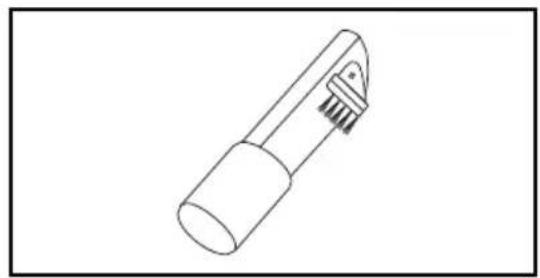
natural_image
Line drawing of a mechanical tool with a curved handle and base (no text or symbols)
natural_image
Line drawing of a mechanical tool with a handle and spool, no text or symbols present➢ The Floor Brush may be used on the following items:
The Crevice Tool may be used on the following items:
➢ The Dusting Brush may be used on the following items:
For best cleaning action, the floor brush should be pushed straight away from you and pulled straight back. At the end of each pull stroke, the direction of the floor brush should be changed to point into the next section to be cleaned. This pattern should be continued across the rug with slow, gliding motions.
natural_image
Illustration of a person cleaning a broom with directional arrows indicating movement (no text or symbols)➢ Fast, jerky motions do not provide complete cleaning.
Los movimientos bruscos no logran una limpieza completa.
➢ Small areas can be cleaned without moving the canister
Las áreas pequeñas pueden ser limpiadas sin mover la aspiradora.
Carpeted stairs need to be vacuumed regularly.
Las escaleras alfombradas necesitan ser aspiradas regularmente.
natural_image
Diagram of a mechanical joint or connector with directional arrows indicating force or movement (no text or symbols present)The hose swivel allows the hose to turn without moving the canister. This is helpful for cleaning in small areas.
This vacuum cleaner has a thermal protector which automatically trips to protect the vacuum cleaner from overheating. If a clog prevents the normal flow of air to the motor, the thermal protector turns the motor off automatically. This allows the motor to cool in order to prevent possible damage to the vacuum cleaner.
➢ Turn off and unplug vacuum cleaner to allow the vacuum cleaner to cool and the thermal protector to reset.
➢ Check for and remove clogs, if necessary.
➢ Also check and replace any clogged filters.
➢ Wait approximately fifty (50) minutes and plug the vacuum cleaner in and turn it on to see if the thermal protector has reset.
NOTE: The wand must be in the shortest position.
➢ Stand the vacuum cleaner up and insert the wand holder into the wand holder hole.
➢ Hold the hose and wind it around the wand.
Personal Injury and Product Damage Hazard
DO NOT carry the vacuum cleaner while it is in the storage position. Injury or damage may result if the hose or extension pipe becomes unattached.

CUIDADO
Performing the following tasks will keep your new Panasonic vacuum cleaner operating at peak performance levels and will ensure these high levels for years to come. Check the BEFORE REQUESTING SERVICE section in this manual for recommendations on performing some of these tasks to help solve various problems that may occur.
Always unplug power cord from electrical outlet before performing any service on vacuum cleaner.

ADVERTENCIA
▶ Unplug cord from wall outlet.
➢ Clean exterior using a clean, soft cloth that has been dipped in a solution of mild liquid detergent and water and wrung dry.
➢ DO NOT drip water on vacuum cleaner. Wipe dry after cleaning.
➢ DO NOT clean tools in dishwasher or clothes washer.
➢ Wash tools in warm soapy water, rinse and air dry.
➢ DO NOT use tools if they are wet.

CAUTION
Product Damage Hazard
Do not use the hose without the handle in place. If the hose is used without the handle, the hose will bend excessively, causing it to crack.

CUIDADO
When the hose is clogged with dust, remove it in the following manner:
natural_image
Technical line drawing of a mechanical device pouring granular material into a circular container (no text or symbols)
natural_image
Line drawing of a vacuum cleaner device with an arrow pointing to the component (no text or symbols present)➢ Push the dust bin release button and lift off the dust bin.
➢ Slide the lever in the direction of the arrow to remove the embedded dust.
➢ Push the release button, open the dust bin and then open the filter.
➢ Empty the dust bin into a trash container.
➢ Close the dust bin and reinstall as shown.
Do not use the vacuum cleaner without dust bin, otherwise it may damage the motor.

CUIDADO
natural_image
Technical line drawing of a mechanical assembly with a faucet spraying water onto a bracket (no text or symbols)Remove the dust bin. Remover el contenedor de polvo.
Slide the lever in the direction of the arrow to remove the embedded dust. Deslizar la palanca en la dirección de la flecha para remover el contenedor de polvo.
Push the release button, open the dust bin, and then open the filter. Presionar el botón de liberación, remover el contenedor de polvo, entonces remover el filtro.
➢ Take out the cleaning brush (included) to clean the dust filter and pre-filter.
Push the dust filter cover release latch to pull out dust filter cover. Presionar el botón de la tapa del filtro para remover la tapa del filtro.
➢ Wash all parts of the dust bin. Allow filter to dry 24 hours before putting back into vacuum cleaner.
DO NOT operate without filter installed.
DO NOT wash in the dishwasher.
natural_image
Line drawing of a vacuum cleaner device with a black arrow pointing to the component (no text or symbols present)
NOTE: When the cleaning of the filter no longer restores vacuum cleaner suction to full power, replace the filter.
➢ Install the dust filter cover along inside of locating strip, and make sure you hear a “click.”
➢ Close the dust bin and reattach it as shown.
Under normal usage, the HEPA Media filter will require replacement once every year. However, vacuuming large amounts of extremely fine dust or similar material over a long period of time may decrease airflow performance through the filter. If this occurs, it may become necessary to replace the HEPA Media filter more often.
➢ Open the filter cover by pressing the release latch at the bottom of the filter cover and lifting out and up.
➢ Remove the HEPA Media filter.
Remover el filtro HEPA Media Media.
➢ Install a new HEPA Media filter, by inserting tabs on the bottom of the filter into the slots in the canister and pressing into place.
NOTE: Be sure the HEPA Media filter is facing the right direction with the seal facing the canister.
➢ Reinstall filter cover by inserting tabs on the top of the filter cover into the slots on the canister. Press into place and be sure release latch snaps into place.
natural_image
Simple line drawing of a faucet above a bowl with liquid, no text or symbols presentRemove the dust bin. Remover el contenedor de polvo.
Remove the secondary filter and rinse with water.
Once the filter is washed clean, squeeze by hand and allow to air dry.
➢ Allow filter to dry 24 hours before putting back into vacuum cleaner.
NOTE: When the cleaning of the filter no longer restores vacuum cleaner suction to full power, replace the filter.
DO NOT operate without filter installed.
DO NOT wash in the dishwasher.
Review this table to find do-it-yourself solutions for minor performance problems. Any other service needed should be performed by an authorized service representative.

WARNING
Always turn off and unplug vacuum cleaner before performing maintenance to the vacuum cleaner. Failure to do so could result in electrical shock or personal injury.
| PROBLEM POSSIBLE CAUSE POSSIBLE SOLUTION | ||
| Vacuum cleaner won't start. switch to on. (page 13) | 1. Unplugged at wall outlet. | 1. Plug in firmly, push ON/OFF |
| 2. Tripped circuit breaker / blown fuse at household fuse. . | 2. Reset circuit breaker or replace | |
| service panel.a | ||
| Poor job of dirt pick-up. | 1. Full or clogged dust bin. | 1. Empty dust bin. (page 21) |
| 2. Clogged airflow passages. | 2. Clear airflow passages. (page 20) | |
| 3. Dirty filters. | 3. Change/Clean filters. | |
| 4. Hole in hose. | (page 24, 25) | |
| 5. Dust bin open. | Replace hose. | |
| 5. Close dust bin until release button is latched. (page 21) | ||
| Vacuum cleaner starts but shuts off. | 1. Tripped thermal protector in canister. | 1. See PERFORMANCE FEATURES – “Thermal Protector.” (page 17) |
| Cord won't rewind. | 1. Dirty power cord. | 1. Clean the power cord. |
| 2. Cord jammed. 2. Pull out cord and rewind. (page 13) | ||
Limited Warranty (Only For U.S.A.)
Panasonic Products Limited Warranty
Limited Warranty Coverage (For USA Only)
If your product does not work properly because of a defect in materials or workmanship, Panasonic Consumer Electronics Corporation (referred to as “the warrantor”) will, for the length of the period indicated on the chart below, which starts with the date of original purchase (“warranty period”), at its option either (a) repair your product with new or refurbished parts, (b) replace it with a new or a refurbished equivalent value product, or (c) refund your purchase price. The decision to repair, replace or refund will be made by the warrantor.
| Product or Part Name Parts Labor Motor | |||
| Vacuum Cleaner 1 year 1 year 1 | year | ||
During the “Labor” warranty period there will be no charge for labor. During the “Parts” warranty period, there will be no charge for parts.
This warranty only applies to products purchased and serviced in the United States. This warranty is extended only to the original purchaser of a new product which was not sold “as is”.
Carry-In or Mail in Service:
To find a service center please visit: http://shop.panasonic.com/support
When shipping the unit, carefully pack and send it in the original (or supplied) carton. Include a letter detailing the complaint along with the bill of sales and provide a daytime phone number where you can be reached. A valid registered receipt is required under the Limited Warranty.
When shipping Lithium Ion batteries please visit our web site at http://shop.panasonic.com/support as Panasonic is committed to providing the most up to date information.
IF REPAIR IS NEEDED DURING THE WARRANTY PERIOD, THE PURCHASER WILL BE REQUIRED TO FURNISH A SALES RECEIPT/PROOF OF PURCHASE INDICATING DATE OF PURCHASE, AMOUNT PAID AND PLACE OF PURCHASE. CUSTOMER WILL BE CHARGED FOR THE REPAIR OF ANY UNIT RECEIVED WITHOUT SUCH PROOF OF PURCHASE.
Limited Warranty Limits And Exclusions
This warranty ONLY COVERS failures due to defects in materials or workmanship, and DOES NOT COVER glass, plastic parts, temperature probes (if included) and normal wear and tear or cosmetic damage. The warranty ALSO DOES NOT COVER damages which occurred in shipment, or failures which are caused by products not supplied by the warrantor, or failures which result from accidents, misuse, abuse, neglect, bug infestation, mishandling, misapplication, alteration, faulty installation, set-up adjustments, maladjustment of consumer controls, improper maintenance, power line surge, lightning damage, modification, or commercial use (such as in a hotel, office, restaurant, or other business), rental use of the product, service by anyone other than a Factory Service center or other Authorized Servicer, or damage that is attributable to acts of God.
THERE ARE NO EXPRESS WARRANTIES EXCEPT AS LISTED UNDER “LIMITED WARRANTY COVERAGE”.
THE WARRANTOR IS NOT LIABLE FOR INCIDENTAL OR CONSEQUENTIAL DAMAGES RESULTING FROM THE USE OF THIS PRODUCT, OR ARISING OUT OF ANY BREACH OF THIS WARRANTY. (As examples, this excludes damages for lost time, travel to and from the servicer, loss of or damage to media or images, data or other memory or recorded content. The items listed are not exclusive, but for illustration only.)
ALL EXPRESS AND IMPLIED WARRANTIES, INCLUDING THE WARRANTY OF MERCHANTABILITY, ARE LIMITED TO THE PERIOD OF THE LIMITED WARRANTY.
Some states do not allow the exclusion or limitation of incidental or consequential damages, or limitations on how long an implied warranty lasts, so the exclusions may not apply to you.
This warranty gives you specific legal rights and you may also have other rights which vary from state to state. If a problem with this product develops during or after the warranty period, you may contact your dealer or Service Center. If the problem is not handled to your satisfaction, then write to:
Consumer Affairs Department
Panasonic Consumer Marketing Company
661 Independence Pkwy
Chesapeake, VA 23320
PARTS AND SERVICE, WHICH ARE NOT COVERED BY THIS LIMITED WARRANTY, ARE YOUR RESPONSIBILITY.
Shop
Accessories!
for all your Panasonic gear
Go to
http://shop.panasonic.com/support
Get everything you need to get the most out of your Panasonic products
Accessories & Parts for your Camera,
Phone, A/V products, TV, Computers & Networking, Personal Care, Home
Appliances, Headphones, Batteries, Backup Chargers & more...
Customer Services Directory
For Product Information, Operating
Assistance, Parts, Owner's Manuals, Dealer and Service info go to
http://shop.panasonic.com/support
For the hearing or speech impaired
TTY: 1 877 833 8855
Consumer Affairs Department
Panasonic Consumer Marketing Company
661 Independence Pkwy
Chesapeake, VA 23320
PARTES Y SERVICIOS QUE NO ESTAN CUBIERTO POR ESTA GARANTIA LIMITADA, SON SU RESPONSABILIDAD.
If your Panasonic Vacuum Cleaner needs service, look in the yellow pages of the telephone book under HOME APPLIANCE SERVICE for your nearest Panasonic Corporation of North America authorized service center, or call, 1-800-211-PANA (7262) toll free to find a convenient servicenter. DO NOT send the product to the Executive or Regional Sales offices. They are NOT equipped to make repairs.
If you ship the product
Carefully pack and send it prepaid, adequately insured and preferably in the original carton. Attach a postage-paid letter to the outside of the carton, which contains a description of your complaint. DO NOT send the product to the Executive or Regional Sales Offices. They are NOT equipped to make repairs.
PANASONIC CORPORATION OF NORTH AMERICA
Two Riverfront Plaza
Newark, NJ 07102
World Wide Web Address
http://www.panasonic.com/repair
Two Riverfront Plaza
Newark, NJ 07102
World Wide Web Address
http://www.panasonic.com/repair
- WARNING
- ADVERTENCIA
- Important Safety Instructions 6
- Before Requesting Service 26
- Warranty (For U.S. & Puerto Rico Only) 28
- What To Do When Service is Needed (For U.S. & Puerto Rico Only) /
- TO OUR VALUED CUSTOMER
- PLEASE PAY CLOSE ATTENTION TO ALL WARNING AND CAUTION STATEMENTS.
- CAUTION
- TO AVOID ELECTRICAL SHOCK
- TO AVOID ACCIDENTS
- IMPORTANT SAFETY INSTRUCTIONS
- SAVE THESE INSTRUCTIONS THIS VACUUM CLEANER IS INTENDED FOR HOUSEHOLD USE ONLY
- ASSEMBLY INSTRUCTIONS
- HOW TO EXPAND / CONTRACT WAND
- NOTE: The wand must be in the shortest position.
- ➢ Stand the vacuum cleaner up and insert the wand holder into the wand holder hole.
- ➢ Hold the hose and wind it around the wand.
- CUIDADO
- Product Damage Hazard
- When the hose is clogged with dust, remove it in the following manner:
- DO NOT operate without filter installed.
- DO NOT wash in the dishwasher.
- Limited Warranty (Only For U.S.A.)
- Panasonic Products Limited Warranty
- Limited Warranty Coverage (For USA Only)
- Carry-In or Mail in Service:
- Limited Warranty Limits And Exclusions
- ALL EXPRESS AND IMPLIED WARRANTIES, INCLUDING THE WARRANTY OF MERCHANTABILITY, ARE LIMITED TO THE PERIOD OF THE LIMITED WARRANTY.
- Shop
- Accessories!
- Customer Services Directory
- PANASONIC CORPORATION OF NORTH AMERICA
Brand : PANASONIC
Model : MC-CL310
Category : Vacuum Cleaner