
UHF-4100M - DJ Equipment GEMINI - Free user manual and instructions
Find the device manual for free UHF-4100M GEMINI in PDF.


| Product Type | Single UHF Wireless Microphone System |
| Model | Gemini UHF-4100M |
| Frequency Range (US) | 682 - 698 MHz |
| Frequency Range (Europe) | 854 - 865 MHz |
| Receiving System | PLL synthesized |
| Frequency Stability | ±0.005% |
| Frequency Response | 50 Hz - 15 kHz (±3 dB) |
| Signal-to-Noise Ratio | >90 dB |
| Modulation Mode | FM |
| Total Harmonic Distortion | 1% @ 1 kHz |
| Sensitivity | 10 dBuV (FM: 40 kHz, S/N≥85 dB) |
| Audio Outputs | Balanced XLR, Unbalanced 1/4" |
| Power Supply (Receiver) | 12V DC via included adapter |
| Power Supply (Transmitter) | 2 x AA alkaline batteries |
| Battery Life (Transmitter) | Approximately 8 hours |
| Receiver Dimensions (W x H x D) | 210 x 138 x 45 mm |
| Handheld Transmitter Dimensions (L x Dia) | 250 x 38 mm |
| Microphone Element (Handheld) | Unidirectional dynamic |
| Polar Pattern (Handheld) | Cardioid |
| Effective Range | Up to 250 feet (76.2 m) |
| Special Features | IR sync, auto-scan, Line/Mic gain switch |
| Maintenance & Cleaning | Use soft dry cloth; avoid volatile liquids |
| Safety | Avoid moisture, heat sources; use shielded cables |
| Spare Parts / Repairability | Contact authorized service center; no user serviceable parts |
Frequently Asked Questions - UHF-4100M GEMINI
User questions about UHF-4100M GEMINI
0 question about this device. Answer the ones you know or ask your own.
Ask a new question about this device
Download the instructions for your DJ Equipment in PDF format for free! Find your manual UHF-4100M - GEMINI and take your electronic device back in hand. On this page are published all the documents necessary for the use of your device. UHF-4100M by GEMINI.
USER MANUAL UHF-4100M GEMINI
IN THE USA: IF YOU ARE EXPERIENCING PROBLEMS WITH THIS UNIT CALL 1-732-346-0061 FOR GCI TECHNOLOGIES CUSTOMER SERVICE. DO NO ATTEMPT TO RETURN THIS EQUIPMENT TO YOUR DEALER.
Parts of the design of this product may be protected by worldwide patents. Information in this manual is subject to changes without notice and does not represent a commitment on the part of the vendor.
GCI Technologies Corp. shall not be liable for any loss or damage whatsoever arising from the use of information or any error contained in this manual.
No part of this manual may be reproduced, stored in a retrieval system or transmitted, in any form or by any means, electronic, electrical, mechanical, optical, chemical, including photocopying and recording, for any purpose without the express written permission of GCI Technologies Corp.
It is recommended that all maintenance and service on this product is performed by GCI Technologies. Corp or its authorized agents. GCI Technologies will not accept liability for loss or damage caused by maintenance or repair performed by unauthorized personnel.
Worldwide Headquarters • 280 Raritan Center Parkway, Edison, NJ 08837 • USA Tel: (732) 346-0061 • Fax: (732) 346-0065
Gemini Sound Products Worldwide Headquarters 280 Raritan Center Pkwy Edison, NJ 08837 USA Tel: (732) 346-0061 Fax: (732) 346-0065
Gemini Sound Products Unit 44 Brambles Enterprise Centre Waterlooville P07 7TH, UK Tel: 087 087 00880 Fax: 087 087 00990
GCI Technologies S.A. Caspe. 172 - 5 ^st A 08013 Barcelona, Spain Tel: 34 93 436 37 00 Fax: 34 93 347 69 61
GCI Technologies GmbH Lerchenstraße 14 80995 München, Germany Tel: 089-319 019 8-0 Fax: 089-319 019 8-18

http://www.geminiproaudio.com
© GCI Technologies Corp. 2011 All Rights Reserved
natural_image
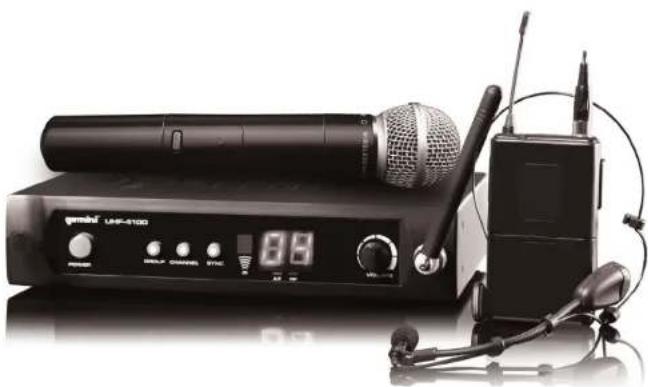
Black-and-white photo of a WRF-4100 audio recording device with a microphone, control panel, and earphones (no visible text or symbols on main body)UHF-4000 SERIES gemini®
OPERATIONS MANUAL MANUAL DE INSTRUCCIONES MANUEL D'INSTRUCTIONS BEDIENUNGSHANDBUCH
ENGLISH
Warning 4
Unit overview 8
Introduction 11
Frequency Chart 13
UHF-4100 Single UHF Wireless System 14
UHF-4200 Dual UHF Wireless System 15
Transmitter Operation 16
Specifications 18
Warranty 50
Product Registration 51
FRANÇAIS
Mises en Garde 6
Schémas 8
Introduction 31
IMPORTANT WARNING AND SAFETY INSTRUCTIONS!



RISK OF ELECTRIC SHOCK DO NOT OPEN!


CAUTION: This product satisfies FCC regulations when shielded cables and connectors are used to connect the unit to other equipment. To prevent electromagnetic interference with electric appliances such as radios and televisions, use shielded cables and connectors for connections.
The exclamation point within an equilateral triangle is intended to alert the user to the presence of important operating and maintenance (servicing) instructions in the literature accompanying the appliance.
The lightning flash with arrowhead symbol, within an equilateral triangle, is intended to alert the user to the presence of uninsulated "dangerous voltage" within the product's enclosure that may be of sufficient magnitude to constitute a risk of electric shock to persons.
READ INSTRUCTIONS: All the safety and operating instructions should be real before the product is operated.
RETAIN INSTRUCTIONS: The safety and operating instructions should be retained for future reference
HEED WARNINGS: All warnings on the product and in the operating instructions a FOLLOW INSTRUCTIONS; All operating and use instructions should be followed.
CLEANING: The product should be cleaned only with a polishing cloth or a soft dry cloth. Never clean with furniture wax, benzine, insecticides or other volatile liquids since they may corrode the cabinet.
ATTACHMENTS: Do not use attachments not recommended by the product manufacturer as they may cause hazards.
WATER AND MOISTURE: Do not use this product near water, for example, near a bathtub, wash bowl, kitchen sink, or laundry tub; in a wet basement; or near a swimming pool; and the like.
ACCESSORIES: Do not place this product on an unstable cart, stand, tripod, bracket, or table. The product may fall, causing serious injury to a child or adult, and serious damage to the product. Use only with a cart, stand, tripod, bracket, or table recommended by the manufacturer, or sold with the product. Any mounting of the product should follow the manufacturer's instructions, and should use a mounting accessory recommended by the manufacturer.
CART: A product and can combination should be moved with care. Quick slope, excessive force, and uneven surfaces may cause the product and can combination to overturn. See Figure A.
VENTILATION: Slots and openings in the cabinet are provided for ventilation and to ensure reliable operation of the product and to protect it from overheating, and these openings must not be blocked or covered. The openings should never be blocked by placing the product on a bed, sofa, rug, or other similar surface. This product should not be placed in a built-in installation such as a bookcase or rack unless proper ventilation is provided or the manufacturer's instructions have been adhered to.
POWER SOURCES: This product should be operated only from the type of power source indicated on the marking label. If you are not sure of the type of power supply to your home, consult your product dealer or local power company.
LOCATION: The appliance should be installed in a stable location.
NON-USE PERIODS: The power cord of the appliance should be unplugged from the outlet when left unused for a long period of time.
GROUNDING OR POLARIZATION
- If this product is equipped with a polarized alternating current line plug (a plug having one blade wider than the other), it will fit into the outlet only one way. This is a safety feature. If you are unable to insert the plug, fully into the outlet, try reversing the plug. If the plug should still fail to fit, contact your electrician to replace your obsolete outlet. Do not deflect the safety purpose of the polarized plug:
- If this product is equipped with a three-wire grounding type plug, a plug having a third (grounding) pin, it will only fit into a grounding type power outlet. This is a safety feature. If you are unable to insert the plug into the outlet, contact your electrician to replace your obsolete outlet. Do not defeat the safety purpose of the grounding type plug.
POWER-CORD PROTECTION: Power-supply cords should be routed so that they are not likely to be walked on or pinched by items placed upon or against them, paying particular attention to cords at plugs, convenience replaces, and the point where they exit from the product.
OUTDOOR ANTENNA GROUNDING: If an outside antenna or cable system is connected to the product, be sure the antenna or cable system is grounded so as to provide some protection against voltage surges and built-up static charges. Article 810 of the National Electrical Code. ANSN/NFPA 70, provides information with regard to proper grounding of the mast and supporting structure, grounding of the lead-in wire to an antenna discharge unit, size of grounding conductors, location of antenna-discharge unit, connection to grounding electrodes, and requirements for the grounding electrode. See Figure B.
LIGHTNING: For added protection for this product during a lightening storm, or when it is left unattended and unused for long periods of time, unplug it from the wall outlet and disconnect the antenna or cable system. This will prevent damage to the product due to lightening and power-line surges.
POWER LINES: An outside antenna system should not be located in the vicinity of overhead power lines or other electric light or power circuits, or where it can fall into such power lines or circuits. When installing an outside antenna system, extreme care should be taken to keep from touching such power lines or circuits as contact with them might be false.
OVERLOADING: Do not overload wall outlets, extension cords, or integral convenience receptacles as this can result in a risk of fire or electric shock.
OBJECT AND LIQUID ENTRY: Never push objects of any kind into this product through openings as they may touch dangerous voltage points or short-cut parts that could result in a fire or electric shock. Never spill liquid of any kind on the product.
SERVICING: Do not attempt to service this product yourself as opening or removing covers may expose you to dangerous voltage or other hazards. Refer all servicing to qualified service personnel.
DAMAGE REQUIRING SERVICE: Unplug this product from the wall outlet and refer servicing to qualified service personnel under the following conditions
- When the power-supply cord or plug is damaged.
- If liquid has been spilled, or objects have fallen into the product.
- If the product has been exposed to rain or water.
- If the product does not operate normally by following the operating instructions. Adjust only those controls that are covered by the operating instructions as an improper adjustment of other controls may result in damage and will often require extensive work by a qualified technician to restore the product to its normal operation.
• If the product has been dropped or damaged in any way.
- When the product exhibits a distinct change in performance, this indicates a need for service.
REPLACEMENT PARTS: When replacement parts are required, be sure the service technician has used replacement parts specified by the manufacturer or have the same characteristics as the original part. Unauthorized substitutions may result in fire, electric shock, or other hazards.
SAFETY CHECK: Upon completion of any service or repairs to this product, ask the service technician to perform safety checks to determine that the product is if proper operating condition.
WALL OR CEILING MOUNTING: The product should not be mounted to a wall or ceiling.
HEAT: The product should be situated away from heat sources such as radiators, heat registers, sloves, or other products (including amplifiers) that produce heat.
UHF-4000 SERIES MANUAL • GEMINIPROAUDIO.COM
UHF-4000 SERIES MANUAL • GEMINIPROAUDIO.COM
FUNCTIONS
① Base receiver antennas
② Receiver Power Button
③ Volume Rotary Control
④ Group Control
⑤ Channel Control
⑥ Sync Control
⑦ LED Display
⑧ IR Receiver
⑨ Balanced XLR Out
⑩ Mixed 1/4" out
⑪ Line/Mic Gain switch
⑫ DC IN
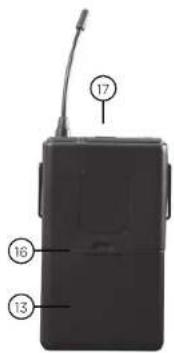
⑬ Battery cavity
⑭ Mic Power / Mute button
⑮ Transmitter LED Indicator
16 IR Transmitter
⑱ Screw in 1/8" Jack
⑲ Padded head rest
20 Snap-off Lavalier Microphone
⑰ Belt Pack MUTE & ON/OFF switch
INTRODUCTION
Congratulations on your purchasing a Gemini wireless system. This system includes the latest features and is backed by a one year limited warranty. Prior to use we suggest that you carefully read all the instructions.
This book includes instructions for both the UHF-4100 and the UHF-4200 systems.
CAUTION
- All operating instructions should be read before using this equipment.
- To reduce risk of electrical shock, do not open the unit. There are NO USER OR SERVICEABLE PARTS INSIDE. Please refer servicing to a qualified service technician.
- Do not expose this unit to direct sunlight or a heat source such as a radiator or stove.
- Dust, dirt and debris can interfere with the performance of this unit. Make an effort to keep the unit away from dusty, dirty environments, and cover the unit when it is not in use. Dust it regularly with a soft clean brush.
- When moving this equipment, it should be placed in its original carton and packaging. This will reduce the risk of damage during transit.
- DO NOT EXPOSE THIS UNIT TO RAIN OR MOISTURE.
- DO NOT USE ANY SPRAY CLEANER OR LUBRICANT ON ANY CONTROLS OR SWITCHES.
Microphone:
- Do not drop the microphone onto a hard surface.
- Do not strike the microphone head front with fist or fingers, and do not blow strongly into the microphone head front.
- Do not use the microphone in areas of high humidity and/or high temperature as this could lead to damage of the microphone.
FCC COMPLIANCE
IMPORTANT REGULATORY INFORMATION
This device complies with Part 15 of FCC rules. Operation is subject to the following two conditions:
(1) this device may not cause harmful interference and
(2) this device must accept any interference that is received, including any interference that may cause undesired operation.
Warning: Changes or modifications to this unit not expressly approved by the party responsible for compliance could void the user's authority to operate the equipment.
EUROPEAN COMPLIANCE
CE0700①
R & TTed countries
BE, DE, ES, FR, NL, UK
Hereby, GCI Technologies Corp., declares that this PROFESSIONAL UHF WIRELESS SYSTEM is in compliance with the essential requirements and other relevant provisions of Directive 1999/5/EC. The Declaration of Conformity may be consulted at: http://www.geminiproaudio.com/uhf4000_DoC.pdf
IMPORTANT NOTE: (For European countries only)
A license may be required when using this UHF wireless microphone system in your country. It is your responsibility to ensure that you have the correct license for the frequencies used. Please check the frequency table on Page 13 of this manual.
A license is not required for wireless microphones on UHF frequencies from 854 MHz to 865 MHz in most EU countries, but please visit the following website for more information regarding licensing in your country: http://www.ero.dk/rtte then follow the "National Frequency Tables" link.
UK RESTRICTIONS
This wireless equipment is for use only on the following frequencies in the UK: 863-865mHz. For use inside UK, select channel groups 8 or 9. Channel groups 0-7 (854-862.9 mHz) cannot be operated in the UK.
FREQUENCY CHART
US
*Channel frequencies given in MHz.
| Group | Channel 0* | Channel 9* |
| 0 | 682.15 | 683.5 |
| 1 | 683.65 | 685 |
| 2 | 685.15 | 686.5 |
| 3 | 686.65 | 688 |
| 4 | 688.15 | 689.5 |
| 5 | 689.65 | 691 |
| 6 | 691.15 | 692.5 |
| 7 | 692.65 | 694 |
| 8 | 694.15 | 695.5 |
| 9 | 695.65 | 697 |
Channel frequencies increase at an interval of 0.15 MHz
EUROPE
*Channel frequencies given in MHz.
| Group | Channel 0* | Channel 9* |
| 0 | 855 | 855.9 |
| 1 | 856 | 856.9 |
| 2 | 857 | 857.9 |
| 3 | 858 | 858.9 |
| 4 | 859 | 859.9 |
| 5 | 860 | 860.9 |
| 6 | 861 | 861.9 |
| 7 | 862 | 862.9 |
| 8 | 863 | 863.9 |
| 9 | 864 | 864.9 |
Channel frequencies increase at an interval of 0.1 MHz
UHF-4100 SINGLE UHF WIRELESS SYSTEM
The UHF-4100 single channel UHF series wireless system is a high quality audio product that provides excellent performance under most operating conditions.
Two different versions are available and operate on different ranges of UHF frequencies between either 682.15 MHz to 697 MHz (US version) and 855 MHz to 864.9 MHz (EURO version).
THE MODELS AVAILABLE ARE:
UHF-4100M - Which comes equipped with a handheld microphone transmitter.
UHF-4100HL - Which comes equipped with a belt pack transmitter and Headset/ lavalier combo.
OPERATING THE UNIT
- Remove all packing materials. Save the box and packing materials to transport the unit and in case the unit ever requires service.
- Attach the base receiver antenna (1) and plug the AC/DC adaptor into the rear of the receiver (12) and an appropriate AC Outlet. Push the Power On (2) button to turn the unit on.
- Extend the antenna fully vertical and point it out into the direction you will be speaking from.
- Insert an XLR or 1/4" cable into the XLR jack (9) or 1/4" jack (10) on the rear of the receiver and connect the other end of the cable to your amp, effects or mixer jack.
- Press and hold the group adjustment (4) to auto search on upper frequencies for a clear group and channel frequency. Press and hold channel adjustment (5) to auto search on lower frequencies for a clear group and channel frequency. Set the group and channel adjustment to the desired frequency as indicated on the included Frequency Chart with the group adjustment (4) and channel adjustment (5).
- Adjust the volume using the level control (3) on the front panel. You can also use the Line/Mic Gain switch to toggle between a mic-level signal and line-level signal (11).
Note: Effective range between the transmitter and receiver is up to 250 feet.
14
UHF-4000 SERIES MANUAL • GEMINIPROAUDIO.COM
UHF-4200 DUAL UHF WIRELESS SYSTEM
The UHF-4200 dual channel UHF series wireless system is a high quality audio product that provides excellent performance under most operating conditions and allows for automatic or manual frequency adjustment.
Two different versions are available and operate on different ranges of UHF frequencies between either 682.15 MHz to 697 MHz (US version) and 855 MHz to 864.9 MHz (EURO version).
THE MODELS AVAILABLE ARE:
UHF-4200M - Which comes equipped with (2) hand held microphone transmitters.
UHF-4200HL- Which comes equipped with (2) belt pack transmitters and (2) Headset/ lavalier combos.
OPERATING THE UNIT
- Remove all packing materials. Save the box and packing materials to transport the unit and in case the unit ever requires service.
- Plug the AC/DC adaptor into the rear of the receiver (12). Then plug the adaptor into an appropriate AC Outlet. Push the Power On (2) button to turn the unit on. The power indicator will be illuminated.
- Extend the antennas fully vertical and point it out into the direction you will be speaking from.
- Insert XLR or 1/4" cables into the XLR jacks (9) or 1/4" jack (10) on the rear of the receiver and connect the other end of the cable to your amp, effects or mixer jack.
- Press and hold the group adjustment (4) to auto search on upper frequencies for a clear group and channel frequency. Press and hold channel adjustment (5) to auto search on lower frequencies for a clear group and channel frequency. To manually set group and channel to the desired frequency as indicated on the included Frequency Chart press group adjustment (4) and channel adjustment (5).
- Adjust the volume using the level control (3) on the front panel. You can also use the Line/Mic Gain switch to toggle between a mic-level signal and line-level signal (11).
Note: Effective range between the transmitter and receiver is up to 250 feet.
UHF-4000 SERIES MANUAL • GEMINIPROAUDIO.COM
- Unscrew the battery cavity (13) to open. Insert the two included AA batteries into the battery cavity according to the polarity indication marked on the battery housing.
- Press and hold power/mute button(14) to turn transmitter on. The transmitter LED (15) will light green signaling the mic is now on.
- Keep the battery cover open and point the transmitter infrared (16) toward the receiver IR transmitter (8) and press Sync control (6) button. The RF Signal LED should now be solid red.
- Close the battery cavity (13).
- The microphone can be muted by pressing the Mic Power / Mute button (14). If the microphone is not going to be used for any length of time, press and hold the Mic Power / Mute button (14) to power the microphone off. The mic will not need to be resynced upon powering it back on.
BELT PACK OPERATION
- Open the battery cavity (13) on the rear of the belt pack. Insert the two included AA batteries into the battery cavity according to the polarity indication marked on the battery housing.
- Press and hold power/mute button (17) to turn transmitter on. The transmitter LED (15) will light green signaling the mic is now on.
- Keep the battery cover open and point the IR Transmitter infrared (16) toward the receiver IR receiver (8) and press Sync control (6) button. The RF Signal LED should now be solid red.
- Close the battery cavity (13).
- The microphone can be muted by pressing the Belt Pack Power / Mute button (17). If the microphone is not going to be used for any length of time, press and hold the Belt Pack Power / Mute button (17) to power the microphone off. The belt pack will not need to be resynced upon powering it back on.
TROUBLESHOOTING
This equipment operates at a frequency that has been authorized by the FCC. However, there is no guarantee that interference will not occur in a particular installation. If this equipment does cause interference to radio or television reception, try one or more of the following suggestions:
- Change the operating frequency of the unit.
- Repoint or relocate the receiving antenna.
- Plug the equipment into a socket or a different circuit.
Remember, any changes made to the unit without authorization from Gemini will void your warranty.
SPECIFICATIONS
RECEIVER (UHF-4100 AND UHF-4200)
| Frequency range | USA: 682 - 698MHz |
| .Europe: 854 - 865MHz | |
| Receiving System | PLL synthesized |
| Frequency Stability | +/- 0.005% |
| Frequency response | 50Hz-15KHz (+/- 3dB) |
| Signal-to-Noise Ratio | >90dB |
| Modulation Mode | FM |
| IF Frequency | 80.5 MHz |
| T.H.D. | 1% @ 1 kHz |
| Sensitivity | 10dBuV (FM: 40kHz, S/N≥85dB) |
| Power Supply | 12V DC |
| Audio Output | Balanced XLR |
| Unbalanced 1/4" | |
| Dimensions | 210 x 138 x 45 mm |
TRANSMITTER (ALL MODELS)
| Frequency range | USA: 682 - 698MHzEurope: 854 - 865MHz |
| RF Power Output | <10dBm |
| Oscillation Mode | PLL synthesized |
| Spurious Emission | More than 50dBbelow carrier frequency |
| Frequency Stability | 0.005% with quartz control |
| Max modulation | +/-60kHz |
| Current Consumption | 100mA |
| Battery Type | Two (2) AA Alkaline |
| Battery Life | 8 hours |
TRANSMITTER (HANDHELD)
| Microphone Element | Unidirectional Dynamic Mic |
| Polar Pattern | Cardioid |
| Dimensions | 250 x 38 mm |
TRANSMITTER (HEADSET / LAVALIER)
| Microphone Element | Condenser Mic |
| Polar Pattern | Cardioid |
| Dimensions | 63 x 20 x 110 mm |
FUNCIONES
BE, DE, ES, FR, NL, UK
BE, DE, ES, FR, NL, UK
Warranty and Repair:
All GCI products are designed and manufactured to the highest standards in the industry. With proper care and maintenance, your product will provide years of reliable service.
LIMITED WARRANTY
A. GCI warrants its products to be free from defects in materials and workmanship for One (1) year from the original purchase date. Exceptions: Laser assemblies on CD Players, cartridges, and crossfaders are covered for 90 days.
B. This limited warranty does not cover damage or failure caused by abuse, misuse, abnormal use, faulty installation, improper maintenance or any repairs other than those provided by an authorized GCI Service Center.
C. There are no obligations of liability on the part of GCI for consequential damages arising out of or in connection with the use or performance of the product or other indirect damages with respect to loss of property revenues, of profit, or costs of removal, installation, or reinstallation. All implied warranties for GCI, including implied warranties for fitness, are limited in duration to One (1) year from the original date of purchase, unless otherwise mandated by local statutes.
RETURN/REPAIR
A. In the U.S.A., please call our helpful Customer Service Representatives at (732)738-9003, and they will be happy to give you a Return Authorization Number (RA#) and the address of an authorized service center closest to you.
B. After receiving an RA#, include a copy of the original sales receipt, with defective product and a description of the defect. Send by insured freight to: GCI Sound Products Corp, and use the address provided by your customer service representative. Your RA# must be written on the outside of the package, or processing will be delayed indefinitely!
C. Service covered under warranty will be paid for by GCI and returned to you. For non-warranted products, GCI will repair your unit after payment is received. Repair charges do not include return freight. Freight charges will be added to the repair charges.
D. On warranty service, you pay for shipping to GCI, we pay for return shipping within the continental United States, Alaska, Hawaii, Puerto Rico, Canada, Bahamas, and the Virgin Islands will be charged for freight,
E. Please allow 2-4 weeks for return of your product. Under normal circumstances your product will spend no more than 10 working days at Gemini. We are not responsible for shipping times.
GCI Technologies Corp.
Worldwide Headquarters
280 Raritan Center Parkway
Edison, NJ 08837 USA
Tel: (732) 346-006
Fax (732) 346-0065
IN THE UNITED KINGDOM
In the event that you need service on your GCI product under warranty simply write a letter describing the problem, along with your contact information. Make sure to enclose a copy of your receipt for proof of warranty information. A return number is not required. You will be responsible for shipping charges to Gemini UK and Gemini UK will pay to return the unit to you if it is considered under warranty.
GCI Technologies Ltd
Unit 44 Brambles Enterprise Centre
Waterberry Drive
Waterfooville
Hampshire, P07, 7TH, UK
Tel: +44 (0) 87 087 00880
Fax +44 (0) 87 087 00990
EN ESPAÑA
Page 15 please write:
80995 München, Munich, Germany
T:+49(0)8931901980
F:+49(0)89319019819
Register your product online at www.key.audio.com to be eligible for great prize giveaways! If you do not have Internet access, fill out the form included and mail it to the appropriate address listed previously.
First and Last Name
| Address (Number and Street) | Apartment Number |
City and State or Province
Country
Zip Code or Postal Code
| Email Address | Telephone Number |
| Date of Birth | Date of Purchase |
| Purchase Price (Excluding Tax) | City of Purchase |
Model Number (Example: CDT-05)
Serial Number (back of unit)
UHF-4000 SERIES MANUAL • GEMINIPROAUDIO.COM

- IN THE USA: IF YOU ARE EXPERIENCING PROBLEMS WITH THIS UNIT CALL 1-732-346-0061 FOR GCI TECHNOLOGIES CUSTOMER SERVICE. DO NO ATTEMPT TO RETURN THIS EQUIPMENT TO YOUR DEALER.
- UHF-4000 SERIES gemini®
- ENGLISH
- FRANÇAIS
- IMPORTANT WARNING AND SAFETY INSTRUCTIONS!
- FUNCTIONS
- INTRODUCTION
- CAUTION
- Microphone:
- FCC COMPLIANCE
- EUROPEAN COMPLIANCE
- CE0700①
- UK RESTRICTIONS
- FREQUENCY CHART
- US
- EUROPE
- UHF-4100 SINGLE UHF WIRELESS SYSTEM
- THE MODELS AVAILABLE ARE:
- OPERATING THE UNIT
- UHF-4200 DUAL UHF WIRELESS SYSTEM
- BELT PACK OPERATION
- TROUBLESHOOTING
- SPECIFICATIONS
- FUNCIONES
- Warranty and Repair:
- LIMITED WARRANTY
- RETURN/REPAIR
- GCI Technologies Corp.
- IN THE UNITED KINGDOM
- GCI Technologies Ltd
- EN ESPAÑA
- Page 15 please write:
Brand : GEMINI
Model : UHF-4100M
Category : DJ Equipment