
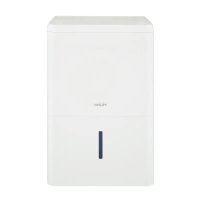
DM32M - Dehumidifier HAIER - Free user manual and instructions
Find the device manual for free DM32M HAIER in PDF.


| Product Type | Dehumidifier |
| Model | DM32M |
| Brand | Haier |
| Dimensions (H x W x D) | 24.6 x 15.4 x 11.4 inches |
| Weight | 35.3 lbs |
| Power Supply | 115V / 60Hz |
| Current Draw | 4.5 Amps |
| Moisture Removal (at 80°F, 60% RH) | 32 pints/day |
| Water Tank Capacity | 1.6 gallons |
| Recommended Room Size | Up to 1,500 sq ft |
| Auto Defrost | Yes |
| Continuous Drain Option | Yes (with included hose) |
| Humidistat | Adjustable, digital display |
| Timer | 24-hour timer |
| Filter | Washable, anti-bacterial mesh |
| Filter Cleaning Interval | Every 2 weeks |
| Bucket Full Indicator | Yes, with auto shut-off |
| Energy Star Rated | Yes |
| Refrigerant Type | R-410A |
| Noise Level | 48 dB |
| Spare Parts Available | Replacement filters, drain hose |
| Warranty | 1 year |
Frequently Asked Questions - DM32M HAIER
User questions about DM32M HAIER
0 question about this device. Answer the ones you know or ask your own.
Ask a new question about this device
Download the instructions for your Dehumidifier in PDF format for free! Find your manual DM32M - HAIER and take your electronic device back in hand. On this page are published all the documents necessary for the use of your device. DM32M by HAIER.
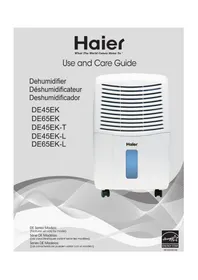
USER MANUAL DM32M HAIER
Mechanical Series Models:
(Features will vary by model)
Some models may have an additional letter after the model number.
PRODUCT RECORDS....3
ELECTRICAL SAFETY 4
DEHUMIDIFIER CONTROLS....5
PROPER USE AND CARE....6,7
TROUBLESHOOTING....8
WARRANTY 9
PRODUCT SPECIFICATIONS ....10
DEHUMIDIFIER SAFETY....11
PRODUCT REGISTRATION....11
ELECTRICAL SAFETY....12
DEHUMIDIFIER CONTROLS....13
USE AND CARE INSTRUCTIONS....14, 15
TROUBLESHOOTING....16
WARRANTY....17
PRODUCT CHARACTERISTICS....18
DEHUMIDIFIER SAFETY....19
PRODUCT REGISTRATION....19
YOUR SAFETY IS IMPORTANT TO US.
PLEASE READ INSTRUCTIONS CAREFULLY BEFORE OPERATING DEHUMIDIFIER
Always take these basic precautions:
This dehumidifier must be properly installed and grounded as described in this manual.
Never operate this dehumidifier in an area that is likely to accumulate standing water. If this situation develops, disconnect the power supply before touching, stepping into, or attempting to clean up the water.
Repair and replace immediately all electric service cords that have become frayed or otherwise damaged. DO NOT use a power cord that shows signs of damage anywhere along its length, at the plug, or where it is connected to the appliance.
Always unplug dehumidifier before servicing or moving the unit.
CAUTION
• DO NOT cover the dehumidifier's air vents. • DO NOT allow children to climb on or play with the dehumidifier. • ALWAYS contact a professional for service and repair.
WARNING: You can be killed or seriously injured if you do not follow the instructions in this manual. Please keep these instructions for future reference.
THANK YOU...
... for purchasing this Haier appliance. This easy-to-use manual will help you get the best use out of your dehumidifier.
Please record the model number, serial number, and store information here. The model and serial numbers can be located inside the unit after removing the bucket.
Staple your receipt to this manual. You will need it to obtain warranty service.
Model Number
Serial Number
Date of Purchase
Store Name
Store Address
Store Phone
BEFORE USING YOUR DEHUMIDIFIER
Please read this manual carefully. It contains instructions to help you use, maintain, and get the most use out of your dehumidifier.
Electrical Safety
Grounding
This dehumidifier must be grounded to reduce the risk of electric shock by providing an escape wire for the electric current. This dehumidifier has a power cord with a grounding wire and a grounded 3-prong plug. ONLY PLUG INTO AN OUTLET THAT IS PROPERLY INSTALLED AND GROUNDED.
DO NOT, under any circumstances, cut or remove the third (ground) prong from the power cord.
Power Supply Cord Wiring Requirements
115 Volt (103.5 min. - 126.5 max)
15 Amp time-delay fuse or circuit breaker
WARNING
Electrical Shock Hazard
Plug into a grounded 3 prong outlet.
Do not remove ground prong.
Do not use an adapter.
Do not use an extension cord.
Failure to follow these instructions can result in death, fire, or electrical shock.
FAMILIARIZE YOURSELF WITH THE CONTROLS ON YOUR DEHUMIDIFIER.
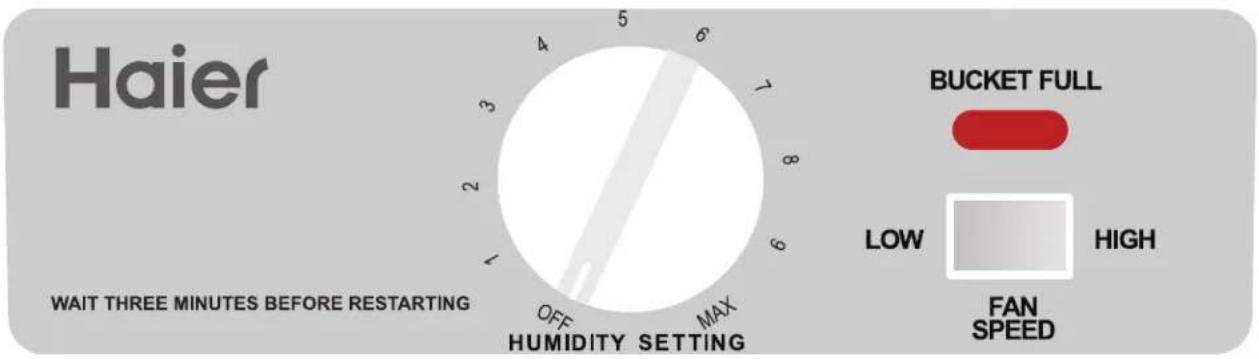
Control Panel
Features:
① Humidity Control
When starting the dehumidifier, turn the knob to the right until the unit turns on. Adjust the knob to the desired level of dryness – turn the control knob clockwise for more drying. In the MAX position, the unit will run longer and extract more moisture from the air.
② Red Indicator Light
(BUCKET FULL indicator)
When the light comes on, the automatic float control turns the unit off. Turn the humidity control off before emptying the bucket.
③ Fan Speed
High speed for higher moisture removal. Low speed for quieter operation.
④ Auto Frost Sensor
When the temperature gets down to 60°F or lower, ice may form on the evaporator coils, preventing removal of moisture. The FROST CONTROL stops the compressor when this happens but allows the fan to continue running. When the ice is no longer present, it starts the compressor.
It is normal for the surrounding air to become slightly warmer as the dehumidifier operates. This warming effect further reduces the relative humidity of the surrounding air.
THERE ARE TWO WAYS TO REMOVE WATER FROM THE BUCKET:
1. Empty the bucket manually
When the water bucket is full, the red indicator light "BUCKET FULL" will go on.
- YOU MUST turn the POWER off.
- Wait a few minutes to allow the water to stop dripping.
- Use both side handles to lift and remove the bucket.
- Empty water through opening into a sink or tub.
- Reinstall bucket.
IMPORTANT
Make sure the drain cap is tightened before operating the unit.
2. Attach a standard garden hose
The direct drainage feature can be activated using the following steps.
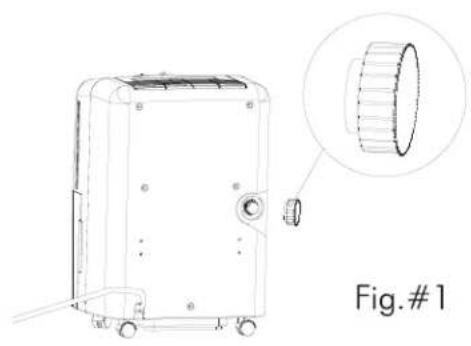
- Remove the plastic cap at the rear of the unit. (Keep the rubber insert for use later.) (Fig. #1)
- Tightly screw the purchased garden hose to the direct drain opening. (Fig. #2)
- Position the dehumidifier as close as you can to the floor drain.
- Position the opening end of the drain hose directly over the floor drain and start the unit.
- When the direct drain feature is not being used, remove the drain hose from the direct drain opening and plug it with the rubber cap provided.

PROPER USE & CARE
- Place the dehumidifier in a location that does not restrict airflow into the front coil or out of the top grille.
- The dehumidifier must be operated in an enclosed area to be most effective. Close all doors, windows and other outside openings to the room.
- A dehumidifier operating in a basement will have little or no effect in drying an adjacent enclosed storage area, such as a closet, unless there is adequate circulation of air in and out of the area.
- When the dehumidifier stops, wait at least 3 minutes before restarting.
PROPER CLEANING
- Before cleaning, turn the dehumidifier off and remove the plug from the wall outlet. Use water and a mild detergent to clean the inlet and outlet grilles. DO NOT use bleach or abrasives.
- The air filter is on the front of the dehumidifier. It should be checked at least every 2 to 3 weeks to see if it needs cleaning.
- When the unit is turned on for the first time, the "Bucket Full" light may be lit. If you remove and replace the bucket, the light will shut off.
WARNING

You can be killed or seriously injured if you do not follow the instructions in this manual.
AIR FILTER REMOVAL
- Grasp the filter handle, and pull the filter out. The filter will slide out easily.
- Clean the filter thoroughly using a vacuum cleaner or wash using luke warm water and mild detergent. Dry thoroughly before re-installing.
- To re-install the air filter, slide the filter back inside the tracks and push inward.

STORAGE
When the dehumidifier is not being used for long time periods, please follow these instructions.
- Disconnect the power cord from the power supply.
- Empty the water tank and wipe (clean) thoroughly.
- Clean air filter thoroughly.
- Re-package the unit in the original carton.
- Store the unit upright in a dry location.
If you experience operational problems, please follow these troubleshooting suggestions before calling Customer Service. If these suggestions fail to solve the problem, call Customer Service toll free at 1-877-337-3639.
Unit not operating
- Check to see if the grounded 3-prong plug is pushed completely into the outlet.
- The fuse may be blown or the circuit has been tripped. Check the house fuse/circuit breaker. Replace fuse or reset breaker as needed.
- The bucket may be full. The dehumidifier automatically turns off when this occurs. The drain bucket needs to be emptied.
- If the bucket is not full, it may be positioned improperly. Remove and reinstall so that it fits all the way into the dehumidifier.
- When the ambient temperature is above 95°F or below 50°F, the unit will shut off. This protects the compressor. Wait 3 minutes and then restart.
Dehumidifier is icing up during initial stage of operation.
- This is normal for a dehumidifier. Frost will usually disappear within 60 minutes unless the temperature is below 60°F.
Airflow is restricted
- Make sure there are no curtains, blinds or furniture blocking the front or back of the dehumidifier.
- Clean the filter. It may be clogged.
NOTE:
After prolonged usage, the condenser coils behind the filter may develop a buildup of residue. Unless cleaned regularly with a soft brush, this residue will harden and may require special cleaning methods by a refrigeration/air conditioning professional.
Unsatisfactory dehumidification
- When first installed, allow at least 3 or 4 days to remove the moisture from the room to maintain the desired dryness.
- Area to be dehumidified may be too large for your model. Check with your dealer.
- The controls may not be set correctly. Adjust controls according to instructions.
- Doors and windows may not be closed. Check that all doors, windows and other openings are closed tightly.
- Clothes dryer may be in operation in the same room. Install the dehumidifier away from the moisture-laden air generated by the dryer. Dryer should be vented to the outside.
- Please note that when room temperature is below 60°F, there might be ice forming on the coils. The unit will go into Auto-Defrost mode to remove the ice before resuming its dehumidification. The defrost operation will reduce the unit's ability for moisture removal.
FULL ONE YEAR WARRANTY
This product is warranted against defects in materials and workmanship for a period of one year from the date of the original purchase by a consumer for home use, and includes the parts and labor required to repair or replace defective parts.
EXCLUSIONS
WARRANTOR IS NOT RESPONSIBLE FOR CONSEQUENTIAL DAMAGES or damages to product caused by improper power supply voltage, accident, fire, floods or acts of god. (Some states do not allow the exclusion or limitation of incidental or consequential damages, so the above exclusion or limitation may not apply to you.)
This warranty gives you specific legal rights, and you may also have other rights which vary from state to state. To know what your legal rights are in your state, consult your local or state consumer affairs office or your state's Attorney General.
Warrantor:
Haier America Trading L.L.C.
Wayne, NJ 07470
For toll-free service call 1-877-337-3639.
| Model | DM32M |
| Refrigerant | R410A |
| FeaturesDehumidification | √ |
| Automatic Humidist at Control | √ |
| Automatic shut-off | √ |
| 2 speed fan | √ |
| Technical dataVoltage/frequency (V/Hz) | 115/60 |
| Capacity (pints per 24 hours) | 32 pints |
| Net dimension WxHxD (inch.) | 133/8 × 191/2 × 105/8 |
| Packed dimension WxHxD (inch.) | 143/4 × 203/4 × 12 |
YOUR SAFETY IS ESSENTIAL TO US.
READ THE INSTRUCTIONS CAREFULLY BEFORE OPERATING YOUR DEHUMIDIFIER
STORAGE
STORAGE


- YOUR SAFETY IS IMPORTANT TO US
- ALWAYS TAKE THESE BASIC PRECAUTIONS
- CAUTION
- THANK YOU
- BEFORE USING YOUR DEHUMIDIFIER
- ELECTRICAL SAFETY
- GROUNDING
- POWER SUPPLY CORD WIRING REQUIREMENTS
- ELECTRICAL SHOCK HAZARD
- FAMILIARIZE YOURSELF WITH THE CONTROLS ON YOUR DEHUMIDIFIER
- CONTROL PANEL
- FEATURES
- ① HUMIDITY CONTROL
- ② RED INDICATOR LIGHT
- ③ FAN SPEED
- ④ AUTO FROST SENSOR
- THERE ARE TWO WAYS TO REMOVE WATER FROM THE BUCKET
- EMPTY THE BUCKET MANUALLY
- ATTACH A STANDARD GARDEN HOSE
- PROPER USE & CARE
- PROPER CLEANING
- WARNING
- AIR FILTER REMOVAL
- STORAGE
- UNIT NOT OPERATING
- DEHUMIDIFIER IS ICING UP DURING INITIAL STAGE OF OPERATION
- AIRFLOW IS RESTRICTED
- NOTE
- UNSATISFACTORY DEHUMIDIFICATION
- FULL ONE YEAR WARRANTY
- EXCLUSIONS
- WARRANTOR
- YOUR SAFETY IS ESSENTIAL TO US
Brand : HAIER
Model : DM32M
Category : Dehumidifier