
appRP01V5 - Network Card/Adapter Approx - Free user manual and instructions
Find the device manual for free appRP01V5 Approx in PDF.


| Product Type | 300Mbps Wireless WiFi-N Extender/Repeater |
| Brand | Approx |
| Model | appRP01V5 |
| Wireless Speed | 300 Mbps |
| Wireless Standard | IEEE 802.11b/g/n |
| Frequency Band | 2.4 GHz |
| Antenna Type | Internal |
| Ports | 1 x RJ-45 Ethernet port |
| Buttons | WPS button, Reset button |
| LED Indicators | Power, WPS, Link/Activity |
| Power Supply | 230 V AC, 50/60 Hz |
| Dimensions (approx.) | 80 x 60 x 30 mm |
| Weight (approx.) | 100 g |
| Wireless Security | WEP, WPA/WPA2 |
| Installation | WPS push button or web interface |
| Operating Temperature | 0°C to 40°C |
| Compliance | CE, RoHS |
| Package Contents | WiFi Extender, Ethernet cable, Quick Installation Guide |
| Maintenance | Clean with soft dry cloth; disconnect power before cleaning |
| Safety | Do not open device; avoid water exposure; use only supplied power |
Frequently Asked Questions - appRP01V5 Approx
User questions about appRP01V5 Approx
0 question about this device. Answer the ones you know or ask your own.
Ask a new question about this device
Download the instructions for your Network Card/Adapter in PDF format for free! Find your manual appRP01V5 - Approx and take your electronic device back in hand. On this page are published all the documents necessary for the use of your device. appRP01V5 by Approx.
USER MANUAL appRP01V5 Approx
Thank you for choosing Approx's Wi-Fi 300Mbps repeater APPRP01VSI
Product description
The APPRP01VS is a repeater for Wi-Fi networks, designed for those looking for a definitive solution to extend the reach of their wireless network. Connected to an electrical outlet, it repeats the Wi-Fi signal to distant areas such as patios, terraces or remote rooms. For the most demanding it also allows them to use it as an access point or in client mode. With the APPRP01VS, any wireless network can be extended almost immediately, as long as there is an electric socket available in the range of the router. Some of the most outstanding features are its speed to 300/Mbps and its quick and easy configuration.
You no longer have excuses to extend your Wi-Fi network?
Package contents
-Wireless repeater APPRP01VS
- Quick installation guide in many languages
- RJ-4S network cable
*Note: Make sure that your packaging contains the items described above. If any item is missing or damaged, please contact
Description of parts
Description of parts
300 Mbps Wireless WiFi-N Extender
V1.0

-
ON/OFF button
-
Lan port RJ-45
-
WPS button/Reset Press for a candidate to match the device to its default status
Press for 6 seconds to reset the device to its Press for 1 or 2 seconds to connect via WRS
- Led status
ON: On. Works correctly
OFF: Off. It does not receive electricity.
Flashing slowly: The device is not connected to any network.
Hashing rapidly: The device is connecting via WPS.
This repeater has three modes of config
The following table provides the original data:

Wireless Repeater Installation
You will need a router or access point with internet.

Access Point installation
You will need a router with internet.
Connect it from your LAN output to the repeater
using the 10-45 cable.
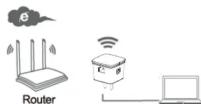
Client Mode installation
You will need a router with internet.
Connect wirelessly to the main router.
Connect it via RJ-45 cable to the computer.
The repeater can be configured wirelessly or by cable for its first configuration.
-
Please connect your APPRP01VS repeater to a home electrical outlet that is free within the range coverage of your main router.
-
Click on the network icon (or) At the bottom right of the desktop. You will find the Wi-Fi signal of the APPRP01VS repeater. Click
"Connect" and wait a few seconds.

-
Go to your web browser and type in the address bar 192.168.10.1 or http://ap.setup
-
Automatically your browser will ask for a password to access the repeater configuration, please insert admin

- Once inside the web configuration of your repeater follow the steps of the configuration wizard.
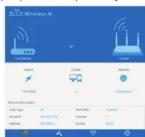
Configuration using RJ-45 cable
-
Please connect your APPRP01VS repeater to a free electrical outlet in your home within the range coverage of your main router.
-
Connect the supplied RJ-45 cable between a LAN output from your host computer and the repeater.
-
Follow the same steps as the wireless settings from point 3 to point S.
-
Follow the same steps as the wireless settings from point 5 to point 5
^a Note: If you cannot access your device, do the following:
- Click "Start," "Control Panel," "Networks and Internet," "Network Connections" click direct button "Local Area Connection" or "Wireless
Network Connection,"Properties." Select "Internet Protocol Version 4 (TCP / IPv4)" and click "Properties."
- Write 192.168.10.2 in the IP address, 255.255.255.0 in network mask and 192.168.10.1 On gateway and accept.
-
Report the same steps as the wireless setting from point 3 to point 5.
-
Repeat the same steps as the wireless settings from plain, 3 to plain, 3.
You can also restore the factory settings with the following procedure
Connect the repeater to an electrical outlet (not a power strip), press the reset button for 6 seconds and release, wait one minute without
doing anything, the repeater will have returned to the default values.
Configuration Mode /Con
Configuration Modules (Com AP Mode (Access Point)
- Select AP inside the Wizard

-
Enter a name for your Wi-Fi network in the SSID field
-
In Security Type select a wireless security type for your device and set a password.
-
Pass the Applicator to finish
-
Press the Apply button to finish.

- Finally, the device will restart to save the change
(1) 本说明仅供参考。
Repeater Mode (Repeater 1. Select Repeater within III

- Select the name of the wireless network to which you want to connect

-
In the Wi-Fi Password field, type the password of the router to which you are connecting to repeat the signal.
-
Finally press the Connect button to accept the configuration. If you want to clone the network name of your main router, type the
same name in the Repeater SSID field
- If you want to connect in client, mode you only need to connect the supplied RJ-4S cable between the Llan port of the APPROPUTS and the Llan port of your PC once these stenvs are completed.
the can part of your life since these steps are completed
WPS Mode (Repeater and Client Mode)
-
Connect the repeater to an electrical outlet in your home.
-
Press the WPS button on the repeater for 1 or 2 seconds, the WPS LED will blink rapidly for 2 minutes

- Before 2 minutes, press the WPS button of your main router for 2 or 3 seconds, the repeater will be configured automatically.
Technical Support
For more information about the installation and configuration of this product, visit our support section on our website www.approx.es
or write an email to the following address: soporte@approx.e
aqprox
300 Mbps Wireless WiFi-N Extender
Introduction
m = 311
[Non-Text]
[Non-Text]
[Non-Text]
[Non-Text]
[Non-Text]
[Non-Text]
[Non-Text]
[Non-Text]
m = 311
setup
configura
广力云智慧零售收银系统
m = 311
1.5. Range
1 + u1 - 1 = ( 1 + u) u1 < 1 = u
(
-
m = 311
Calendar
m = 311
-
-
m = 311
m = 311
m = 311
m = 311
m = 311
m = 311
APPROX IBERIA hereby declares that this device is in compliance with the essential requirements and other relevant provisions of directives 2014/35/EU, 2011/65/EU and 2014/53/EU.
The original EU declaration of conformity may be found at:
www.approx.es/APPRP01V5
DEUTSCH
SAFETY, MAINTENANCE AND RECYCLING INSTRUCTIONS
-
Caution: Never open the device. The internal parts are shock hazard.
-
Do not install this unit near water, for example, in a wet basement, in an unprotected outdoor installation, or any area classified as a wet location.
-
Do not insert objects of any kind into this unit through openings as they may touch voltage
points and short out parts that could result in fire or electric shock.
-
Do not spill any liquid on the unit. Danger of short circuits.
-
Before connecting make sure the voltage of the country or origin: 250VAC maximum.
-
Clean the product with a soft dry cloth. Always with the device turned off:
-
Follow local regulations for disposing of the product.
SECURITE, ENTRETIEN ET INSTRUCTIONS DE RECYCLAGE
AEE REI-RAEE 5548 In this manual, the container (bin) symbol indicates that the product is subject to the European directive 2002/96 / EC, electrical and electronic products, batteries, and batteries and other accessories must necessarily be subject to a selective collection.
At the end of the life of the device, make use of the recycling bins. This gesture will help reduce the health risks and preserve the environment.
Municipalities and distributors, will provide essential details on recycling your old device. If this
device carries an internal battery, it must be removed and deposited separately for proper
management.
Recyclage
Brand : Approx
Model : appRP01V5
Category : Network Card/Adapter