Tekno - Scooter RAZOR - Free user manual and instructions
Find the device manual for free Tekno RAZOR in PDF.


| Product Type | Electric Scooter |
| Brand | Razor |
| Model | Tekno |
| Dimensions (L x W x H) | 34 x 12 x 40 inches (approx.) |
| Weight | 20 lbs (approx.) |
| Max Rider Weight | 120 lbs |
| Recommended Age | 8+ years |
| Motor | High-torque, chain-driven |
| Battery | 24V sealed lead-acid, rechargeable |
| Charging Time | 8-12 hours |
| Run Time | Up to 40 minutes of continuous use |
| Top Speed | 10 mph (approx.) |
| Brake Type | Rear fender brake |
| Tire Type | Solid urethane, front and rear |
| Power Source | Battery charger included (120V AC outlet) |
| Assembly Required | Yes, minor assembly (handlebars, etc.) |
| Maintenance | Periodic cleaning and battery care |
| Cleaning Instructions | Wipe with damp cloth; avoid water on electrical components |
| Safety Features | Retractable kickstand, twist-grip throttle |
| Spare Parts Availability | Through Razor or authorized dealers |
| Warranty | 90-day limited warranty |
Frequently Asked Questions - Tekno RAZOR
User questions about Tekno RAZOR
0 question about this device. Answer the ones you know or ask your own.
Ask a new question about this device
Download the instructions for your Scooter in PDF format for free! Find your manual Tekno - RAZOR and take your electronic device back in hand. On this page are published all the documents necessary for the use of your device. Tekno by RAZOR.
USER MANUAL Tekno RAZOR
natural_image
Two Razof scooter models shown side by side, one white and one black, both with visible wheels and branding (no text or symbols on the scooter body)OWNER'S MANUAL
Read and understand this entire manual before allowing child to use this product! For assistance contact Razor. DO NOT RETURN TO STORE.
NOTE: Manual illustrations are for demonstration purposes only. Illustrations may not reflect exact appearance of actual product. Specifications subject to change without notice.
Please have your product along with the 22 character product I.D. code with you before contacting Razor for warranty assistance and/or replacement parts.
Product I.D. Code: ____ - ____ - ____
CONTENTS
Safety Warnings ....1
Before You Begin....2
Assembly and Set-Up....3
Pre-Ride Checklist 4
Usage 4
Repair and Maintenance....5
Product Parts 6
Warranty and Contact Information 7
SAFETY WARNINGS
AN IMPORTANT MESSAGE TO PARENTS: This manual contains important information. For your child's safety, initial setup and steering tube installation require adult assistance for young riders. It is your responsibility to review this information with your child and make sure that your child understands all warnings, cautions, instructions and safety topics. Razor USA recommends that you periodically review and reinforce the information in this manual with younger riders, and that you inspect and maintain your child's scooter to ensure their safety.
GENERAL WARNING: Scooter riding can be a hazardous activity. Scooters can and are intended to move, and it is therefore possible to get into dangerous situations and/or lose control and/or fall. If such things occur you can be seriously injured or die. LIKE ANY OTHER MOVING PRODUCT, USING A SCOOTER CAN BE A DANGEROUS ACTIVITY AND MAY RESULT IN INJURY OR DEATH EVEN WHEN USED WITH PROPER SAFETY PRECAUTIONS. USE AT YOUR OWN RISK AND USE COMMON SENSE.
- Always wear safety equipment, such as helmet, knee pads and elbow pads. Always wear a helmet when riding your scooter and keep the chinstrap securely buckled.
• Always wear closed toe shoes.
- Ride on smooth, paved surfaces away from motor vehicles.
- Avoid sharp bumps, drainage grates, and sudden surface changes. Scooter may suddenly stop.
- Avoid streets and surfaces with water, sand, gravel, dirt, leaves, and other debris. Wet weather impairs traction, braking, and visibility.
- Do not ride at night.
- Brake will get hot from continuous use. Do not touch after braking.
- Avoid excessive speed associated with downhill rides.
- Obey all local traffic and scootering laws and regulations.
- Watch out for pedestrians.
- Do not exceed 143 lb (65 kg) total weight on the scooter.
- Do not allow children under age six (6) to use the scooter. These scooters are for children ages six (6) and above. Children under age eight (8) should ride with adult supervision at all times. All children and preteens should ride with adult guidance at all times.
- Rider weight does not necessarily mean a child's size is appropriate to fit or maintain control of the scooter.
- A parent's decision to allow his or her child to ride this product should be based on the child's maturity, skill and ability to follow rules.
ACCEPTABLE RIDING PRACTICES AND CONDITIONS
Direct parental supervision is required. Scooters are meant to be used only in controlled environments free of potential traffic hazards and not on public streets. Do not allow your child to ride a scooter in any areas where vehicle traffic is present. Child must maintain a hold on the handlebars at all times. Never allow more than one child at a time to ride a scooter. Never use near steps, sloped driveways, hills, roadways, alleys or swimming pool areas.
Do not ride a scooter in wet weather. Scooters are intended for use on solid, flat, clean and dry surfaces, such as pavement or level ground, without loose debris, such as rocks or gravel. Wet, slick or uneven and rough surfaces may impair traction and contribute to possible accidents. Do not ride a scooter in mud, ice, puddles or water. Avoid excessive speeds that can be associated with downhill rides. Never risk damaging surfaces, such as carpet or flooring, by use of a scooter indoors. Do not ride at night or when visibility is impaired.
PROPER RIDING ATTIRE
Always ensure child is wearing proper protective equipment, such as an approved safety helmet. A helmet may be legally required by local law or regulation in your area. A child should always wear shoes and keep shoelaces tied and out of the way of the wheels. Never ride barefooted or in sandals. Knee pads and elbow pads are recommended.
WARNING: ALWAYS INSPECT SCOOTER PRIOR TO RIDING. Properly inspecting and maintaining your scooter can reduce the risk of injury. Always inspect your scooter before riding and regularly maintain it.
WARNING: CHECK LOCAL LAWS REGARDING SCOOTER USE. Check local laws and regulations to see where and how you may use your Razor scooter legally. In many states and local areas scooter riders are required BY LAW to wear a helmet. Check local laws and regulations regarding laws governing helmet use and scooter operation in your area.
WARNING: BATTERY
- Lithium batteries included for lights - adult attention for changing and disposal.
- Battery should only be replaced by an adult.
- Loose battery could present a choking hazard and should be kept away from small children.
- Dispose of batteries properly.
FAILURE TO USE COMMON SENSE AND HEED THE ABOVE WARNINGS FURTHER INCREASES RISK OF SERIOUS INJURY. USE AT YOUR OWN RISK AND WITH APPROPRIATE AND SERIOUS ATTENTION TO SAFE OPERATION. USE CAUTION.
BEFORE YOU BEGIN
Remove contents from box. Inspect the contents of the box for scratches in the paint and/or dents that may have occurred during shipping. Because your scooter was partially assembled and packed at the factory, there should not be any problems, even if the box has a few scars or dents.
□ Required Tools
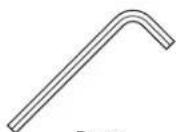
5 mm
Allen wrench
WARNING: DO NOT USE NON-RAZOR PRODUCTS WITH YOUR SCOOTER. Razor scooters have been built to certain Razor design specifications. The original equipment supplied at the time of sale was selected on the basis of its compatibility with the frame, fork and all other parts. Certain aftermarket products may not be compatible and will void the warranty.
Product ID Locations: See locations to the left
- Deck (Underneath Unit)
- Box - Side of UPC (Not Shown)
Box Contents:
- Scooter
- Allen Wrench
- Owner's Manual
ASSEMBLY AND SET-UP
☐ Assembling the Handlebars Assembling the Handlebars
□ Assembling the T-bar
Tool required: 5 mm Allen wrench
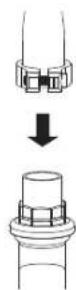
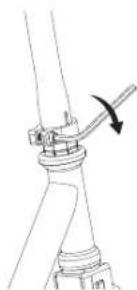
1 Loosen the collar clamp and slide it upward. Insert T-bar into the fork until it bottoms out on the headset locknut.
Note: If necessary, carefully twist the T-bar side to side while pushing downward until T-bar bottoms out on the headset locknut.
natural_image
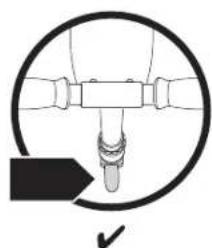
Mechanical diagram showing a lever mechanism with an arrow indicating rotation (no text or symbols present)2 With the front wheel pointed straight ahead, the handlebars square to the front wheel and the Razor logo facing the front, tighten the clamp as shown. Tighten securely.
natural_image
Diagram of a mechanical component with a circular outline and a checkmark arrow (no text or symbols)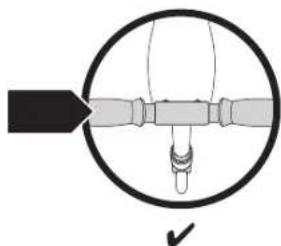
natural_image
Diagram of a mechanical or electrical component with a circular outline and internal structure, no visible text or symbols.□ Activating the Batteries
natural_image
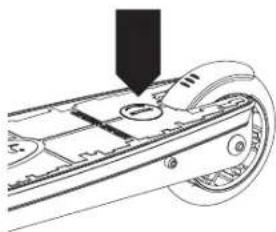
Mechanical assembly diagram showing a component being inserted into a housing (no text or symbols visible)1 To activate the batteries, locate the battery compartment on the top of the deck and remove the plastic tab from under the battery cover.
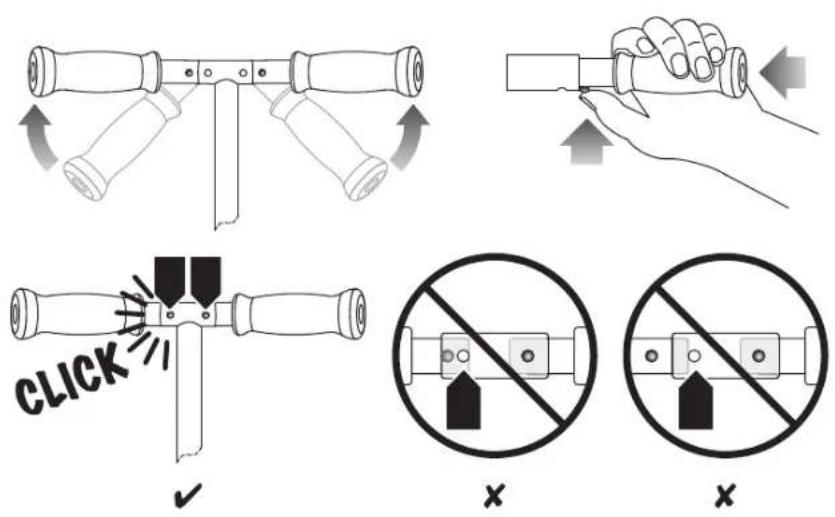
WARNING: Failure to properly engage the spring-loaded buttons may cause the handlebars to dislodge while riding and may cause rider to lose control and fall. When correctly engaged, the handlebars will not rotate nor move sideways, and the spring-loaded buttons will be clearly visible in the holes on the T-bar.
WARNING: Check hand grips regularly for wear or damage, as grips are designed to aid in gripping handlebars and to provide some protection against possible impact. Replace immediately if worn, torn, damaged or missing.
WARNING: Failure to properly install and tighten the pivoting mechanism and the plastic cover may cause the rider to lose control and fall. If you do not understand these instructions, contact Razor customer care for assistance.
WARNING: Do not attempt to thread the handle bar into the front fork thread. Tighten clamp securely.
PRE-RIDE CHECKLIST

Deck and Handlebars
Check for cracks or broken connections. Although broken decks are rare, it is possible for an aggressive rider to run into a curb or object and wreck and bend or break the deck. Get in the habit of inspecting your scooter on a regular basis.

Hardware/Loose Parts
Check and secure all fasteners before every ride. Make sure the collar clamp is locked properly into place before riding. There should not be any unusual rattles or sounds from loose parts or broken components. If the unit is damaged, do not ride. Reference "Safety Warnings" on page 1 of this manual.

Safety Gear
Always wear proper protective gear, such as an approved safety helmet. Elbow pads and kneepads are recommended. Always wear closed toe shoes (lace-up with rubber soles) and keep shoelaces tied and out of the way of the wheels. NEVER RIDE BAREFOOTED OR IN SANDALS.

Laws and Regulations
Always check and obey any local laws or regulations.

Be Careful!
This product is not for aggressive or trick riding. Avoid steep inclines and don't ride too fast — you can lose control and fall. Skateboard parks are not designed for young riders. Never ride in traffic or on the street and watch your surroundings for pedestrians, bikers, boarders and skaters.
Maintain a hold on the handlebars at all times.
USAGE
□ How to Ride
Place one foot on the baseboard and push forward with the other foot. Steer with both hands on the handlebars. For enhanced cornering, lean slightly into the direction of the turn.
Gently step on the LED light button to activate the LED lights. Lights will remain on for approximately 20 seconds after button has been released. Gently step on the LED light button again to re-activate the lights.
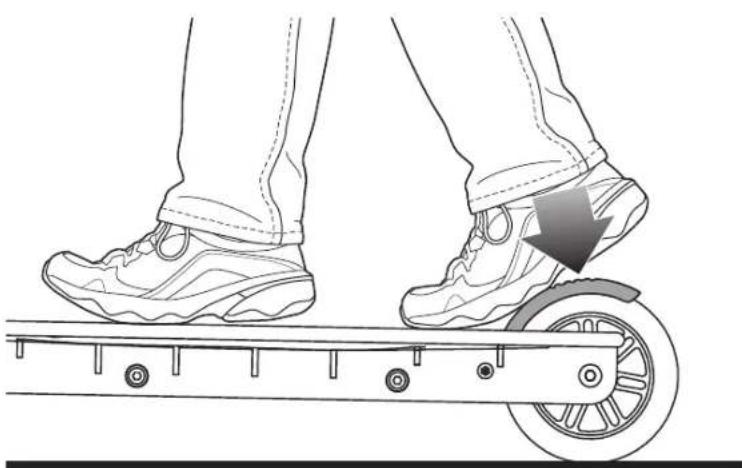
□ How to Stop
For controlled stops, apply the brake by stepping on the brake. Razor recommends that you practice applying the brake at various speeds and in an open area free from obstructions before riding your Razor scooter around others.
natural_image
Illustration of a person's lower legs and feet on a scooter with wheels, showing foot movement (no text or symbols)Need Help? Visit our web site for replacement parts, product support, a list of authorized service centers in the US and customer service contact information at www.razor.com. Please have the product I.D. code (located on the white label of your product) available for better assistance. Additional Customer Service contact information is listed at the back of this manual.
REPAIR AND MAINTENANCE
□ Cleaning
Wipe with a damp cloth to remove dirt and dust. Do not use industrial cleaners or solvents, as they may damage the surfaces. Do not use alcohol, alcohol-based or ammonia-based cleaners, as they may damage or dissolve the plastic components or soften the decals or decal adhesive.
Collar Clamp
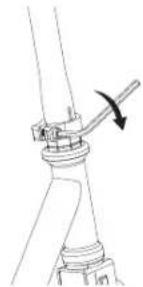
Tool required: 5 mm Allen wrench
natural_image
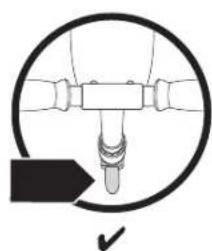
Technical line drawing of a mechanical joint or clamp mechanism (no text or symbols)1 Using a 5 mm Allen wrench, check that the collar clamp bolt is tightened securely. Make sure the front wheel is pointed straight ahead and the handlebars is squared to the front wheel.
natural_image
Pure mechanical diagram showing a lever mechanism inside a circle, with no text or symbols present.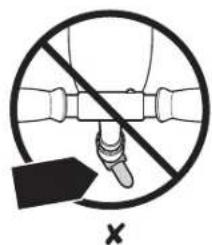
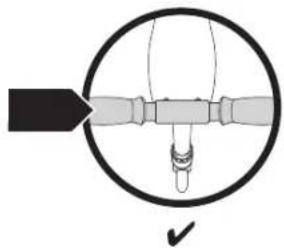
natural_image
Diagram of a mechanical or electrical component with a circular outline and internal structure, no visible text or symbols.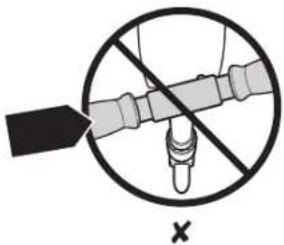
□ Replacing the Batteries
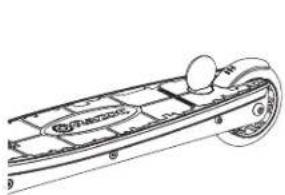
natural_image
Line drawing of a boat's side panel with no text or symbols1 Using a coin, loosen the battery cover by turning clockwise then remove cover.
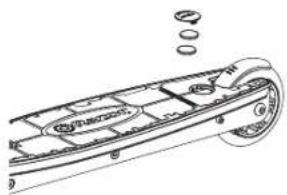
natural_image
Technical line drawing of a mechanical component with no visible text or symbols2 Discard both old batteries and replace with two (2) CR2032L 3V Lithium batteries. Note: Make sure to install BOTH batteries positive (+) side up.
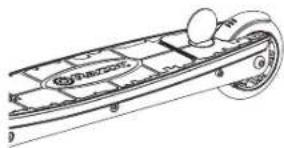
natural_image
Line drawing of a boat's side panel with no visible text or symbols3 Replace cover and secure with a coin by turning counterclockwise.
□ Wheels and Bearings
Under normal circumstances and conditions, Razor wheels and wheel bearings are maintenance free. Nonetheless, it is the responsibility of the owner or guardian to periodically inspect the wheels for wear and tear, the axle for proper tightness, bearings for side-to-side play, and for loose parts. When a wheel develops play, this is an indication of excess wear and replacement is necessary. Replace immediately with only genuine Razor wheels. Worn wheels/ bearings are considered normal wear-and-tear and are not covered by the Razor Warranty. Wheels other than genuine Razor wheels may not be compatible with your Razor scooter. The use of anything other than genuine Razor replacement parts may affect your safety and will void your warranty.
□ Replacement Parts
The most frequently requested replacement parts are available for purchase at some Razor retail partners. For the complete selection of replacement parts visit shop.razor.com.
□ Repair Centers
For a list of authorized Razor repair centers:
- Check online at www.razor.com.
• Additional Customer Service contact information is listed at the back of this manual.
WARNING:
• Lithium batteries included for lights - adult attention for changing and disposal.
- Battery should only be replaced by an adult.
- Loose batteries could present a choking hazard and should be kept away from small children.
- Dispose of batteries properly.
Note: Batteries are not covered under the limited warranty.
WARNING: Wheelies and other stunt-type riding reduces your ability to maneuver and control your scooter. Take the necessary precautions, such as wearing appropriate protective gear, and practice in an area safe for stunt riding and free from obstructions.
PRODUCT PARTS
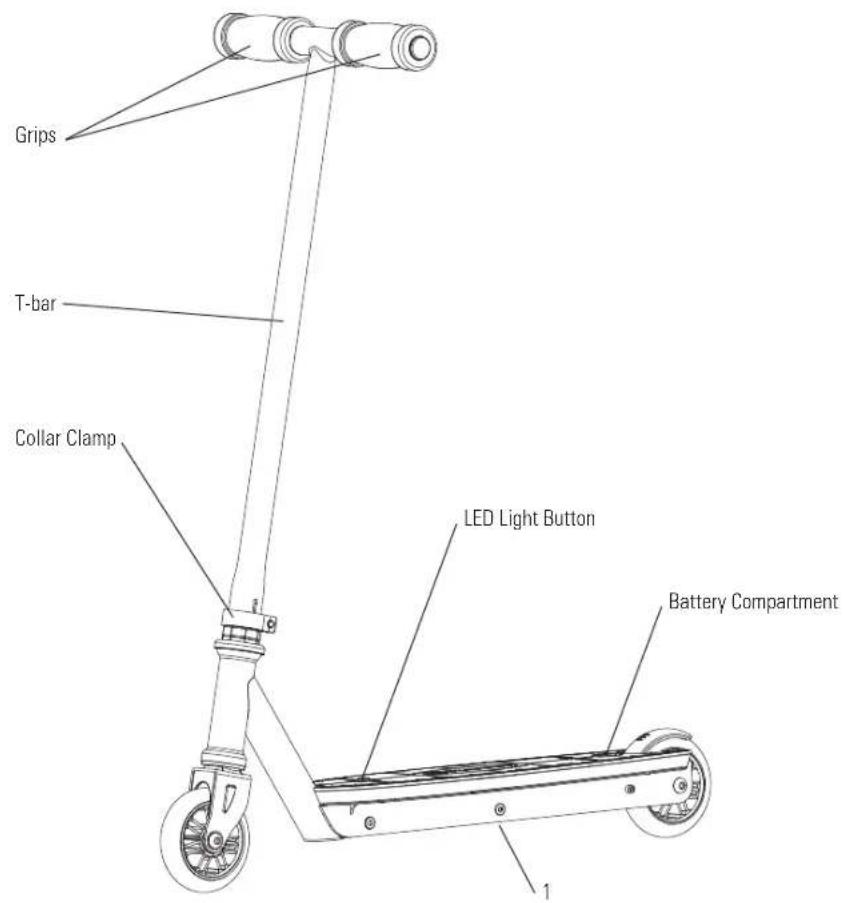
Keep your scooter running for years with genuine Razor parts. Visit our web site for more information on spare part availability. (Illustrations may not reflect exact appearance of actual product. Specifications subject to change without notice.)
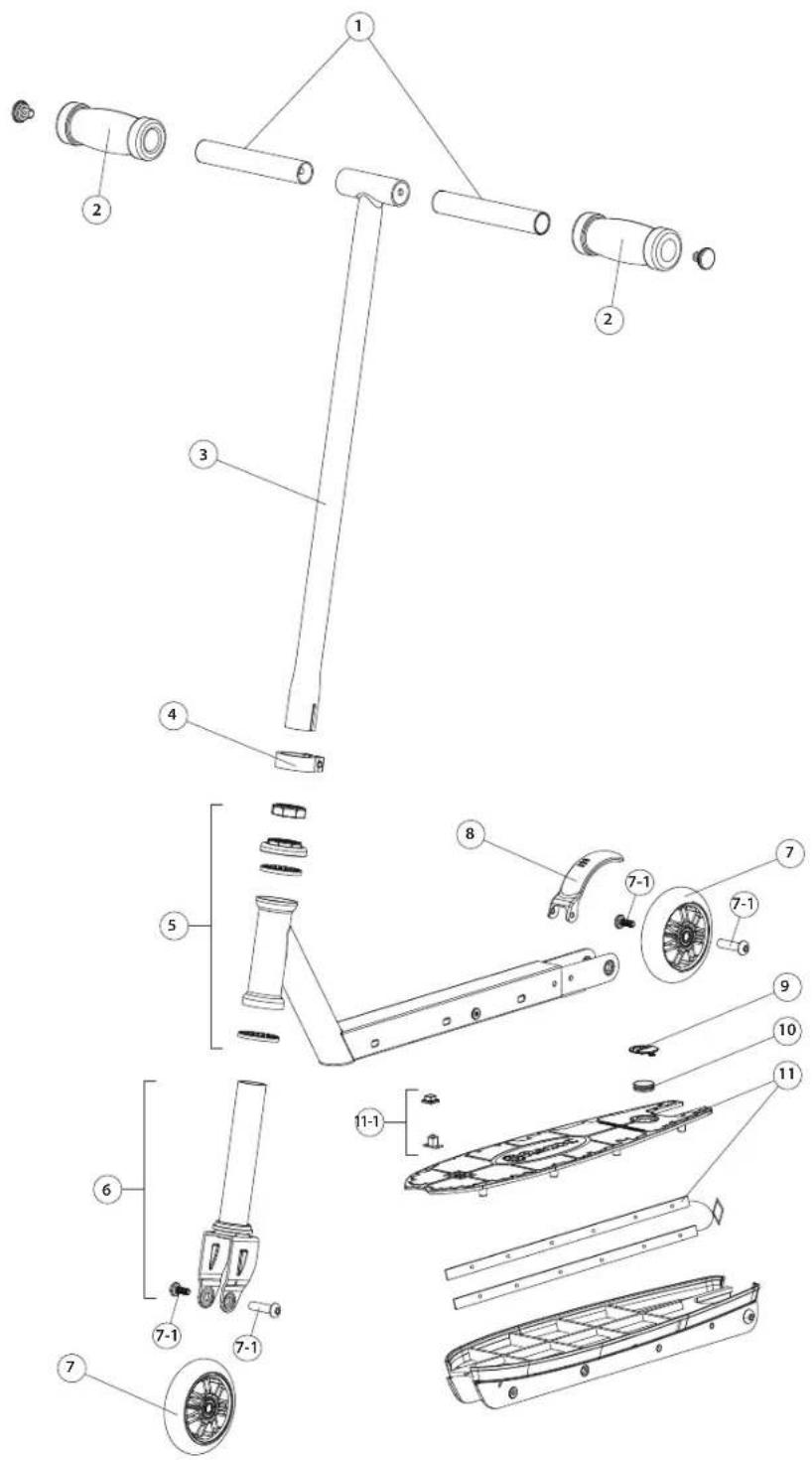
- Handlebars
- Handlebar Grips
- T-Bar
- Collar Clamp
- Headset
- Front Fork
- Wheels (Front/Rear)
7-1. Axle Bolts (Front/Rear) - Brake
- Battery Cover
- Batteries CR2032L 3V (x2)
- Deck Plate w/ LED Lights
11-1. LED Light Button
WARRANTY
Razor Limited Warranty
The manufacturer warranties this product to be free of manufacturing defects for a period of 6 months from date of purchase. This Limited Warranty does not cover normal wear and tear, or any damage, failure or loss caused by improper assembly, maintenance, or storage.
This Limited Warranty will be void if the product is ever:
• used in a manner other than for recreation or transportation;
- modified in any way;
- rented.
The manufacturer is not liable for incidental or consequential loss or damage due directly or indirectly to the use of this product.
Razor does not offer an extended warranty. If you have purchased an extended warranty, it must be honored by the store at which it was purchased.
For your records, save your original sales receipt with this manual and write the serial number below.
CUSTOMER SERVICE CONTACT INFORMATION
Need Help? Visit our web site for replacement parts, product support, a list of authorized service centers in the US and customer service contact information at www.razor.com. Please have the product I.D. code (located on the white label of your product) available for better assistance. Additional Customer Service contact information is listed below:
UNITED STATES
Razor USA LLC
P.O. Box 3610
Cerritos, CA 90703
USA
+1 866 467 2967
Monday - Friday
8:00 AM - 5:00 PM Pacific Time
EUROPE
Razor USA (Europe)
Handelsweg 2
2742 RD Waddinxveen
Netherlands
+44 (0) 120 267 2702
ASIA
Razor USA (Asia)
P.O. Box 3610
Cerritos, CA 90703
USA
+81 50 7579 6622
info@razor-asia.com
DISTRIBUTED IN THE UK BY:
Re:creation Limited
2 Meadows Business Park
Station Approach, Blackwater
Camberley, Surrey GU17 9AB
United Kingdom
+44 (0) 118 973 6222 Tel
+44 (0) 118 973 6220 Fax
sales@recreationltd.co.uk
DISTRIBUTED IN AUSTRALIA BY:
Funtastic Limited
Level 2, Tower 2, Chadstone Place
1341 Dandenong Road
Chadstone VIC 3148
Australia
+1 800 244 543
info@funtastic.com.au
Printed in China for Razor USA LLC.
Copyright © 2003-2014 Razor USA, LLC. All rights reserved. Razor® and the Razor logo design are among the registered trademarks of Razor USA LLC in the United States and/or select foreign countries. Party Pop™ and Tekno™ are trademarks of Razor USA LLC. US_150326