E125 - Scooter RAZOR - Free user manual and instructions
Find the device manual for free E125 RAZOR in PDF.


| Product Type | Electric Scooter |
| Brand | Razor |
| Model | E125 |
| Motor | 12V, 85W chain-driven motor |
| Battery | 12V sealed lead-acid, rechargeable |
| Charging Time | 8-12 hours for initial charge; 5-8 hours thereafter |
| Max Speed | 10 mph (16 km/h) |
| Run Time | Up to 40 minutes of continuous use |
| Weight Capacity | 120 lbs (54 kg) |
| Recommended Age | 8 years and up |
| Product Weight | Approx. 27 lbs (12.2 kg) |
| Dimensions (L x W x H) | 33.5 x 15 x 34 inches (85 x 38 x 86 cm) |
| Deck Height | 4 inches (10 cm) off ground |
| Tires | 10-inch pneumatic front tire, 8-inch pneumatic rear tire |
| Brake | Hand-operated rear brake |
| Frame | Steel frame with folding mechanism |
| Grip Tape | Non-slip deck surface |
| Colors Available | Black, Blue, Red (varies by region) |
| Assembly Required | Yes, minor assembly (handlebar, bolts) |
| Safety Certification | ASTM F2641 compliant |
| Included Accessories | Charger, owner's manual |
Frequently Asked Questions - E125 RAZOR
User questions about E125 RAZOR
0 question about this device. Answer the ones you know or ask your own.
Ask a new question about this device
Download the instructions for your Scooter in PDF format for free! Find your manual E125 - RAZOR and take your electronic device back in hand. On this page are published all the documents necessary for the use of your device. E125 by RAZOR.
USER MANUAL E125 RAZOR
NOTE: The E100/E125/E150/E175 must be traveling up to 3mph before motor will engage. Kick start up to 3mph while applying the throttle to engage motor.
OWNER'S MANUAL
Read and understand this entire manual before riding! DO NOT RETURN TO STORE!
NOTE: Manual illustrations are for demonstration purposes only. Illustrations may not reflect exact appearance of actual product. Specifications subject to change without notice.
Item Number:
E100 Red 13111260
E100 Pink 13111261
E100 Daisy 13111061
E100 Sweet Pea 13111263
E100 Hello Kitty 13111264
E125 Red 13111110
E125 Silver 13111101
E125 Black 13125E-BK
E150 Red 13111601
E150 Pink 13111661
E175 Red 13111259
CONTENTS
Safety Warnings .... 1
Before You Begin 2
Assembly and Set-Up 3
Hardware Maintenance 4
Repair and Maintenance 4-6
Troubleshooting Guide 7-8
Electric Scooter Parts 9
Warranty 11
SAfETy WARNINGS
WARNING: Riding the electric scooter can be a hazardous activity. Certain conditions may cause the equipment to fail without fault of the manufacturer. Like other electric products, the scooter can and is intended to move and it is therefore possible to lose control, fall off and/or get into dangerous situations that no amount of care, instruction or expertise can eliminate. If such things occur you can be seriously injured or die, even when using safety equipment and other precautions. RIDE AT YOUR OWN RISK AND USE COMMON SENSE.
This manual contains many warnings and cautions concerning the consequences of failing to maintain, inspect or properly use your electric scooter. Because any incident can result in serious injury or even death, we do not repeat the warning of possible serious injury or death each time such a possibility is mentioned.
APPROPRIATE RIDER USE AND PARENTAL SUPERVISION
This manual contains important safety information. It is your responsibility to review this information and make sure that all riders understand all warnings, cautions, instructions and safety topics and assure that young riders are able to safely and responsibly use this product. Razor recommends that you periodically review and reinforce the information in this manual with younger riders, and that you inspect and maintain your children's vehicle to insure their safety.
The recommended rider age is 8 and older. Any rider unable to fit comfortably on the scooter should not attempt to ride it. A parent's decision to allow his or her child to ride this product should be based on the child's maturity, skill and ability to follow rules.
Keep this product away from small children and remember that it is intended for use only by persons who are, at a minimum, completely comfortable and competent while operating the scooter.
DO NOT EXCEED THE WEIGHT LIMIT OF 120 pounds (54kg). Rider weight does not necessarily mean a person's size is appropriate to fit or maintain control of the scooter.
Do not touch the brakes or motor on your scooter when in use or immediately after riding as these parts can become very hot.
Refer to the section on safety for additional warnings.
ACCEPTABLE RIDING PRACTICES AND CONDITIONS
Always check and obey any local laws or regulations which may affect the locations where the electric scooter may be used.
Ride defensively. Watch out for potential obstacles that could catch your wheel or force you to swerve suddenly or lose control. Be careful to avoid pedestrians, skaters, skateboards, scooters, bikes, children or animals who may enter your path, and respect the rights and property of others.
Do not activate the speed control on the hand grip unless you are on the scooter and in a safe, outdoor environment suitable for riding. The electric scooter must be moving at 3 miles per hour before the motor will engage.
Do not attempt or do stunts or tricks on your electric scooter. The scooter is not made to withstand abuse from misuse such as jumping, curb grinding or any other type of stunts.
Maintain a hold on the handlebars at all times.
Never allow more than one person at a time to ride the scooter.
Never use near steps or swimming pools.
Keep your fingers and other body parts away from the chain, steering system, wheels and all other moving components.
Never use headphones or a cell phone when riding.
Never hitch a ride with another vehicle.
Do not ride your scooter in wet or icy weather and never immerse the scooter in water, as the electrical and drive components could be damaged by water or create other possibly unsafe conditions.
The electric scooter is intended for use on flat, dry surfaces such as pavement or level ground without loose debris such as sand, leaves, rocks or gravel. Wet, slick, bumpy, uneven or rough surfaces may impair traction and contribute to possible accidents. Do not ride your scooter in mud, ice, puddles or water. Avoid excessive speeds that can be associated with downhill rides. Never risk damaging surfaces such as carpet or flooring by use of an electric scooter indoors.
Do not ride at night or when visibility is limited.
PROPER RIDING ATTIRE
Always wear proper protective equipment such as an approved safety helmet (with chin strap securely buckled), elbow pads and kneepads. A helmet may be legally required by local law or regulation in your area. A long-sleeved shirt, long pants, and gloves are recommended. Always wear athletic shoes (lace-up shoes with rubber soles), never ride barefooted or in sandals, and keep shoelaces tied and out of the way of the wheels, motor and drive system.
USING THE CHARGER
The charger supplied with the electric scooter should be regularly examined for damage to the cord, plug, enclosure and other parts, and in the event of such damage, the scooter must not be charged until the charger has been repaired or replaced.
Use only with the recommended charger.
Use caution when charging.
The charger is not a toy. Charger should be operated by an adult.
Do not operate charger near flammable materials.
Unplug charger and disconnect from scooter when not in use.
Do not exceed charging time.
Always disconnect from the charger prior to wiping down and cleaning your scooter with liquid.
FAILURE TO USE COMMON SENSE AND HEED THE ABOVE WARNINGS INCREASES RISK OF SERIOUS INJURY. USE WITH APPROPRIATE CAUTION AND SERIOUS ATTENTION TO SAFE OPERATION.
BEFORE YOU BEGIN
Remove contents from box. Remove the foam separators that protect the components from damage during shipping. Inspect the contents of the box for scratches in the paint, dents or kinked cables that may have occurred during shipping. Because the scooter was 95 percent assembled and packed at the factory, there should not be any problems, even if the box has a few scars or dents.
MAKE SURE POWER SWITCH IS TURNED "OFF" BEFORE CONDUCTING ANY MAINTENANCE PROCEDURES.
Estimated Assembly and Set-Up Time
Razor recommends assembly by an adult with experience in bicycle mechanics. Allow up to 20 minutes for assembly, not including initial charge time. Allow up to 18 hours for initial charge (see page 3 for charging information)
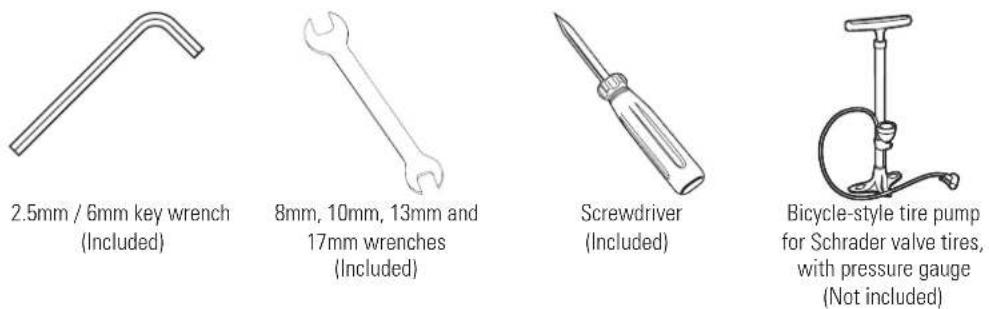
Required Tools

WARNING:
DO NOT USE NON-RAZOR PRODUCTS WITH YOUR RAZOR ELECTRIC SCOOTER. The scooter has been built to certain Razor design specifications. The original equipment supplied at the time of sale was selected on the basis of its compatibility with the frame, fork and all other parts. Certain aftermarket products may not be compatible and will void the warranty.
Note: Electric scooter must be moving at 3mph/4.8km before twisting the throttle to engage motor.
Need Help? Visit our web site for replacement parts, product support and a list of authorized service centers at www.razor.com or call toll free 866-467-2967 Monday - Friday 8AM - 5PM Pacific Time.
ASSEMBLY AND SET-UP
□ Attaching the Handlebars
natural_image
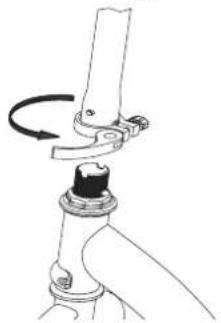
Mechanical assembly diagram showing a lever mechanism with a rotating arrow (no text or symbols)1 Open the quick release.
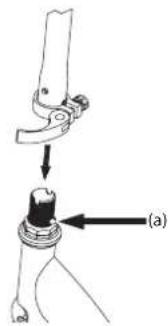
2 Depress the push button (a) located on the front fork and insert the handlebar stem until the button locks securely into the fork.
natural_image
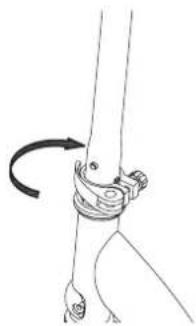
Line drawing of a human knee joint with a curved arrow indicating rotation (no text or symbols)3 Adjust the tension of the quick release to where you can close the lever all the way to secure the stem.
□ Inflating the Tire
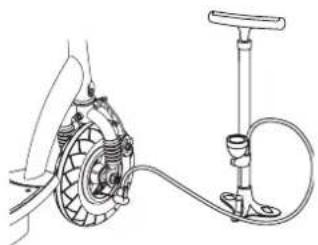
The front tire is inflated when shipped, but it invariably may lose some pressure between the point of manufacturing and your purchase.
natural_image
Technical line drawing of a mechanical device with tubing and a hand pump (no text or symbols)1 Using a bicycle style tire pump equipped for a Schrader-type valve, inflate the front tire to the correct PSI indicated on the sidewall of the tire.
□ Charging the Battery
Your electric scooter may not have a fully charged battery. Therefore it is a good idea to charge the battery prior to use.
- Initial charge time: 18 hours
- Run time: Up to 40 minutes of continuous ride time
- Recharge time: up to 12 hours
- Average battery life: 250 charge/discharge cycles
When the scooter is not in regular use, recharge the battery at least once a month until normal use is resumed.
natural_image
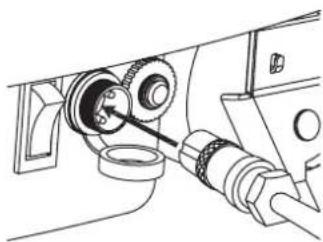
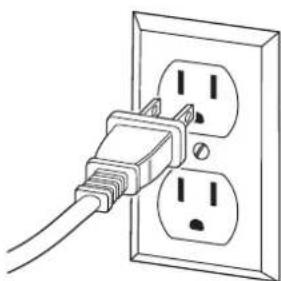
Technical line drawing of a mechanical assembly with gears and shafts (no text or symbols)1 Turn power OFF before charging. Plug the charger into the charger port on the electric scooter.
natural_image
Line drawing of a cable inserted into two separate electrical outlets (no text or symbols)2 Plug the charger into a wall outlet. If the lights on charger do not light up, check the power to the outlet. If necessary, try a different outlet.
Note: Make sure the cables/wires are out of the way before inserting the stem into the fork.
Note: The pressurized air supplies found at gasoline stations are designed to inflate high-volume automobile tires. If you decide to use such an air supply to inflate the tire, first make sure the pressure gauge is working, then use very short bursts to inflate to the correct PSI. If you inadvertently over-inflate the tire, release the excess pressure immediately.
WARNING: Always disconnect your scooter from the charger before cleaning with liquid.
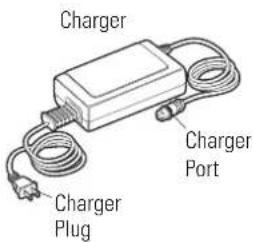
Note: If your charger does not look like the one illustrated, your unit has been supplied with an alternative charger. The specifications and charging procedure would not change.
The charger has a small window with one LED or two LEDs to indicate the charge status. Refer to the illustration on the charger unit for the actual "charging" and "charged" status indications for your model charger.
Chargers have built-in over-charge protection to prevent battery from being over-charged.
Charger will get warm during use. This is normal for some chargers and is no cause for concern. If your charger does not get warm during use, it does not mean that it is not working properly.
WARNING: Failure to recharge the battery at least once a month may result in a battery that will no longer accept a charge.
CONNECTORS/HARDWARE MAINTENANCE

Brake
Check the brakes for proper function. When you squeeze the lever, the brake should provide positive braking action. When you apply the brake with the speed control on, the brake cut-off switch should stop the motor. Make sure that brakes are not rubbing.

Frame, Fork and Handlebars
Check for cracks or broken connections. Although broken frames are rare, it is possible for an aggressive rider to run into a curb or wall and wreck and bend or break a frame. Get in the habit of inspecting your scooter on a regular basis.

Tires
Periodically inspect the tires for excess wear, and regularly check the front tire pressure and re-inflate as necessary.

Safety Gear
Always wear proper protective gear such as an approved safety helmet. Elbow pads and kneepads are recommended. Always wear athletic shoes (lace-up shoes with rubber soles), never ride barefooted or in sandals, and keep shoelaces tied and out of the way of the wheels, motor and drive system.

Battery
Make sure the power switch is turned off whenever the scooter is not in use. Never store the product in freezing or below freezing temperatures! Freezing will permanently damage the battery.

Do not use this product for the first time until you have inflated the front tire to the correct PSI and charged the battery for at least 18 hours. Failure to follow these instructions may damage your product and void your warranty.
REPAIR AND MAINTENANCE
Turn power switch "OFF" before conducting any maintenance procedures.
□ Adjusting the Brakes
Tools required: 10mm wrench
natural_image
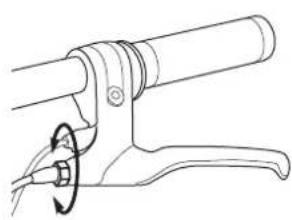
Line drawing of a mechanical lever with a rotating knob (no text or symbols)1 To adjust the brake cable play, thread the brake lever adjuster in or out 1/4 to 1/2 turn until the desired brake adjustment is attained. Most adjustments are complete at this step. If brake still needs further adjustment, proceed to step 2.
natural_image
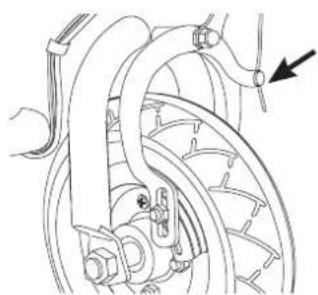
Mechanical diagram showing a brake system with no visible text or symbols2 If brake is too tight or has too much slack, use a 10mm open wrench to loosen the brake cable and adjust accordingly.
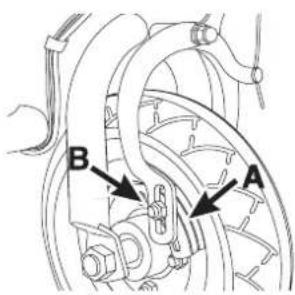
3 Inspect the brake pads (A) for proper alignment against the wheel or excess wear. To realign brake pads, loosen the fixing nut (B) and adjust the pad to contact the rim. Retighten and test. Readjust as needed.
Need Help? Visit our web site for replacement parts, product support and a list of authorized service centers at www.razor.com or call toll free 866-467-2967 Monday - Friday 8AM - 5PM Pacific Time.
REPAIR AND MAINTENANCE
□ front Wheel Replacement
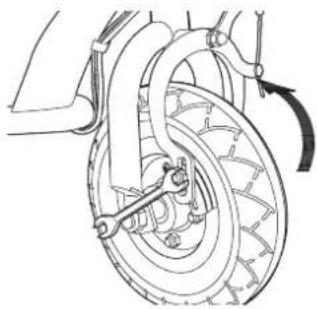
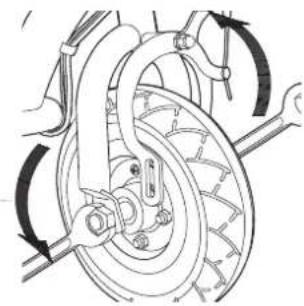
Tools required: 10mm wrench, two (2) 17mm wrenches and a flathead screwdriver.
natural_image
Technical line drawing of a bicycle wheel assembly with no visible text or symbols1 Using a 10mm open wrench, loosen the brake cable bolt.
natural_image
Technical line drawing of a bicycle wheel and suspension system (no text or symbols)2 Using two 17mm wrenches, loosen the locknuts by turning the wrenches counter clockwise. Remove wheel and install replacement wheel.
☐ Chain and Rear Wheel Replacement
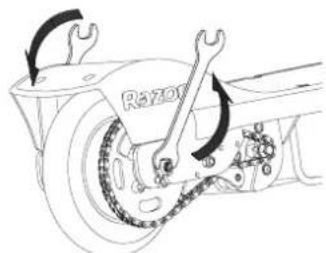
Tools required: Phillips screwdriver, 10mm wrench, two (2) 8mm wrenches, and two (2) 13mm wrenches.
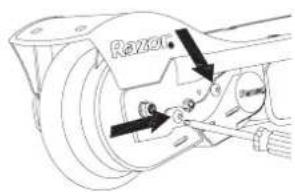
1 With a Phillips screwdriver, loosen the two screws and remove the chain guard.
natural_image
Technical line drawing of a vehicle brake system with wrench and chain (no text or symbols)2 Using two 13mm wrenches, loosen the locknuts by turning the wrenches counter clockwise.
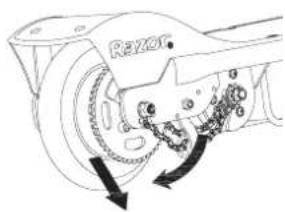
3 To loosen the chain, push the tensioner down to create some slack in the chain.
natural_image
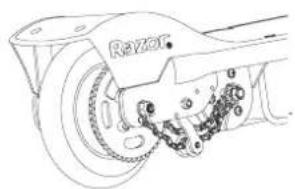
Technical line drawing of a mechanical component with labeled parts (no readable text or symbols)4 Remove wheel and install replacement wheel. (Note the sequence of the hardware)
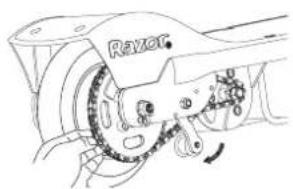
5 Push the chain tensioner down to install the chain on both sprockets.
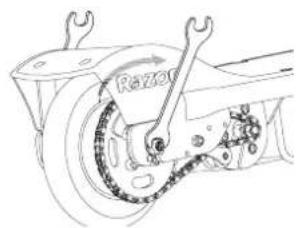
6 With two 13mm wrenches, re-tighten the locknuts.
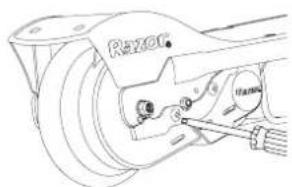
7 Re-attach the chain guard.
Note: Front wheel hardware sequence
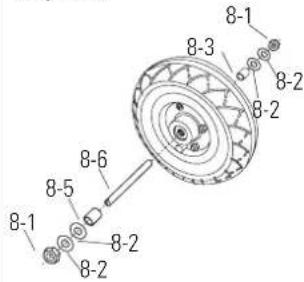
Right Side (Throttle)
8-3 - (Short) spacer
8-2 - Washer
Fork
8-2 - Washer
8-1 - 17mm locknut
Middle
8-6 - Front axle bolt
Left Side (Brake)
8-5 - (Short) spacer
8-2 - Washer
Fork
8-2 - Washer
8-1 - 17mm locknut
Note: Rear wheel hardware sequence
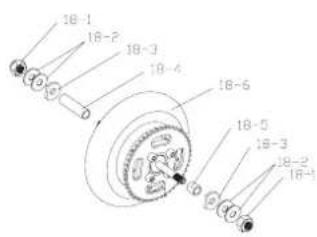
Right Side (Throttle)
18-1 M8 Nut
18-2 Washer (2)
Frame
18-3 Plate cut washer
18-4 (Short) Spacer
Left Side (Brake)
18-1 M8 Nut
18-2 Washer (2)
Frame
18-3 Plate cut washer
18-4 (Long) Spacer
REPAIR AND MAINTENANCE
□ Battery Care and Disposal
Do not store the battery in temperatures above 75° or below -10°F.


NS SEALED LEAD ACID BATTERIES. BATTERIES MUST BE RECYCLED.
Disposal: Your Razor product uses sealed lead-acid batteries which must be recycled or disposed of in an environmentally safe manner. Do not dispose of a lead-acid battery in a fire. The battery may explode or leak. Do not dispose of a lead-acid battery in your regular household trash. The incineration, land filling or mixing of sealed lead-acid batteries with household trash is prohibited by law in most areas. Return exhausted batteries to a federal or state approved lead-acid battery recycler or a local seller of automotive batteries. If you live in Florida or Minnesota, it is prohibited by law to throw away lead-acid batteries in the municipal waste stream.
Charger
The charger supplied with the electric scooter should be regularly examined for damage to the cord, plug, enclosure and other parts and in the event of such damage, the product must not be charged until it has been repaired or replaced.
Use ONLY with the recommended charger.
Wheels
Wheels and drive system are subject to normal wear and tear. It is the responsibility of the user to periodically inspect wheels for excess wear and adjust and replace drive train components as required.
□ Replacement Parts
The most frequently requested replacement parts are available for purchase at some Razor retail partners. For the complete selection of replacement parts visit www.razor.com/shop.
□ Repair Centers
For a list of authorized Razor repair centers:
- Check online at www.razor.com.
- Call 866-467-2967 for the center nearest you.
WARNING: If a battery leak develops, avoid contact with the leaking acid and place the damaged battery in a plastic bag. Refer to the disposal instructions at left. If acid comes into contact with skin or eyes, flush with cool water for at least 15 minutes and contact a physician.
WARNING: Battery posts, terminals and related accessories contain lead and lead compounds. Wash your hands after handling.
TROUBLESHOOTING GUIDE
Problem Possible Cause Solution
| Scooter does not run | Scooter must be traveling 3mph before motor will engage. | Kick start to 3mph while twisting the throttle to engage motor. |
| Battery needs a charge | Charge the battery. A new battery should be charged for at least 18 hours before using the scooter for the first time and up to 12 hours after each subsequent use. | |
| Check all connectors. Make sure the charger connector is tightly plugged into the charging port, and that the charger is plugged into the wall. | ||
| Charger is not working | Make sure power flow to the wall outlet is on. | |
| Scooter suddenly stopped working while in use | Tripped circuit breaker | Check all wires and connectors to make sure they are tight.The circuit breaker (next to on/off switch) will automatically shut off the power if the motor is overloaded.An excessive overload, such as too heavy a rider or too steep a hill, could cause the motor to overheat. If the scooter suddenly stops running, wait a few seconds and then push the breaker to reset the circuit. Correct the conditions that caused the breaker to trip to avoid repeatedly tripping the breaker. |
| Short run time (less than 15 minutes per charge) | Undercharged battery | Charge the battery. A new battery should be charged for at least 18 hours before using the scooter for the first time and up to 12 hours after each subsequent use. |
| Check all wires and connectors. Make sure the battery connector is tightly plugged into the charger connector, and that the charger is plugged into the wall. | ||
| Battery is old and will not accept full charge | Make sure power flow to the wall outlet is on.Even with proper care, a rechargeable battery does not last forever. Average battery life is 1 to 2 years depending on scooter use and conditions. Replace only with a Razor replacement battery. | |
| Brakes are not adjusted properly | Refer to adjusting the brakes instructions on page 4. | |
| Scooter runs sluggishly | Riding conditions are too stressful | Use only on solid, flat, clean and dry surfaces such as pavement or level ground. |
| Tire is not properly inflated | The tire is inflated when shipped, but it invariably will lose some pressure between the point of manufacturing and your purchase. Refer to instructions on page 3 of this manual to properly inflate tire. | |
| Scooter is overloaded | Make sure you do not overload the scooter by allowing more than one rider at a time, exceeding the electric scooters 120 pounds (54kg) maximum weight limit, going up a hill or towing objects behind the scooter. If the scooter is overloaded, the circuit breaker may trip and shut off power to the motor. Correct the riding conditions that caused the overload, wait a few seconds, and then push the breaker to reset the circuit. Avoid repeatedly tripping the circuit breaker. | |
| Brake dragging | Use your fingers to twist the adjuster in either direction until front wheel is centered between pads. | |
| Brakes are not adjusted properly | Refer to adjusting the brakes instructions on page 4. |
TROUBLESHOOTING GUIDE
Problem Possible Cause Solution
| Sometimes the scooter doesn't run, but other times it does | Loose wires or connectors | Check all wires around the motors and all connectors to make sure they are tight. |
| Motor or electrical switch damage | Contact your local Razor authorized service center for diagnosis and repair. | |
| Scooter makes loud noises or grinding sounds | Chain is too dry | Apply a lubricant such as 3 in 1^TM or Tri-Flow ^TM to the chain. |
For more helpful troubleshooting guides, visit us at www.razor.com.
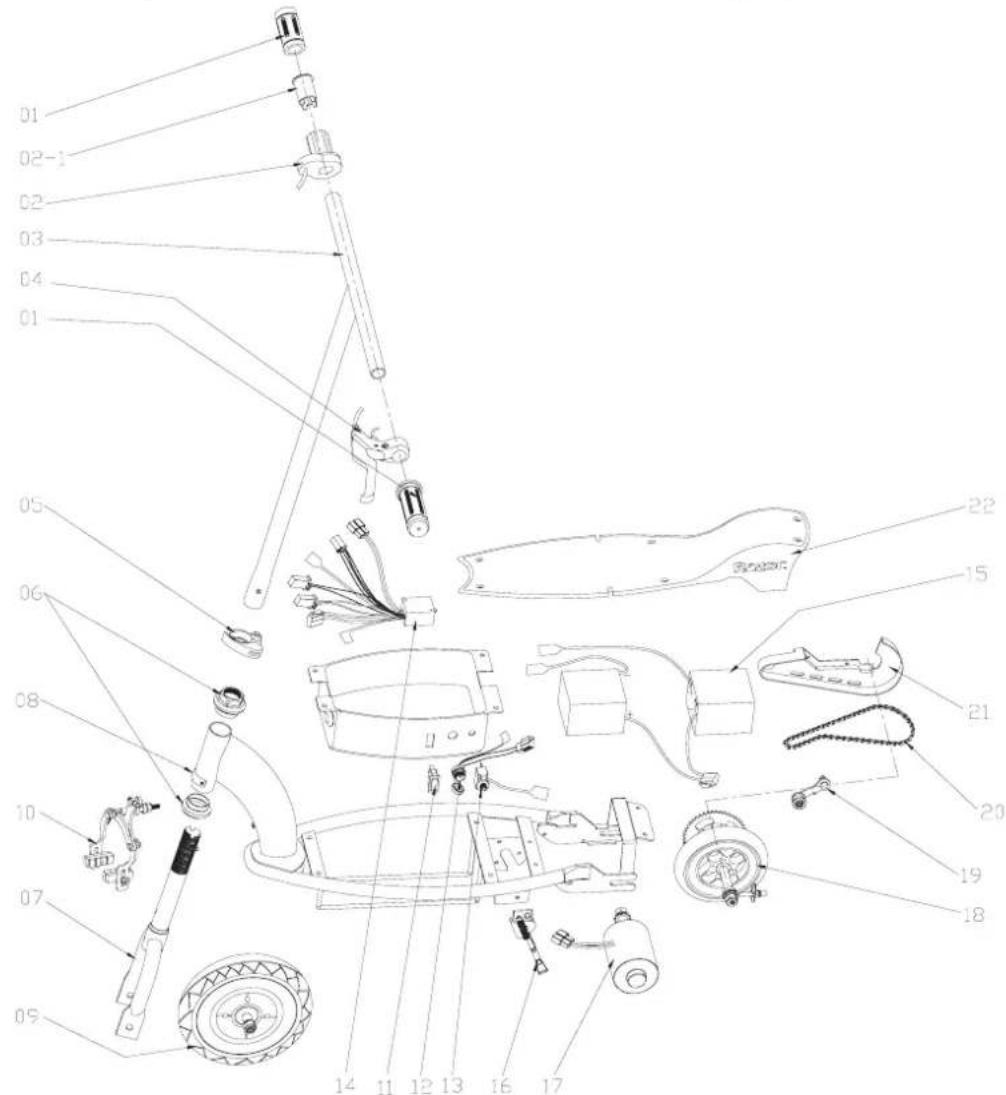
E100/E125/E150/E175 PARTS
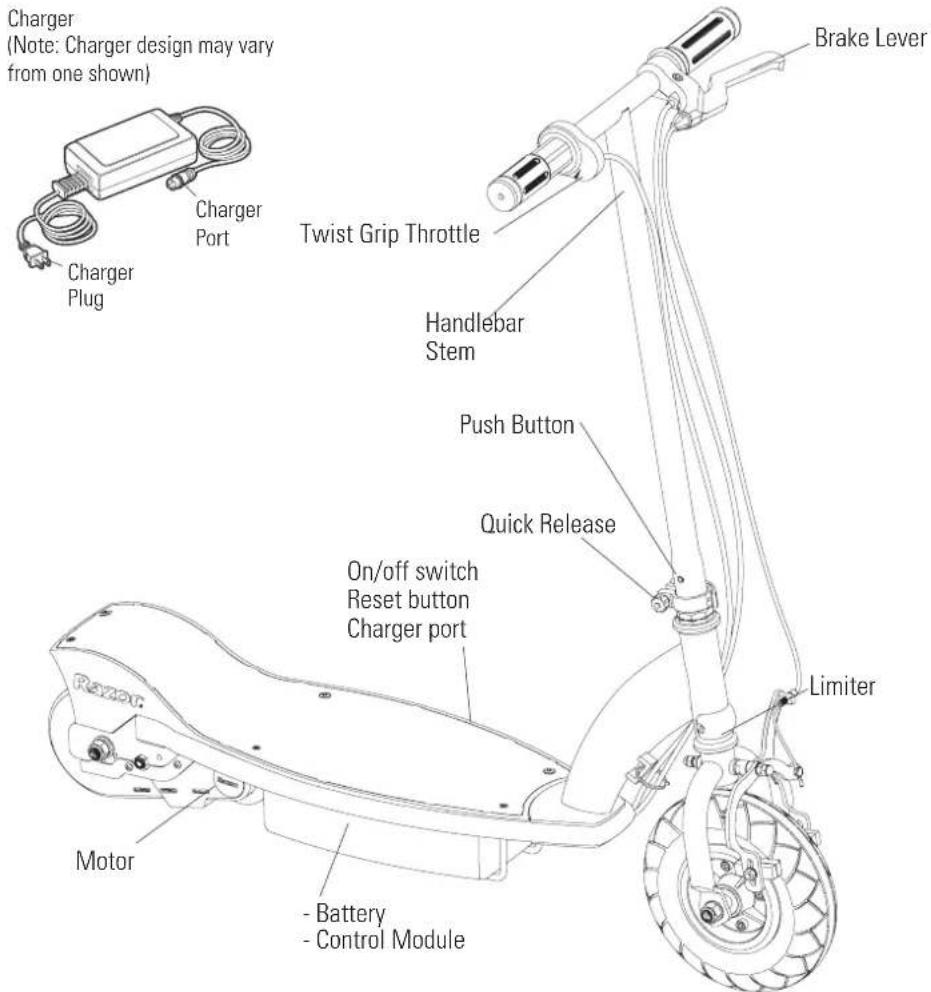
Keep your scooter running for years with genuine Razor parts. Visit our web site or e-mail us for more information on spare part availability. (Specifications subject to change without notice.)
01 Handlebar grip (right/left)
02 Single speed twist grip throttle
02-1 Sleeve
03 Handlebar stem
04 Brake lever assembly
05 Quick release lever
06 Headset (upper/lower)
07 Front fork
07-1 V Spring push button
08 Limiter
09 Front wheel complete
(See pg. 5 for hardware sequence)
10 Front caliper brake with brake pad
11 On/Off switch
12 Charger port
13 Reset button
14 Control module
15 Battery (2-12V/4.5Ah)
16 Kickstand
17 Motor (24V / 100W)
18 Rear wheel complete
(See pg. 5 for hardware sequence)
19 Chain tensioner
20 Chain
21 Chain guard
22 Deck plate with grip tape
Need Help? Visit our web site for replacement parts, product support and a list of authorized service centers at www.razor.com or call toll free 866-467-2967 Monday - Friday 8AM - 5PM Pacific Time.
SB 1918 (CALIFORNIA) DECLARATION
YOUR INSURANCE POLICIES MAY NOT PROVIDE COVERAGE FOR ACCIDENTS INVOLVING THE USE OF THIS SCOOTER/ELECTRIC RIDE-ON PRODUCT. TO DETERMINE IF COVERAGE IS PROVIDED, YOU SHOULD CONTACT YOUR INSURANCE COMPANY OR AGENT.
WARRANTY
Razor Limited Warranty
The manufacturer warranties this product to be free of manufacturing defects for a period of 90 days from date of purchase. This Limited Warranty does not cover normal wear and tear, tires, tubes or cables, or any damage, failure or loss caused by improper assembly, maintenance, or storage or use of the Razor E100, E125, E150, E175.
This Limited Warranty will be void if the product is ever
• used in a manner other than for recreation or transportation
- modified in any way;
- rented.
The manufacturer is not liable for incidental or consequential loss or damage due directly or indirectly to the use of this product.
Razor does not offer an extended warranty. If you have purchased an extended warranty, it must be honored by the store at which it was purchased.
For your records, save your original sales receipt with this manual and write the serial number below.
Item Number:
E100 Red 13111260
E100 Pink 13111261
E100 Daisy 13111061
E100 Sweet Pea 13111263
E100 Hello Kitty 13111264
E125 Red 13111110
E125 Silver 13111101
E125 Black 13125E-BK
E150 Red 13111601
E150 Pink 13111661
E175 Red 13111259
Need Help? Visit our web site for replacement parts, product support and a list of authorized service centers at www.razor.com or call toll free 866-467-2967 Monday - Friday 8AM - 5PM Pacific Time.
U.S. Design Patent D497,397 S
Printed in China for:
Razor USA LLC
PO Box 3610
Cerritos, CA 90703
Copyright © 2003-2010 Razor USA LLC. All rights reserved. RAZOR and the Razor Logo Design are among the registered trademarks of Razor USA LLC in the United States and/or select foreign countries.