Leslie 525 - Pregnant Hammond - Free user manual and instructions
Find the device manual for free Leslie 525 Hammond in PDF.


User questions about Leslie 525 Hammond
0 question about this device. Answer the ones you know or ask your own.
Ask a new question about this device
Download the instructions for your Pregnant in PDF format for free! Find your manual Leslie 525 - Hammond and take your electronic device back in hand. On this page are published all the documents necessary for the use of your device. Leslie 525 by Hammond.
USER MANUAL Leslie 525 Hammond
Innovative Sound Systems
natural_image
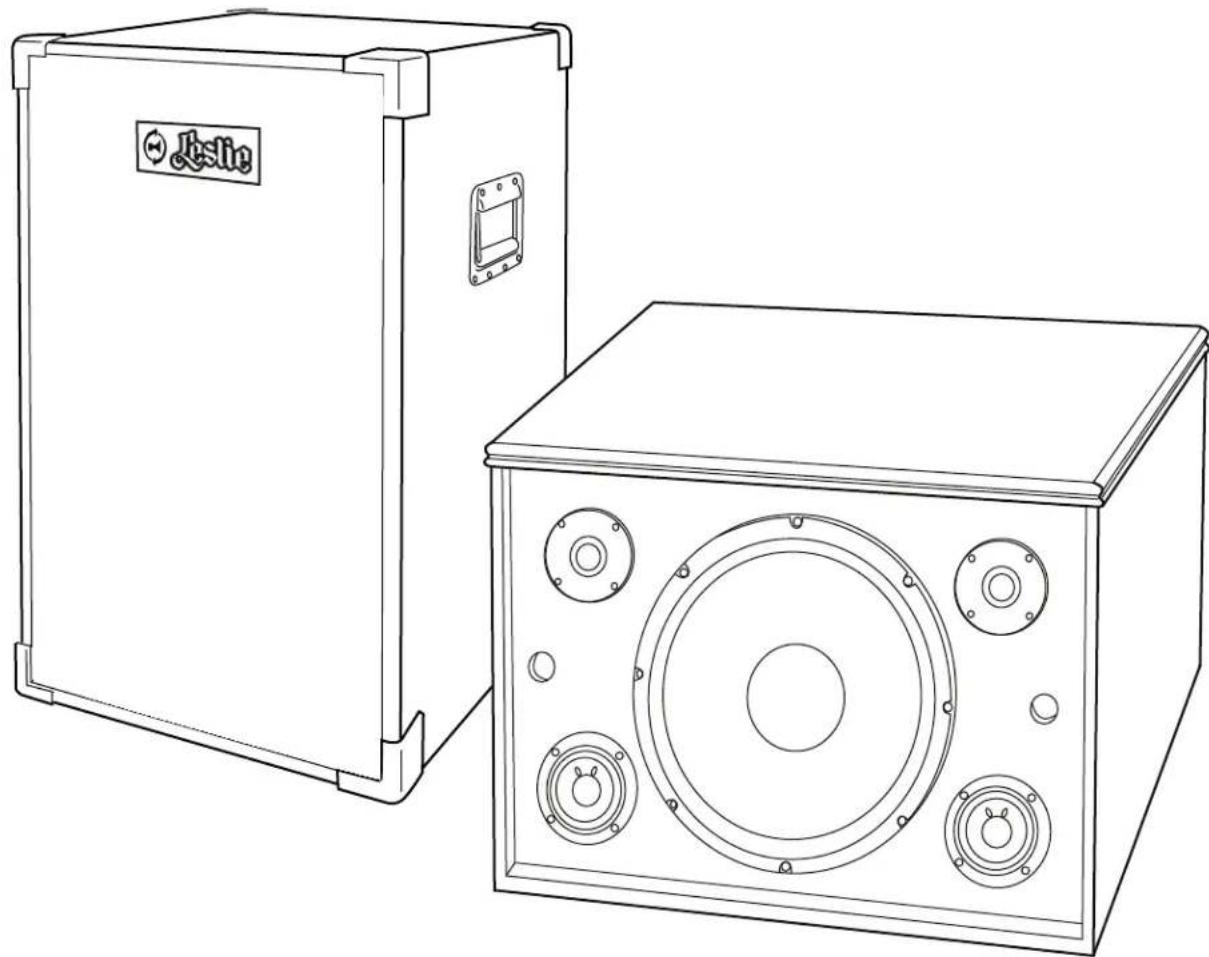
Line drawing of a two-port electronic device with speaker and control knobs (no text or symbols)Owners Manual
Models 525 / 3301
Read these instructions.
Keep these instructions.
Heed all warnings.
Follow all instructions.
Do not use this apparatus near water.
Clean only with dry cloth.
Do not block any ventilation openings. Install in accordance with the manufacturer's instructions.
Do not install near any heat sources such as radiators, heat registers, stoves or other apparatus (including amplifiers) that produce heat.
Do not defeat the safety purpose of the polarized or grounding type plug. A polarized plug has two blades with one wider than the other. A grounding type plug has two blades and a third grounding prong. The wider blade or third prong is provided for your safety. If the provided plug does not fit into your outlet, consult an electrician for replacement of the obsolete outlet.
Protect the power cord from being walked on or pinched, particularly at plugs, convenience receptacles, and the point where they exit from the apparatus.
Only use attachments/accessories specified by the manufacturer.
Use only with the cart, stand, tripod, bracket, or table specified by the manufacturer, or sold with the apparatus. When cart is used, use caution when moving the cart/apparatus combination to avoid injury from tip-over.
PORTABLE CART WARNING

Unplug this apparatus during lightning storms or when unused for long periods of time.
Refer all servicing to qualified service personnel. Servicing is required when the apparatus has been damaged in any way, such as power-supply cord or plug is damaged, liquid has been spilled or objects have fallen into the apparatus, the apparatus has been exposed to rain or moisture, does not operate normally, or has been dropped.
Apparatus shall not be exposed to dripping or splashing and no objects filled with liquids, such as vases, shall be placed on the apparatus.
WARNING: To reduce the risk of fire or electrical shock, do not expose this apparatus to rain or moisture.

CAUTION
RISK OF ELECTRIC SHOCK, DO NOT OPEN

CAUTION: TO REDUCE THE RISK OF ELECTRIC SHOCK, DO NOT REMOVE COVER (OR BACK). NO USER-SERVICEABLE PARTS INSIDE. REFER SERVICING TO QUALIFIED SERVICE PERSONNEL.

This symbol indicates that dangerous voltage constituting a risk of electric shock is present within this unit.

This symbol indicates there are important operating and maintenance instructions in the literature accompanying this unit.
Thank You!
We greatly appreciate your purchase of a new Leslie speaker system. If this is your first purchase of a Leslie product, we would like to welcome you into the Leslie family. If you are a repeat customer, thank you for your continued confidence in our Leslie products.
Your new Leslie speaker system was engineered and manufactured to the most stringent-quality standards, reproducing the full-spectrum sound of musical instruments and housed in acoustically-engineered cabinet. This will assure that your new Leslie will sound and look great for many years to come. Your Leslie speaker culminates many years of research and dedication to the art of sound reproduction and is carefully designed and tested to provide long dependable service.
Many features have been included in this speaker to insure the finest sound from your organ or keyboard product. Please take a moment to carefully read this manual and familiarize yourself with many of the fine features found in your new Leslie speaker system. Take pride in being the owner of the most innovative sound system in the industry today.
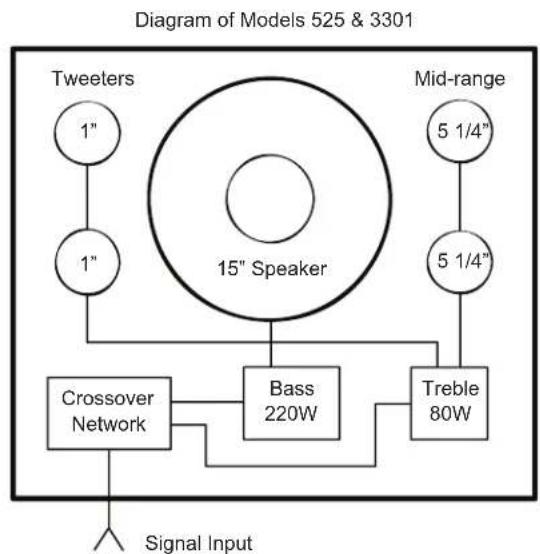
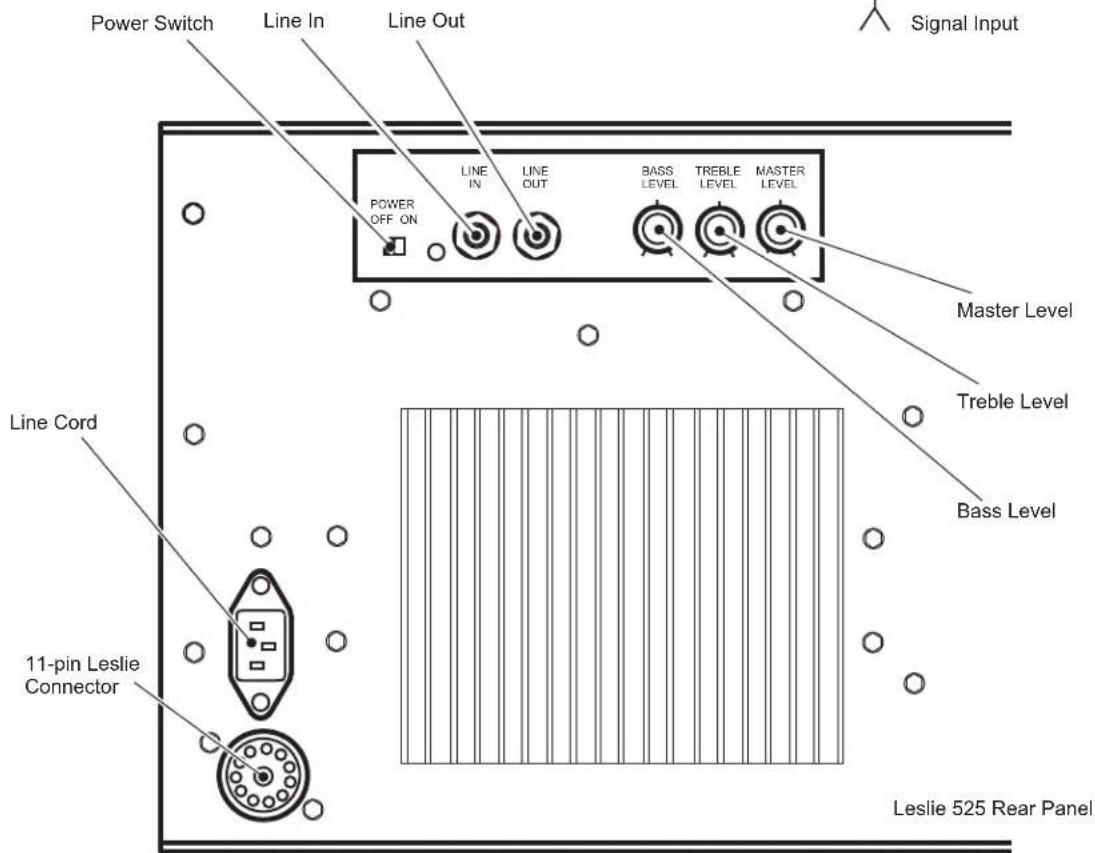
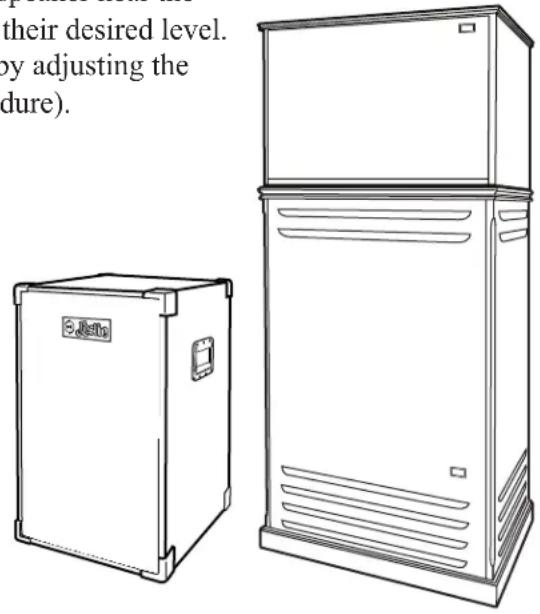
The Leslie 525 / 3301 stationary speaker systems have been designed to enhance and amplify the sound of most keyboard products on the market today. It can also be used to add an additional channel to any Leslie speaker to facilitate multi-channel organs. These Leslie's feature a 300-watt RMS solid-state single-channel amplifier. Its five-speaker system produces extremely clean highs and solid deep bass that you can actually feel! To make it easy to connect to most keyboard or electronic organs, we have provided an 11-pin Leslie connector and a 14 line input jack on the rear panel. Master volume, bass and treble controls are provided so that you can adjust the sound to match your room acoustics.
The Leslie 525, in its furniture-grade cabinet, was designed to be placed directly on top of any traditional Leslie speaker such as our 122XB or our 971 for multi-channel installations or in any remote position. The Leslie 3301 with its rugged cabinet was designed to be placed directly on the floor when used to amplify a keyboard-type product. In the case when you need to add an additional channel to our portable Leslie 3300, this cosmetically matching unit can be placed directly on top of the Leslie 3300. If you desire true stereo separation in your musical performance, use two Leslie 525s or 3301s.
flowchart
graph TD
    A["Signal Input"] --> B["Crossover Network"]
    B --> C["Bass 220W"]
    C --> D["Treble 80W"]
    D --> E["Mid-range"]
    E --> F["1/4""]
    F --> G["Tweeters 1""]
    G --> H["15" Speaker"]
    H --> I["1""]
    I --> J["1""]
    J --> K["1""]
    K --> L["Tweeters 1""]
In most cases, your local Leslie dealer will connect your new Leslie speaker to your organ or keyboard product. In the case that no setup was provided or if you wish at a later time to move your Leslie speaker to another location, please carefully read and follow the appropriate setup procedure.
Single Leslie Installation
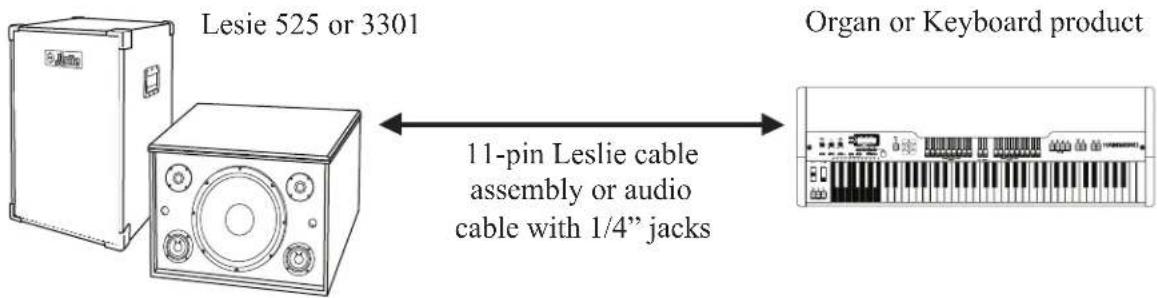
This Setup procedure should be followed when connecting an organ or keyboard to a single Leslie 525 or 3301.
- Place your Leslie 525 or 3301 speaker in a location that produces the best sound reproduction.
- If you wish to connect your Leslie by means of an 11-pin Leslie cable assembly, carefully plug the male end of the 11-pin Leslie cable assembly into the female socket located on your organ or keyboard. You also have the option of connecting your organ or keyboard to your Leslie 525 or 3301 by means of a cable with 14 " plug on both ends (not provided). Plug one end of the cable assembly into the Line Out jack on your organ or keyboard, and the other end to the Line In jack on the Leslie. Then proceed to step 4.
- Repeat the above procedure to connect the other end of the Leslie cable to the Leslie speaker.
- Plug the AC power cord from the Leslie into a 120V AC outlet.
- Turn the Master volume control on the Leslie (see page 3) to the fully counterclockwise position. Set the bass and treble controls to the mid-position.
- If you are connecting a Hammond organ to your Leslie, pull all the upper and lower drawbars including the pedal drawbar fully out (#9 positions). Set the expression pedal to the loudest position (fully depressed). For non-Hammond products, set the volume control to the loudest position and set the voice registration to a setting that provides maximum sound (i.e. Full organ).
- Turn on the power switch on your organ or keyboard product and on your Leslie if you are using the 14 " Line Input jack. For organs, play a three-note chord on the upper and lower manuals and depress the low "C" pedal. For keyboards, place the unit in the split keyboard mode and play a three-note chord on the upper manual and the low "C" pedal note. Have someone slowly turn the volume control clockwise on the Leslie until the sound begins to distort, then slowly decrease the volume (turn the control counterclockwise) until the sound is undistorted. Your volume control is now properly set.
Caution: Do not play your Leslie at a volume setting that produces a distorted sound. Severe damage may occur to your new Leslie if played in this condition for an extended period of time
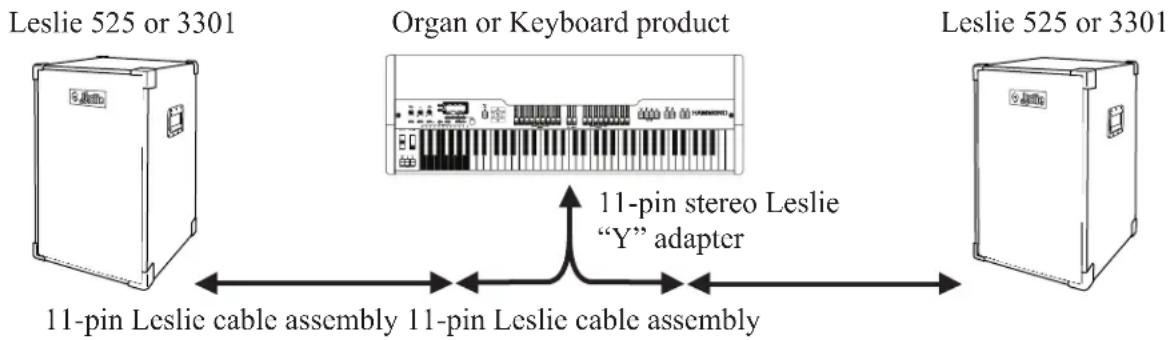
This Setup procedure should be followed when connecting a stereo organ or keyboard equipped with an 11-pin Leslie connector to two Leslie 525s or 3301s. This installation provides true stereo imaging by providing left and right audio channels. The purchase of an optional 11-pin stereo Leslie "Y" adapter and two Leslie cable assemblies from your local Leslie dealer is required to complete this installation.
flowchart
graph LR
    A["Leslie 525 or 3301"] -->|11-pin Leslie cable assembly| B["Organ or Keyboard product"]
    B -->|11-pin stereo Leslie 'Y' adapter| C["Leslie 525 or 3301"]
- Place your Leslie 525 or 3301 speakers in a location that produces the best sound reproduction.
- Review the position of your organ or keyboard and determine the best method of routing the optional Leslie cable assemblies.
- Plug the male end of the optional 11-pin stereo Leslie "Y" adapter into the 11-pin Leslie connector on the back of your organ or keyboard.
- Connect the male end of an optional 11-pin Leslie cable assembly into the left-channel Leslie connector on the 11-pin stereo "Y" adapter. Connect the other end of the 11-pin Leslie cable assembly to the Leslie 525 or 3301 which will be used for the left-channel audio.
- Connect the male end of another 11-pin Leslie cable assembly into the right-channel Leslie connector on the 11-pin stereo "Y" adapter. Connect the other end of the 11-pin Leslie cable assembly to the Leslie 525 or 3301 which will be used for the right-channel audio.
- Plug the AC power cords from the Leslies into a 120V AC outlet.
- Turn the Master volume controls on the Leslies (see page 3) to the fully counterclockwise position. Set the bass and treble controls to the mid-position.
- If you are connecting a Hammond organ to your Leslie, pull all the upper and lower drawbars including the pedal drawbar fully out (#9 positions). Set the expression pedal to the loudest position (fully depressed). For non-Hammond products, set the volume control to the loudest position and set the voice registration to a setting that provides maximum sound (i.e. Full organ).
- Turn on the power switch on your organ or keyboard product. For organs, play a three-note chord on the upper and lower manuals and depress the low "C" pedal. For keyboards, place the unit in the split keyboard mode and play a three-note chord on the upper manual and the low "C" pedal note. Have someone slowly turn the volume control clockwise on one of the Leslie until the sound begins to distort, then slowly decrease the volume (turn the control counterclockwise) until the sound is undistorted. Your volume control is now properly set. Repeat this procedure for the other Leslie speaker.
Caution: Do not play your Leslie at a volume setting that produces a distorted sound. Severe damage may occur to your new Leslie if played in this condition for an extended period of time.
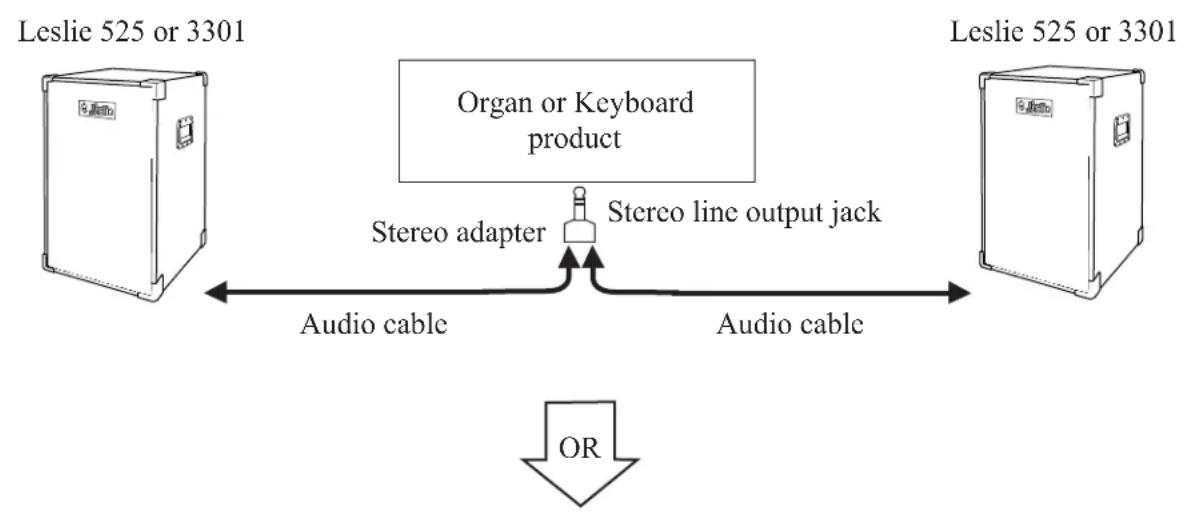
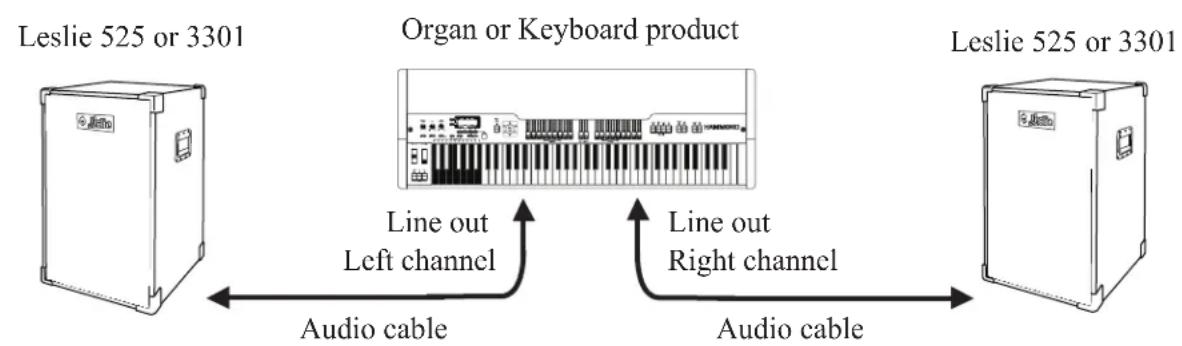
This Setup procedure should be followed when connecting a stereo organ or keyboard equipped with a 14 " Line Output jack or a 14 " left and right-channel Line Output jack to two Leslie 525s or 3301s. This installation provides true stereo imaging by providing left and right audio channels. The purchase of audio cable assemblies outfitted with 14 " male plugs on both ends are required for this installation and are available at your local audio store. In addition, if your organ or keyboard contains a single stereo line output jack, then the purchase of a stereo "Y" adapter is also required. This adapter should have a male 14 " jack for the Line Input signal and two female 14 " sockets for the left and right output signals.
flowchart
graph LR
    A["Leslie 525 or 3301"] -->|Audio cable| B["Organ or Keyboard product"]
    B --> C["Stereo adapter"]
    C --> D["Stereo line output jack"]
    D --> E["Leslie 525 or 3301"]
    E --> F["Audio cable"]
    F --> G["OR"]
flowchart
graph LR
    A["Leslie 525 or 3301"] -->|Line out Left channel| B["Organ or Keyboard product"]
    B -->|Line out Right channel| C["Leslie 525 or 3301"]
    A <-->|Audio cable| B
- Place your Leslie 525 or 3301 speakers in a location that produces the best sound reproduction.
- Review the position of your organ or keyboard and determine the best method of routing the optional audio cable assemblies.
-
If your keyboard has separate left and right line output jacks, proceed to step 4. If your keyboard or organ has a single 14 ” stereo output jack, plug the male end of the optional Stereo “Y” adapter into this jack. Plug one end of the optional audio cable equipped with 14 ” plugs into the left-channel output jack on the stereo “Y” adapter. Plug the other end of the audio cable into the Leslie 525 or 3301 Line Input jack that will be used for the left-channel audio. Plug one end of the other audio cable into the right-channel output jack on the stereo “Y” adapter. Plug the other end of the audio cable into the Leslie 525 or 3301 Line Input jack that will be used for the right-channel audio. Proceed to step 5.
-
Plug one end of the optional audio cable into the left Line Output jack. Plug the other end of the audio cable into the Leslie 525 or 3301 Line Input jack that will be used for the left-channel audio. Repeat the above procedure for the right-channel Leslie speaker.
- Plug the AC power cords from the Leslies into a 120V AC outlet.
- Turn the Master volume controls on the Leslies (see page 3) to the fully counterclockwise position. Set the bass and treble controls to the mid-position.
- If you are connecting a Hammond organ to your Leslie, pull all the upper and lower drawbars including the pedal drawbar fully out (#9 positions). Set the expression pedal to the loudest position (fully depressed). For non-Hammond products, set the volume control to the loudest position and set the voice registration to a setting that provides maximum sound (i.e. Full organ).
- Turn on the power switch on your organ or keyboard product.. For organs, play a three-note chord on the upper and lower manuals and depress the low "C" pedal. For keyboards, place the unit in the split keyboard mode and play a three-note chord on the upper manual and the low "C" pedal note. Have someone slowly turn the volume control clockwise on one of the Leslies until the sound begins to distort, then slowly decrease the volume (turn the control counterclockwise) until the sound is undistorted. Your volume control is now properly set. Repeat this procedure for the other Leslie speaker.
Caution: Do not play your Leslie at a volume setting that produces a distorted sound. Severe damage may occur to your new Leslie if played in this condition for an extended period of time.
Installation Using an 11-pin Rotary Leslie and a 525 or 3301 Leslie
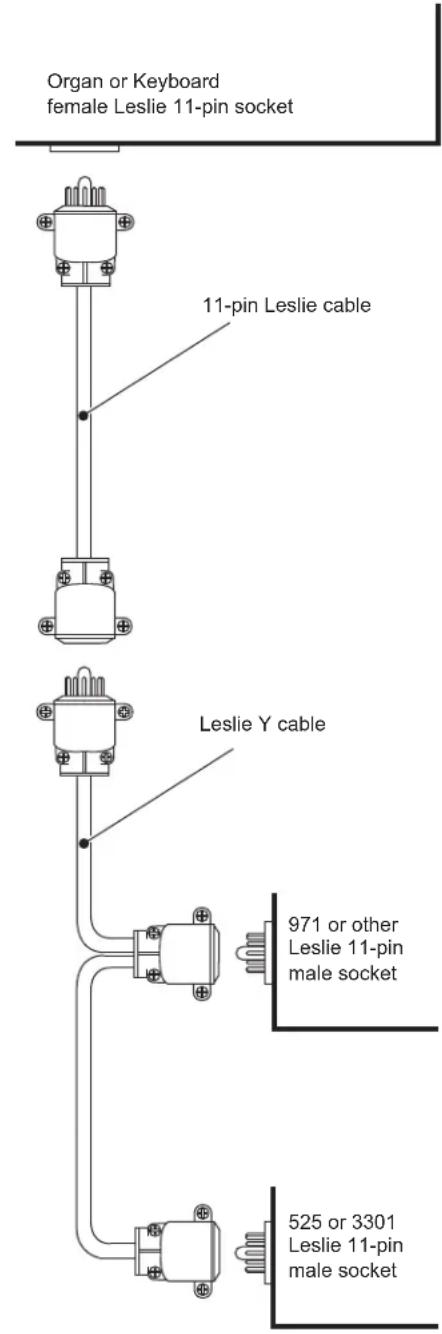
This Setup procedure should be followed when connecting an organ or keyboard equipped with an 11-pin Leslie connector to an 11-pin rotary Leslie speaker such as Leslie 122XB, 971, or 3300, and a Leslie 525 or 3301. In this installation, the Leslie 525 or 3301 is placed directly on top of the rotary Leslie speaker. The purchase of an optional 11-pin Leslie "Y" adapter from your local Leslie dealer is required to complete this installation.
- Carefully position the Leslie 525 or 3301 on top of your 11-pin rotary Leslie speaker.
- Plug the female Leslie connector that is the farthest away from the male Leslie connector found on the optional 11-pin Leslie "Y" adapter into the 11-pin Leslie connector located on the back of the Leslie 525 or 3301.
- Plug the remaining female Leslie connector found on the 11-pin Leslie "Y" adapter into the 11-pin Leslie connector located on the back of your Leslie rotary speaker.
- Plug the male Leslie connector found on the Leslie "Y" adapter into the 11-pin Leslie cable assembly usually supplied with your Leslie rotary speaker. If additional Leslie cable assemblies are needed, you can purchase them from your local Leslie dealer. The other end of the Leslie cable assembly should be plug into the 11-pin Leslie connector found on your organ or keyboard product.
- Plug the AC power cords from the Leslies into a 120V AC outlet.
- Turn the Master volume controls on your Leslie 525 or 3301 (see page 3) to the fully counterclockwise position. Set the bass and treble controls to the mid-position.
- If you are connecting a Hammond organ to your Leslie, pull all the upper and lower drawbars including the pedal drawbar fully out (#9 positions). Set the expression pedal to the loudest position (fully depressed). For non-Hammond products, set the volume control to the loudest position and set the voice registration to a setting that provides maximum sound (i.e. Full organ).
- Turn on the power switch on your organ or keyboard product. For organs, play a three-note chord on the upper and lower manuals and depress the low "C" pedal. For keyboards, place the unit in the split keyboard mode and play a three-note chord on the upper manual and the low "C" pedal note. Have someone slowly turn the volume control clockwise on the Leslie 525 or 3301 until the sound begins to distort, then slowly decrease the volume (turn the control counterclockwise) until the sound is undistorted. Your volume control is now properly set.
Caution: Do not play your Leslie at a volume setting that produces a distorted sound. Severe damage may occur to your new Leslie if played in this condition for an extended period of time.
Where to place your new Leslie Speaker System
One of the first considerations will be where to place the speaker for the best all-around effect. Most musicians prefer having the Leslie speaker near the organ or keyboard product so that the sound is balanced to their desired level. Closer or more distant locations are easily accommodated by adjusting the volume level of the speaker (see page 4 Leslie Setup Procedure).
Whatever the distance from the keyboard, the Leslie speaker should be given enough space so the sound can radiate fully through the room. Restricting the sound dispersal by placing the cabinet against a wall or between large pieces of furniture reduces the effectiveness of the speaker. Sound reflection is desirable. Yet in most homes, much sound is absorbed by furniture, rugs and drapes, rather than being reflected. Placing the speaker diagonally in a corner is a good practice. Sound will be reflected off the two adjacent walls, enhancing the beauty, power and dispersion of the music.
Care of your new Leslie Speaker
Your new Leslie speaker has been carefully engineered for durability and maximum service. Except for occasional replacement of maintenance items such as belt and vacuum tubes, your new Leslie speaker will require little or no attention.
CAUTION
As with any electrical or electronic equipment, care should be exercised to prevent fire and shock hazard. The following information is provided to give guidance in the safe use and care of your Leslie speaker.
ENVIRONMENT
This speaker is primarily designed to be used in an interior environment. To prevent an electrical shock hazard, do not expose your Leslie to wet floors, liquid spills and splashes, or rain.
ENCLOSURE
The removal of any part of the enclosure may result in exposure to electrical shock. Servicing should not be attempted by the user; refer all servicing to factory-trained technicians.
POWER
Operate this speaker only at the AC voltage and frequency indicated on the nameplate located on the back of the Leslie.
CLEANING THE CABINET
Use a soft cloth or chamois, slightly dampened with water. A little mild detergent may be added to the water if necessary. For the Leslie models finished in red walnut, rub lightly with the grain of the wood. Excessive rubbing in one spot or at the edge of the cabinet may damage the finish. Use a good grade of furniture wax or polish.
MOVING OR RELOCATING YOUR LESLIE SPEAKER
So as not to damage your Leslie cables, carefully unplug both ends of the cable before moving your Leslie speaker. To prevent damage to the cabinet, it is advisable that more than one person move the speaker.
PACKING AND SHIPPING
Packing and shipping should be done by your local Leslie dealer or by a qualified mover. The speaker should not be moved or carried on its side or upside down, as this will result in damage to the moving parts inside the cabinet. The cabinet must be moved, carried or shipped in an upright position. The exterior should be protected by boxing the cabinet or covering it with padding.
SPECIFICATIONS:
Leslie models 525 / 3301
- Single-Channel Input
- Amplifier: 300-Watt RMS Total: 220-Watt RMS bass amplifier
- 80-Watt RMS treble amplifier
- Speakers: 550-watt, 15" woofer, 2 - 5 ¼" mid-range and 2 - 1" tweeters
- Inputs: 11-pin Leslie connector and 14 " Line Input jack
- Outputs: 14 " Line Output jack suitable to drive a powered sub-woofer
- Controls: Master volume, bass and treble level, and power on/off switch
- Dimensions: Model 525 - 18 3/8" H, 28 7/8" W, 20 3/8" D
- Model 3301 - 28 3/8" H, 18 3/4" W, 20 3/8" D
- Weight: Model 525 - 99 lbs
Model 3301 - 100 lbs
OPTIONAL ACCESSORIES
Shown below are only a few of the available optional accessories for your new Leslie Speaker. Visit our website or your local Leslie dealer to view all the available products to enhance your Leslie Speaker.
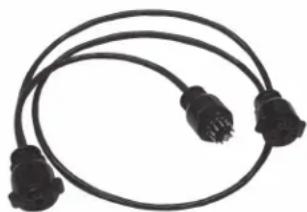
11-pin Leslie "Y" cable
This adapter is used to connect two 11-pin Leslie speakers to a Hammond Organ or keyboard that has a single 11-pin Leslie connector.
natural_image
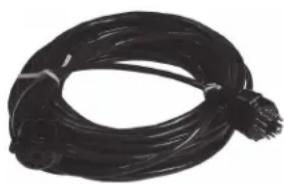
Coiled black electrical plug with terminal connectors (no text or symbols visible)11-pin Leslie cable assemblies
These cable assemblies are available in 30', 50' and 100' lengths.
natural_image
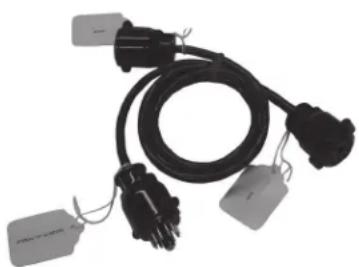
Coiled black cable or wire with a small protrusion at the bottom (no text or symbols visible)11-Pin Stereo "Y" Adapter
This adapter is used to connect two 11-pin Leslie to multi-channel organs or keyboards that have a single 11-pin Leslie connector. This adapter provides either a right or left channel to each of the Leslie to enhance the stereo imaging.
natural_image
Coiled black electrical plug with attached labels (no visible text or symbols)
SERVICE
Hammond maintains a policy of continuously improving and upgrading its instruments and therefore reserves the right to change specifications without notice.
Although every attempt has been made to insure the accuracy of the descriptive contents of this manual, total accuracy cannot be guaranteed.
Should the owner require further assistance, inquiries should first be made to your Authorized Hammond Dealer.
If you still need further assistance, contact Hammond at the following address.