TP-83IR - Thermostat Joblotron - Free user manual and instructions
Find the device manual for free TP-83IR Joblotron in PDF.


| Product Type | Smart Thermostat |
| Brand | Joblotron |
| Model | TP-83IR |
| Color | White |
| Display | LCD with backlight |
| Dimensions (L x W x H) | 120 x 80 x 25 mm |
| Weight | 150 g |
| Power Supply | 2x AA batteries or 24VAC |
| Battery Life | Approximately 1 year |
| Temperature Range | 5°C to 35°C (41°F to 95°F) |
| Accuracy | ±0.5°C |
| Control Type | Touch buttons |
| Programming | 7-day programmable with 4 periods per day |
| Features | Energy saving mode, frost protection, child lock |
| Connectivity | None (standalone) |
| Installation | Wall-mounted with included screws and anchors |
| Certifications | CE, RoHS |
| Warranty | 2 years |
| Included Accessories | Screws, wall anchors, user manual |
| Maintenance | Clean with a soft, dry cloth; do not use liquids |
| Safety | Overheat protection, low battery indicator |
| Spare Parts Availability | Not available; replace the whole unit |
| Repairability | Not user-serviceable; refer to a professional |
Frequently Asked Questions - TP-83IR Joblotron
User questions about TP-83IR Joblotron
0 question about this device. Answer the ones you know or ask your own.
Ask a new question about this device
Download the instructions for your Thermostat in PDF format for free! Find your manual TP-83IR - Joblotron and take your electronic device back in hand. On this page are published all the documents necessary for the use of your device. TP-83IR by Joblotron.
USER MANUAL TP-83IR Joblotron
The TP-83IR programmable wireless indoor thermostat
The TP-83IR is a wireless indoor thermostat with a programmable weekly heating schedule. It is designed for indoor temperature regulation which balances economy with comfort. The device is capable of recognizing warm-up persistence characteristics (within 2 days) and will adjust the settings accordingly so that a high level of operational comfort is achieved. You need not find out how early the heating should start in order to get to a comfortable temperature at the desired time. The required timing is configured automatically. The thermostat is equipped with an IR sensor. This is especially suitable for under-floor heating control – using the IR-measured temperature floor heating regulation can be performed with higher precision and allows for a comfortable floor temperature with no additional risk of damaging the floor.
The thermostat is compatible with AC-82, AC-83 and AC-8014 receivers or GD-04 with GD-04R.
Temperature adjustment can be performed by simply turning the setting knob.
When combined with an Oasis wireless security system (Jablotron), the following are possible:
- Switching the heating ON and OFF remotely (by mobile phone, remote control or Internet).
- Disabling the heating when windows are open.
- Informing the user about heating faults and frost threats (if the temperature drops below a pre-configured value a warning SMS is sent).
- Informing on the occurrence of fire (when the temperature is above a pre-configured value).
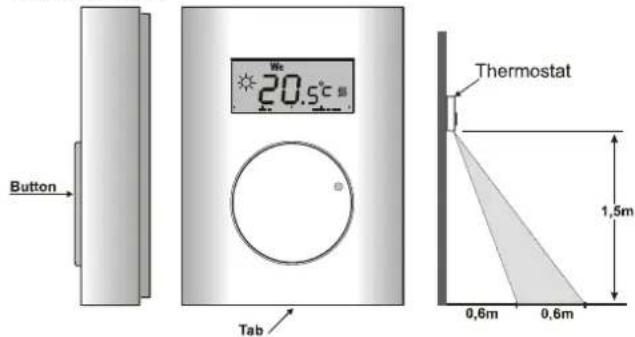
Installation
The TP-83IR should be mounted in a dry indoor location. Choose a mounting location about 1.5 meters above the floor in an area with good air circulation. The view of the IR sensor on the bottom must be direct and must not be shielded by any object – see the picture. Avoid places with draughts, dead air spots and radiant heat from the sun or appliances. It should not be installed close to any metal structure or other objects that may obstruct radio signal transmissions.
- Release the upper cover by pressing the plastic tab on the bottom side of the housing
- Mount the back part on to the desired location.
- Insert the battery (the polarity is marked on the holder).
- Close the thermostat.
Enrollment
Install and connect the receiving unit to the heating system. If the receiving unit was purchased separately then the thermostat must be enrolled to it — enter enrollment mode on the receiving unit (see its manual) and either enter menu M1 or connect the battery to the thermostat (both operations cause an enrollment signal to be sent). More information you can find in the receiver's manual.
Symbols on the display
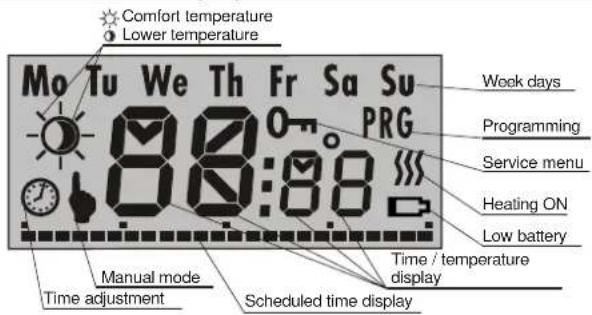
Adjustment and programming
All the required parameters can be configured in the adjustment menu using the knob. The menu is divided into the following parts:
M1 manual temperature-adjustment
M2 setting the economical or comfortable temperature, time adjustment
M3 weekly programming schedule
M4 service menu
You can enter the menu and scroll through M1 to M4 by pressing and holding the knob. The desired submenu is selected by releasing the knob.
Scrolling inside any particular menu M1 to M4 is done by turning the knob. The currently displayed parameter can be adjusted by pressing the knob briefly, turning the knob until the desired value is displayed, and confirming the setting by re-pressing the knob (this will also cause a return to the menu so that you can configure other parameters immediately). The adjustment menu is escaped from by pressing the knob while OK is displayed or automatically after approx. 30 seconds.
1. M1 - manual mode
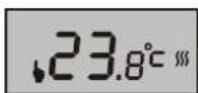
If set to manual mode, the thermostat performs fixed temperature regulation regardless of the weekly schedule. The desired temperature can be set within the range of t Lo to t Hi. The M1 menu is escaped from by pressing and holding the knob
for 2 seconds.
Note: As mentioned above, entering the M1 menu causes an enrollment signal to be sent.
2. M2 - temperature & time setting
If the M2 menu is entered, turning the knob will scroll through the Lower temperature (○), Comfortable temperature (☆) and Time (○) parameters followed by an OK option.

Each parameter can be entered by briefly pressing the knob. When ⬆ or ⬇ is entered the displayed temperature flashes and can be adjusted by turning the knob (re-pressing the knob confirms the setting). The Time parameter adjustment is similar but requires three steps – for the day, hour and minutes.
3. M3 - programming the weekly heating schedule
This mode allows you to program when the thermostat should switch between Day ( ^① ) and Night ( ^② ) operation. The heating schedule can be programmed either for each day separately or just for working days or just for the weekend or for all days together.

Enter the M3 menu, scroll to the desired option by turning the knob and enter the schedule programming by briefly pressing the knob (this erases the current schedule setting).
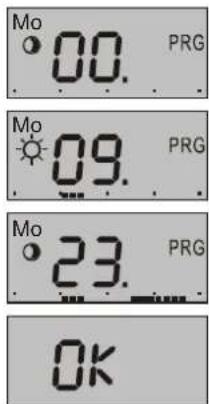
Schedule programming is done by marking periods of time for which the Day heating operation is requested. The marking bar is shown at the bottom of the display, each hour can be either marked or unmarked. You mark or unmark by turning the knob. The mark/unmark mode is displayed by symbols, the currently programmed hour is shown on the display (00 to 23). Switching between mark/unmark modes is done by pressing the knob (this applies when turning clockwise, turning the knob anti-clockwise always switches to unmark mode).
Turning the knob to the rightmost position (following hour 23) will display an OK option. Pressing the knob will then finish programming.
4. M4 - Service menu
This menu allows for the configuration of parameters which usually stay fixed during normal operation. When the service menu is entered, the 0-n symbol is shown on the display. The menu contains 9 items (they can be scrolled through by turning the knob). Each of the first 7 items corresponds to a parameter which can be configured in a standard way (by pressing the knob, turning the knob until the desired value is displayed, and re-pressing the knob).
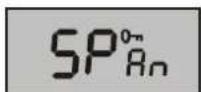
The SPAN parameter allows you to configure the hysteresis - the accuracy to which the temperature is regulated. One of the following accuracy ranges can be selected: ±0.1°C, ±0.2°C or ±0.5°C (the factory default setting is ±0.2°C).
Example: If the accuracy is adjusted to ±0.5^ and the temperature is set to 24^ , the thermostat switches the heating on when the temperature drops below 23.5^ and it switches it off if the temperature goes above 24.5^ . In reality the temperature scatter can be slightly higher because of the temperature persistence of the room.
Warning: too high an accuracy can cause the heating to turn on and off too frequently.
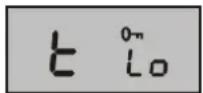
The t Lo parameter is the lower limit to which the economical temperature can be set. In addition, any drop in temperature under t Lo causes a "heat to t Lo temperature" signal to be transmitted.
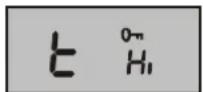
The t Hi parameter is the upper limit to which the Comfortable temperature can be set.
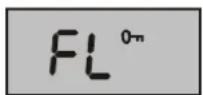
Floor sensor ON/OFF
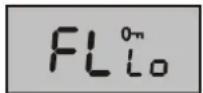
Lower floor-temperature threshold
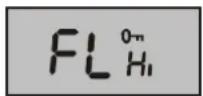
Upper floor-temperature threshold
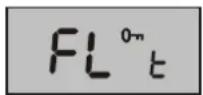
Current temperature of the floor (displayed after pressing the knob)
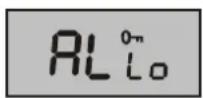
The AL Lo corresponds to the critically low temperature. Any drop in temperature under AL Lo causes a Panic signal to be sent to the receiver (reporting a frost threat).
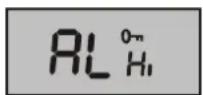
AL Hi corresponds to the critically high temperature. Any rise in temperature above AL Hi causes a Fire signal to be sent to the receiver.
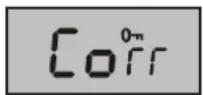
The Corr parameter allows for a correction of possible temperature measurement offsets. The range of adjustable corrections is ±1^ .
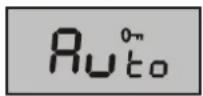
This parameter allows you to enable or disable thermostat adaptive mode. If enabled, the thermostat switches on in advance according to the temperature persistence of the heating system.
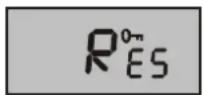
Selecting this item and pressing and holding the knob for 5 seconds resets the thermostat to the factory default settings.
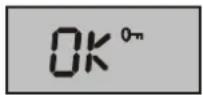
By selecting OK and pressing the knob the menu is escaped from.
The parameter ranges are restricted according to the following table:
| Parameter Adjustment range Factory default | Description | ||
| SPAN | 0.1°C;0.2°C;0.5°C | 0.2°C | Hysteresis for switching |
| t Lo +6°C to +40°C* 6°C Lower limit of | |||
| t Hi | +6°C to +40°C* | 40°C | Upper limit of * |
| FL | On/Off | On | Floor sensor ON/OFF |
| FL Lo | +6°C to +40°C* | 22°C | Lower floor-temperature threshold |
| FL Hi +6°C to 40°C* 27°C | Upper floor-temperature threshold | ||
| AL Lo | -9°C to +20°C | 3°C | Panic alarm |
| AL Hi | +30°C to +70°C | 60°C | Fire alarm |
| Corr | ±1°C | 0 | Correction |
| Auto | On/OFF | On | Adaptive mode |
| +6°C to +40°C | 18°C | Lower temperature | |
| * | +6°C to +40°C | 21°C | Comfortable temperature |
* t Lo to t Hi and ① to ⚙ must be valid ranges: t Lo must not be greater than t Hi and ② must not be greater than ⚙
Floor heat detection
If enabled by setting FL On, floor temperature detection is performed using an IR sensor. The FL Lo and FL Hi parameters allow you to set temperature thresholds for under-floor heating regulation:
- If the current floor temperature is lower than FL Lo, the thermostat will switch the heating on. This way a comfortable floor-temperature is
maintained even if no switch-on request is generated due to the room temperature.
- If the current floor temperature is higher than FL HI, the thermostat will switch the heating off. This prevents the floor from being damaged by too high a temperature.
Note: Floor heat detection is of higher priority than room temperature detection. This means that the current temperature in the room is taken into account only when the current floor-temperature is between FL Lo and FL Hi.
You can display the current floor temperature by entering the menu, scrolling to the FL t parameter and pressing the knob (a re-press will cause a return to the menu).
Party mode
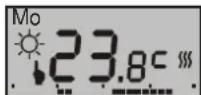
You can put the thermostat into party mode by briefly pressing the knob (indicated by symbols ♦ and ⚙ together). After then the thermostat maintains the Comfortable temperature increased by 2°C.
Party mode terminates whenever a switch to Economy temperature regulation occurs (whether manual or scheduled).
Displaying the set temperature
When not being handled, the thermostat shows the current temperature in the room. If you want to display the temperature which is set for the current time, turn the knob. The set temperature will then flash on the display for 3 seconds.
Battery replacement
Replace the battery when the low-battery symbol is displayed (or the thermostat stops working). If the thermostat is enrolled to the control panel, then a low battery will be indicated by the control panel (to the user and installer). Only use AA 1.5V alkaline batteries.
Integration into the OASiS system
- The thermostat can be enrolled to a control panel as a detector. If the temperature decreases below AL Lo a panic alarm will be triggered = frost threat (heating failure).
- If the temperature exceeds AL Hi then a fire alarm will be triggered.
- An AC-82 receiving unit has two output relays (X and Y). Thermostats can be enrolled separately to each relay in order to control two independent heating circuits.
- To operate a heating system the Oasis control panel can also be enrolled (sequence 299) to the same relay of the receiving unit as the thermostat is enrolled to. A thermostat enrolled to the X relay can be operated via the PGX programmable output, and a thermostat enrolled to the Y relay operated via PGY. If the programmable output of the control panel is switched on, the thermostat maintains the programmed temperature. If the control panel's output is switched off the thermostat only triggers heating if the temperature drops below t Lo.
- To operate the heating, RC-80 or RC-88 remote controls can also be enrolled to a receiving unit (AC-82). The heating can be switched on by remote controls to heat to the desired temperature and also switched off where it only heats when the temperature is below t Lo.
- To disable heating when windows are open JA-80M or JA-82M detectors can also be enrolled to the same relay as the thermostat is enrolled to. If the windows are closed it heats to the desired temperature and if windows are open it heats only when the temperature is below t Lo.
- Up to 8 thermostats can be enrolled to a single relay. If at least one thermostat transmits a heat command then the relay will be switched on.
Specifications
Power supply: 1x AA 1.5 V alkaline battery
Battery lifetime typically 1 year
Temperature measurement: +6°C to +40 °C
Temperature accuracy: adjustable: ± 0.1, ± 0.2 or ± 0.5 °C
Freeze alarm (panic transmission) temperature threshold: < AL Lo
configurable from -9^ to +20^
Fire alarm temperature threshold: > AL Hi
configurable from +30°C to +70°C
Operational frequency: 868 MHz, Oasis protocol
Operational radio range: up to 100 m (open area)
Operational temperature range: -10^ to +70^ (low humidity)
Dimensions: 66 x 90 x 22 mm
Complies with ETSI EN 300220, EN50130-4, EN55022, and EN 60950-1
Can be operated according to ERC REC 70-03

JABLOTRON ALARMS. hereby declares that the TP-83IR is in compliance with the essential requirements and other relevant provisions of Directive 1999/5/EC. The original of the conformity assessment can be found on the web site www.jablotron.com, Technical Support section.

Note: Dispose of batteries safely depending on battery type and local regulations. Although this product does not contain any harmful materials we suggest you return the product to the dealer or directly to the manufacturer after use.

JABLOTRON ALARMS a.s.
Pod Skalkou 4567/33
466 01 Jablonec nad Nisou
Tel.: 483 559 911
fax: 483 559 993
JABLOTRON Internet: www.jablotron.cz