TP-89 - Thermostat Joblotron - Free user manual and instructions
Find the device manual for free TP-89 Joblotron in PDF.


User questions about TP-89 Joblotron
0 question about this device. Answer the ones you know or ask your own.
Ask a new question about this device
Download the instructions for your Thermostat in PDF format for free! Find your manual TP-89 - Joblotron and take your electronic device back in hand. On this page are published all the documents necessary for the use of your device. TP-89 by Joblotron.
USER MANUAL TP-89 Joblotron
The TP-89 digital bus thermostat
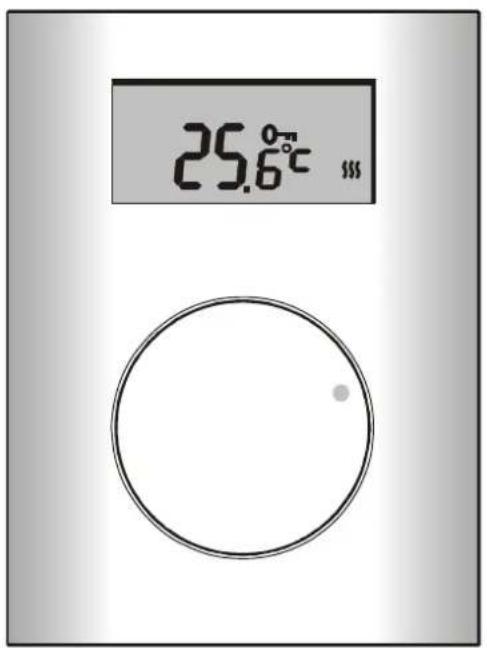
The TP-89 is an indoor thermostat which can be used to set and measure the temperature in a room. The thermostat is designed to work exclusively in combination with AC-8007 / AC-8014 / AC-814 receivers. Temperature adjustment can be performed simply by turning the setting knob. This knob can be locked to avoid accidental setting. The thermostat does not use any programmed scheduling. The following features are also available:
- Anti-freeze protection – any drop in temperature under the (configurable) AL Lo value is detected and signalled to the receiver, causing the receiver's FRE output terminal to be activated.
- Floor temperature detection – the thermostat is equipped with an input terminal for the connection of a temperature sensor such as the TS-80. This is especially suitable for under-floor heating control – by placing the sensor directly into the floor heating regulation can be performed with higher precision. As a result, using the TP-89 and the TS-80 in combination allows for a comfortable floor temperature with no additional risk of damaging the floor.
Installation and enrollment
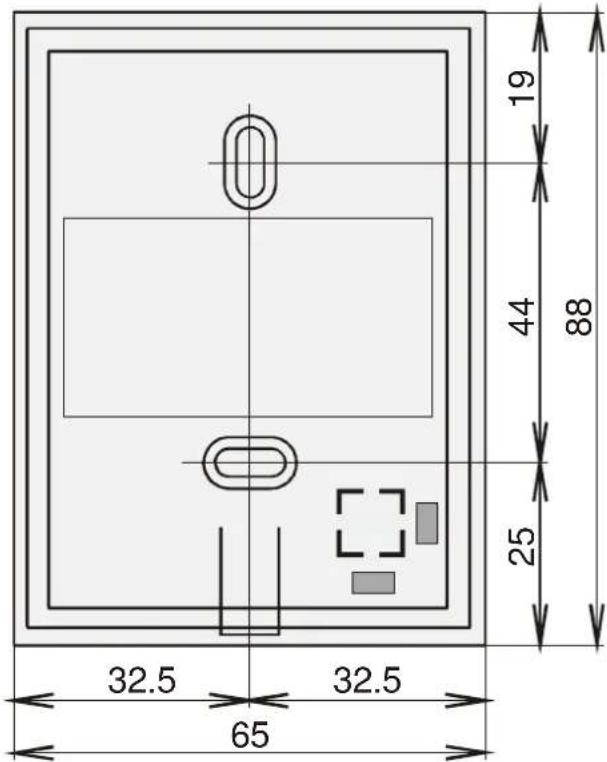
The TP-89 should be mounted in a dry indoor location. Choose a mounting location about 1.5 meters above the floor in an area with good air circulation. Avoid places with draughts, dead air spots and radiant heat from the sun or appliances.
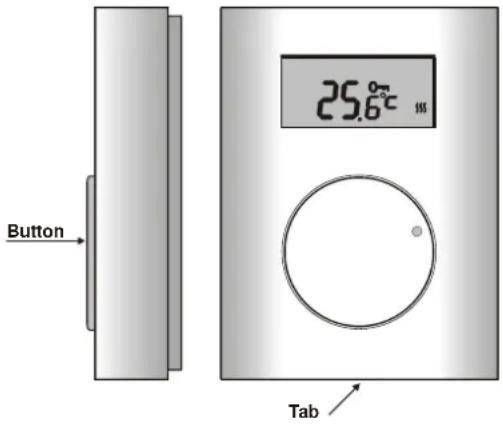
- Release the upper cover by pressing the plastic tab on the bottom side of the housing
- Mount the back part on to the desired location.
- Connect the receiver's digital bus jumper to the BUS terminals. The polarity is irrelevant.
- Should a floor sensor be used, wire it to the SEN terminals.
- Close the thermostat.
- Enroll the thermostat to the receiver by pressing and holding the knob for 5 seconds. The receiver must be in enrollment mode (see the AC-8007/8014/814 manual).
Configuring the fixed parameters
The thermostat works with the following temperature thresholds:
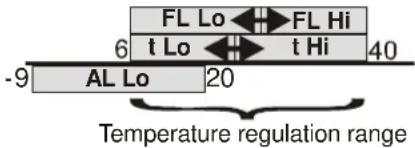
t Lo (economic), t Hi (comfort), AL Lo (fault/freeze), FL Lo (floor low temperature) and FL Hi (floor high temperature). Each of the parameters is configurable within a corresponding temperature range – see the table below.
You can enter the adjustment menu by keeping the knob pressed for 10 seconds. Scrolling the menu is done by turning the knob. The display will show temperature parameter names – see the table below. The currently displayed parameter can be adjusted by pressing the knob briefly, turning the knob until the desired temperature is displayed, and confirming the setting by re-pressing the knob (this will also cause a return to the menu so that you can configure other parameters immediately). The adjustment menu is escaped from by pressing the knob while OK is displayed or automatically after 30 seconds. The parameter ranges are restricted according to the table.
| Parameter Adjustment range Factory Description | |||
| SPAN 0.1°C;0.2°C;0.5°C | 0.2°C | Hysteresis switching | |
| t Lo | +6°C to +40°C* | 6°C | Economic temperature |
| t Hi | +6°C to +40°C* | 40°C | Comfortable temperature |
for
| AL Lo | -9°C to +20°C | 3°C | FRE (freeze) output to ON |
| AL Hi | +30° to +70°C | 60°C | Not applicable |
| FL | ON/OFF | OFF | Floor sensor ON/OFF |
| FL Lo | +6°C to +40°C* | 22°C | Lower floor-temperature threshold |
| FL Hi | +6°C to 40°C* | 27°C | Upper floor-temperature threshold |
| FL t | Current temperature of the floor (displayed after pressing the knob) | ||
| Corr | ±1°C | 0 | Correction |
* t Lo to t Hi and FL Lo to FL Hi must be valid ranges: t Lo must not be greater than t Hi and FL Lo must not be greater than FL Hi.
Adjustment ranges as depicted on a coordinate axis:
Temperature accuracy adjustment: The thermostat allows you to configure the hysteresis – the accuracy to which the temperature is regulated. The setting is done via the SPAN item in the adjustment menu (proceed the same way as with the threshold parameters mentioned above). Turning the knob lets you select one of the following accuracy ranges: ±0.1^ , ±0.2^ or ±0.5^ (the factory default setting is ±0.2^ ).
Example: If the accuracy is adjusted to ±0.5^ and the temperature is set to 24^ , the thermostat switches the heating on when the temperature drops below 23.5^ and it switches it off if the temperature goes above 24.5^ . In reality the temperature scatter can be slightly higher because of the temperature persistence of the room.
Warning: too high an accuracy can cause the heating to turn on and off too frequently.
Temperature measurement correction: Possible temperature measurement offsets can be corrected via the Corr item in the adjustment menu. The range of adjustable corrections is ±1^ .
Manual operation
- When not being handled, the thermostat shows the current temperature in the room.
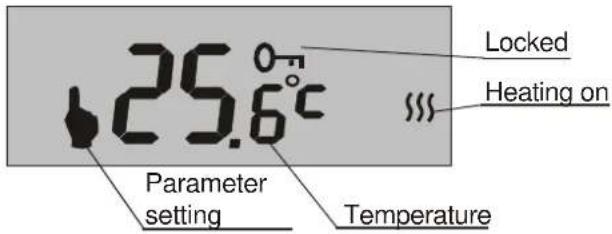
- By turning the knob the desired temperature can be set from t Lo to t Hi (during setting, a hand symbol is shown on the display). If the temperature cannot be set, see "Locking the thermostat".
Setting the t Lo and t Hi limits allows the installer to prevent the regulated temperature from being set to undesirably high or low values by manual operation.
Example: If t Lo = +15°C and t Hi = +22°C then the regulation temperature can only be set within the range of +15 to +22°C (unless the adjustment menu is entered). - If you stop turning the knob the current temperature in the room will be displayed again (3 seconds after the last movement of the knob).
- If the current temperature is lower than the desired temperature minus the hysteresis, the thermostat will switch the heating on (a symbol of wavy lines will appear on the display).
- If the current temperature is higher than the desired temperature plus the hysteresis, the thermostat will switch the heating off (the symbol of wavy lines will disappear).
Floor heat detection
If enabled by setting FL On, floor temperature detection is performed using a sensor located in the floor. The FL Lo and FL Hi parameters allow you to set temperature thresholds for under-floor heating regulation:
- If the current floor temperature is lower than FL Lo, the thermostat will switch the heating on. This way a comfortable floor-temperature is maintained even if no switch-on request is generated due to the room temperature.
- If the current floor temperature is higher than FL Hi, the thermostat will switch the heating off. This prevents the floor from being damaged by too high a temperature.
Note: Floor heat detection is of higher priority than room temperature detection. This means that the current temperature in the room is taken into account only when the current floor-temperature is between FL Lo and FL HI.
You can display the current floor temperature by entering the menu, scrolling to the FL t parameter and pressing the knob (a re-press will cause a return to the menu).
Displaying the set temperature
As mentioned above, normally the thermostat displays the current temperature in the room. If you want to display the set temperature, press the knob briefly (no matter if the thermostat is locked). The set temperature will then flash on the display for 3 seconds.
Locking the thermostat
- To prevent the accidental changing of the set temperature the thermostat can be locked by pressing and holding the knob (the key symbol will appear on the display for about 2 seconds).
- To unlock the thermostat simply press and hold the turning knob (the key symbol will disappear on the display for about 2 seconds).
Heating fault detection
If the temperature in the room drops below AL Lo the thermostat sends signals to the receiver. This is responded to by the receiver by switching on the FRE (freeze) output for 10 seconds.
This feature is especially suitable for detecting heating faults.
RESET
The RESET function allows you to reset the device to the factory defaults listed in the table. You can perform a RESET by selecting Res in the adjustment menu and pressing and holding the knob for 5 seconds.
Specification
Power supply: via the receiver digital bus
Temperature measurement: +6 to +40 °C
Temperature accuracy: adjustable: ± 0.1, ± 0.2 or ± 0.5 °C
Freeze alarm (panic transmission) temperature threshold: <AL Lo configurable from -9°C to +20°C
Operational range: up to 200 m (twisted cable)
Floor sensor type TS-80
Operational temperature range: -10°C to +70°C (low humidity)
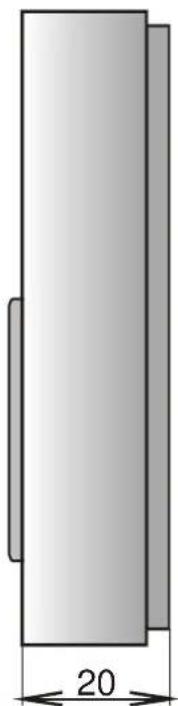
Dimensions: 65 x 88 x 20 mm
Complies with:
EMC
EN 50130-4, EN 55022

Jablotron Ltd. hereby declares that the TP-89 is in compliance with the essential requirements and other relevant provisions of Directive 2004/108/EC. The original of the conformity assessment can be found on the web site www.jablotron.com, Technical Support section.

Note: Although this product does not contain any harmful materials we suggest you return the product to the dealer or directly to the manufacturer after use.
natural_image
Simple 3D diagram of a vertical rectangular block with a dimension label '20' (no text or symbols beyond the label)