
VX-792C - Calculator SHARP - Free user manual and instructions
Find the device manual for free VX-792C SHARP in PDF.
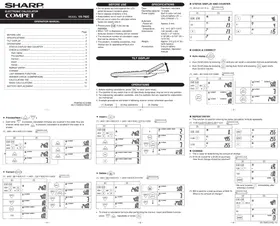


| Type | Electronic calculator |
| Display | 12-digit LCD with tilt mechanism |
| Power Supply | Built-in solar cell and CR2032 lithium battery (3V DC) |
| Dimensions (W × D × H) | 130 mm × 209 mm × 21 mm (5-1/8" × 8-7/32" × 13/16") |
| Weight (with battery) | Approx. 215 g (0.47 lb) |
| Automatic Power Off | After approx. 5 minutes of inactivity |
| Operating Temperature | 0°C to 40°C (32°F to 104°F) |
| Calculation Steps Storage | Up to 102 steps |
| Playback Function | Recall formulas and answers in order of entry with PLAYBACK and AUTO PLAYBACK |
| Check & Correct | Correct, Insert (INS), Delete (DEL) of entered steps |
| Answer Check (Comparison) | Displays "OK" when recalculated answer matches previous result |
| Last Answer Memory | Stores most recent result for use in next calculation |
| Tax Calculation | Set tax rate (up to 4 digits), calculate tax-inclusive/exclusive amounts |
| Change Calculation | Computes change when amount paid is entered after pressing − |
| Repeat Entry | Allows repeated entry of same formula without re-entering |
| Basic Operations | Addition, subtraction, multiplication, division, percentage, power, reciprocal, grand total |
| Memory | Standard memory (M+, M-, MR, MC) plus independent memory |
| Safety Note | Do not press hard on LCD; keep battery away from children; do not dispose of battery in fire |
| Battery Replacement | CR2032 lithium battery; replace when display dims; perchlorate notice for California |
| Accessories Included | Lithium battery (installed), operation manual |
Frequently Asked Questions - VX-792C SHARP
User questions about VX-792C SHARP
0 question about this device. Answer the ones you know or ask your own.
Ask a new question about this device
Download the instructions for your Calculator in PDF format for free! Find your manual VX-792C - SHARP and take your electronic device back in hand. On this page are published all the documents necessary for the use of your device. VX-792C by SHARP.
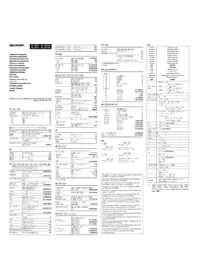
USER MANUAL VX-792C SHARP
- Each time is pressed, calculation formulas are recalled in the order they are entered, while each time is pressed, calculation is recalled in the order of its answer.
(1) (400-80+500)×3=2460
F543210A ①
| (2) | (3) |
| 03 PLAYBACK+ | ANB500 | |
| 02 PLAYBACK- | ANB80 | |
| 01 PLAYBACK | ANS400 |
◆ Correct (CORRECT)
(1) (400-80+500)×3→(400-100+500)×3=2400
F543210A
| (2) | (3) | ||
| CCE400500 | CCE-803 | 05= | 2460 |
| NEXT | 01 PLAYBACK | 400 | |
| NEXT | 02 PLAYBACK- | 80 | |
| ORI | 02 PLAYBACK CONNECT- | 80 | |
| 100 | 02 PLAYBACK CONNECT- | 100 | |
| CORRECT | 02 PLAYBACK- | ANS100 | |
| NEXT | AUTOREPLAY | 03 PLAYBACK+ | ANS500 |
| NEXT | 04 PLAYBACKX | ANS3 | |
| NEXT | 05 PLAYBACK= | ANS2400 | |
-4-
BEFORE USE
- Do not press too hard against the LCD panel because it contains glass.
- Never dispose of battery in fire.
- Keep battery out of reach of children.
- Do not use or store where fluids can splash onto it.
ON
- Please press C-CE indication
Indications Who can #0
- When 0.2 is displayed, calculation formulas stored in memory will be el
- The maximum number of calculation steps
that can be stored is 102.
• This product, including accessories, may
change due to upgrading without prior
notice
SPECIFICATIONS
Type: Electronic calculator
Operating capacity: 12 digits
Power supply: Built-in solar cell and Lithium batteries (2V)
Lithium battery (5V) (DC) CR2032 × 1
Automatic
Power-off:
Operating
temperature: Dimensions:
Dimensions
5-1/8"(W) × 8-7/32"
13/16"(H)
Weight: Approx. 215 g (0.47 lb.)
(with battery)
Accessories: Lithium battery
(installed manual
TILT DISPLAY
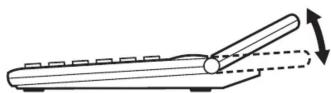
OPERATIONS
- Before starting calculations, press CA to clear (zero-clear).
- The position of any switch that is not specifically designated, may be set to any position.
- For expressing calculation examples, only the symbols that are required for explanation are mentioned.
- Example procedures are listed in following manner unless otherwise specified.
| (1) Example | (2) Key operations | (3) Display |
| -2- | ||
◆ Insert (INS)
(1) (400-80+500)×3→(400-80+500)÷2×3=1230
F543210A ①
| (2) | (3) |
| 2 | 04 PLAYBACK CONNECT INSERT ANS+2. |
| CONNECT | 04 PLAYBACK ANS+2. |
| NEXT AUTO REPLAY | 05 PLAYBACK ANS×3 |
| NEXT ↓ | 06 PLAYBACK ANS=1230. |
◆ Delete (DEL)
(1) (400 - 80 + 500)× 3→ (400 + 500)× 3 = 2700
F543210A
| (2) | (3) |
| DEL | 02 PLAYBACK+ | 500 |
| NEXT(AUTO REPLAY) | 03 PLAYBACKx | ANS3 |
| NEXT↓ | 04 PLAYBACK= | 2700 |
• To check a calculation formula after performing the Correct, Insert and Delete function,
press ▽/ △ repeatedly or press Ⓗ AUTO REPLAY
-5-
STATUS DISPLAY AND COUNTER
(1) 23 × 2 ÷ 4 = 11.5 F543210A/(1)
| (2) | (3) |
| C CE C CE | 00 0 |
| 23 | 01 23 |
| 01 23 | |
| 2 | 02 2 |
| 02÷ | 46. | |
| 4 | 03÷ | 4 |
| 04= | 115 |
CHECK & CORRECT
◆ Auto replay (AUTO REPLAY)

assing AUTO REPLAY
and you can recall a calculation formula automatically. AUTO REPLAY during Auto Scroll and pressing AUTO REPLAY again starts
(1) (400-80+500)×3=2460
F543210A
| (2) | (3) |
| 03 PLAYBACK AUTOREPLAY ANS+ 500 | ||
| 04 PLAYBACK ANS× 3 | ||
| 05 PLAYBACK ANS= 2460. | ||
REPEAT ENTRY
This function is used for entering the same calculation formula repeatedly.
(1) 4.95+2.55+2.55+2.55=12.6
| (2) | (3) |
| 00 0 | |
| 4.95 + | 01 495 + |
| 2.55 | 02 255 + |
| REPEAT | 03+ | 2.55 |
| REPEAT | 04+ | 2.55 |
| = | 05= | 12.6 |
CHANGE
This is used for determining the amount of change. (1) 130.00 is paid for a126.00 purchase. How much change should be returned?
F543210A
| (2) | (3) |
| C-CE C-CE126 =※ | 03= 126. |
| 130 | 04 130. |
| CHANGE | 05 CHANGE ANS4 |
Be sure to press = immediately after entering a number.
F543210A
| (2) | (3) |
| C-CE C-CE23.5 + 25.2= | 03= ANS48.7 |
| 50 | 04 ANS50 |
| CHANGE | 05 CHANGE ANS13 |
LAST ANSWER FUNCTION
This function stores the result of the last calculation (result obtained by pressing =).
(1) After performing the calculation 1+7=8, the result "8" can be used in the next calculation such as: 64×2/1+7
| (2) | (3) |
| |cc CCE & CCE \\ 1 & + & 7 | |cc 02 & & \\ + & & η |
| = | |cc 03 & & ann \\ = & & B |
| 64 × 2 ÷ | |cc 05 & & ann \\ + & & I2B |
| ANS | |cc 06 & & ann \\ + & & B |
| = | |cc 01 & & ann \\ = & & I6 |
| By pressing ☐, a new calculation is performed. Therefore, the number stored in the last answer memory changes to "16" since it is the newest calculation result. | |
The last answer function uses only one memory location to store one number. This memory is always stored with the latest calculation result.
ANSWER CHECK (COMPARISON)
- If the answer obtained with = , % agrees with the succeeding tested result, "OK" will be displayed.
- Pressing CA will clear the previous calculated result, disabling the comparison.
- Comparison with the counter or values of memory calculation, or comparison during calculation process will not be performed.
- The Answer Check function is not available for tax rate calculations and change calculations.
(1) 120 × 3652 + 670 - 258 = 438652
| GT ANSWERCHECK | F543210A | 5/4 |
| 1 | 1 | 1 |
| (2) | (3) | |
| ccce | 00 | 0 |
| 120 x | 01x | 120 |
| 3652 + | 02+ | 438240 |
| 670 - | 03- | 438910 |
| 258 = | 05= | 438652 |
| ccce | 00 | 0 |
| 120 x | 03- | 438910 |
| 3652 + 670 - | ||
| 258 = | 05= | 438652 |
CALCULATING TAX
• To perform a tax calculation, first it is absolutely necessary to set and check the tax rate. (The initial tax rate is 0.) - A tax rate can be set (or changed) with a number containing up to four digits. (Decimal point is not regarded as a digit.) - The set tax rate is retained until it is changed. However, the set tax rate may be changed or lost if the battery is consumed largely. (1) Confirming the tax rate. (0%)
| (2) | (3) |
(1) Set a 5% tax rate. Calculate the tax on \$800 and calculate the total Including tax.
| (2) | (3) | ||
| C CE | C CE | 00 | 0 |
| RAX | 5 | RAX | 5DAXRAX |
| RAX | RAX | ||
| C CE | C CE | 01 | 800 |
| 800 | C AX | B40DAX | |
| RAX | RAX | 40DAX | |
(1) Perform two calculations using \840 and \525, both of which already include tax. Calculate the tax on the total and the total without tax.
| (2) | (3) |
| C-CE C-CE840 + 525= | 031365. ANS= |
| -TAX | 041300. ANS/TAX |
| -TAX | 0565. ANS/TAX |
BASIC CALCULATIONS
| (1) | (2) | (3) |
| CA | 0. | |
| (-24+2)÷4=-5.5 | -24+ 2 +4= | -5.5 |
| 13×(-4)÷2=-26 | 13 × 4 12= 2 = | -26. |
| 34+57=91 | 34+57 = | 91. |
| 45+57=102 | 45 = | 102. |
| 38-26=12 | 38 - 26 = | 12. |
| 35-26=9 | 35 = | 9. |
| 68×25=1700 | 68 × 25 = | 1700. |
| 68×40=2720 | 40 = | 2720. |
| 35÷14=2.5 | 35 + 14 = | 2.5 |
| 98÷14=7 | 98 = | 7. |
| 200×10%=20 | 200 × 10 12= | 20. |
VX-792C
Page 2
-8-
| 9÷36=25(%) | 9+36% | 25. | |
| 200+(200×10%)=220 | 200+10% | 220. | |
| 46=(43)2=4096 | 4×==×= | 4'096. | |
| 1/8=0.125 | 8+ | 0.125 | |
| 25×5=125 | GM25×5(MF) | 125. M | |
| -84÷3=28 | 84+3(MF) | 28. M | |
| +68+17=85 | 68+17(MF) | 85. M | |
| 182 | AM | 182. M | |
| 2+3→2+4=6 | 2+3(CD)(G)4= | 6. | |
| 5×2→5÷2=2.5 | 5×+2= | 2.5 | |
| 123456→123478 | 123456(D)78 | 123'478. | |
| 987654320988÷0.444×555=1234.56790123× 1012 | 987654320988+0.444× | 2.22444566889E | |
| (CD)555= | 1234.56790123 | ||
| (1234.56790123× 102 =1234567901230000) | |||
| GT C-O O-O O-O F\ 5\ 4\ 3\ 2\ 1\ 0\ A O-O O-O +O1SO | |||
| 23.5+42.3=65.8 | GTGT23.5+42.3= | 65.80 | |
| 72.4-37.321+12=47.08 | 72.4-37.321+12= | 47.08 | |
| +27-19-21.61=-13.61 | 27-19-21.61= | -13.61 | |
| 99.27 | GT | 99.27 | |
| F543210A | |||
| 145C | 145+ | 1.45 | |
| 4500C | 4500= | 46.45 | |
| -763C | 763= | 38.82 | |
| 3882C | |||
| Note: (-) was not used in the entries. | |||
-9-
BATTERY REPLACEMENT![graph LR A["Receipt"] --> B["Step 1"] B --> C["Step 2"] C --> D["Step 3"] D --> E["Output"]](/content/2026/05/1069574/images/eb7037ab456e1aa5ea514e6676f4f4b2ab765a7d8b022731d2126a81e8be8f1e.jpg)
For USA only:
This product contains a CR Coin Lithium Battery which contains Perchlorate Material – special handling may apply, California residents, See www.dtsc.ca.gov/hazardouswaste/perchlorate/
-12-
VX-792C(U1E)-2③
Brand : SHARP
Model : VX-792C
Category : Calculator