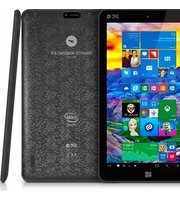
GLEE Smartee Windows Tablet 8.9 - Tablet SPC - Free user manual and instructions
Find the device manual for free GLEE Smartee Windows Tablet 8.9 SPC in PDF.


| Product Type | Windows Tablet |
| Brand | SPC |
| Model | GLEE Smartee Windows Tablet 8.9 |
| Display Size | 8.9 inches |
| Operating System | Windows 10 Home |
| Processor | Intel Atom x5-Z8350 Quad Core 1.44GHz |
| RAM | 2 GB DDR3L |
| Storage | 32 GB eMMC |
| Wireless Connectivity | Wi-Fi 802.11 b/g/n, Bluetooth 4.0 |
| Camera | Front 0.3 MP, Rear 2 MP |
| Battery Capacity | 4000 mAh Lithium-ion |
| Power Input | 5V DC, 2A via Micro-USB |
| Dimensions (W x D x H) | 228 x 150 x 10 mm |
| Weight | 450 g |
| Ports | 1x Micro-USB, 1x 3.5mm audio, 1x microSD card slot |
| Maintenance | Clean with a soft, dry cloth. Do not use liquids. |
| Safety | Avoid exposure to moisture, heat, and direct sunlight. |
| Spare Parts | Battery, screen, charger available from authorized service centers. |
| Repairability | Battery and storage are replaceable by a professional. |
Frequently Asked Questions - GLEE Smartee Windows Tablet 8.9 SPC
User questions about GLEE Smartee Windows Tablet 8.9 SPC
0 question about this device. Answer the ones you know or ask your own.
Ask a new question about this device
Download the instructions for your Tablet in PDF format for free! Find your manual GLEE Smartee Windows Tablet 8.9 - SPC and take your electronic device back in hand. On this page are published all the documents necessary for the use of your device. GLEE Smartee Windows Tablet 8.9 by SPC.
USER MANUAL GLEE Smartee Windows Tablet 8.9 SPC
natural_image
Silhouette of a rocket inside a circular frame (no text or symbols)SMARTEE WINDOWS 8.9"
MANUAL DE USUARIO / USER MANUAL / MANUAL DO UTILIZADOR
UPDATED INFO: support.spc-universe.com
¡ BIENVENIDO !
This guide includes all the information to make the most out of your Smartee Windows 8.9".
EN
GET AN SPC ACCOUNT
Free advantages just one click away.
Before going on reading this manual, we strongly recommend you visiting www.spc-universe.com, SO YOU CAN CREATE AN SPC ACCOUNT AND REGISTER YOUR PRODUCT.
By doing this, you will be able to get into SPC universe: an exclusive club where our clients can get incredible offers and discounts and also upgrade or renew their products.
Moreover, having an account means free access to SPC services: tablet and smartphone apps, technical support...
This is SPC. A universe in technology.
BOX CONTENTS
■ Smartee Windows 8,9"
Power adaptor
■ Micro-USB to USB adapter
User Manual
■ Cautions and warnings book
- Customer service
FEATURES
■ Operating System: Windows 10 Home
■ Processor: Quad Core Intel Atom Z-3735G@1.33GHz
RAM 1GB DDR3
■ 32GB eMMC memory
■ Wireless connection: Wifi 802.11 b/g/n + Bluetooth 4.0
■ Connections micro HDMI / micro-USB-OTG / MicroSD
■ It plays: Music, pictures and video
■ Dimensions and weight 234x137x11 mm / 437,5g
UNIT AND CONTROLS
EN

- ON/OFF button
- Vol +
- Vol -
- Micro USB connector
-
Earphone connector
-
Micro SD card reader
- Micro HDMI connector
- Go back key
- Rear camera
- Frontal camera
To turn it on, maintain pressed the ON/OFF button (1). To turn it off, do it directly from the power off function of Windows, or long press the ON/OFF button (1).
MEMORY CARD AND USB DEVICE INSTALLATION
Insert the microSD card in the slot (6) with the contacts inwards and backwards.
NOTE: Removing the microSD card while it is in use may cause data loss or result in application errors. Make sure all save operations to the microSD card are complete before removing the microSD card.
To extract it, touch Safely Remove Hardware 📄 in the notification area at the bottom-right corner of the screen.
NOTE: If you do not see Safely Remove Hardware touch Show Hidden Icons to display all icons in the notification area.
■ Touch Eject SD Memory Card. A message appears confirming that the microSD card can be safely removed. If a warning message appears stating the microSD card
cannot be removed, ensure all data transfers involving the microSD card are complete.
■ Press on the microSD card to release it.
■ Slide the card out after it pops out from the microSD card slot.
You can also insert USB memories or devices in the USB-OTG slot or micro-USB-OTG slot with the included micro-USB to USB adaptor cable.
PLAYING CONTENT, MUSIC, PICTURES AND VIDEO
The unit can play music, pictures or videos from the internal memory, microSD card, or from an external USB storage unit (pendrive or hard disk). The supported formats will depend on the codecs and media player with which you are going to play. Should not play any type of content, try downloading codecs and another media player.
BASIC OPERATION
CONNECTIVITY: WIFI
The device has Wifi to connect and browse Internet when you are a WiFi network range Internet connectivity. For this:
For connect to WIFI net, access to the Settings, from Start Menu.
Select WiFi. Switch on the option and you will see a list with WIFI available nets. Select the net that you want to connect to and enter the corresponding password in case it is necessary.
USING WINDOWS 10
For the latest news and basic use of Windows 10, you can check a basic guide in support.spc-universe.com or directly on the Microsoft website.
SYNCHRONIZING YOUR DEVICE
If you already have a Microsoft account, you can synchronize user settings of your device with your computer using the same Microsoft account. When you sign in with your Microsoft account on your device, your settings, including internet browser history, app settings, and personal files etc., are synchronized with other Windows PCs and devices.
If you do not have any Microsoft account yet, the first time you switch on the device you will have the possibility of create one.
TABLET MODE
Windows 10 has “Tablet mode” option that make easier the usage of the users. For instance, with the “Tablet mode” activated, the virtual keypad appears in the screen every time the user wants to start writing. In summary, it is an optimized mode for use Windows 10 tablets in more comfortable way.
For activate and deactivate the tablet mode, go to Settings menu and inside the System option, select "Tablet mode". Inside this mode you will find several options of activation and deactivation.
RESET AND RECOVER YOUR DEVICE
This option allows you to recover Windows to the factory original parameters, deleting or without deleting your personal data, your installed applications from Windows Store or your customization settings.
Access to the Settings menu, and then select Update and Security. Finally select Recovery.
You will see different recovery options and behind each option you can see the detail of each. Please, read the information carefully in order to select the most convenient option. You can reset the device and reinstall Windows erasing all your data, reset the device and reinstall Windows without erasing your data, you will be able of come back to an earlier build, restart from external device or unit...
The information that this guide contains cannot be transmitted, played or distributed in any case without the written authorization of SPC.
COMERCIAL BRANDNAMES
SPC is a registered brandname of Telecom y Novatecno S.A.
NOTE: SPC reserves the right to modify the information of this guide in any moment. All the information and recommendations that we can find here do not guarantee anything.
BEM-VINDO
Marca/Brand/Marca: SPC
Denominación comercial/Commercial Name/Nome comercial:9757132N
NORMAS APLICADAS/APPLICABLE NORMS/NORMAS APLICÁVEIS
EN 60950-1: 2006+A11: 2009+A1: 2010+A12: 2011+A2: 2013
EN 60950-1: 2006+A11: 2009+A1: 2010+A12: 2011
EN 62479: 2010
EN 301 489-1 V1.9.2; EN 301 489-3 V1.6.1; EN 301 489-17 V2.2.1
EN 300 328 V1.8.1
EN 300 440-1 V1.6.1
EN 300 440-2 V1.4.1
EN 55022:2010
EN 55024:2010
EN 61000-3-2:2006+A2:2009
EN 61000-3-3:2008
FUNCIONALIDADES/FEATURES/CARACTERÍSTICAS
Director General/General Manager/Diretor-geral
1999/5/CE. This declaration of conformity is in compliance with


- SMARTEE WINDOWS 8.9"
- ¡ BIENVENIDO !
- GET AN SPC ACCOUNT
- BOX CONTENTS
- FEATURES
- UNIT AND CONTROLS
- MEMORY CARD AND USB DEVICE INSTALLATION
- PLAYING CONTENT, MUSIC, PICTURES AND VIDEO
- BASIC OPERATION
- CONNECTIVITY: WIFI
- USING WINDOWS 10
- SYNCHRONIZING YOUR DEVICE
- TABLET MODE
- RESET AND RECOVER YOUR DEVICE
- COMERCIAL BRANDNAMES
- BEM-VINDO
Brand : SPC
Model : GLEE Smartee Windows Tablet 8.9
Category : Tablet