
Bemo - Camcorder LOGITECH - Free user manual and instructions
Find the device manual for free Bemo LOGITECH in PDF.


| Product Type | Camcorder |
| Brand | Logitech |
| Model | Bemo |
| Dimensions (H x W x D) | 10.2 cm x 5.8 cm x 3.5 cm |
| Weight | 180 g (with battery) |
| Power Source | Rechargeable lithium-ion battery, USB-C charging |
| Recording Resolution | 1080p Full HD at 30 fps |
| Image Sensor | 8 MP CMOS |
| Optical Zoom | 4x digital zoom |
| Memory Card Support | microSD up to 128 GB |
| Battery Life | Up to 2 hours continuous recording |
| Connectivity | USB-C, Wi-Fi (802.11 b/g/n), Bluetooth 4.2 |
| Built-in Microphone | Yes, stereo |
| Display | 2.7-inch TFT LCD touchscreen |
| Mounting | 1/4-inch tripod mount |
| Care and Cleaning | Wipe exterior with a soft, dry cloth. Do not use liquids or abrasive cleaners. |
| Safety Precautions | Keep away from water and extreme temperatures. Do not disassemble. Use only approved chargers. |
| Spare Parts and Repairability | Contact Logitech support for replacement parts and service options. |
| Warranty | 1-year limited hardware warranty |
Frequently Asked Questions - Bemo LOGITECH
User questions about Bemo LOGITECH
0 question about this device. Answer the ones you know or ask your own.
Ask a new question about this device
Download the instructions for your Camcorder in PDF format for free! Find your manual Bemo - LOGITECH and take your electronic device back in hand. On this page are published all the documents necessary for the use of your device. Bemo by LOGITECH.
USER MANUAL Bemo LOGITECH
natural_image
Red square icon with a camera lens design (no text or symbols)bemo

Logitech
Quick Start Guide
Welcome
Hi. Thanks for purchasing Bemo. Whether you are filming your first festival, taking a trip down the Camino de Santiago, or just want to share a first person perspective of your day, Bemo has you covered.
Contents Included:
- Bemo social camera
- 4GB microSD Card* (Up to 3 hours of video)
- Micro USB Cable
- Lanyard
- User documentation

*Pre-installed in the Bemo social camera
Getting Started
To begin recording video move the slide switch to On.
Video Mode: Press and hold the capture button to take short video bursts.
The LEDs on the side will show the length of your active recording. You can edit and share these videos with the Bemo app.
Slide switch Capture button
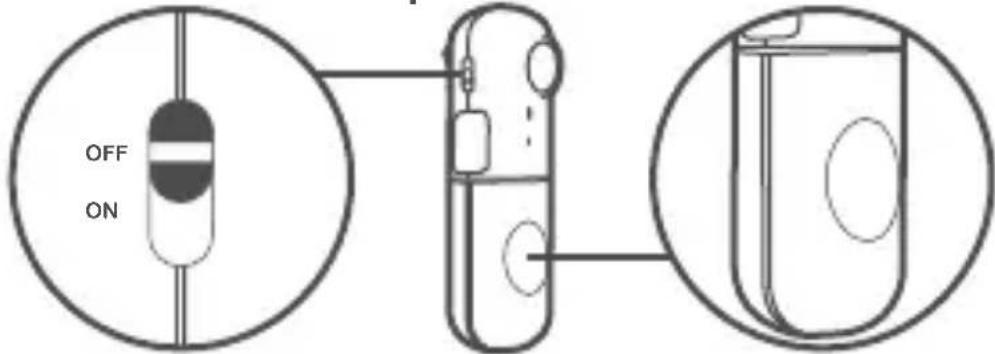
When you turn on your Bemo, the LEDs on the side will light up to show how much charge it has. If the battery is low, the bottom LED light will blink.

Download and Connect
Download the Bemo app from the Apple App Store.
Connect
When you launch the Bemo app for the first time, you will be guided through the process to pair your Bemo to your iPhone. Press the Bluetooth pairing button on your Bemo to make it discoverable. Upon successful pairing, the Bluetooth LED will rapidly flash, then turn off.
Note: Bluetooth ^® should be enabled on your iPhone before attempting to pair with your Bemo.

Using the Bemo app
The Bemo app will allow you to do the following:
- Discover the content you’ve captured with your camera
- Assemble your short video clips to create shareable moments
- Use the live viewfinder to make sure your activity is in frame
- Remotely trigger your camera via your iPhone
- Activate time lapse to create awesome stop motion video clips
- Keep an eye on your camera's status (battery, memory, etc.)
The Bemo app will also help you apply new firmware updates to your camera.

Available on the
App Store
Charging and Storage
Plug the supplied micro USB cable into any charger or USB port of a laptop to charge your Bemo.

Your Bemo comes with a 4GB micro SD card preinstalled. The Micro USB port can be found on the side of the Bemo, below the Bluetooth pairing button.
Installing the Lanyard
Pull the lanyard up under the back clip to attach to your Bemo.

natural_image
Line drawing of a medical device with a loop and attached cable, showing an upward arrow (no text or symbols)Please place the cord adjuster behind your neck to customize the lanyard length.
Technical Specs
Size (Circumference):
92mm × 30mm × 27mm
Battery:
680 mAh rechargeable Lithium-ion polymer
Water Resistant:
Your Bemo is water resistant. It is safe to wear when dancing in the rain. However, it is not waterproof, so we do not recommend wearing when surfing, kayaking, or anything that could cause complete submersion.
Customer Service:
Have questions? Please call our Customer Service Team at +1 646-454-3200
Warranty:
Please reference the included Important Information Document for the warranty of your country.
More Information
See more possibilities and learn about additional features and options
www.logitech.com/support/bemo
www.logitech.com
© 2014 Logitech. All rights reserved. Logitech, the Logitech logo, and other Logitech marks are owned by Logitech and may be registered. The Bluetooth® word mark and logos are registered trademarks owned by Bluetooth SIG, Inc. and any use of such marks by Logitech is under license. All other trademarks are the property of their respective owners. Logitech assumes no responsibility for any errors that may appear in this manual. Information contained herein is subject to change without notice.
620-005087.004
Brand : LOGITECH
Model : Bemo
Category : Camcorder