
Sirus-C - Headphones COOLER MASTER - Free user manual and instructions
Find the device manual for free Sirus-C COOLER MASTER in PDF.


| Product Type | Gaming Headset |
| Brand | Cooler Master |
| Model | Sirus-C |
| Connectivity | Wired (3.5mm jack + USB) |
| Driver Size | 40 mm |
| Frequency Response | 20 Hz - 20 kHz |
| Impedance | 32 Ω |
| Sensitivity | 105 dB |
| Microphone | Omnidirectional, detachable |
| Weight | Approximately 0.33 kg |
| Cable Length | 2.0 m |
| Controls | In-line remote with volume and mute |
| Compatibility | PC, PS4, Xbox One, Nintendo Switch, mobile devices |
| Power Source | Powered via USB connection |
| Cleaning and Maintenance | Wipe with a soft dry cloth; do not use liquids |
| Safety | Keep away from moisture and extreme temperatures |
| Spare Parts and Repairability | Not user-replaceable; contact support for repairs |
| General Information | Over-ear design, memory foam ear cushions, adjustable headband |
Frequently Asked Questions - Sirus-C COOLER MASTER
User questions about Sirus-C COOLER MASTER
0 question about this device. Answer the ones you know or ask your own.
Ask a new question about this device
Download the instructions for your Headphones in PDF format for free! Find your manual Sirus-C - COOLER MASTER and take your electronic device back in hand. On this page are published all the documents necessary for the use of your device. Sirus-C by COOLER MASTER.
USER MANUAL Sirus-C COOLER MASTER
compatible with the PS4, PS3, XBOX 360
and Mac/Windows PCs. The superior
stereo sound and crystal-clear communication
over PlayStation Network, XBOX LIVE or online
PC gaming provide a whole enjoyment for gamers.
Using the switch on the in-line controller to select the
device for a PC, PS4, PS3 or XBOX 360 be connected.
Box Contents: 4. Headset attached with main cable source
in-lined control box, USB connector, 3.5mm
plug 2.35mm to 25mm plug, micromassable
- RCA adapter cable
Remark: Optional HDMI cable or AV cable (summed with XBOX 260 or PC3, PDA) are
attached

flowchart
graph TD
    A["With HDMI Connection"] --> B["USB Microphone"]
    B --> C["HD TV"]
    C --> D["Audio (rec/emu)"]
    C --> E["HD"]
    C --> F["+"]
    G["PS3 video output to HDMI in the Settings menu"] --> H["(Settings=Display Settings=Video Output Settings=HDMI)."]
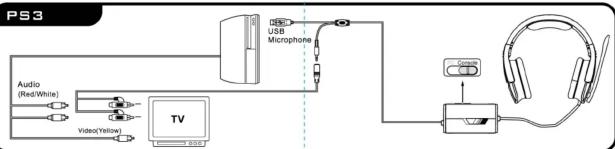
flowchart
graph LR
    A["Audio (Red/White)"] --> B["Video(Yellow)"]
    B --> C["TV"]
    C --> D["USB Microphone"]
    D --> E["+"]
    E --> F["+"]
    F --> G["+"]
    G --> H["+"]
    H --> I["+"]
    I --> J["+"]
    J --> K["+"]
    K --> L["+"]
    L --> M["+"]
    M --> N["+"]
    N --> O["+"]
    O --> P["+"]
    P --> Q["+"]
    Q --> R["+"]
    R --> S["+"]
    S --> T["+"]
    T --> U["+"]
    U --> V["+"]
    V --> W["+"]
    W --> X["+"]
    X --> Y["+"]
    Y --> Z["+"]

Brand : COOLER MASTER
Model : Sirus-C
Category : Headphones