VIP-2020PT - Phone Planet - Free user manual and instructions
Find the device manual for free VIP-2020PT Planet in PDF.


| Product Type | VoIP Phone |
| Brand | Planet |
| Model | VIP-2020PT |
| Dimensions (W x D x H) | 200 x 180 x 50 mm |
| Weight | 0.5 kg |
| Power Supply | Power over Ethernet (PoE) IEEE 802.3af or 5V DC adapter |
| Display | 2.4-inch color LCD with backlight |
| Keypad | 20 programmable keys, 4 context-sensitive soft keys |
| Audio | HD audio, full-duplex speakerphone, headset support |
| Network Interfaces | 2 x RJ45 10/100 Mbps Ethernet ports |
| Protocol Support | SIP (RFC 3261), SDP, RTP, RTCP, SRTP, TLS |
| Codec Support | G.711, G.722, G.729, iLBC, Opus |
| Features | Call hold, transfer, conference, call forwarding, DND, intercom, paging |
| Provisioning | Auto-provisioning via TFTP/HTTP/HTTPS, TR-069 |
| Security | 802.1X, SRTP, TLS, HTTPS, admin password |
| Power Consumption | Max 5W (PoE Class 1) |
| Operating Temperature | 0°C to 40°C |
| Storage Temperature | -10°C to 60°C |
| Cleaning | Use a soft, dry cloth; avoid liquids and abrasives |
| Spare Parts | Power adapter, handset cord, network cable |
| Repairability | Replaceable handset, base unit not user-serviceable |
Frequently Asked Questions - VIP-2020PT Planet
User questions about VIP-2020PT Planet
0 question about this device. Answer the ones you know or ask your own.
Ask a new question about this device
Download the instructions for your Phone in PDF format for free! Find your manual VIP-2020PT - Planet and take your electronic device back in hand. On this page are published all the documents necessary for the use of your device. VIP-2020PT by Planet.
USER MANUAL VIP-2020PT Planet
The package should contain the following items plus VIP-2020PT. If any item is missing or damaged, please contact the seller immediately.
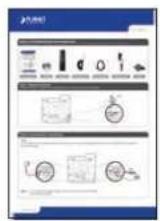
Quick Guide

CD-ROM

Handset

Handset Cord

RJ-45 cable

Power Adapter

Stand
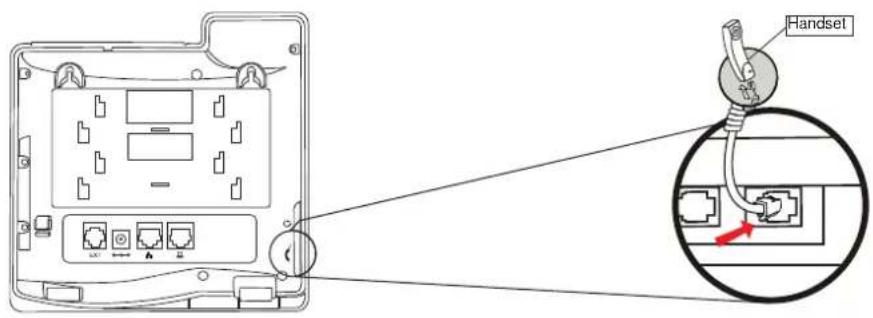
Step 1. Handset Connection
Plug one end of the handset cord into the handset and the other end into the handset jack
Step 2. Connecting Power System
The VIP-2020PT can be powered either by external AC/DC adapter or by connecting to an IEEE802.3af/at PSE device such as 802.3af Injector / Hub or 802.3af/at POE switch.
Once the VIP-2020PT is powered, the LCD screen will prompt for POST.
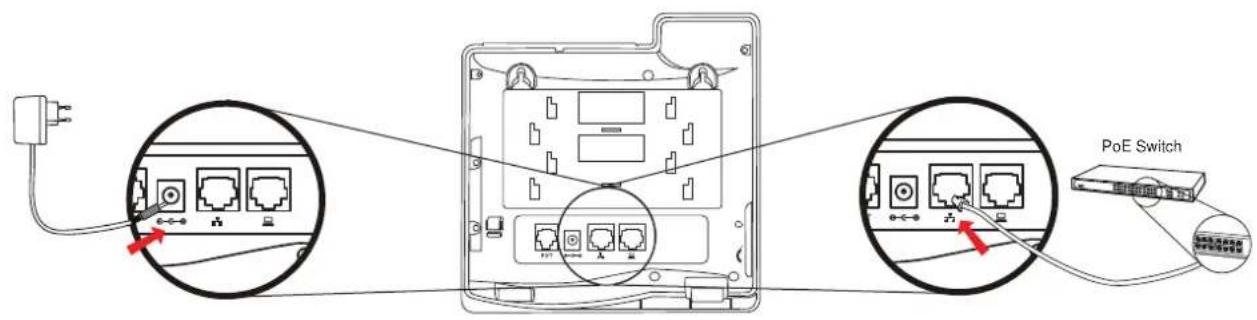
NOTE : 1. Use only the power adapter shipped with the unit to ensure correct functionality
2. Only WAN supports POE.
Step 3. Connecting Network
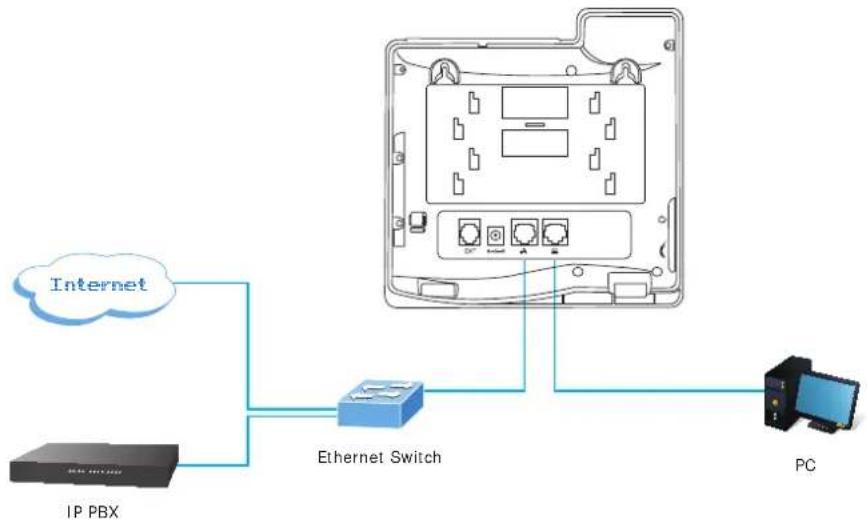
flowchart
graph TD
    A["IP PBX"] --> B["Ethernet Switch"]
    B --> C["PC"]
    D["Internet"] --> B
    style D fill:#f9f,stroke:#333
    style B fill:#bbf,stroke:#333
Step 4. Computer Network Setup
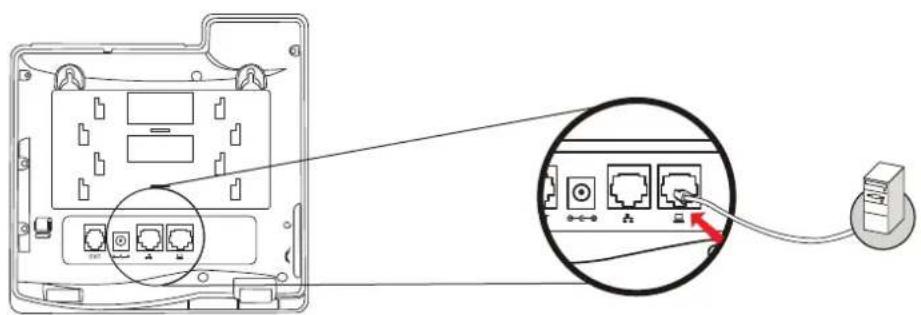
Set your computer's IP address to 192.168.0.x, where x is a number between 2 to 254 (except 1 where is being used for the phone by default). If you don't know how to do this, please ask your network administrator. Connect your PC to VIP-2020PT PC port.
Step 5. Login Prompt
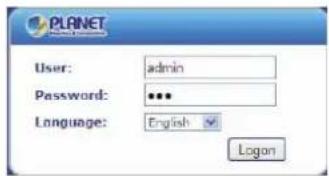
Use web browser (Internet Explorer 6.0 or above) to connect to 192.168.0.1 (type this address in the address bar of web browser).
You'll be prompted to input user name and password: admin and 123
Further Configuration
For detailed configuration, please check user's manual on the bundled CD.
If you have any other question, please contact the dealer where you purchased this product or you can contact PLANET directly at the following: Email address: support@planet.com.tw
Brand : Planet
Model : VIP-2020PT
Category : Phone