
AQ7170 - Cassette player PHILIPS - Free user manual and instructions
Find the device manual for free AQ7170 PHILIPS in PDF.


| Product Type | Portable Cassette Player |
| Brand | Philips |
| Model | AQ7170 |
| Dimensions (approx.) | 130 x 85 x 35 mm |
| Weight (approx.) | 200 g (without batteries) |
| Power Supply | 2 x AA batteries (1.5V each) or optional AC adapter (3V DC, center positive) |
| Playback Speed | 4.76 cm/s (standard cassette) |
| Wow and Flutter | < 0.3% WRMS |
| Frequency Response | 70 Hz - 10 kHz (cassette type I) |
| Signal-to-Noise Ratio | 45 dB (with Dolby B off) |
| Output Power (headphone) | 10 mW per channel (32 ohms) |
| Controls | Play, Stop/Eject, Rewind, Fast Forward, Pause, Volume |
| Audio Jacks | 3.5 mm stereo headphone jack |
| Battery Life | Approx. 15 hours (alkaline batteries) |
| Auto Stop | Yes, at end of tape |
| Cleaning | Use dry cotton swab for heads and pinch roller; do not use liquids |
| Safety Warnings | Keep away from moisture; use only specified batteries; do not disassemble |
| Spare Parts / Repairability | Replaceable drive belt; standard Phillips screws for disassembly |
| Recommended Accessories | AC adapter (3V DC, 500mA); stereo headphones |
Frequently Asked Questions - AQ7170 PHILIPS
User questions about AQ7170 PHILIPS
0 question about this device. Answer the ones you know or ask your own.
Ask a new question about this device
Download the instructions for your Cassette player in PDF format for free! Find your manual AQ7170 - PHILIPS and take your electronic device back in hand. On this page are published all the documents necessary for the use of your device. AQ7170 by PHILIPS.
USER MANUAL AQ7170 PHILIPS
Stereo Radio Cassette Recorder AQ7170
Register your product and get support at www.philips.com/welcome
User Manual
1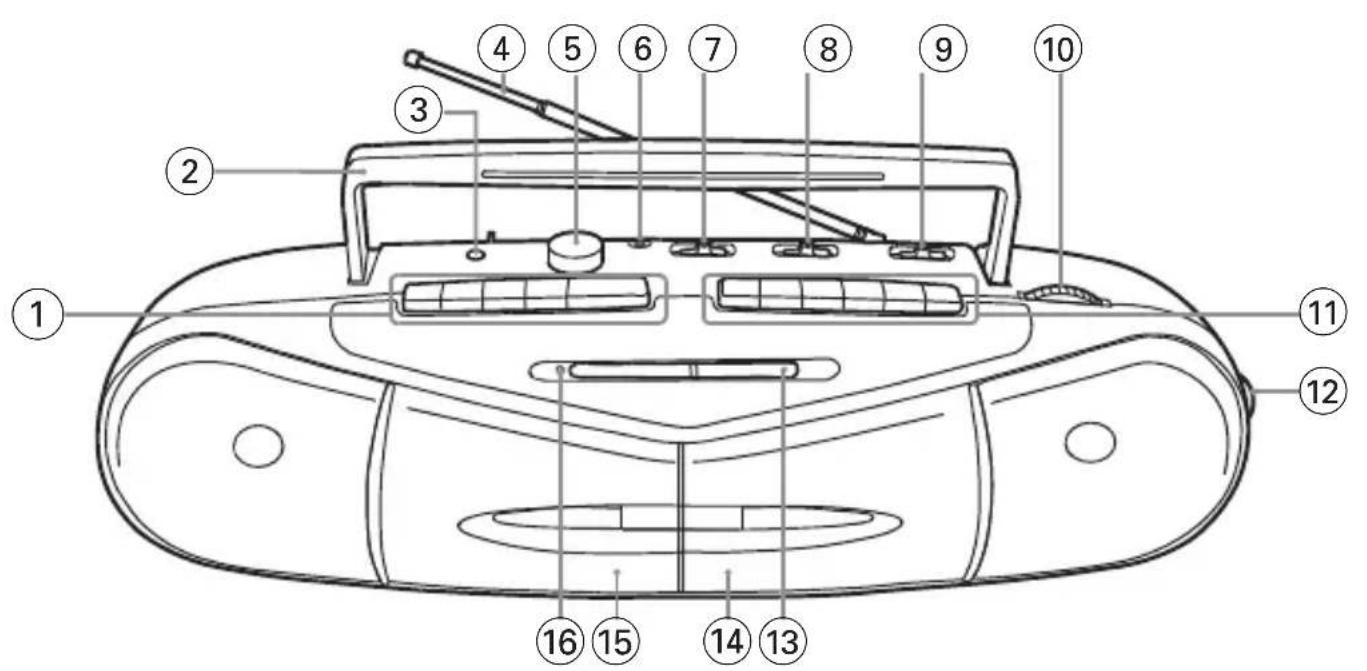
Congratulations on your purchase and welcome to Philips!
To fully benefit from the support that Philips offers, register your product at www.philips.com/welcome.
Supplied Accessories
- AC power cord
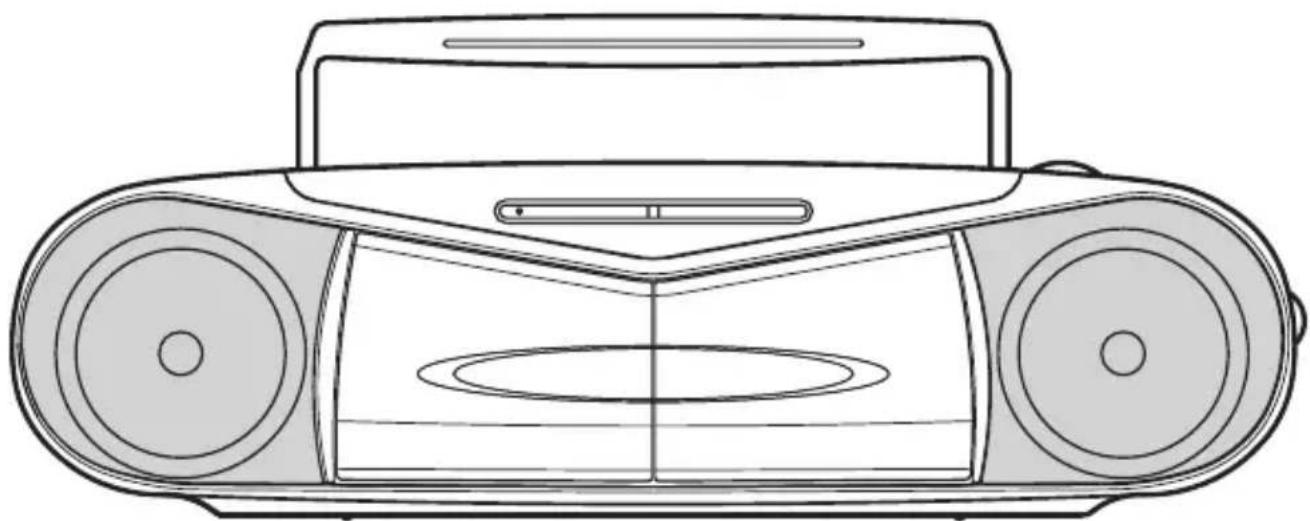
Top and front panels (See 1)
① Cassette recorder keys (Cassette A):
PAUSE II – pauses playback or recording
STOP·EJECT ▲
- stops playback or recording.
- opens the cassette holder.
F.F/REW ◀◀ or ▶▶
— fast winds/rewinds the tape
PLAY ◀ – starts playback
② Handle – for carrying the set
③ PHONES – 3.5mm stereo headphone jack Helpful hints: Connecting the headphones will switch off the speakers.
④ Telescopic antenna – improves FM/SW reception.
⑤ VOLUME rotary – adjusts volume level
⑥ MIC (built-in microphone)
- for voice recording
⑦ DUBBING/BEAT CUT
– switches to change recording speed
– switches to reduce interference when recording radio station
⑧ Source selector: TAPE (OFF), RADIO
- selects tape or radio source of sound - switches off the set
⑨ Band selector: MW, SW1, SW2, FM
– selects wavebands, MW, SW1, SW2 or FM
⑩ TUNING rotary – tunes to radio stations
⑪ Cassette recorder keys (Cassette B):
PAUSE II – pauses playback or recording
STOP·EJECT ■▲
— stops playback or recording.
- opens the cassette holder.
F.F/REW ◀ or ▶
– fast winds/rewinds the tape
PLAY ◀ – starts playback
RECORD ● – starts recording
⑫ FINETUNING rotary – fine tunes radio frequency
⑬ Frequency reader
⑭ Cassette door B
⑮ Cassette door A
⑯ FM STEREO indicator – lights up for stereo FM reception
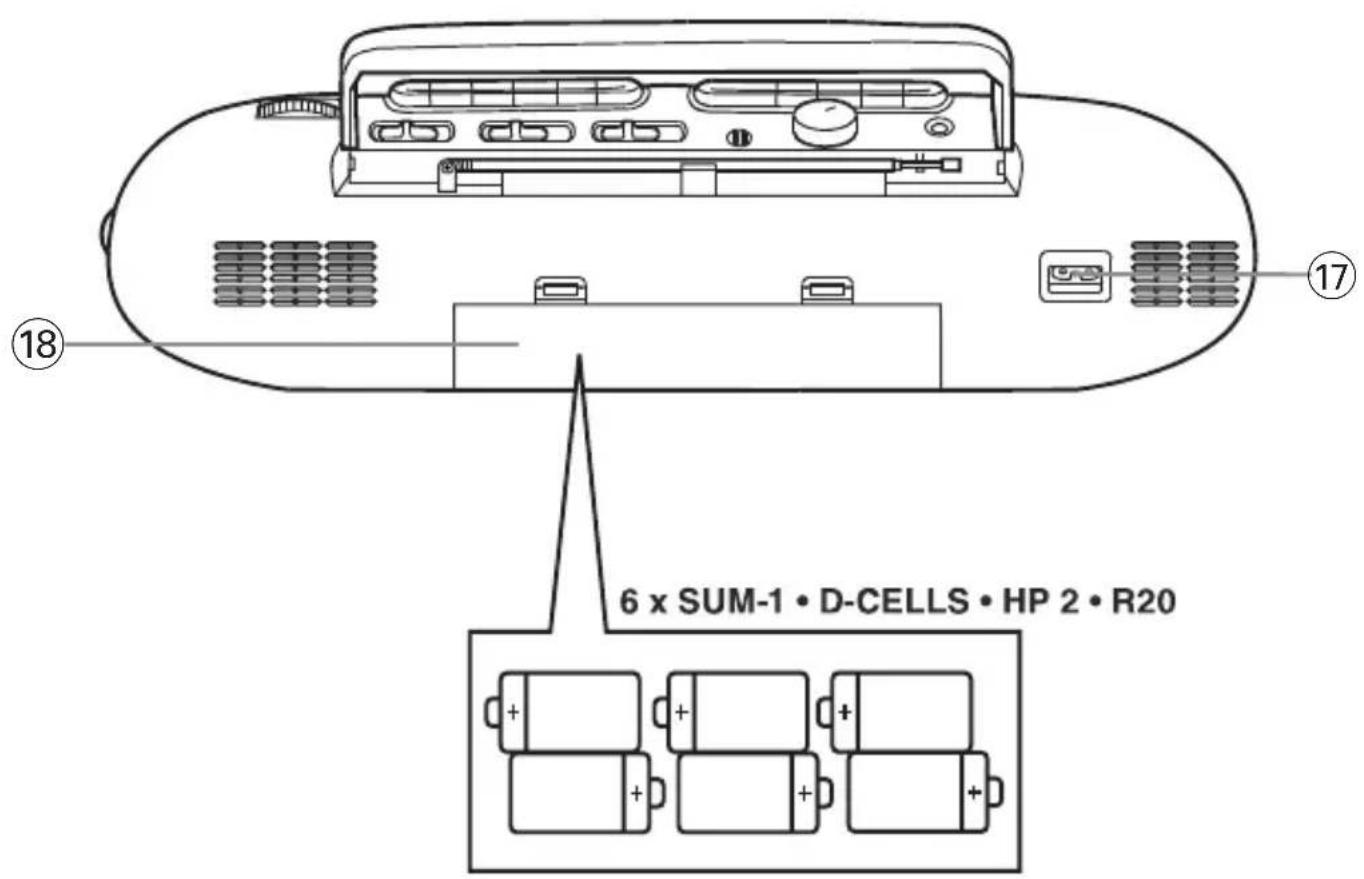
Back panel (See 1)
⑰ AC INPUT – inlet for power cord
⑱ Battery door – open to insert 6 × 1.5 batteries, type R20 or D-cells
Power supply
Whenever convenient, use the power cord if you want to conserve battery life. Make sure you remove the plug from the set and wall outlet before inserting batteries.
Batteries (not included)
- Insert 6 batteries, type R20 or D-cells (preferably alkaline) with the correct polarity. (See 1).
Batteries contain chemical substances, so they should be disposed of properly.
- Incorrect use of batteries can cause electrolyte leakage and will corrode the compartment or cause the batteries to burst:
- Do not mix battery types: e.g. alkaline with carbon zinc. Only use batteries of the same type for the set.
- When inserting new batteries, do not try to mix old batteries with the new ones.
- Remove the batteries if the set is not to be used for a long time.
Using AC power
1 Connect the power cord to the AC INPUT inlet and the wall socket. The set is now connected and ready for use. 2 To switch the set off completely, withdraw the power cord from the wall socket. 3 Install the unit near the AC outlet and where the AC power plug can be easily reached. - Disconnect the power cord from the wall socket to protect your set during heavy thunderstorms. Children could seriously injure themselves as the free end of the cable may still be live if only the connector is removed from the MAINS socket at the back of the unit.
Helpful hints: To avoid unnecessary energy consumption, always adjust the Source selector to TAPE (OFF) after using the set. Also check that the tape deck keys are released.
The type plate is located on the bottom of the set.
General operation
Switching on and off and selecting functions
1 To switch on, push the Source selector slider to TAPE or RADIO as desired. 2 To switch off, push the Source selector to TAPE/OFF and check the cassette keys are released.
Helpful hints:
- To change from TAPE to RADIO, or when you are switching off the set: first make sure you press the STOP·EJECT ■▲ key to end playback and all the cassette keys are released.
Adjusting volume
Adjust the volume with the VOLUME control.
Radio reception
1 Adjust the Source selector to RADIO. 2 Adjust the Band selector to select your desired waveband, MW, SW1, SW2 or FM. 3 Turn TUNING to tune to a station.
- FM STEREO lights up when receiving stereo FM reception.
- When receiving SW, you may also use FINETUNING rotary to fine tune to a station.
4 To switch off the radio, adjust the Source selector to TAPE (OFF) position.
To improve radio reception:
- For FM, SW2, extend and turn the telescopic antenna for best reception. Reduce its length if the signal is too strong.
- For MW and SW1, the set uses a built-in antenna. Direct this antenna for best reception by turning the whole set.
Tape operation/recording
Playing a tape (Cassette A or B)
1. Push the Source selector to TAPE. 2. Press STOP·EJECT ■▲ to open the cassette holder, insert a cassette, and close the deck. 3. Press PLAY ◀ to start playback. 4. To pause playback, press PAUSE II. To resume, press the key again. 5. By pressing F.F/REW ◀◀ or ▶▶, fast forwarding/rewinding of the tape is possible in both directions. To stop fast winding, press ■/▲. 6. To stop the tape, press ■/▲.
Helpful hints:
- During playback, the keys are automatically released at the end of a tape and the set is switched off (unless PAUSE II mode has been activated). During fast forwarding/rewinding, the keys will not be released at the end of a tape. To switch off the set, make sure the cassette keys are also released.
Non-stop playback from Cassette A to Cassette B
1. Push the Source selector to TAPE. 2. Insert a cassette tape in both Cassette A and Cassette B, then close both decks. 3. Press PLAY ◀ on Cassette A to start playback. 4. Press PLAY ◀ on Cassette B.
- Cassette B is in standby for playback. 5. Cassette B playback will auto start when Cassette A comes to the end of the tape.
- The playback will auto stop until the end of tape B.
General information on recording
- Recording is permissible insofar as copyright or other rights of third parties are not infringed.
- For recording, use only NORMAL type cassettes (IEC type I) on which the tabs have not yet been broken. This deck is not suited for recording on CHROME (IEC II) or METAL (IEC IV) type cassettes.
- The best recording level is set automatically. Altering the VOLUME will not affect the recording.
- To protect a tape from accidental erasure, break out the tabs. If you wish to record again, cover the tabs with a piece of adhesive tape.
Recording from the Radio (Cassette B only)
1 Select RADIO source. 2 Tune to the desired radio station (see Radio reception). 3 Press ■/▲ on the Cassette B to open the cassette holder. Insert a blank tape and close the deck. 4 Press REC ● to start recording. 5 For brief interruptions press Ⅱ. To resume recording, press Ⅱ again. 6 To stop recording, press ■/▲.
Helpful hints:
- When recording from radio stations, adjust DUBBING/BEAT CUT on the top panel to 1 or 2, if necessary, to reduce interference.
Recording your voice (Cassette B only)
1 Select TAPE source. 2 Follow steps 3-4 under Recording from the Radio. 3 Speak towards the built-in microphone MIC located on the top panel.
• Your voice is recorded.
4 Follow steps 5-6 under Recording from the Radio.
Helpful hints:
- When recording, speak a little far from the MIC on the top panel to avoid distortion of recorded sound.
- When recording, volume adjusting will not affect the volume of the recorded sound. The recorded sound volume can be auto adjusted.
Recording Cassette A to Cassette B
1 Select TAPE source. 2 Insert a tape to be recorded in the Cassette A.
- If desired, select a particular point of tape A to start recording. 3 Insert a blank tape in the Cassette B. 4 Push DUBBING/BEAT CUT on the top panel to NORMAL or HIGH position.
NORMAL: Recording speed is the same as the Cassette A playback.
HIGH: Recording speed is about 2 times the Cassette A playback.
5 Press PAUSE II on the Cassette B. 6 Press REC ●.
• Cassette B is in standby for recording. 7 Press PLAY ◀ on the Cassette A. • PAUSE II auto ejects, and recording starts.
To stop recording,
- Simultaneously press ■ / ▲ on the Cassette A and Cassette B.
- Recording will auto stop when Tape B comes to the end earlier.
- When Tape A comes to the end earlier, immediately press ■ / ▲ on the Cassette B to stop recording.
Note:
— When recording, do not switch
DUBBING/BEAT CUT to change recording speed.
The making of unauthorized copies of copy-protected material, including computer programmes, files, broadcasts and sound recordings, may be an infringement of copyrights and constitute a criminal offence. This equipment should not be used for such purposes.

Be responsible Respect copyrights
Tape deck maintenance
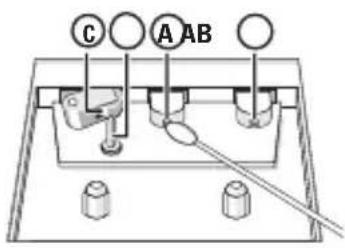
To ensure quality recording and playback of the tape deck, clean parts Ⓐ, Ⓑ and Ⓒ as shown, once a month. Use a cotton bud slightly moistened with alcohol or a special head cleaning fluid to clean the deck.
1 Open the cassette holder by pressing ■▲.
2 Press ◀ and clean the roller Ⓒ.
3 Press ; and clean the heads Ⓐ, and the capstan Ⓑ.
4 After cleaning, press ■▲.
→ Cleaning of the heads can also be done by playing a cleaning cassette through once.
Safety information
- Place the set on a flat, hard and stable surface so that the system does not tilt.
- Do not expose the set, batteries to humidity, rain, sand or excessive heat caused by heating equipment or direct sunlight.
- The apparatus shall not be exposed to dripping or splashing.
- The MAINS plug or an appliance coupler is used as the disconnect device, the disconnect device shall remain readily operable.
- Adequate ventilation with a minimum gap of 15cm (6 inches) between the ventilation holes and surrounding surfaces is necessary to prevent heat build-up.
- Do not cover the ventilation openings with items such as newspapers, table-cloths, curtains, etc.
- No objects filled with liquids, such as vases, shall be placed on the apparatus.
- No naked flame sources, such as lighted candles, should be placed on the apparatus.
- The mechanical parts of the set contain self-lubricating bearings and must not be oiled or lubricated. • To clean the set, use a dry cloth. Do not use any cleaning agents containing alcohol,
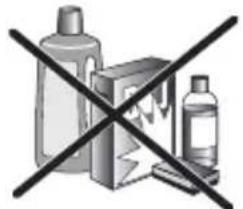

ammonia, benzene or abrasives as these may harm the housing.
If a fault occurs, first check the points listed below before taking the set for repair.
If you are unable to remedy a problem by following these hints, consult your dealer or service centre.
WARNING:
Do not open the set as there is a risk of electric shock. Under no circumstances should you try to repair the set yourself, as this will invalidate the guarantee.
Problem
- Possible cause
- Remedy
No Sound/Power
- Volume not adjusted
- Adjust the VOLUME
— Power cord not securely connected
- Connect the AC power cord properly
— Batteries dead/ incorrectly inserted
- Insert (fresh) batteries correctly
- Headphones connected to the set
- Disconnect headphones.
Display does not function properly / No reaction to operation of any of the controls
- Electrostatic discharge
- Switch off and unplug the set. Reconnect after a few seconds
Severe radio hum or noise
- Electrical interference: set too close to TV, VCR or computer
- Increase the distance
Poor radio reception
- Weak radio signal
• FM: Adjust the FM telescopic aerial - MW: Direct this antenna for best reception by turning the whole set.
Poor cassette sound quality
— Dust and dirt on the heads, etc. - Clean deck parts, see Maintenance - Use of incompatible cassette types (METAL or CHROME) - Only use NORMAL (IEC I) for recording
Recording does not work
- Cassette tab(s) may be broken
- Apply adhesive tape over the missing tab space
Environmental information
All unnecessary packaging material has been omitted. The packaging can be easily separated into three materials: cardboard, polystyrene and plastic.
Your set consists of materials which can be recycled if disassembled by a specialized company. Please observe the local regulations regarding the disposal of packaging, dead batteries and old equipment.
Meet Philips at the Internet
http://www.philips.com

CLASS 1 LASER PRODUCT
AQ 7170



- STEREO RADIO CASSETTE RECORDER AQ
- USER MANUAL
- CONGRATULATIONS ON YOUR PURCHASE AND WELCOME TO PHILIPS
- SUPPLIED ACCESSORIES
- TOP AND FRONT PANELS (SEE 1)
- STOP·EJECT ▲
- F.F/REW ◀◀ OR
- STOP·EJECT ■▲
- F.F/REW ◀ OR
- BACK PANEL (SEE 1)
- POWER SUPPLY
- BATTERIES (NOT INCLUDED)
- BATTERIES CONTAIN CHEMICAL SUBSTANCES, SO THEY SHOULD BE DISPOSED OF PROPERLY
- USING AC POWER
- GENERAL OPERATION
- SWITCHING ON AND OFF AND SELECTING FUNCTIONS
- HELPFUL HINTS
- ADJUSTING VOLUME
- RADIO RECEPTION
- TO IMPROVE RADIO RECEPTION
- TAPE OPERATION/RECORDING
- PLAYING A TAPE (CASSETTE A OR B)
- NON-STOP PLAYBACK FROM CASSETTE A TO CASSETTE B
- GENERAL INFORMATION ON RECORDING
- RECORDING FROM THE RADIO (CASSETTE B ONLY)
- RECORDING YOUR VOICE (CASSETTE B ONLY)
- RECORDING CASSETTE A TO CASSETTE B
- TO STOP RECORDING
- NOTE
- TAPE DECK MAINTENANCE
- SAFETY INFORMATION
- WARNING
- PROBLEM
- NO SOUND/POWER
- DISPLAY DOES NOT FUNCTION PROPERLY / NO REACTION TO OPERATION OF ANY OF THE CONTROLS
- SEVERE RADIO HUM OR NOISE
- POOR RADIO RECEPTION
- POOR CASSETTE SOUND QUALITY
- RECORDING DOES NOT WORK
- ENVIRONMENTAL INFORMATION
- MEET PHILIPS AT THE INTERNET
- HTTP://WWW.PHILIPS.COM
- CLASS 1 LASER PRODUCT
Brand : PHILIPS
Model : AQ7170
Category : Cassette player