
SM517 - Car kit Arkon - Free user manual and instructions
Find the device manual for free SM517 Arkon in PDF.


| Product Type | Universal Car Mount Kit |
| Brand | Arkon |
| Model | SM517 |
| Compatibility | Smartphones and GPS devices up to 6.5 inches |
| Mounting Type | Dashboard or windshield suction cup |
| Material | High-grade ABS plastic and silicone |
| Dimensions | 12 x 6 x 4 inches |
| Weight | 1.2 lbs (0.54 kg) |
| Adjustable Arm | Yes, 360° rotation and tilt |
| Suction Cup Diameter | 3.5 inches |
| Holder Type | Clamp with adjustable width |
| Power Source | None (passive mechanical mount) |
| Installation | Tool-free, attach suction cup and adjust |
| Maintenance | Wipe clean with a damp cloth |
| Safety Features | Secure grip, does not obstruct airbags when installed correctly |
| Spare Parts | Replacement suction cups available from Arkon |
| Repairability | Not user-serviceable; contact Arkon for support |
| Warranty | 1-year limited warranty |
| Package Contents | Mount, suction cup, adhesive pad, instructions |
| Country of Origin | China |
Frequently Asked Questions - SM517 Arkon
User questions about SM517 Arkon
0 question about this device. Answer the ones you know or ask your own.
Ask a new question about this device
Download the instructions for your Car kit in PDF format for free! Find your manual SM517 - Arkon and take your electronic device back in hand. On this page are published all the documents necessary for the use of your device. SM517 by Arkon.
USER MANUAL SM517 Arkon
SM517 | Windshield or Dashboard Mount for Samsung Galaxy Tab and other 7 " Tablets
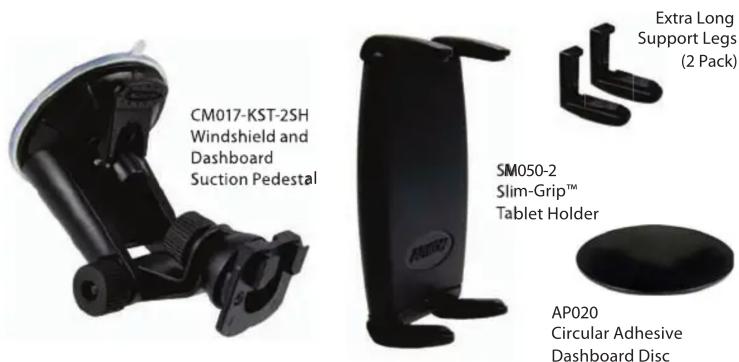
Package Contents:
(1) CM017-KST-2SH - Windshield and dashboard pedestal
(1) SM050-2 - Slim-Grip™ tablet holder
(2) Extra long support legs
(1) AP020 - Circular adhesive dashboard disc
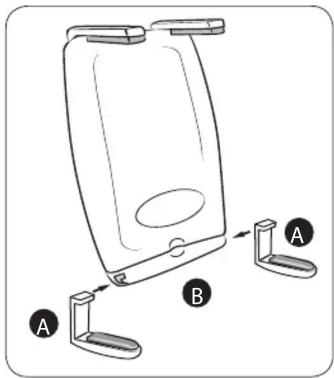
Install the Support Legs to the Holder
Step 1. Insert the extra long support legs (A) by sliding them into the support leg grooves (B) on the bottom of the holder.

natural_image
Line drawing of a hand holding a tablet device with a scroll wheel and download arrow (no text or symbols)*Fits tablets with screen size 7"
Windshield Mounting
Step 1. Find a safe location on the interior of the vehicle's windshield to mount the pedestal. Firmly push the suction base (C) against the windshield and flip the base lever down (D) to the locked position.

Dashboard or Console Mounting Instructions
Step 1. Choose a suitable location for disc (and pedestal) installation. Do not place mount in or near an air bag deployment zone or where it will obstruct view of the road or hinder vehicle operation.
Step 2. Clean the dashboard or console surface area thoroughly with the included alcohol pad. Allow the area dry before applying the mounting disc.

natural_image
Simple line drawing of a hand holding a piece of paper (no text or symbols)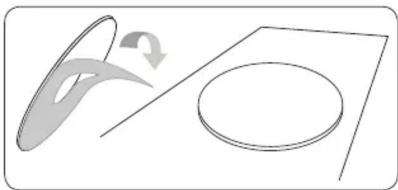
natural_image
Diagram showing a curved arrow and a circular shape on a flat surface, no text or symbols presentStep 3. Remove the paper backing of the disc and place on the cleaned surface. Press the top of the disc down firmly to allow the adhesive to stick to the surface. Allow 24 hours for the adhesive to cure to the surface before applying any pressure.
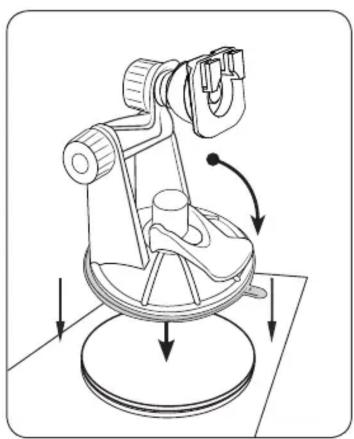
Step 4. Place the suction cup of the pedestal firmly down on the center of the mounting disc and lower the securing lever.
natural_image
Technical illustration of a surveying instrument with directional arrows indicating motion (no text or symbols)
Safety Precautions
Do not install Arkon products over an air bag cover or within the air bag deployment zone. Arkon Resources, Inc. assumes no responsibility of liability for injury or death as a result of car crashes and / or air bag deployment.
Arkon is not responsible for any damages caused to your car, your device, or yourself due to the installation or use of this pedestal mount.
ARKON®
The Mobile Mounting Specialists™
Consumer Hotline:
USA (800) 841-0884
INT'L (626) 254-9005
Monday - Friday 9 am - 5 pm, PST
www.arkon.com
Arcadia, CA 91006 USA
Designed in USA | Made in China and Taiwan
© Copyright 2010 Arkon Resources, Inc.
Insert Phone into Holder
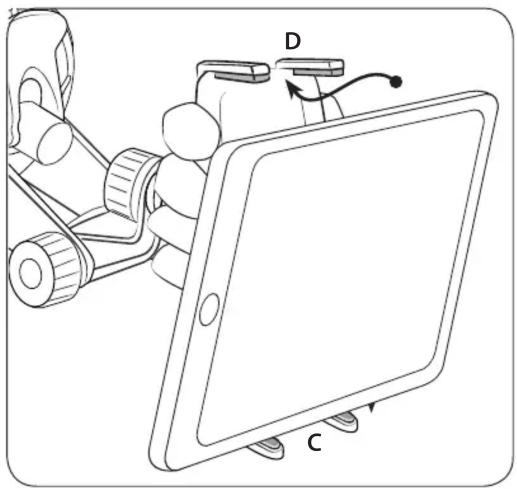
Step 1. Secure holder with your hand for support, as spring-loaded mechanism requires significant force to operate. Hold your phone and insert into universal holder by pushing down on the bottom spring-loaded support legs with moderate amount of pressure (C). Slide the top of the device under the top support legs (D) until it fits snuggly in the holder.
natural_image
Line drawing of a robotic arm holding a tablet with labeled parts D and C (no text or symbols beyond labels)Adjusting Holder to Fit Phone

Step 1. Step If necessary, adjust the support legs (E) on top and bottom by sliding them laterally to avoid any buttons or ports that may be on your tablet or other device.

Safety Precautions
Do not install Arkon products over an air bag cover or within the air bag deployment zone. Arkon Resources, Inc. assumes no responsibility of liability for injury or death as a result of car crashes and / or air bag deployment.
Arkon is not responsible for any damages caused to your car, your device, or yourself due to the installation or use of this pedestal mount.
ARKON®
The Mobile Mounting Specialists™
Consumer Hotline:
USA (800) 841-0884
INT'L (626) 254-9005
Monday - Friday 9 am - 5 pm, PST
www.arkon.com
Arcadia, CA 91006 USA
Designed in USA | Made in China and Taiwan
© Copyright 2010 Arkon Resources, Inc.

Brand : Arkon
Model : SM517
Category : Car kit