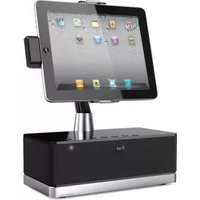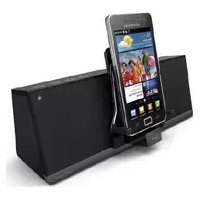
MobiAir - Docking Station ILUV - Free user manual and instructions
Find the device manual for free MobiAir ILUV in PDF.


| Product Type | Docking Station for smartphones and tablets |
| Brand | iLuv |
| Model | MobiAir |
| Dimensions (approx.) | 4.3 x 3.5 x 2.2 inches (11 x 9 x 5.5 cm) |
| Weight | 6.7 oz (190 g) |
| Power Supply | USB powered (5V/2A recommended) |
| Charging Ports | Lightning/micro USB/USB-C adjustable connector |
| Audio Output | 3.5 mm auxiliary port for external speakers |
| Compatibility | Most smartphones and tablets with case thickness ≤ 3 mm |
| LED Indicator | Status light for charging and connectivity |
| Material | ABS plastic with non-slip base |
| Color | Black (standard) |
| Cable Length | 47 inches (120 cm) |
| Usage | Desktop or bedside table |
| Cleaning Instructions | Wipe with a dry, soft cloth; avoid liquids and abrasives |
| Safety Features | Overcharge and short-circuit protection |
| Spare Parts Availability | Replacement cables and connectors available via iLuv support |
| Repairability | Modular design; user-replaceable cable and connector head |
| Warranty | 1-year limited warranty against defects |
| Package Contents | Docking station, USB cable, user manual |
Frequently Asked Questions - MobiAir ILUV
User questions about MobiAir ILUV
0 question about this device. Answer the ones you know or ask your own.
Ask a new question about this device
Download the instructions for your Docking Station in PDF format for free! Find your manual MobiAir - ILUV and take your electronic device back in hand. On this page are published all the documents necessary for the use of your device. MobiAir by ILUV.
USER MANUAL MobiAir ILUV
Designed by iLuv in New York
Bluetooth® Stereo Speaker Dock for Smartphones
Quick Start Guide MobiAir™ / iMM377
Welcome.

Innovative Lifestyle Unquestionable Value®
CONTENTS
Bluetooth Stereo Speaker Dock for Smartphones | IMM377

2
WHAT'S INCLUDED

CONNECT TO POWER SOURCE

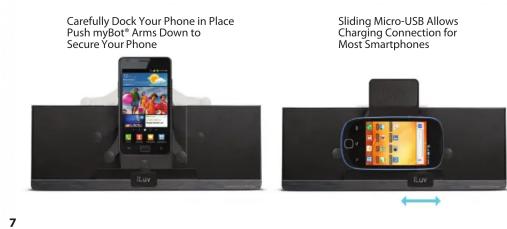
DOCKING YOUR SMARTPHONE

DOCKING YOUR SMARTPHONE
Check Micro-USB Connector on your smartphone. Micro-USB Ports Vary on Smartphones

natural_image
Close-up of a device with iLuv logo and blue circular arrows indicating rotation or adjustment (no text or symbols on main image)6
DOCKING YOUR SMARTPHONE
POWERING + PAIRING

8
POWERING + PAIRING
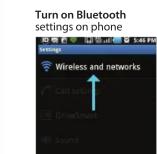


Phone indicates when paired
WARRANTY
ONE YEAR LIMITED WARRANTY | UNE GARANTIE LIMITEE D'AN GARANTIA LIMITADA DE UM ANO | GARANTÍA LIMITADA DE UN AÑO EINEM JAHREINGESCHRÄNKTE GARANTIE | GARANZIA LIMITATA UN ANNO 1년 제한 보증 | 観年有限保証 | 一年有限保证 1年制限保証 | 1JAARVOOR BEPERKTE GARANTIE
EUROPEAN UNION TWO YEAR LIMITED WARRANTY | GARANTIE LIMITEE DE DEUX ANS GARANTIA LIMITADA DE DOIS | GARANTÍA LIMITADA 2 AÑOS ZWEI JAHREN EINGESCHRÄNKTE GARANTIE | ARANZIA LIMITATA DUE ANNI 2년 제한 보증 | 两年有限保证 2年 制限保証 | 2 JAAR VOOR BEPERKTE GARANTIE
iLuv®, Innovative Lifestyle Unquestionable Value® MobiAir™ and GreeNology™ trademarks are the exclusive properties of JWIN Electronics Corp. and are registered with the U.S. Patent and Trademark Office, and may be registered or pending registration in other countries. All other iLuv® trademarks, service marks, and logos may be registered or pending registration in the U.S. or in other countries. All other trademarks or registered trademarks are the property of their respective owners. © 2012 iLuv Creative Technology. Printed in China.
10
9