Crasher - Docking Station JLab - Free user manual and instructions
Find the device manual for free Crasher JLab in PDF.


User questions about Crasher JLab
0 question about this device. Answer the ones you know or ask your own.
Ask a new question about this device
Download the instructions for your Docking Station in PDF format for free! Find your manual Crasher - JLab and take your electronic device back in hand. On this page are published all the documents necessary for the use of your device. Crasher by JLab.
USER MANUAL Crasher JLab
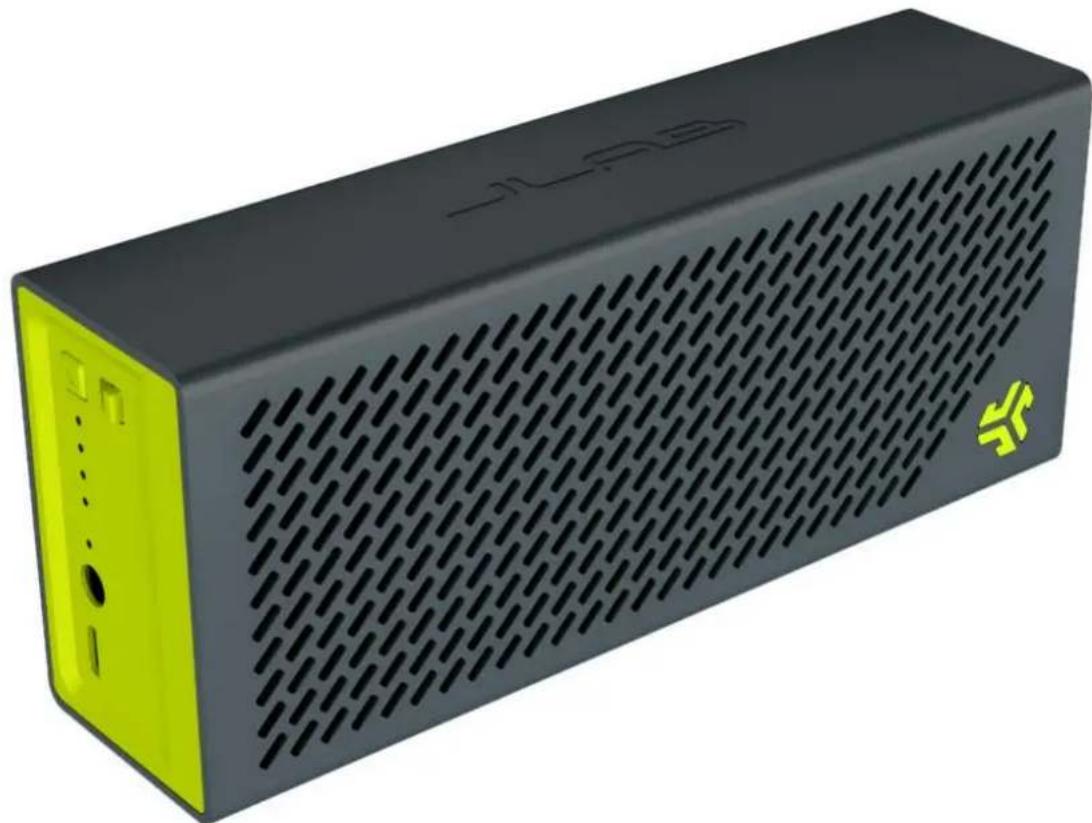
CRASHER BLUETOOTH WIRELESS STEREO SPEAKER
INSTRUCTION MANUAL
natural_image
Black and yellow 3D model of a black and lime speaker with grille pattern (no text or symbols visible)INTRODUCTION
Thank you for purchasing the Crasher. We are excited to welcome you to the JLab community. As an owner of the Crasher portable Bluetooth speaker, we are here to help assist you with any product questions or issues that come your way.
The Crasher Bluetooth wireless speaker system applies the latest Bluetooth wireless technology that enables you to enjoy wireless music, audio, and hands free calls wherever you want.
WHAT'S INCLUDED
- The Crasher Bluetooth stereo speaker
- USB to Micro USB charging cable
- 3.5mm to 3.5mm AUX audio cable
- Power adapter with USB jack
- Soft carrying pouch
FEATURES & BENEFITS
- Bluetooth Wireless Connectivity
- Quality Hi-Fi stereo sound
- Hands free call control
- Built In Battery Power Pack to charge your devices via full sized USB port
- Use up to 33 feet away
- Around 18 hours of operation time (median volume level)
natural_image
Grid pattern with repeating oval shapes, no text or symbols present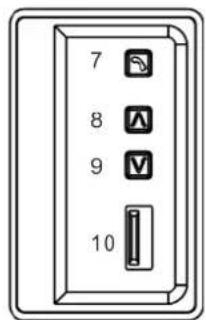
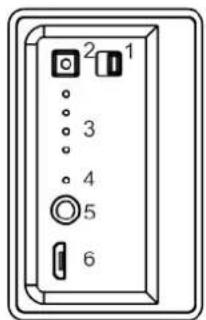
- Power On/Off Control
- Battery Check / Bluetooth Pair Button
- Pairing/Battery Check LED Indicators
- Charging Red/Green LED Indicator
- 3.5mm Audio In Jack to connect non BT devices
- Micro USB Charge In Jack for charging the speaker
- Telephone Call Button
- Volume +
- Volume -
- USB Charging Out Jack (to external portable devices)
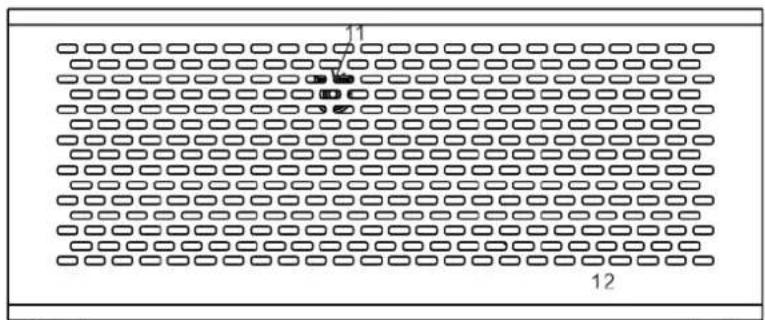
- Microphone location
- Speaker Drivers
- Back Passive Woofer (located on back panel of unit)
1st Step - CHARGING THE CRASHER
- Make sure the speaker is fully charged before initial use.
- Connect the speaker via the Micro USB port (see item 6 above) to your PC or wall outlet using the Micro USB cable and/or 5V Power Adapter.
- The Battery LED (see item 4 above) will illuminate in red while charging and should become green once fully charged.. Another way to check if fully charged, is to click the Battery Check button once (see item 2 above). If all 4 LED indicators light up, your Crasher is almost or fully charged. If only 1 – 3 of the LED lights light up, please continue charging your device.
- JLab recommends charging the Crasher overnight with the Micro USB for optimum performance.
- If you encounter any issues while using your Crasher, please first check to ensure device is fully charged before troubleshooting the issue and contacting Support.
2nd Step - POWER UP
- Once the Crasher is fully charged, locate the Power Button toggle switch (see item 1 above).
- Slide toggle to the right to power on. LED lights and sound should further indicate that the Crasher is on.
- To power off, slide toggle to the left.
3rd Step - GET CONNECTED VIA BLUETOOTH
- Make sure the Crasher is turned ON (See 1st and 2nd Step)
- Press the Pair/Battery Check button and hold for about 5 seconds or until the 4 LEDs flash.
- Enable the searching mode on your Bluetooth compatible device. (Most commonly found on your smartphone under Settings, then Bluetooth, then by turning BT On / Searching for Devices.)
- Select "JLab Crasher" in the list shown on your Bluetooth device / smartphone.
- Enter "0000" if a password is required.
- When the Bluetooth connection is made, the first LED will flash slowly. Please allow 10 – 20 seconds for your device to connect.
- Once connected, select your music, videos or calls and see your sound instantly amplified with the JLab Crasher.
- Please note, only one device may be connected at a time. To connect another Bluetooth device, you must disconnect with the Crasher from your device / smartphone.
- To reset the Crasher and void any existing connections, hold down the Pair/Battery Check button (see item
MAKE & RECEIVE TELEPHONE CALLS
- If a call is received while streaming music on speaker, the music will be muted and a ring tone will be heard in its place.
- Answer and end calls by pressing the talk button once (see item 7 above).
- Make calls by dialing on the cell phone and talking towards the speaker. Talk at a normal volume from 3 – 5 feet away.
- To decline an incoming call, hold the talk button (see item 7 above) for 2 – 3 seconds or until the phone call stops ringing and returns to your music.
- Check the instruction manual for your cell phone to ensure no further steps are required.
PLUG & PLAY NON BT DEVICES WITH AUX CABLE
- Connect the speaker with almost any audio device directly by using the supplied 3.5mm cable.
- Connect one end of the 3.5mm cable to the audio in port on the Crasher (see item 5 above) and the other end of the cable to the 3.5mm audio port on your favorite devices.
- While connected, this 3.5mm aux line in will override any Bluetooth wireless music being played. Once the 3.5mm device is disconnected from the aux connection, the Crasher will return to the music on the Bluetooth connected device.
- When connected via the 3.5mm aux cable, the Crasher's volume control is overridden by the volume settings of your device. As you would headphones, volume should be controlled through your audio device when connected via aux.
CHECK THE BATTERY LIFE
- The speaker is designed with a smart battery check feature for your convenience.
- One click of the battery check button (see item 2 above) will show you the current battery capacity on your Crasher
4 LEDs light up = app. 100%full
3 LEDs light up = app. 75% full
2 LEDs light up = app. 50% full
1 LED lights up = app. 25% full (indicating charging is needed)
CHARGE YOUR PORTABLE DEVICES ON THE GO
- The Crasher delivers a portable battery pack that can charge your favorite music devices on-the-go including smartphones, iPhones, MP3 Players and more.
- Connect your portable device with its own charging cable (not included) to the USB jack on the Crasher speaker (see item 10 above).
- This portable backup power supply allows you to listen to your music without interruption.
- The built-in power pack will supply a current of around 1A. This will charge most smartphones and non-high power portable devices. We do not recommend charging tablets or iPads as these often require at least 2.1A of power to charge.
SPECS
AUDIO
Custom Fine Tuned Acoustic Drivers (Stereo Pair)
Dual Passive Built-In Subwoofer
Built-in Microphone (IEEE 1329 Type 1-compliant speakerphone)
20Hz – 20kHz Frequency Response
Distortion 0.5%
CUSTOMIZE IT
Select from Black, Purple/Teal, Silver/White and Gun Metal/Green
BATTERY AND POWER
On/Off Switch
Up to 18 hours continuous play
Built in rechargeable lithium-ion battery
3.7V 1500mA
Portable Power Pack to charge your devices
Output power of 2 x 1.5W
BLUETOOTH
Wireless Range: at least 33 feet
Bluetooth v2.1 compliant
CONNECTIONS
Bluetooth
3.5mm Stereo input (AUX)
Instantly transition from AUX to Bluetooth sound and back
TROUBLESHOOTING
If you experience any of the following issues, please try these quick steps to resolve the issue:
No sound:
- Ensure the speaker is charged fully.
- Ensure the speaker is switched on.
- Ensure your Bluetooth device is on and connected.
- Move your Bluetooth device closer to the Crasher
- Turn off your Bluetooth device and the Crasher then power them both back on
Volume
- Turn up the volume on your portable device and/or the Crasher.
- Make sure the Crasher is fully charged
Sound is Garbled
- Turn down the volume on your device/phone and the Crasher
- Make sure the Crasher is fully charged
Unable to pair with a Bluetooth device:
- Confirm that your device is Bluetooth compatible.
- Reset the speaker by pressing and holding the Pair/Battery Check button for 12 seconds, then turn off and turn back on.
SAFETY INSTRUCTIONS
- Heed all safety warnings and follow instructions.
- Do not use this device near water.
- Clean only with a dry cloth.
- Do not operate or store the device near any heat sources such as radiators, stoves or other devices that produce heat.
- Only use attachments and accessories specified by the manufacturer.
- Unplug the device from power sockets during lightning storms or when unused for long periods of time.
- Refer all servicing to qualified service personnel.
CAUTION
TO PREVENT ELECTRIC SHOCK, MATCH WIDE BLADE OF POWER PLUG TO WIDE SLOT, FULLY INSERT.
Use of controls or adjustments or performance of procedures other than those specified may result in damage to the unit and negative exposure to the user.
Danger of explosion if battery is incorrectly replaced. Do not attempt to replace without the manufacturer's approval.
WARNING
To reduce the risk of fire or electric shock, do not expose this speaker or the accessories to rain or moisture.
Changes or modifications to this unit not expressly approved by the party responsible for compliance could void the user's authority to operate the equipment.
Do not place the unit on top of any soft, porous, or sensitive surfaces to avoid damaging the surface. Use a protective barrier between the unit and surface to protect the surface.
Use of this unit near fluorescent lighting may cause interference regarding use of Bluetooth connection. If the unit is displaying erratic behavior move away from any fluorescent lighting, as it may be the cause.
Lithium batteries, like all rechargeable batteries are recyclable and should be recycled or disposed of in normal household waste. Contact your local government for disposal or recycling practices in your area. They should never be incinerated since they might explode.
The apparatus shall not be exposed to dripping or splashing and that no objects filled with liquids, such as vases, shall be placed on apparatus
NOTE: This equipment has been tested and found to comply with the limits for a Class B digital device, pursuant to Part 15 of the FCC Rules. These limits are designed to provide reasonable protection against harmful interference in a residential installation. Changes or modifications made to the Crasher without approval by JLab could void the user's authority to operate the equipment. The Crasher complies with Part 15 of the FCC Rules. Operation is subject to the following two conditions: (1) this device may not cause interference, and (2) this device must accept any interference received, including interference that may cause undesired operation.
LIMITED 1 YEAR WARRANTY
All JLab products are covered under a 1 year limited warranty. Please see JLab's warranty information for more details.