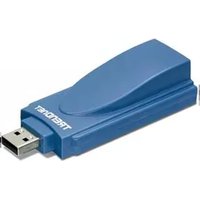
TFM-560U - Router TRENDNET - Free user manual and instructions
Find the device manual for free TFM-560U TRENDNET in PDF.


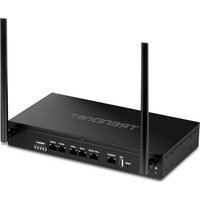
| Product Type | Router |
| Brand | TRENDnet |
| Model | TFM-560U |
| Connectivity | Wired |
| Ethernet Ports | 4 x 10/100 Mbps LAN, 1 x 10/100 Mbps WAN |
| USB Ports | 1 x USB 2.0 |
| Wireless Standards | IEEE 802.11b/g/n |
| Frequency Band | 2.4 GHz |
| Maximum Data Rate | 300 Mbps (wireless), 100 Mbps (wired) |
| Security | WEP, WPA/WPA2, MAC Address Filtering |
| Power Supply | 5V DC, 1A external adapter |
| Dimensions | 145 x 110 x 30 mm |
| Weight | 200 g |
| Operating Temperature | 0°C to 40°C |
| LED Indicators | Power, WAN, LAN (4), WLAN |
| Antenna Type | 2 external detachable antennas |
| Mounting | Desktop or wall-mountable |
| Warranty | 3 years limited |
| Compliance | FCC, CE |
| Package Contents | Router, power adapter, Ethernet cable, quick installation guide, CD with manual |
Frequently Asked Questions - TFM-560U TRENDNET
User questions about TFM-560U TRENDNET
0 question about this device. Answer the ones you know or ask your own.
Ask a new question about this device
Download the instructions for your Router in PDF format for free! Find your manual TFM-560U - TRENDNET and take your electronic device back in hand. On this page are published all the documents necessary for the use of your device. TFM-560U by TRENDNET.
USER MANUAL TFM-560U TRENDNET
natural_image
Blue USB device labeled 'TRENTNET' with a separate 3D-printed cover, placed on a grid-patterned surface (no text or symbols on the device itself)Quick Installation Guide



Table of Contents
English 1
- Before You Start 1
- How to Install 2
- Verify Installation 5
Troubleshooting 6
1. Before You Start

natural_image
Blue USB device with a lid and USB port, no visible text or symbols on the device bodyPackage Content
- TFM-560U
- Driver CD-ROM
- Quick Installation Guide
• RJ-11 Telephone Cable
System Requirements
- CD-ROM Drive
• CPU: Intel Pentium 233 MHz or above
• Memory: 32MB or above - Hard Drive Space: 4MB or above
- USB Port: 1.1 or 2.0
• Windows 2003 Server/XP/2000/ME/98SE
Application

Workstation with 56K (V.92) USB 2.0 Data/Fax/Voice Modem (TFM-560U)

Phone Jack
2. How to Install
Note: Refer to the User's Guide on the Driver CD-ROM for Windows 98SE and Windows ME installation instructions
Windows 2003 Server/XP/2000
- Remove the TFM-560U USB cap and then connect the modem to an available USB 2.0 or 1.1 port on the computer.

natural_image
Blue USB device labeled 'HOTET' with orange indicator light and 'OH DATA' button, no readable text beyond labels
natural_image
Illustration of a desktop computer tower (no text or symbols visible)- When the Add New Hardware Wizard or the Found New Hardware Wizard appears, click Cancel.

-
Insert the Driver CD-ROM into your CD-ROM drive.
-
Go to Start -> Run, type in E:\Driver\Win2K&XP\setup.exe and then click OK.
Note: E:\ represents the drive letter that is assigned to your CD-ROM drive.
- Click OK.
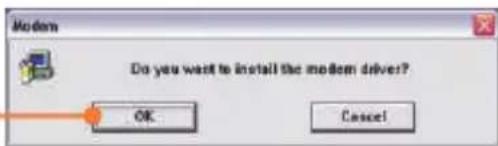
Windows 2003 Server/XP
- Click Continue Anyway.
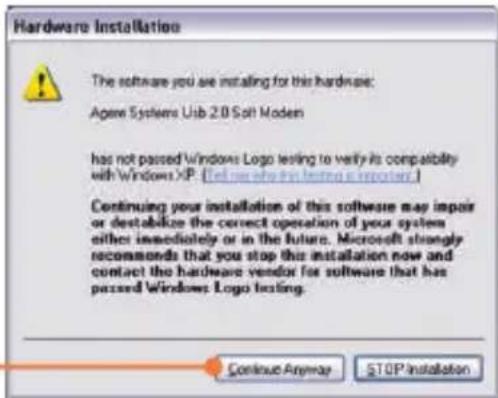
Windows 2000
- Click Yes.

- Connect a telephone cable from the modem to a phone jack.
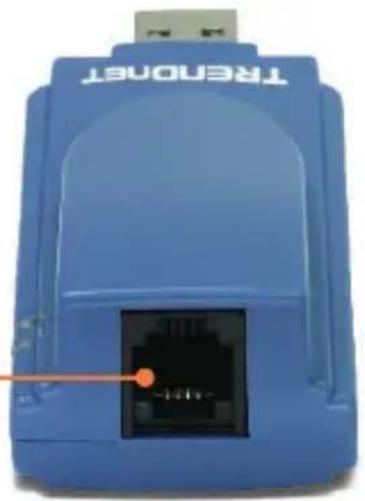
natural_image
Blue electronic device labeled 'TRENDOT' with a black connector and orange pointer (no readable text beyond label)Your installation is now complete.
For detailed information regarding the TFM-560U configuration and advanced settings, please refer to the User's Guide included on the Driver CD-ROM or TRENDnet's website at www.trendnet.com
3. Verify Installation
Windows 2003 Server/XP/2000
-
Right-click My Computer and click Properties. Under the Hardware tab, click Device Manager.
-
Expand the "Modems" heading to verify that the Agere Systems USB 2.0 Soft Modem has been installed and that no question marks or exclamation points are visible.

Troubleshooting
Q1: I inserted the modem into my computer's USB port and my computer does not detect the modem? What should I do?
A1: Make sure the computer meets the minimum system requirements as shown at the beginning of this quick installation guide. Also verify that the modem is properly inserted in the computer's USB port. You may also try inserting the modem into a different USB port.
Q2: After successful installation of the TFM-560U, I tried to connect to the Internet but I do not get a dial tone. What should I do?
A2.1: Unplug the telephone cable from the computer, and check for a dial tone by connecting the telephone cable directly from the wall outlet to a telephone. If there is no dial tone, then the problem is in your telephone cable or telephone system. Call your telephone service provider for assistance. If there is a dial tone, reconnect cables to the modem and verify that the telephone cord is securely connected to the modem and phone jack.
A2.2: If a PBX or other phone system is installed, check modem performance with a direct line from your telephone company. Some PBXs may cause the telephone line condition change and effect modem performance.
Q3: How do I install the drivers on Windows 98SE or ME?
A3: Please refer to the User's Guide included on the Driver CD-ROM.
If you still encounter problems or have any questions regarding the TFM-560U, please refer to the User's Guide included on the Driver CD-ROM or contact Trendnet's Technical Support Department.
Certifications
This equipment has been tested and found to comply with FCC and CE Rules. Operation is subject to the following two conditions:
(1) This device may not cause harmful interference.
(2) This device must accept any interference received. Including interference that may cause undesired operation.



Waste electrical and electronic products must not be disposed of with household waste. Please recycle where facilities exist. Check with you Local Authority or Retailer for recycling advice.

NOTE: THE MANUFACTURER IS NOT RESPONSIBLE FOR ANY RADIO OR TV INTERFERENCE CAUSED BY UNAUTHORIZED MODIFICATIONS TO THIS EQUIPMENT. SUCH MODIFICATIONS COULD VOID THE USER'S AUTHORITY TO OPERATE THE EQUIPMENT.
TRENDnet Technical Support
US·Canada
Toll Free Telephone: 1(866) 845-3673
24/7 Tech Support

Europe (Germany • France Italy Spain Switzerland UK)
Toll Free Telephone: +00800 60 76 76 67
English/Espanol-24/7
Francais/Deutsch-11am-8pm, Monday-Friday MET
Worldwide
Telephone: +(31) (0) 20 504 05 35
English/Espanol-24/7
Francais/Deutsch - 11am-8pm, Monday - Friday MET
Product Warranty Registration
Please take a moment to register your product online.
Go to TRENDnet's website at http://www.trendnet.com
- Quick Installation Guide
- Table of Contents
- English 1
- Troubleshooting 6
- Before You Start
- Package Content
- System Requirements
- Application
- How to Install
- Windows 2003 Server/XP/2000
- Windows 2003 Server/XP
- Windows 2000
- Your installation is now complete.
- Verify Installation
- Troubleshooting
- Certifications
- TRENDnet Technical Support
- Product Warranty Registration
Brand : TRENDNET
Model : TFM-560U
Category : Router