TME19W - Monitor Tatung - Free user manual and instructions
Find the device manual for free TME19W Tatung in PDF.


| Product Type | LED Monitor |
| Brand | Tatung |
| Model | TME19W |
| Screen Size | 19 inches (48.26 cm) |
| Resolution | 1280 x 1024 (SXGA) |
| Aspect Ratio | 5:4 |
| Brightness | 250 cd/m² |
| Contrast Ratio | 1000:1 |
| Response Time | 5 ms |
| Viewing Angle | 170° horizontal / 160° vertical |
| Input Connectors | VGA (D-Sub), DVI-D |
| Power Consumption | 25W (typical), <0.5W standby |
| Power Supply | AC 100-240V, 50/60Hz |
| Dimensions (with stand) | 411 x 418 x 180 mm |
| Weight | 3.8 kg |
| VESA Mount | 100 x 100 mm |
| Features | On-Screen Display (OSD), VESA mount compatible, Tilt adjustment |
| Certifications | CE, FCC, RoHS |
| Operating Temperature | 0°C to 40°C |
| Package Contents | Monitor, power cable, VGA cable, user manual |
Frequently Asked Questions - TME19W Tatung
User questions about TME19W Tatung
0 question about this device. Answer the ones you know or ask your own.
Ask a new question about this device
Download the instructions for your Monitor in PDF format for free! Find your manual TME19W - Tatung and take your electronic device back in hand. On this page are published all the documents necessary for the use of your device. TME19W by Tatung.
USER MANUAL TME19W Tatung
* Because wall vertical surface vary from job to job, it is mandatory that you consult with the appropriate local engineer and architect to ensure that the mounting component are properly mounted on the wall to handle the applied loads.
* Installation on flat, solid wall is mandatory. Wooden, concrete, and metal wall are recommended; drywall or any other hollow wall must be avoided. Use #14 or 1/4" wood screws for wooden wall and the thread covered in the wood no less than 1 12 "; use 14 " concrete anchors for concrete wall and the anchor's length covered in concrete no less than 1 1/4"; use 14 " machine screws for metal wall and the thread covered in metal wall no less than 3/4". Screws for installing on the concrete or metal wall will be prepared by installers.
* Maximum weight of monitor is 18 lb.
* Do not use over force on the screws for installation of monitor.
Features:
* For LCD monitor wall mount.
* Provide the monitor various distance away from wall, 3 1/2" to 13 1/2" (90mm - 340mm).
* Support monitor size from 15" to 20", maximum load 18 lb.
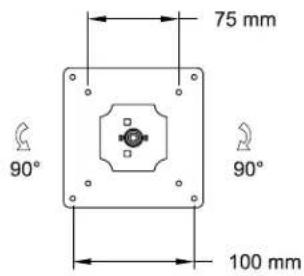
* Fit for VESA standard 75mm and 100mm.
* Wide tilt and swivel angle.
* Light weight, easy installation.
* Compatible Tatung CCVE monitors are:
Parts in the assembly:
(1) Double Arm + Dual-pivot component (x1).
(2) Wall plate (x1).
(3) VESA plate. (x1).
(4) Screws, M4, 0.7 pitch x 12mm, Pan-head, Phillips, (x4)
(5) Wood screws, #14, 1 1/2" length, / washer (2 pairs).
Tools needed: Screw driver.
INSTRUCTIONS:
(1) Install Wall plate (2) onto the wall:
Find out wooden stud, use wood screws / washers provided to secure the wall plate onto the wall. See Fig. 1.
For other type of wall, consult with the local architects for proper installation.
(2) Install LCD monitor:
Use screw (4), (M4, 4 pieces provided in the package) to secure LCD monitor with the VESA plate (3). Do not use over force on the screws.
(3) There are two hole-pattern on the VESA plate, 75 mm and 100 mm, apply proper one to fit the mounting hole-pattern on the back of the monitor. see Fig. 2.
(4) The monitor can be tilted on any direction or angle, including Azimuth Rotation, gently turning the monitor until get desirable view angle.
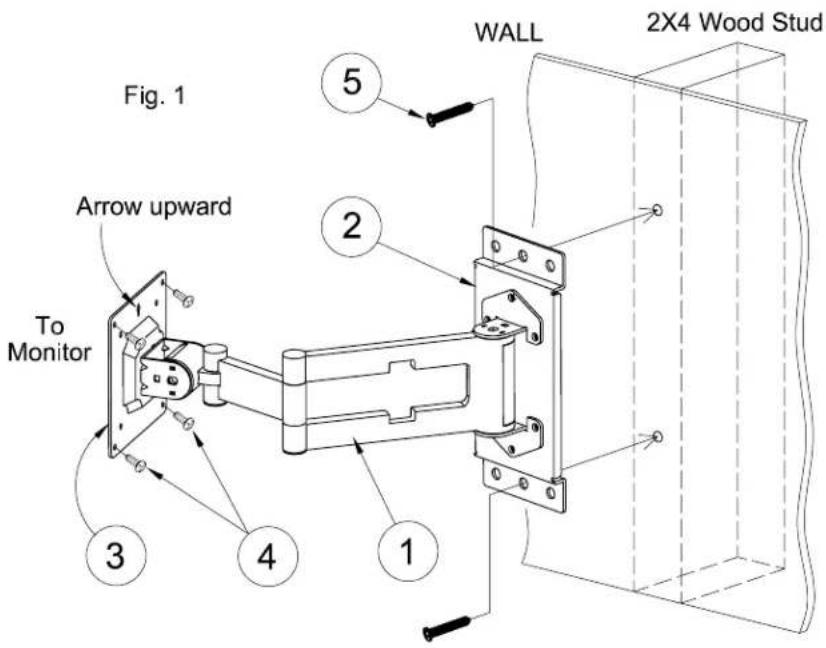
Fig. 2
VESA Plate FRONT VIEW