
Basic S250 - USB Drive Ironkey - Free user manual and instructions
Find the device manual for free Basic S250 Ironkey in PDF.


| Product Type | USB Flash Drive |
| Brand | Ironkey |
| Model | Basic S250 |
| Capacity | 250 GB |
| Interface | USB 3.0 |
| Dimensions | 77.9 x 18 x 9.8 mm |
| Weight | 12 g |
| Power Source | USB bus-powered |
| Encryption | Hardware AES 256-bit |
| Password Protection | Yes, with hardware-based authentication |
| Auto-Lock | Yes, after idle or removal |
| Tamper Resistance | Epoxy-coated internal components |
| Operating Systems | Windows, macOS, Linux |
| Temperature Range | 0°C to 70°C (operating) |
| Maintenance | Wipe with a dry, lint-free cloth |
| Safety Feature | Self-destruct after 10 failed password attempts |
| Spare Parts | Not replaceable; sealed unit |
| Warranty | 5 years limited |
Frequently Asked Questions - Basic S250 Ironkey
User questions about Basic S250 Ironkey
0 question about this device. Answer the ones you know or ask your own.
Ask a new question about this device
Download the instructions for your USB Drive in PDF format for free! Find your manual Basic S250 - Ironkey and take your electronic device back in hand. On this page are published all the documents necessary for the use of your device. Basic S250 by Ironkey.
USER MANUAL Basic S250 Ironkey
natural_image
Technical line drawing of a mechanical component with internal components and mounting holes (no text or symbols)Thank you for your interest in IronKey.
IronKey is committed to creating and developing the best security technologies and making them simple-to-use, affordable, and available to everyone. Years of research and millions of dollars of development have gone into bringing this technology to you in the IronKey.
For a quick product overview, you can also view our online demos at https://www.ironkey.com/demo.
We are very open to user feedback and would greatly appreciate hearing about your comments, suggestions, and experiences with the IronKey.
Standard Feedback:
feedback@ironkey.com
Anonymous Feedback:
https://www.ironkey.com/feedback
User Forum:
https://forum.ironkey.com
CONTENTS
What is it? 3
Meet the IronKey .... 3
Core Features....4
Device Diagrams 5
Technical and Security Notes....6
IronKey Device Security 6
How does it work? 7
Product Walkthrough 7
Initializing Your IronKey on Windows....7
Using the IronKey Unlocker on Windows....8
Initializing Your IronKey on a Mac. 9
Using the IronKey Unlocker on a Mac....10
Initializing Your IronKey on Linux .... 11
Using the IronKey Unlocker on Linux 12
Activating IronKey Enterprise 13
Using the Secure Backup Software (Windows Only) 16
Using the IronKey Virtual Keyboard (Windows Only) 17
Using Your IronKey in Read-Only Mode (Windows, Mac, Linux)....18
Product Specifications....19
What's next? 20
Where can I go for more info?....20
Who is the IronKey Team? 20
Contact Information....21

natural_image
Top-down schematic of a room layout with furniture and fixtures (no text or labels)What is it?
Meet the IronKey
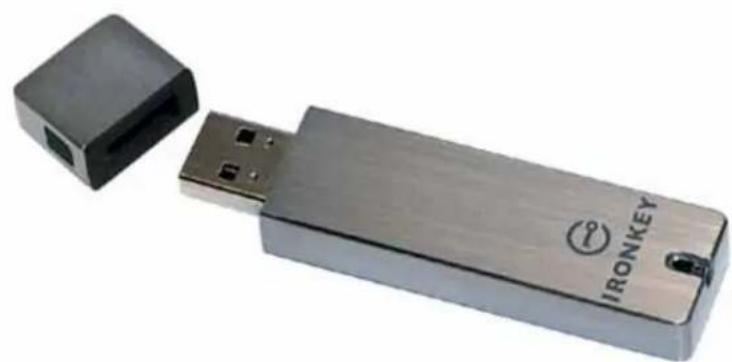
IronKey Basic is designed to be the world's most secure USB flash drive. Now you can safely carry your files and data with you wherever you go. And even if your IronKey is lost or stolen, your data remains protected and can even be restored to a new IronKey from an encrypted backup. While it uses some of today's most advanced security technologies, it is simple to use and you only need to remember one password to unlock it.
natural_image
Exterior view of a metallic IRONKEY USB flash drive with a small black connector (no text or symbols on the device body)Core Features
Hardware-Encrypted Flash Drive
Your IronKey can safely store gigabytes of documents, applications, files and other data. The IronKey Cryptochip inside the IronKey protects your data to the same level as highly classified government information. This encryption technology is always on and cannot be disabled.
Self-Destruct Sequence
If the IronKey Cryptochip detects physical tampering by a thief or a hacker, it initiates a self-destruct sequence. Also, to protect against brute force password attacks, after 10 consecutive incorrect password attempts, it securely erases all onboard data using patent-pending flash-trash technology—so remember your password.
Anti-Malware Autorun Protection
Your IronKey helps protect you from many of the latest malware threats targeting USB flash drives. It detects and prevents autorun execution of unapproved programs, and it can be unlocked in Read-Only Mode.
Portable Cross-Platform Data Access
The IronKey Unlocker allows you to access your encrypted files on Windows 2000, XP, Vista, Mac OS X and numerous distributions of Linux.
Simple Device Management
Your IronKey includes the IronKey Control Panel, a central management area for accessing your files, editing your preferences, changing your device password and safely locking your IronKey.
Secure Local Backup and Data Recovery
Securely back up the data on your IronKey using IronKey's Secure Backup software. It allows you to recover you data to a new IronKey in case your IronKey is ever lost or stolen, or to synchronize data between multiple IronKeys.
Waterproof and Tamper-Resistant
The IronKey was designed to survive the extremes. The IronKey's rugged encasing is injected with an epoxy compound that makes it not only tamper-resistant, but waterproof to military specifications (MIL-STD-810F).
Section 508 compliance
The IronKey Control Panel is Section 508 compliant. Users with disabilities have keyboard navigation and screen reader support.
Device Diagrams
The IronKey has been designed from the ground up with security in mind. A combination of advanced security technologies are used to ensure that only you can access your data. Additionally, the IronKey has been designed to be physically secure, to prevent hardware-level attacks and tampering, as well as to make the device rugged and long-lasting. You can rest assured that your data is secured when you carry an IronKey.

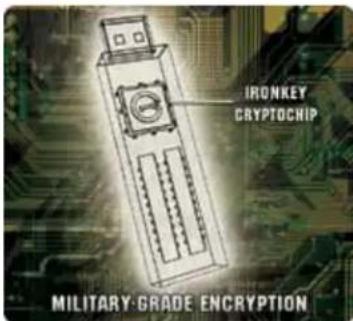
This IronKey Cryptochip is hardened against physical attacks such as power attacks and bus sniffing. It is physically impossible to tamper with its protected data or reset the password counter. If the Cryptochip detects a physical attack from a hacker, it destroys the encryption keys, making the stored encrypted files inaccessible.

The World's Most Secure Flash Drive
FAST
Deal-channel technology makes it faster than ordinary flash drives
SAFE
Ironkey Cryptochip with military-grade cryptography
RUGGED
Waterproof & tamper-proof metal casing

natural_image
3D diagram of a USB drive showing internal components and ports (no text or symbols)RELIABLE
Advanced wear-leveling algorithm for data integrity & longer lifespan
SMART
"Flush-Trash" technology for complete data erasure
INCLUDES
Read-Only Mode & self-defending anti-worm malware protection
Technical and Security Notes
We are endeavoring to be very open about the security architecture and technology that we use in designing and building the IronKey. There is no hocus-pocus or handwaving here. We use established cryptographic algorithms, we develop threat models, and we perform security analyses (internal and third party) of our systems all the way through design, development and deployment.
IRONKEY DEVICE SECURITY
Data Encryption Keys
» AES key generated by onboard Random Number Generator
» AES key generated by customer at initialization time and encrypted
» AES key never leaves the hardware and is not stored in NAND flash
Self-Destruct Data Protection
» Secure volume does not mount until password is verified in hardware
» Password try-counter implemented in tamper-resistant hardware
» Once password try-count is exceeded, all data is erased by hardware
Additional Security Features
» USB command channel encryption to protect device communications
Physically Secure
» Solid, rugged case
» Encryption keys stored in the tamper-resistant IronKey Cryptochip
» All chips are protected by epoxy-based potting compound
Exceeds military waterproof standards (MIL-STD-810F)
Device Password Protection
The device password is hashed using salted SHA-256 before being transmitted to the IronKey Secure Flash Drive over a secure and unique USB channel. It is stored in an extremely inaccessible location in the protected hardware. The hashed password is validated in hardware (there is no “getPassword” function that can retrieve the hashed password), and only after the password is validated is the AES encryption key unlocked. The password try-counter is also implemented in hardware to prevent memory rewind attacks. Typing your password incorrectly too many times initiates a patent-pending “flash-trash” self-destruct sequence, which is run in hardware rather than using software, ensuring the ultimate protection for your data.

natural_image
Technical line drawing of a USB flash drive with internal components and mounting bracket (no text or symbols)How does it work?
Product Walkthrough
The IronKey Basic consists of the following components:
» IronKey Unlocker: Securely unlocks your IronKey
» IronKey Control Panel (Windows and Mac)
» IronKey Secure Backup (Windows only)
» IronKey Virtual Keyboard (Windows only)
Standard Usage Requires:
» Windows 2000 (SP4), XP (SP2+), Vista, Mac OS X (10.4+) or Linux (2.6+) computer
» A USB 2.0 port for high-speed data transfer
INITIALIZING YOUR IRONKEY ON WINDOWS
When you open the package, you will find one IronKey Secure Flash Drive, one lanyard, and a Quick Start Guide. Below is a brief description of the standard way of setting up an IronKey:
Step Description
1 Plug the IronKey into your Windows computer's USB port. | You can initialize your IronKey on a Windows 2000, XP, or Vista computer. It can also be set up and used on Mac and Linux.To use the full speed of the IronKey, plug it into a USB 2.0 port. |
| 2 The “Initialize Your IronKey” screen appears. | The IronKey autoruns as a virtual CD-ROM.This screen might not appear if your computer does not allow devices to autorun. You can start it manually by double-clicking the IronKey icon in “My Computer” and then double-clicking the “IronKey.exe” file. |
# Step Description
3 Create a device password and a nickname for your IronKey.
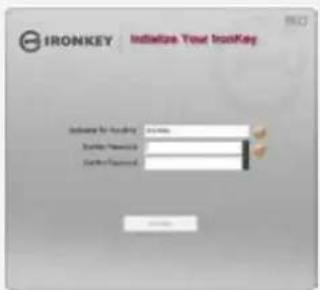
Your password is case-sensitive and must be at least 4 characters long. The threat of brute-force password attacks is removed by the IronKey's self-destruct feature.
4 The IronKey initializes. During this process, it generates the AES encryption keys, creates the file system for the secure volume, and copies secure applications and files to the secure volume.

When initialization is complete, the IronKey Control Panel appears. Your IronKey is then ready to protect your data.
USING THE IRONKEY UNLOCKER ON WINDOWS
The IronKey Unlocker allows you to securely access your files on multiple operating systems. It prompts you for your password, securely validates it, and then mounts your secure volume where all of your files are stored on the IronKey.
Here is how to unlock your IronKey on Windows 2000 (SP4), XP (SP2+), and Vista:
# Step Description
I Plug in your IronKey and unlock it with your password.
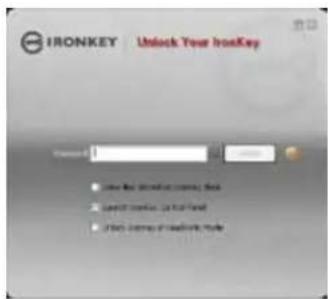
When you plug your IronKey in, the "Unlock Your IronKey" window appears.
If it does not appear, you can start it manually by double-clicking the IronKey Unlocker drive in "My Computer" and double-clicking the "IronKey.exe" file.
Entering your password correctly (which is verified in hardware) will mount your secure volume with all your secure applications and files.
Entering the wrong password too many times will permanently erase all of your data. After every three attempts, you must unplug and reinsert the IronKey.
2 Choose which action to take when you unlock it.
By selecting the corresponding checkboxes before unlocking your IronKey, you can view your secure files and launch the IronKey Control Panel.
INITIALIZING YOUR IRONKEY ON A MAC
If you prefer to use a Mac, you can initialize your IronKey on a Mac OS X computer:
| # Step Description | |
| 1 Plug the IronKey into your computer's USB port. | Your IronKey will run on Mac OS X (10.4+, Intel) computers. It can also be set up and used on Windows and Linux. To use the full speed of the IronKey, plug it into a USB 2.0 port. |
2 Double-click the IronKey drive on your desktop, and double-click the “IronKey” file. The “Initialize Your IronKey” screen appears. | The IronKey has a virtual CD-ROM.NOTE: You can install the IronKey Auto-Launch Assistant, which automatically opens the IronKey Unlocker when you plug in an IronKey. See “Preferences” in IronKey Control Panel Settings. (Mac only) |
| 3 Create your device password. Your password is case-sensitive and must be 4 or more characters long. The threat of brute-force password attacks is removed by IronKey’s self-destruct feature. | |
4 Agree to the License Agreement. The IronKey’s End-User License Agreement appears. | This can also be found online at:https://www.ironkey.com/terms |
5 The IronKey initializes. During this process, it generates the AES encryption key and creates the file system for the secure volume. | This process might take a minute. |
Your IronKey is now ready to use.
USING THE IRONKEY UNLOCKER ON A MAC
You can use the IronKey Unlocker for Mac to access your files and change your device password on a Mac. You can use the other IronKey applications on a Windows computer.
| # Step Description | ||
| 1 | Plug the IronKey into your computer's USB port. | |
| 2 | Double-click the IronKey drive on your desktop, and double-click the “IronKey” file. The “Unlock Your IronKey” screen appears. | NOTE: You can install the IronKey Auto-Launch Assistant, which automatically opens the IronKey Unlocker when you plug in an IronKey. See “Preferences” in IronKey Control Panel Settings. (Mac only) |
| 3 | Unlock it with your password. | Entering your password correctly (which is verified in hardware) will mount your secure volume with all your secure files.Entering the wrong password too many times will permanently erase all of your data. After every three attempts, you must unplug and reinsert the IronKey. |
| 4 | Choose which action to take when you unlock it. | By selecting the corresponding checkbox before unlocking your IronKey, you can view your secure files, launch the IronKey Control Panel, or unlock your IronKey in Read-Only Mode. |
INITIALIZING YOUR IRONKEY ON LINUX
If you prefer to use a Linux computer, you can initialize your IronKey on Linux:
| # Step Description | |
| 1 Plug it into your computer's USB port. | Your IronKey can be initialized on Linux 2.6+ (x86 systems only). It can also be set up and used on Windows and a Mac.To use the full speed of the IronKey, plug it into a USB 2.0 port. |
| 2 Run the ironkey program from the IronKey's linux folder. | The IronKey has a virtual CD-ROM.You must start the IronKey Unlocker manually by going to the linux folder and running ironkey. |
| 3 Agree to the license agreement. The IronKey's End-User License Agreement appears. Scroll to the end of the agreement, and press Q to exit viewing the agreement. Press Y (Yes) to agree to its terms. (It's also online at: https://www.ironkey.com/terms) | |
| 4 Create a device password and a nickname for your IronKey. | Because you can have multiple IronKeys, the nickname helps you distinguish between different IronKey devices.Your password is case-sensitive and must be at least 4 characters long . The threat of brute-force password attacks is removed by the IronKey's self-destruct feature. |
| 5 The IronKey initializes. During this process, it generates the AES encryption key, and creates the file system for the secure volume.This process might take a minute. | |
Your IronKey is now ready to use.
USING THE IRONKEY UNLOCKER ON LINUX
Use the IronKey Unlocker for Linux to access your files and change your device password on Linux, allowing you to securely transfer files from and between Windows, Mac, and Linux computers. You can use the other IronKey applications on a Windows computer.
Depending on your Linux distribution, you might need root privileges to use the program "ironkey" found in the Linux folder of the mounted virtual CD-ROM. If you have only one IronKey attached to the system, simply run the program from a command shell with no arguments (e.g. ironkey). If you have multiple IronKeys, you must specify the device name of the one you want to unlock.
NOTE: ironkey only unlocks the secure volume; it must then be mounted. Many modern Linux distributions do this automatically; if not, run the mount program from the command line, using the device name printed by ironkey.
To change the password of the IronKey named "devicename," enter:
ironkey --changepwd [devicename]
To lock the IronKey named "devicename," enter:
ironkey --lock [devicename]
To unlock the IronKey in Read-Only Mode, enter:
ironkey --read-only
To unlock the IronKey with the password "devicepassword," enter:
ironkey --password [devicepassword]
Simply unmounting the device does not automatically lock the secure volume. To lock the device, you must either unmount and physically remove (unplug) it, or else run:
ironkey --lock
Please note the following important details for using your IronKey on Linux:
I. Kernel Version must be 2.6 or higher
If you compile your own kernel, you must include the following in it:
» DeviceDrivers->SCSIDeviceSupport-><*>SCSICDROMSupport
» DeviceDrivers-><*> Support for Host-side USB
» DeviceDrivers-><*> USB device filesystem
» DeviceDrivers-><*> EHCI HCD (USB 2.0) support
» DeviceDrivers-><*> UHCI HCD (most Intel and VIA) support
» DeviceDrivers-><*> USB Mass Storage Support
The kernels that are included by default in most major distributions already have these features, so if you are using the default kernel that comes with a supported distribution you do not need to take any other action.
Also, on 64-bit linux systems the 32-bit libraries must be installed in order to run the ironkey program.
2. Mounting problems
Make sure you have permissions to mount external SCSI and USB devices
» Some distributions do not mount automatically and require the following command to be run:
mount /dev/
» The name of the mounted device varies depending on the distribution. The names of the IronKey devices can be discovered by running:
ironkey --show
3. Permissions
You must have permissions to mount external/usb/flash devices
» You must have permissions to run executables off the IronKey CD-ROM in order to launch the IronKey Unlocker
» You might need root user permissions
4. Supported distributions
Not all distributions of Linux are supported. Please visit https://support.ironkey.com/linux for the latest list of supported distributions.
5. The IronKey Unlocker for Linux only supports x86 systems at this time.
See https://support.ironkey.com/linux for more information.
ACTIVATING IRONKEY ENTERPRISE
If requested by your system administrator, users with IronKey Basic devices can activate IronKey Enterprise. Activating IronKey Enterprise helps organizations to remotely manage IronKey devices with a suite of security software and online services. See the “IronKey Enterprise User Guide” on your device for information about IronKey Enterprise features.
IMPORTANT: Only begin this process if your system administrator has asked you to activate IronKey Enterprise.
USING THE IRONKEY CONTROL PANEL (WINDOWS AND MAC)
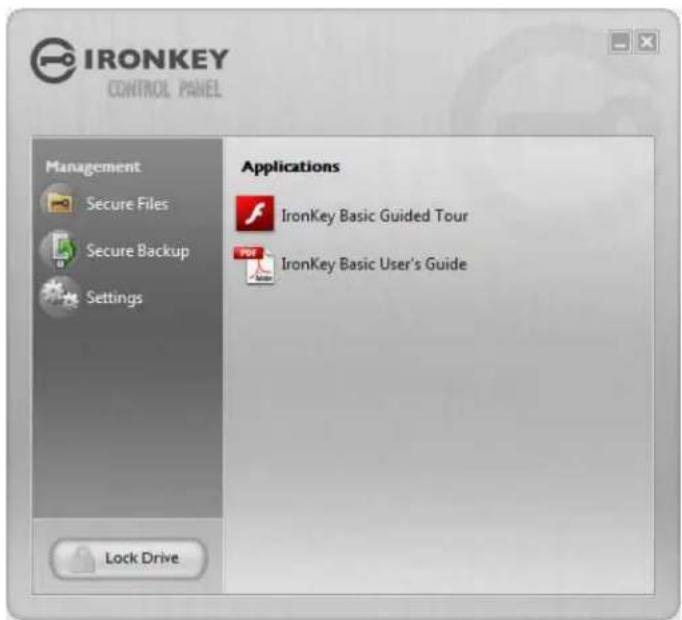
The IronKey Control Panel is a central location for:
» Accessing your secure files
» Launching Secure Backup software (Windows only)
Configuring your IronKey settings
» Changing your IronKey password
Reformatting your IronKey
» Safely locking your device
Most of the Control Panel's options are located in the "Settings" menu.
NOTE: The Windows version of the IronKey Control Panel is shown.
# Step Description
I Creating, editing, deleting secure files

When you click "Secure Files" in the IronKey Control Panel, the default browser on your computer opens directly to your secure volume.
All files on your IronKey are strongly encrypted with military-grade AES encryption. Encrypting files is as simple as moving them into the secure volume. Dragging files onto your desktop decrypts them on-the-fly in hardware. The IronKey gives you the convenience of working as you normally would with a regular flash drive, while providing strong and “always-on” security.
2 Configuring your preferences Click "Settings" to configure your preferences.
» You can set a device time-out to automatically lock your IronKey after a specified period of inactivity.
» You can reformat your secure volume.
» You can configure your device to reset after too many consecutive incorrect password attempts instead of self-destructing. This allows you to continue using your device if you forget your password.
» You can install the IronKey Auto-Launch Assistant, which automatically opens the IronKey Unlocker when you plug in an IronKey. (Mac only)
# Step Description
3 Creating a Lost and Found Message This feature allows you to create a message that appears

on the IronKey Unlocker window. In the event that you lose your IronKey, someone can return it to you if you provide your contact information.
4 Changing your device password You can change your device password, that you use to

unlock your IronKey. Changing your password on a regular basis is a good security practice. However, be especially careful to remember your IronKey password.
5 Viewing device details You can view details about your device, including model

number, serial number, software and firmware version, secure files drive, and OS. You can also click the copy button (CTRL+C) to copy device details to the clipboard for your forum posting or support request; visit the website (CTRL+W); or view legal notices (CTRL+N) and certifications (CTRL+?).
6 Adding, renaming, and removing applications to the Applications

You can right-click anywhere in the Applications List, and click to add, rename, or delete items in the list.
» Mac: Applications installed on the secure volume are automatically added to the list (default: empty).
» Items in the list are shortcuts to actual files. Managing the items in the list does not alter the actual file.
» Items are automatically sorted alphabetically.
» Any file can be added to the list, including documents, images, and batch files.
» For items that are not applications, Windows opens the item with the default program associated with that filetype.
7 Locking and unplugging the IronKey
Clicking "Lock Drive" (Windows, CTRL+L) or "Lock & Quit" (Mac) exits open IronKey applications and locks the device. It is then safe to unplug it from your computer. Ensure that you close all open applications and files before locking your IronKey to prevent data corruption.
USING THE SECURE BACKUP SOFTWARE (WINDOWS ONLY)

If your IronKey is lost or stolen, you have peace of mind knowing that your confidential information cannot be seen by anyone but you. Getting your data back is simple with IronKey's Secure Backup software, which securely restores your data to a new or existing IronKey.
Secure Backup works by saving an encrypted backup of some or all of your IronKey files to your local computer. You can also restore one or all of your files.
# Step Description
| 1 | Backing up your IronKey | You can create an encrypted backup of a single file or your entire IronKey to your local computer.Click the “Secure Backup” button in the IronKey Control Panel, select which files to back up, and choose where those files should be backed up to (destination folder). It’s that simple. |
| 2 | Restoring encrypted backups If you ever lose your IronKey, you can restore your data from an encrypted backup.Open the Secure Backup software, select the location on your local computer where the backup is located, and select which files/folders to restore. If the data is coming from a different IronKey, you will have to supply the device password for that IronKey. | |

If you are using your IronKey on an unfamiliar computer and are concerned about keylogging and screenlogging spyware, use the IronKey Virtual Keyboard, which helps protects your passwords by letting you click out letters and numbers. The underlying techniques in the IronKey Virtual Keyboard will bypass many trojans, keyloggers, and screenloggers.
The IronKey Virtual Keyboard can be launched in a couple of ways:
» In places where you enter a password into the IronKey (e.g. the IronKey Unlocker, changing your device password, initializing your device), click the Virtual Keyboard icon
» Use the keyboard shortcut CTRL+ALT+ V
The IronKey Virtual Keyboard can be used in a number of other applications when you need extra security typing out information (e.g. email, documents).
# Step Description
I Click the IronKey Virtual Keyboard icon.

The IronKey Virtual Keyboard appears. Alternatively, you can press CTRL+ALT+ V.
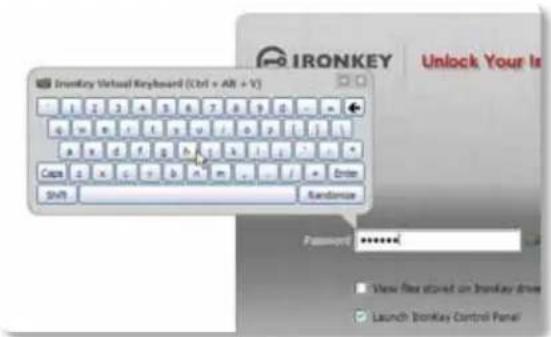
2 Click the keys to type your password. Click "Enter" when you are finished.
You can use the IronKey Virtual Keyboard in conjunction with the actual keyboard, so that you type some characters and click some characters.
3 You can optionally click the "Randomize" button to randomize where the keys are. This helps protect against screenloggers.
When you click a key in the Virtual Keyboard, all of the keys go blank. This feature prevents screenloggers from capturing what you clicked.


If you do not want to use this feature, you can disable it in the options menu next to the close button.
In the options menu, you can also configure the Virtual Keyboard to automatically launch when it encounters password fields.
USING YOUR IRONKEY IN READ-ONLY MODE (WINDOWS, MAC, LINUX)
You can unlock your IronKey in a read-only state such that files on your IronKey cannot be edited. An example of when this is useful is when you want to access a file on your IronKey while using an untrusted or unknown computer. If you unlock your IronKey in Read-Only Mode, you need not fear that malware on that machine will infect your IronKey or modify your files.
When you unlock your IronKey in Read-Only Mode, you will remain in Read-Only Mode until you lock your IronKey.
Note that some features are not available in Read-Only Mode because they require modifying files on your IronKey. Examples of unavailable features include reformatting, updating and restoring applications and files to your IronKey, and using the Applications List.
On Windows and Mac OS X Computers:
# Step Description
When unlocking your IronKey, select the "Unlock IronKey in Read-Only Mode" checkbox.

2 You will see a message in the IronKey Control Panel that confirms you are in Read-Only Mode.

On Linux Computers:
# Step Description
I To unlock your IronKey in Read-Only Mode on Linux, enter:
ironkey --read-only
2 To return to a normal state where you can edit files again, lock your IronKey:
ironkey --lock
Product Specifications
For details about your device, see "About IronKey" in IronKey Control Panel Settings.
CAPACITY\*
Up to 32GB, depending on the model
DIMENSIONS
75mm × 19mm × 9mm
WEIGHT
0.8 oz
WATERPROOF
MIL-STD-810F
Hashing: 256-bit SHA
PKI: 2048-bit RSA
FIPS CERTIFICATIONS
See www.ironkey.com for details.
HARDWARE
USB 2.0 (High-Speed) port recommended, USB 1.1
OS COMPATIBILITY
Windows 2000 (SP4), XP (SP2+), Vista IronKey Unlocker for Linux (2.6+, x86) IronKey Unlocker for Mac (10.4+, Intel)
Designed and Assembled in the U.S.A.
IronKey devices do not require any software or drivers to be installed.
*Advertised capacity is approximate and not all of it will be available for storage. Some space is required for onboard software.
What's next?

natural_image
Technical line drawing of a USB flash drive with two slots and an integrated key (no text or symbols)In many ways, that's up to you. We are focused on building not only the world's most secure flash drive, but also enabling technologies that are simple and enjoyable to use. Your feedback really matters to us, and we carefully review all feature requests and customer feedback for prioritization of our next great features and products.
Have a cool idea or suggestion? Please let us know. You can open a thread on the IronKey Forum (forum.ironkey.com) or submit feedback to feedback@ironkey.com. Let us know if you would like to be a beta tester of new functionality.
Where can I go for more info?
We are endeavoring to be very open about the security architecture and technology that we use in designing and building the IronKey devices and online services. A great deal of information can be found online on our websites:
www.ironkey.com General information
learn.ironkey.com Technical information, whitepapers, and FAQs
support.ironkey.com Customer support information and video tutorials

Who is the IronKey Team?
The IronKey Team consists of security, fraud, and industry experts with many years of background at companies such as Visa, RSA Security, PayPal, Authenex, Nokia, Cisco, Lexar, Netscape, Tumbleweed, Valicert, Apple, and the Department of Homeland Security. IronKey CEO Dave Jevans is also the chairman of the Anti-Phishing Working Group (www.antiphishing.org).
We have spent years and millions of dollars of research and development to create the IronKey. Simple, accessible, and of great value, now you can carry the world's most secure flash drive to protect your digital life.
Contact Information
Product Feedback
feedback@ironkey.com
Feature Requests
featurerequest@ironkey.com
IronKey Online
https://my.ironkey.com
https://learn.ironkey.com
https://support.ironkey.com
https://forum.ironkey.com
https://store.ironkey.com
IronKey Support
https://support.ironkey.com
support@ironkey.com
5150 El Camino Real, Suite C31
Los Altos, CA 94022 USA
Monday - Friday, 6am - 5pm PST

natural_image
Close-up of a hand holding a metallic USB flash drive labeled 'IRONKEY' (no additional text or symbols visible)Note: IronKey is not liable for technical or editorial errors and/or omissions contained herein; nor for incidental or consequential damages resulting from the furnishing or use of this material. The information provided herein is subject to change without notice.
The information contained in this document represents the current view of IronKey on the issue discussed as of the date of publication. IronKey cannot guarantee the accuracy of any information presented after the date of publication. This document is for information purposes only. IronKey makes no warranties, expressed or implied, in this document. IronKey and the IronKey logo are trademarks of IronKey, Inc. in the United States and other countries. All other trademarks are the properties of their respective owners. © 2009 IronKey, Inc. All rights reserved. IK0010694



- CONTENTS
- What is it? 3
- How does it work? 7
- What's next? 20
- What is it?
- Meet the IronKey
- Core Features
- Hardware-Encrypted Flash Drive
- Self-Destruct Sequence
- Anti-Malware Autorun Protection
- Portable Cross-Platform Data Access
- Simple Device Management
- Secure Local Backup and Data Recovery
- Waterproof and Tamper-Resistant
- Section 508 compliance
- Device Diagrams
- The World's Most Secure Flash Drive
- FAST
- SAFE
- RUGGED
- RELIABLE
- SMART
- INCLUDES
- Technical and Security Notes
- IRONKEY DEVICE SECURITY
- Data Encryption Keys
- Self-Destruct Data Protection
- Additional Security Features
- Physically Secure
- Device Password Protection
- How does it work?
- Product Walkthrough
- Standard Usage Requires:
- INITIALIZING YOUR IRONKEY ON WINDOWS
- Step Description
- # Step Description
- USING THE IRONKEY UNLOCKER ON WINDOWS
- INITIALIZING YOUR IRONKEY ON A MAC
- USING THE IRONKEY UNLOCKER ON A MAC
- INITIALIZING YOUR IRONKEY ON LINUX
- USING THE IRONKEY UNLOCKER ON LINUX
- Please note the following important details for using your IronKey on Linux:
- Kernel Version must be 2.6 or higher
- Mounting problems
- Permissions
- Supported distributions
- The IronKey Unlocker for Linux only supports x86 systems at this time.
- ACTIVATING IRONKEY ENTERPRISE
- USING THE IRONKEY CONTROL PANEL (WINDOWS AND MAC)
- USING THE SECURE BACKUP SOFTWARE (WINDOWS ONLY)
- USING YOUR IRONKEY IN READ-ONLY MODE (WINDOWS, MAC, LINUX)
- On Windows and Mac OS X Computers:
- On Linux Computers:
- Product Specifications
- CAPACITY\*
- DIMENSIONS
- WEIGHT
- WATERPROOF
- FIPS CERTIFICATIONS
- HARDWARE
- OS COMPATIBILITY
- What's next?
- Where can I go for more info?
- Who is the IronKey Team?
- Contact Information
Brand : Ironkey
Model : Basic S250
Category : USB Drive