Vector V6 - Detection radar Beltronics - Free user manual and instructions
Find the device manual for free Vector V6 Beltronics in PDF.


| Brand | Beltronics |
| Model | Vector V6 |
| Product Type | Radar Detector |
| Dimensions | 4.5 x 3.0 x 1.0 inches (11.4 x 7.6 x 2.5 cm) |
| Weight | 5.0 oz (142 g) |
| Power Source | 12V DC from cigarette lighter adapter |
| Display Type | LED with numeric and text alerts |
| Detection Bands | X, K, Ka, Ku, Laser |
| Audio Alerts | Voice alerts with adjustable volume |
| Modes | City, Highway, Auto Sensitivity |
| False Alert Filtering | VG-2 undetectable, POP detection |
| Laser Detection | Yes, with optical sensor |
| Mute Function | Quick mute button |
| Auto Dim | Automatic brightness adjustment based on ambient light |
| Mounting | Windshield suction cup mount, adhesive dashboard mount |
| Cord Length | Straight cord, approximately 4 ft (1.2 m) |
| Maintenance | Clean with a soft, damp cloth; avoid solvents |
| Safety Certifications | FCC compliant |
| Spare Parts | Replacement cords, mounts, and suction cups available separately |
| Repairability | Limited DIY; professional repair recommended for internal issues |
| Warranty | 1 year limited warranty |
| User Manual | Free download in PDF from Beltronics website |
Frequently Asked Questions - Vector V6 Beltronics
User questions about Vector V6 Beltronics
0 question about this device. Answer the ones you know or ask your own.
Ask a new question about this device
Download the instructions for your Detection radar in PDF format for free! Find your manual Vector V6 - Beltronics and take your electronic device back in hand. On this page are published all the documents necessary for the use of your device. Vector V6 by Beltronics.
USER MANUAL Vector V6 Beltronics
5442 West Chester Road
West Chester OH
45069 USA
USA 800-341-2288
www.beltronics.com
©2010 Beltronics
Designed and Manufactured In Canada
Features, specifications and prices subject to change without notice.
Model: Vector V6
BELTRONICS®
PERFORMANCE RULES.™
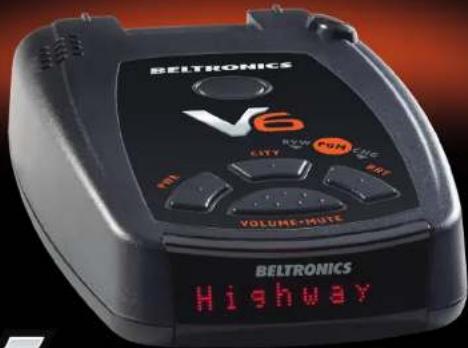

RADAR AND LASER DETECTOR
u1aun
BEIJKOMICZ
Owner's Manual
Congratulations Quick Reference Card
The Vector V6 is the most advanced radar, laser and safety detector ever designed by Beltronics.
The Vector V6 includes full X, K, SuperWide Ka, and Safety Warning System radar capability, front and rear laser detection, varactor-tuned (VTO) microwave receiver, digital signal processing (DSP) for superior range and reduced false alarms, our patented Mute and AutoMute, audible and visual band alerts, and all the performance you'd expect from Beltronics. In addition, the Vector V6 introduces the following revolutionary features:
- Varactor-tuned receiver provides long-range protection against all radar threats
- New easy-to-use Programming lets you customize up to 6 features
- Ultra-bright text-display provides easy to read information from any angle
• Detects and decodes Safety Warning System messages
If you've used a radar detector before, are view of the Quick Reference Guide on pages 4 and 5, and the Programming information on pages 12 and 13 will briefly explain the new features.
If this is your first detector, please read the manual in detail to get the most out of your V6's outstanding performance and innovative features.
Please drive safely.
FCC Note:
Modifications not expressly approved by the manufacturer could void the user's FCC granted authority to operate the equipment.
▼ Remove card along perforations ▼
Beltronics V6 Quick Reference Card
There are 6 user selectable options so you can customize your V6 for your own preferences.
The buttons labeled CITY and BRT are also used to enter the Program Mode, REVIEW your current program settings, and to CHANGE any settings as desired. The words PGM, RYW and CHG are located on the top of the detector, and are highlighted in graphics
How to use Programming
1 To enter Program Mode, press and hold both CITY and BRT buttons down for 2 seconds. The unit will beep twice, and will display the word "Program".
2 Then press the RVW button to review the current settings. You can either tap the button to change from item to item, or hold the button to scroll through the items.
3 Press the CHG button to change any setting. You can either up the button to change from setting to setting, or hold the button to scroll through all the options.
4 To leave Program Mode, simply wait 8 seconds without pressing any button. The unit will display Complete, beep, and return to normal operation.
Factory Default Settings
To reset your V6 to its original factory settings press and hold the "CRI" and "HRT" buttons while turning the power-on. The V6's display will provide reset message, accompanied by an audible alert acknowledging the reset.
An example
Here is how you would turn the V6's Automobile feature off.
1. Enter the Program Mode by holding both the CITY and IRT buttons down for 2 seconds. They will beep notice and display Program
2 Then hold the RVW button down. Vo will scroll through the categories, starting with Display(Filot), then Voice(Voice), then Power-On sequenated(Paint), and then AutoMate(Grade).
3. Release the RVW button when the V6 shows the AutoMute item. Since the factory setting is for AutoMate to be on the V6 will display all use OK.
If you accidentally don't release the Review button in time, and the V6 goes in the next category, hold the SVW button down again, and after the V6 scroll through all categories, it will begin again at the top of the list.
4. Press the CHG button to change from a_0 to b_0 to c_0 to d_0 OFF.
5. To complete the Programming, simply wait 8 seconds without pressing any button. The V6 will display Complete, beep 4 times, and return to normal operation.
Preferences Details ▶
Quick Reference Card
▼ Remove cord along perforations ▼
Beltronics V6 Quick Reference Card
Press the RVW button to go from one category to the next Press the CHG button to change your setting within a category
PILOT Pilot HWY * Full word: Highway or City (Power on indication) PILOT H Letter: H or C
VOICE Voice ON *Voice alerts on Voice OFF Voice alerts off
POWER-ON SEQUENCE Pair-On STD *Standard power-on sequence Pair-On EST Fast power-on sequence
AUTOMUTE allute ON * AutoMute on allute OFF AutoMute off
CITY MODE SENSITIVITY City STD * Standard City mode sensitivity Low X band sensitivity in City Mode
BANDS Bands DFT *Factory default settings Bands MOD Factory default settings modified
Turn bands "ON" or "OFF" by pressing VOLUME·MUTE button
POP ON or OFF (default is off) SWS ON or OFF (default is off) TSR ON or OFF (default is off)
"Factory Default Settings
Table of Contents
Quick Reference Guide 4-5
Installation 6-7
• Power Connection 6
- Mounting Location 6
- Windshield Mount 7
Controls and Features 8-10
• Power and Volume Control 8
• Power-on indication 8
• Voice 8
• AutoMute 8
• Mute 8
• Highway / City Button 9
• Brightness and Dark Mode 9
• Audible Alerts 10
• Power Connector 10
• Signal Strength Meter 10
Programming 11-14
• How to use Programming 11
• Example of Programming 11
• Overview of Programming 12
• Details of Programming 13-14
Technical Details 15-21
• Specifications 15
• Interpreting Alerts 16-17
• How Radar Works 18
• How "POP" Works 18
• How Laser Works 19
• TSR Signal Ranking Software 20
• How Safety Radar Works 2021
Service 22-28
• Troubleshooting 22-23
• Service 24
• Warranty and Accessories 25
• Registration 27-28
Quick Reference Guide
To begin using your V6, just follow these simple steps
1 Plug the small end of the power cord into the side jack of the detector, and plug the large end of the power cord into your car's lighter socket.
2 Mount your V6 on the windshield using the supplied windshield mount.
3 Press the PWR button, located top left, to turn the V 6 on.
4 Press and hold the Volume/Mute button to adjust the volume.
Please read the manual to fully understand your V6's operation and features.
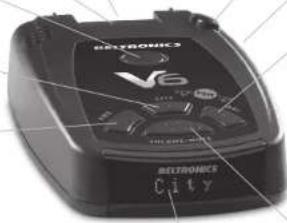
QuickMount Slot
Insert the V6's adjustable Windshield mount into this slot. Page 7
QuickMount Button
Press the button, and slide the Windshield mount into one of its four locking positions. Page 7
City Button
Switches between City and Highway settings. In general, were recommend Highway. Page 9
Power
Press the PWR button to turn the V6 on or off.
AutoMute
Your V6's patented AutoMute automatically reduces the volume level of the audio alert after a brief period. If you prefer, you can turn AutoMute off. Page 8
Programming
Your V6 is ready to go, just plug it in and turn it on. But you can also easily change 6 features for your preferences. Page 2-14
Radar Antenna and Laser Lens
The rear panel of your Ⓧ should have a clear view of the road ahead. For best performance, do not mount the Ⓧ directly behind windshield wipers or tinted areas. Page 6
natural_image
Exterior view of a black V6 electronic device with visible branding and control buttons (no readable text beyond branding)Alphanumeric Matrix Display
Your V6's display will show Highway or City as its power-on indication. If you prefer, you can choose other power-on indications. Page 12-14 During an alert, the display will indicate radar band, and a precise bar graph of signal strength. Page 10 NOTE: In the Dark Mode the display will not light during an alert. Page 9
Rear Laser Port
Receives laser signals from behind the vehicle.
Earphone Jack
Accepts standard mono 3.5mm carphone.
Brightness Button
Press to adjust display brightness. There are three brightness settings, plus Dark Mode. In the Dark Mode, the power-on indication will be changed to a "HDor "CD" (indicating Highway Dark or City Dark). In the Dark Mode, the W's meter will not display during an alert, only the audio will alert you Page 9
Power Jack
Plug the power cord into this connector. Page 6
Volume and Mute Button
Press and hold the Volume/Mute button to adjust the alert volume level. Page 8 Briefly press this button to silence the audio for a specific alert. (The audio will alert you to the next encounter.) Page 8
Installation
Power Connection
To power your V6, plug the small end of the power cord, (telephone-type connector) into the modular jack on the V6's right side, and plug the lighter plug adapter into your vehicle's lighter socket or accessory socket.
Your V6 operates on 12 volts DC negative ground only. The lighter plug provided is a standard size and will work in most vehicles. However, some vehicles may require the optional European sleeve to ensure a snug fit. If so, simply call our service department to order one. This sleeve slides over the lighter plug. Of course, your lighter socket must be clean and properly connected for proper operation.
NOTE: Depending on your vehicle, the lighter socket power may either be continuously on, or it may be switched on and off with your ignition switch.
Optional power cords
See the Accessories section for details on our optional coiled SmartPlug or Direct-wire power cords. Page 25
Mounting Location
WARNING: BELTRONICS cannot anticipate the many ways the V6 can be mounted. It is important that you mount your V6 where it will not impair your view nor present a hazard in case of an accident.
Where to mount your V6
For optimum detection performance, we recommend the following:
- Using the QuickMount bracket, mount your V6 level, and high enough on your front windshield to provide a clear view of the road from the front and rear.
- Mount the V6 away from windshield wipers, other solid objects, and heavily tinted areas that might obstruct the radar antenna or laser lens.
Windshield QuickMount
The V6's QuickMount bracket is designed for unobtrusive and hassle-free mounting.
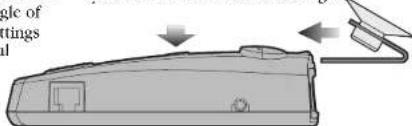
1 Depress the QuickMount button on the top of the V6 (by the word BELTRONICS) and slide the QuickMount bracket into the slot until it is locked into the position which best fits the angle of your windshield (there are four settings available). For extremely horizontal or extremely sloped windshields, the QuickMount bracket can be bent.
To ensure that the suction cups adhere to the windshield firmly, be sure to keep both your windshield and the suction cups clean.
2 To adjust the V6 on your windshield, use the QuickMount adjustment button located on the top of the V6, and slide the V6 forward or backward to obtain a level horizontal position.
When installed and adjusted properly, the back top edge of the V6 should rest solidly against your windshield.
Caulion!
A few vehicles (including some Porsches) have windshields with a soft anti-lacerative coating on the inside surface. Use of suction cups will permanently mar this coating. Consult your dealership or the vehicle owner's manual to determine if your windshield has this coating.
User's Tip
You can leave the QuickMount bracket in place on your windshield, and easily remove the V6 by pressing the adjustment button and sliding the V6 off the mount. Again, be sure to position the bracket where it won't present a hazard in the event of an accident. Additional mounts are available.
Controls and Features
Power
To turn your V6 on or off, press the PWR button located on the top. When you turn your V6 on, it goes through a sequence of alerts.
If you prefer, you may program your V6 for a shorter power-on sequence. See the Programming section for details.
Volume
Press and hold the Volume/Mute button located on the top case to adjust the V6's alert volume level. The audio will ramp up and down, accompanied by a bar-graph on the display. Once you've reached your preferred audio level, simply release the button.
Power-on indication
After the V6's start-up sequence is complete, the alphanumeric display will show Highway or City to indicate which sensitivity mode is selected.
If you prefer, you can select alternate power-on displays. See the Programming section for details.
Voice Alerts
The V6 provides digital voice announcements of radar and laser bands detected. If Safety Radar (SWS) is turned on, a safety radar message will also be announced. See the Programming section for details.
If you prefer, you can turn Voice Alerts off. See Programming section for details.
AutoMute
Your V6 has our patented AutoMute feature. After the V6 alerts you to a radar encounter at the volume you have selected, the AutoMute feature will automatically reduce the volume to a lower level. This keeps you informed without the annoyance of a continuous full-volume alert.
If you prefer, you can turn the AutoMute feature off. See the Programming section for details.
Mute
The Mute button, located on the V6's top case, allows you to silence the audio alert during a radar encounter.
To mute the audio for a single specific signal, briefly press the Mute button. After that radar encounter has passed, the mute will automatically reset and the audio will alert you to the next encounter.
Highway / City Button
The City button selects the V6's sensitivity mode. We recommend the Highway mode for most driving.
When driving in urban areas where annoying X-band intrusion alarms and door openers are common, City mode can be engaged to lower X-band sensitivity and reduce X-band alerts. Full sensitivity is maintained on all other bands. See the Programming section for details.
Brightness
The V6's BRT button selects the brightness of your V6's display. There are four settings: Maximum, Medium, Minimum, and Dark. Press the BRT button to select your preferred brightness.
Dark Mode
When you select the Dark mode with the BRT switch, your V6 changes to a very inconspicuous power-on indication: a very Dim HD or CD. (In this display, the H or C indicates Highway or City, and the D indicates Dark.)
When the V6 is in the Dark mode, the display will not show visual alerts when V6 detects signals. Only the audible alert will tell you of detected signals.
Controls and Features
Audible Alerts
For Radar signals:
Your V6 uses a Geiger-counter-like sound to indicate the signal strength and type of radar signal being encountered.
When you encounter radar, a distinct audible alert will sound and occur faster as the signal gets stronger. This allows you to judge the distance from the signal source without taking your eyes from the road. Each band has a distinct tone for easy identification.
X-band = chirping
K-band = buzzing
Ka-band = double-chirp
POP = full double-chirp
For Laser and POP signals:
Since laser and POP signals (if turned on) are a possible threat no matter how weak, the V6 alerts you to these bands at full strength.
For Safety signals:
Your V6 will alert you to these signals with a double-beep tone, and a corresponding text message. A complete listing of the text messages is on page 21.
Power Connector
The V6's power jack uses a telephone-type connector. This 4-conductor connector only works with the included power cord, optional direct-wire, or SmartPlug cord. For more information or to order, call us toll-free at 1-800-341-2288.
Signal Strength Meter
Your V6's alphanumeric display consists of 280 individual LEDs, to provide an intuitive ultra-bright display of signal strength and text messages.
The V6's standard bar-graph signal strength meter only displays information on a single radar signal. If there are multiple signals present, the V6's internal computer determines which is the most important threat to show on the bar-graph meter.
When your V6 detects radar, it displays the band (X, K, or Ka), and a precise bar-graph of the signal strength. When your V6 detects a laser signal, the display will show "LASER."
NOTE: If you are operating the V6 in the Dark mode, the display will not light when a signal is detected, only the audio will be heard.
Programming
There are 6 user-selectable options so you can customize your V6 for your own preferences. The buttons labeled CITY and BRT are also used to enter the Program Mode, REVIEW your current program settings, and to CHANGE any settings as desired. The words PGM, RVW, and CHG are located on the top of the detector, and are highlighted in colored graphics. Pages 13-14 explain each option in more detail.
How to use Programming
1 To enter Program Mode, press and hold both the CITY and BRT buttons down for 2 seconds. The unit will beep twice, and will display the word Program.
2 Then press the RVW button to review the current settings. You can either tap the button to change from item to item, or hold the button to scroll through the items.
3 Press the CHG button to change any setting. You can either tap the button to change from setting to setting, or hold the button to scroll through all the options.
4 To leave the Program Mode, simply wait 8 seconds without pressing any button, or press the PWR button. The unit will display Complete, beep 4 times, and return to normal operation.
An example
Here is how you would turn your V6's AutoMute feature off.
1 Enter the Program Mode by holding both the CITY and BRT buttons down for 2 seconds. The V6 will beep twice and display Program.
2 Then hold the RVW button down. The V6 will scroll through the categories, starting with Pilot(Pilot), Voice (Voice), Poweron sequence (PwrOn), and then AutoMute (aMub).
3 Release the RVW button when the V6 shows the AutoMute item. Since the factory setting is for AutoMute to be on, the V6 will display amute OH. If you accidentally don't release the RVW button in time, and the V6 goes to the next category, hold the RVW button down again, and after your V6 scrolls through all categories, it will begin again at the top of the list.
4 Press the CHG button to change from aMute ON to aMute OFF
5 To complete the Programming, simply wait 8 seconds without pressing any button, or press the PWR button. The V6 will display Complete, beep 4 times, and return to normal operation.
Overview of Programming Details of Programming
| Press the REVIEW button to go from one category to the next | Press the CHANGE button to change your setting within a category | ||
| PILOT(Power-on indication) | Pilot HWYPilot H | * Full word: Highway or CityLetter: H or C | |
| VOICE | Voice ONVoice OFF | * Voice alerts onVoice alerts off | |
| POWER-ON SEQUENCE | PurOn STDPurOn FST | * Standard power-on sequenceFast power-on sequence | |
| AUTOMUTE | aMute ONaMute OFF | * AutoMute onAutoMute off | |
| CITY MODE SENSITIVITY | City STDCity LoX | * Standard City mode sensitivityLow X band sensitivity in City Mode | |
| BANDS | Bands DFTBands MOD | * Factory default settingsFactory default settings modified | |
| * Factory Default SettingsTo reset your V6 to its original factory settings, press and hold the "CITY" and "BRT" buttons while turning the power on. The V6's display will provide a Reset message, accompanied by an audible alert, acknowledging the reset. | POP ON or OFF (default is off)SWS ON or OFF (default is off)TSR ON or OFF (default is off)12 13 | ||
Pilot (Power-on indication)
NOTE: When you are using the Dark mode, the display will only show HD or CD (Highway-Dark or City-Dark).
Pilot HWY (Full description)
In this setting, your V6 will display
"Highway" or "City" as its power-on indication. (factory default)
Pilot H (Letter)
In this setting, your V6 will display "H" for Highway and "C" for City.
Voice
Voice On (Voice announcements on) In this setting, all radar, laser, and SWS messages (if programmed) will be announced using a digital voice.
Voice Off (Voice announcements off) In this setting, only the distinct audio tone will be heard when a radar, Laser, or SWS message is detected.
Power-on Sequence
PurOnSTD (Standard)
In this setting, each time you turn on your V6, it will display "BEL V6," "Laser," "Ka-band," "K-band," "X-band," "Safety," followed by a brief X-band alert. (factory default)
If any bands have been changed from the factory default settings, a double X-band tone and corresponding message (i.e. "SWS ON"), will alert you that one or more bands have been changed.
PurOnFST (Fast power-on)
In this setting, your V6 will provide a single X-band tone. If any bands have been changed from the factory default settings, a double X-band tone and corresponding message (i.e. "SWS ON"), will alert you that one or more bands have been changed.
AutoMute
aMute ON (AutoMute on)
In this setting, your V6's audio alerts will initially be at the volume you set, but after a few seconds, the V6 will automatically reduce the volume level, to keep you informed, but not annoyed. (factory default)
aMuteOFF (AutoMute off)
With AutoMute off, your V6's audio alerts will remain at the volume you set for the duration of the radar encounter.
Details of Programming Technical Details
City Mode Sensitivity
City STD (Standard)
In this setting, when you put your V6 in the City mode, X-band sensitivity is significantly reduced, to reduce annoyance from X-band intrusion alarms and motion sensors. (factory default)
City LoX (Low X band sensitivity)
In this setting, when you put your V6 in the City mode, X-band sensitivity is reduced more than the standard setting. This will reduce X-band alarms from other sources even further, but also significantly reduces range to X-band traffic radar.
Bands
BandsDFT
In this setting, all North American radar and laser frequencies are monitored. This is the factory setting and it is recommended that you use your V6 in this mode.
BandsMOD
In this setting, your V6 will warn you with an audible alert, and associated text message stating which band has changed from the original factory setting (i.e. "SWS ON"). This warning is displayed during the start up sequence (standard or fast).
Features and Specifications
Operating Bands
• X-band 10.525 GHz ±25 MHz
• K-band 24.150 GHz ±100 MHz
• Ka-band 34.700 GHz ±1300 MHz
- Laser 904nm, 33 MHz bandwidth
Radar Receiver / Detector Type
• Superheterodyne, VTO
• Scanning Frequency Discriminator
• Digital Signal Processing (DSP)
Laser Detection
• Quantum Limited Video Receiver
• Multiple Laser Sensor Diodes
Display Type
• 280 LED Alphanumeric
- Bar Graph
• 3 Levels of Brightness, plus Dark Mode
Power Requirement
• 12VDC, Negative Ground
• Power cord (included)
Programmable Features
• Power-On Indication
• Voice Alerts
• Power-On Sequence
• AutoMute
• City Mode Sensitivity
- Bands
Sensitivity Control
• Highway, and City
Auto Calibration Circuitry
VG2 Immunity
Dimensions (Inches)
• 1.25 H x 2.75 W x 4.75 L
Patented Technology
Product is covered by one or more of the
following U.S. patents
7,576,679 7,397,416 7,388,537 7,098,844
6,836,238 6,779,765 6,693,578 6,670,905
6,614,385 6,587,068 6,400,305 6,249,218
6,127,962 6,069,580 5,668,554 5,600,132
5,587,916 5,559,508 5,446,923 5,402,087
5,365,055 5,347,120 5,305,007 5,206,500
5,164,729 5,134,406 5,111,207 5,079,553
5,049,885 5,049,884 4,961,074 4,954,828
4,952,937 4,952,936 4,939,521 4,896,855
4.887.753 4.862.175 4.750.215 4.686.499
4,631.542 4,630.054 4,625.210 4,613.989
4,604,529 4,583,057 4,581,769 4,571,593
4.313.216 D314.178 D313.365 D310.167
D308.837 D296.771 D288.418 D253.752
Canadian patents:
2,381,585 2,337,077 2,330,964 1,295,715
1,295,714 1,187,602 1,187,586
European patents:
1,145,030 1,090,456
Other Patents Pending.
Technical Details
Interpreting Alerts
Although the V6 has a comprehensive warning system and this handbook is as complete as we can make it, only experience will teach you what to expect from your V6 and how to interpret what it tells you. The specific type of radar being
used, the type of transmission (continuous or instant-on) and the location of the radar source affect the radar alerts you receive. The following examples will give you an introduction to understanding the your V6's warning system for radar, laser and safety alerts.
| Alert | Explanation |
| The V6 begins to sound slowly, then the rate of alert increases. The Signal Meter ramps accordingly. | You are approaching a continuous radar source aimed in your direction. |
| The V6 emits short alerts for a few seconds and then falls silent only to briefly alert and fall silent again. | An instant-on radar source is being used ahead of you and out of your view. |
| The V6 suddenly sounds a continuous tone for the appropriate band received. All segments in the Signal Strength Meter are lit. | An instant-on radar source or laser source is being used nearby. This kind of alert requires immediate attention! |
| A brief laser alert. | Laser is being used in the area. Because laser is inherently difficult to detect, any laser alert may indicate a source very close by. |
| The V6 receives weak signals. These signals may be a little stronger as you pass large, roadside objects. The signals increase in frequency. | A moving patrol car with continuous radar is overtaking you from behind. Because these signals are reflected (reflections are increased by large objects), they may or may not eventually melt into a solid point even when the patrol car is directly behind you. |
| Alert | Explanation |
| The V6 alerts slowly for a while and then abruptly jumps to a strong alert. | You are approaching a radar unit concealed by a hill or an obstructed curve. |
| The V6 alerts intermittently. Rate and strength of alerts may be inconsistent or vary wildly. | A patrol car is traveling in front of you with a radar source aimed forward. Because signals are sometimes reflected off of large objects and sometimes not, the alerts may seem inconsistent. |
| The V6 alerts intermittently. Rate and strength of signal increases with each alert. | A patrol car is approaching from the other direction, sampling traffic with instant-on radar. Such alerts should be taken seriously. |
| The V6 gives an X-band, or K-band alert intermittently. | You are driving through an area populated with radar motion sensors (door openers, burglar alarms, etc.). Since these transmitters are usually contained inside buildings or aimed toward OR away from you, they are typically not as strong or lasting as a real radar encounter. |
| CAUTION: Since the characteristics of these alerts may be similar to some of the preceding examples, overconfidence in an unfamiliar area can be dangerous. Likewise, if an alert in a commonly traveled area is suddenly stronger or on a different band than usual, speed radar may be set up nearby. |
Technical Details
How Radar Works
Traffic radar, which consists of microwaves, travels in straight lines and is easily reflected by objects such as cars, trucks, even guardrails and overpasses. Radar works by directing its microwave beam down the road. As your vehicle travels into range, the microwave beam bounces off your car, and the radar antenna looks for the reflections. Using the Doppler Principle, the radar equipment then calculates your speed by comparing the frequency of the reflection of your car to the original frequency of the beam sent out.
Traffic radar has limitations, the most significant of these being that it typically can monitor only one target at a time. If there is more than one vehicle within range, it is up to the radar operator to decide which target is producing the strongest reflection. Since the strength of the reflection is affected by both the size of the vehicle and its proximity to the antenna, it is difficult for the radar operator to determine if the signal is from a sports car nearby or a semi-truck several hundred feet away.
Radar range also depends on the power of the radar equipment itself. The strength of the radar unit's beam diminishes with distance. The farther the radar has to travel, the less energy it has for speed detection.
Because intrusion alarms and motion sensors often operate on the same frequency as radar, your V6 will occasionally receive non-police radar signals. Since these transmitters are usually contained inside of a building, or aimed toward the ground, they will generally produce much weaker readings than will a true radar encounter. As you become familiar with the sources of these pseudo alarms in your daily driving, they will serve as confirmation that your V6's radar detection abilities are fully operational.
How "POP" Works
"POP" mode is a relatively new feature for radar gun manufacturers. It works by transmitting an extremely short burst, within the allocated band, to identify speeding vehicles in traffic. Once the target is identified, or "POPPED," the gun is then turned to its normal operating mode to provide a vehicle tracking history, (required by law).
How Laser (Lidar) Works
Laser speed detection is actually LIDAR (Light Detection and Ranging). LIDAR guns project a beam of invisible infrared light. The signal is a series of very short infrared light energy pulses, which move, in a straight line, reflecting off your car and returning to the gun. LIDAR uses these light pulses to measure the distance to a vehicle. Speed is then calculated by measuring how quickly these pulses are reflected given the known speed of light.
LIDAR (or lascr) is a newer technology and is not as widespread as conventional radar, therefore, you may not encounter laser on a daily basis. And unlike radar detection, laser detection is not prone to false alarms. Because LIDAR transmits a much narrower beam than does radar, it is much more accurate in its ability to distinguish between targets and is also more difficult to detect. AS A RESULT, EVEN THE BRIEFEST LASER ALERT SHOULD BE TAKEN SERIOUSLY.
There are limitations to LIDAR equipment. LIDAR is much more sensitive to weather conditions than RADAR, and a LIDAR gun's range will be decreased by anything affecting visibility such as rain, fog, or smoke. A LIDAR gun cannot operate through glass and it must be stationary in order to get an accurate reading. Because LIDAR must have a clear line of sight and is subject to cosine error (an inaccuracy, which increases as the angle between the gun and the vehicle, increases) police typically use LIDAR equipment parallel to the road or from an overpass. LIDAR can be used day or night.
Technical Details
TSR Signal Ranking Software
Your radar detector includes a new optional boost in anti-falsing software to eliminate excessive alerts from erroneous X and K-band sources. One example of this is traffic flow monitoring systems. These systems, which are becoming more widely used in several countries, generate K-band signals to measure the flow of traffic on a given road. Unfortunately most detectors see this as a real threat and will alert you to it unnecessarily. Our new proprietary software (TSR), intelligently sorts, ranks and rejects this type of false alarm automatically. The result is ultimate protection without excessive false alarms.
The TSR software is set up as an option and can be activated through the Programming section. We suggest you in TSR on if you are experiencing extreme false alerts in your area. If not, your detector is ready to start protecting you right out of the box.
If you have any questions about this new feature, please give us a call or visit our website for more details.
How Safety Radar Works
Safety Warning System, or SWS, uses a modified K-band radar signal. The SWS safety radar system has 64 possible messages (60 currently allocated). The SWS messages your V6 can display are listed on the facing page.
From the factory, your V6 is programmed with SWS decoding OFF. If SWS is used in your area, your V6 will display the safety messages associated with the signal. If you wish to detect this system, use the Programming feature to turn the V6's SWS decoding ON.
NOTE: Some of the safety messages have been condensed, so that each message can be displayed on one or two screens on the V6's eight-character display.
Since Safety radar technology is relatively new, and the number of transmitters in operation is not yet widespread, you will not receive Safety signals on a daily basis. Do not be surprised if you encounter emergency vehicles, road hazards and railroad crossings that are unequipped with these transmitters. As Safety transmitters become more prevalent (the number of operating transmitters is growing every day), these Safety radar signals will become more common.
SWS Text Messages
Highway Construction or Maintenance
1 Work Zone Head
2 Road Closed Ahead/Follow Detour
3 Bridge Closed Ahead/Follow Detour
4 Highway Work Crews Ahead
5 Utility Work Crews Ahead
6 All Traffic Follow Detour Ahead
7 All Trucks Follow Detour Ahead
8 All Traffic Exit Ahead
9 Right Lane Closed Ahead
10 Center Lane Closed Ahead
11 Left Lane Closed Ahead
12 For future use
Highway Hazard Zone Advisory
13 Stationary Police Vehicle Ahead
14 Train Approaching/At Crossing
15 Low Overpass Ahead
16 Drawbridge Up
17 Observe Drawbridge Weight Limit
18 Rock Slide Area Ahead
19 School Zone Ahead
20 Road Narrows Ahead
21 Sharp Curve Ahead
22 Pedestrian Crossing Ahead
23 Deer/Moose Crossing
24 Blind/Deaf Child Area
25 Steep Grade Ahead/Truck Use Low
26 Accident Ahead
27 Poor Road Surface Ahead
28 School Bus Loading/Unloading
29 No Passing Zone
30 Dangerous Intersection Ahead
31 Stationary Emergency Vehicle Ahead63
32 For future use
Weather Related Hazards
33 High Wind Ahead
34 Severe Weather Ahead
35 Heavy Fog Ahead
36 High Water/Flooding Ahead
37 Ice On Bridge Ahead
38 Ice On Road Ahead
39 Blowing Dust Ahead
40 Blowing Sand Ahead
41 Blinding Snow Whiteout Ahead
42 For future use
Travel Information/Convenience
43 Rest Area Ahead
44 Rest Area With Service Ahead
45 24 Hour Fuel Service Ahead
46 Inspection Station Open
47 Inspection Station Closed
48 Reduced Speed Area Ahead
49 Speed Limit Enforced
50 Hazardous Materials Exit Ahead
51 Congestion Ahead/Expect Delay
52 Expect 10 Minute Delay
53 Expect 20 Minute Delay
54 Expect 30 Minute Delay
55 Expect 1 Hour Delay
56 Traffic Alert/Tune AM Radio
57 Pau Toll Ahead
58 Trucks Exit Right
59 Trucks Exit Left
60 For future use
Fast/Slow Moving Vehicles
61 Emergency Vehicle In Transit
62 Police In Pursuit
63 Oversize Vehicle In Transit
64 Slow Moving Vehicle
Troubleshooting
| Problem | Solution |
| The V6 beeps briefly at the same location every day, but no radar source is in sight. | • An X or K-band motion sensor or intrusion alarm is located within range of your route. With time, you will learn predictable patterns of these signals. |
| The V6 does not seem sensitive to radar or laser. | • Make sure that windshield wipers do not block your V6's radar antenna and that the laser lens is not behind tinted areas.• Determine if your vehicle has an Iastacle#, ElectriClear® or solar reflective windshield which may deflect radar or laser signals.• Your V6 may be in City Mode. |
| The V6 did not alert when a police car was in view. | • VASCAR (Visual Average Speed Computer and Recorder) a stopwatch method of speed detection, may be in use.• Officer may not have radar or laser unit turned on. |
| The V6 did not provide a Safety signal while within range of an emergency vehicle. | • Safety transmitters may not be commonly used in your area. |
| The V6's display is not working. | • Press the BRT button to deactivate Dark Mode. |
| The V6's audible alerts are less loud after the first few alerts. | • The V6 is in AutoMute Mode. See page 8 for details. |
| The V6 bounces or sags on windshield. | • The V6 is not making contact with the windshield to provide stability. While holding down the V6's QuickMount button, slide the V6 toward the windshield so that the back top edge makes firm contact. |
| The V6's power-on sequence reoccurs while you are driving. | • A loose power connection or dirty lighter socket can cause the V6 to be briefly disconnected. |
| Problem | Solution |
| Your 14-year old son has changed all 6 of the Programming options. | You can return all of the programming options to the factory defaults by holding down the CITY and BRT buttons while you turn the V6 on. |
| The V6 will not turn on. | Check that the power is ON.Check that vehicle ignition is ON.Check that vehicle lighter socket is functional.Try theV6 in another vehicle. |
| The V6 feels very warm. | It is normal for the V6 to feel warm. |
Explanation of Displays
| HD Sensitivity control is in Highway mode, display is in Dark mode (page 9) |
| CD Sensitivity control is in City mode, display is in Dark mode (page 9) |
| No display The V6 is in the Dark mode (page 9) |
| PilotHWY One of the many programming messages (pages 11-14) |
| WorkZone One of the many Safety Radar messages (pages 20-21) |
| Caution The V6 has detected a Safety Radar Signal, but the signal isn't yet strong enough to decode the specific safety message (page 20-21) |
| Self Cal The V6 is running a self-calibration test |
Service The V6 has failed the calibration test. Contact Beltronics for repair Required
Service
Service Procedure
If your V6 ever needs service, please follow these simple steps:
1 Check the troubleshooting section of this manual. It may have a solution to your problem.
2 Call us at 1-800-341-2288. We may be able to solve your problem over the phone. If the problem requires that you send your V6 to the factory for repair, we will provide you with a Service Order Number, which must be included on the outside of your shipping box.
Enclose the following information with your V6:
- Your Service Order Number
- Your name and return address
- Your daytime telephone number
• A description of the problem you are experiencing
• Copy of original purchase receipt
Beltronics Extended Service Plan
Beltronics offers an optional extended service plan. Call Beltronics for details at 1-800-3/11-2288
Out Of Warranty Repairs
For out of warranty repairs, include prepayment in the amount you were quoted by the Beltronics Customer Service Representative. If the detector has been damaged, abused or modified, the repair cost will be calculated on a parts and labor basis. If it exceeds the basic repair charge, you will be contacted with a quotation. If the additional payment is not received within 30 days (or if you notify us that you choose not to have your V6 repaired at the price quoted), your V6 will be returned, without repair. Payment can be made by check, money order, or credit card.
Ship your V6 and power cord to:
BELTRONICS
Customer Service Department Service Order Number
5442 West Chester Road West Chester OH 45069
For your own protection, we recommend that you ship your V6 postpaid and insured. Insist on a proof of delivery, and keep the receipt until the return of your V6.
Warranty and Accessories
BELTRONICS
One Year Limited Warranty
What this warranty covers: BELTRONICS warrants your Product against all defects in materials and workmanship.
For how long: One (1) year from the date of the original purchase.
What we will do: BELTRONICS, at our discretion, will either repair or replace your Product free of charge. What we will not do: BELTRONICS will not pay shipping charges that you incur for sending your product to us.
What you must do to maintain this
warranty: Show original proof of purchase from an authorized BELTRONICS dealer. Warranty Exclusions: Warranty does not apply to your product under any of the following conditions: 1. The serial number has been removed or modified. 2. Your product has been subjected to misuse or damage (including water damage, physical abuse, and/or improper installation). 3. Your product has been modified in any way. 4. Your receipt or proof-of-purchase is from a non-authorized dealer or internet auction site including E-bay, U-bid, or other non-authorized resellers.
To obtain service: 1. Contact BELTRONICS (1-800-341-2288) to obtain a Return Authorization number. 2. Properly pack your product and include: your name, complete return address, written description of the problem with your product, daytime telephone number, and a copy of the original purchase receipt. 3. Label the outside of the package clearly with your Return Authorization number. Ship the product pre-paid (insured, for your protection) to: Beltronics Inc., 5442 West Chester Rd., West Chester. OII 45069.
LIMITATION OF WARRANTY: EXCEPT AS EXPRESSLY PROVIDED HEREIN, YOU ARE
ACQUIRING THE PRODUCT "AS IS" AND "WHERE IS," WITHOUT REPRESENTATION OR WARRANTY. BELTRONICS SPECIFICALLY DISCLAIMS ANY REPRESENTATION OR WARRANTY INCLUDING, BUT NOT LIMITED TO THOSE CONCERNING THE MERCHANTABILITY AND SUITABILITY OF THE PRODUCT FOR A PARTICULAR PURPOSE. BELTRONICS SHALL NOT BE LIABLE FOR CONSEQUENTIAL, SPECIAL OR INCIDENTAL DAMAGES INCLUDING, WITHOUT LIMITATION, DAMAGES ARISING OUT OF THE USE, MISUSE OR MOUNTING OF THE PRODUCT. The above limitations or exclusions shall be limited to the extent they violate the laws of any particular state. BELTRONICS is not responsible for products lost in shipment between the owner and our service center. Other legal rights: This Warranty gives you specific rights. You may have other legal rights, which vary, from state to state.
Accessories
The following accessories and replacement parts are available for Beltronics V6.
Coiled SmartPlug \$29.95
Direct-wire SmartPlug \$29.95
Standard Coiled Power Cord \$14.95 Direct-wire Power Cord \$14.95
Detector Accessory Kit \$14.95
Windshield Suction Cups Mount \$9.95 Single Cup Windshield Mount \$19.95
Features, specifications and prices are subject to change without notice.

Register online:

www.
beltronics
.com
▼ Remove card along perforations ▼
BELTRONICS PRODUCT REGISTRATION CARD BELTRONICS®
If you purchased your detector directly from BELTRONICS, you do not need to fill this out.
If you did not purchase your detector directly from BELTRONICS, please fill out this section and return to us.
or register online at our web address: www.beltronics.com
| 1. First Name____Middle Initial____Last Name____ | ||
| Address____ | ||
| City____ | State____ | ZI P____ |
| Phone Number (In case we have a question)____ | ||
| 2. Product Purchased BELTRONICS Vector V6 Serial Number____ | ||
| 3. Place of Purchase____ | Date____ | Price____ |
| 4. Primary reason for purchasing this BELTRONICS product____ | ||
一
ATTN CUSTOMER SERVICE BELLINGTONS INC 5442 WEST CHISTER RD WEST CHISTER OH 45069-9789
POSTAGE WILL BE PAID BY ADDRESS
BUSINESS REPLY MAIL FIRST-CLASS MAIL PERMIT NO 300 WEST CHISTER OH

▲ Review card slot prescriptions ▲