USB-25G - Network card / adapter AIRLIVE - Free user manual and instructions
Find the device manual for free USB-25G AIRLIVE in PDF.


| Product Type | USB 2.5G Ethernet Adapter |
| Brand | AirLive |
| Model | USB-25G |
| Interface | USB 3.0 / USB-A |
| Network Speed | 2.5 Gbps (2500 Mbps) |
| Supported Standards | IEEE 802.3, 802.3u, 802.3ab, 802.3bz |
| Connector | RJ45 |
| Dimensions | Approx. 56 x 26 x 15 mm |
| Weight | Approx. 25 g |
| Power Source | Bus-powered via USB |
| Operating Systems | Windows, macOS, Linux, Chrome OS |
| LED Indicators | Link/Activity (green) |
| Main Functions | Add 2.5G Ethernet port to computer, backward compatible with 10/100/1000 Mbps |
| Maintenance | Keep dry, avoid dust, clean with soft cloth |
| Safety | Do not expose to liquids, avoid overheating |
| Spare Parts | Not applicables (integrated unit) |
| Repairability | Not repairable; replace if faulty |
| General Information | Plug and play, driver required for some OS |
Frequently Asked Questions - USB-25G AIRLIVE
User questions about USB-25G AIRLIVE
0 question about this device. Answer the ones you know or ask your own.
Ask a new question about this device
Download the instructions for your Network card / adapter in PDF format for free! Find your manual USB-25G - AIRLIVE and take your electronic device back in hand. On this page are published all the documents necessary for the use of your device. USB-25G by AIRLIVE.
USER MANUAL USB-25G AIRLIVE
Driver Free Installation
1. Plug the driver-free USB-25G adapter into the computer's USB port.
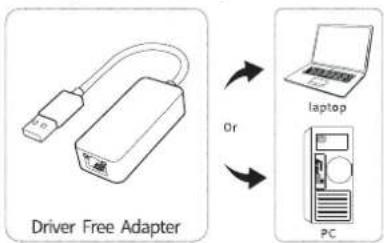
flowchart
graph LR
    A["Driver Free Adapter"] -->|Or| B["laptop"]
    B --> C["PC"]
Note: When using the PC, it is recommended to insert the adapter on the back of the computer case, the effect is better! (The USB interface on the front of most desktop computers is insufficient or unavailable)
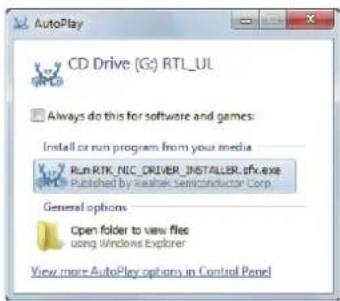
- If the Drivers do not automatically install when you connect the USB-25G to the host computer, a message that a Virtual CD is loaded will appear.
- Click to open the folder or run the install file RTK_NIC_DRIVER_INSTALLER.sfx.exe directly to begin the background installation.
text_image
AutoPlay CD Drive (G:) RTL_UL Always do this for software and games: Install or run program from your media Run RTK_NIC_DRIVER_INSTALLER.sfx.exe Published by Reather Semiconductor Corp General options Open folder to view files using Windows Explorer View more AutoPlay options in Control Panel- After the installation is successfully finished the USB-25G is ready for use.
For the best speed preformance it is suggest to use a USB 3.0/3.1 port on your computer.
Support Operating System Windows
For Windows, MacOS and Linux drivers visit airlive.com/download
airlive®
USB-25G
Declaration of Conformity
Declaration of Conformity
We, Manufacturer/Importer
AirLive Technology Corporation
4F, No.132, Lane 235, Baoqian Rd., Xindian Dist., New Taipei City 23145, Taiwan
Declare that the product
USB-25G
is in conformity with
In accordance with 2014/30/EU Directive
Clause
■ EN 55032:2015+A1:2020
■ EN 55035:2017+A11:2020
■ EN 61000-3-3:2013+A1:2019
■ EN 61000-3-2:2019 (EMC)
■ CE marking

Manufacturer/Importer
Name : A van Rossem Position/ Title : Product Manager
Date: May 2022 Place: Republic
- FCC Statement
This equipment has been tested and found to comply with the limits for a Class B digital device, pursuant to Part 15 of the FCC Rules. These limits are designed to provide reasonable protection against harmful interference in a residential installation. This equipment generates, uses and can radiate radio frequency energy and, if not installed and used in accordance with the instructions, may cause harmful interference to radio communications. However, there is no guarantee that interference will not occur in a particular installation. If this equipment does cause harmful interference to radio or television reception, which can be determined by turning the equipment off and on, the user is encouraged to try to correct the interference by one or more of the following measures:

Tested To Comply With FCC Standards. FOR HOME OR OFFICE USE
CE AirLive Technology Corporation declares that this device is in compliance with the essential requirements and other relevant provisions of directive 2014/53/EU.


www.airlive.com